Part 1
요약·해설
표 11개 109행, 공식 이미지 2개와 DTS 원문 경로를 보존했습니다.
nRF52840 M4F
BLE · 802.15.4
4 header pins
UART1 overlay
Part 2
접을 수 있는 영어 원문 전체
영어 원문 전체 펼치기
93A65952D443B53DD2184601EE045005AA2A562C50F38E8FFF30DAD0A6F0AC84
.. _ubx_bmd380eval_nrf52840:

u-blox EVK-BMD-34/48: BMD-380-EVAL
##################################

Overview
********

The BMD-380-EVAL hardware provides support for the
u-blox BMD-380 Bluetooth 5.0 module, based on The
Nordic Semiconductor nRF52840 ARM Cortex-M4F CPU and
the following devices:

* :abbr:`ADC (Analog to Digital Converter)`
* CLOCK
* FLASH
* :abbr:`GPIO (General Purpose Input Output)`
* :abbr:`I2C (Inter-Integrated Circuit)`
* :abbr:`MPU (Memory Protection Unit)`
* :abbr:`NVIC (Nested Vectored Interrupt Controller)`
* :abbr:`PWM (Pulse Width Modulation)`
* RADIO (Bluetooth Low Energy and 802.15.4)
* :abbr:`RTC (nRF RTC System Clock)`
* Segger RTT (RTT Console)
* :abbr:`SPI (Serial Peripheral Interface)`
* :abbr:`UART (Universal asynchronous receiver-transmitter)`
* :abbr:`USB (Universal Serial Bus)`
* :abbr:`WDT (Watchdog Timer)`

.. figure:: ../../../../../../../boards/u-blox/ubx_bmd380eval/doc/img/BMD-34-38-EVAL.jpg
     :align: center
     :alt: BMD-340-EVAL

     BMD-340-EVAL (Credit: u-blox AG)

.. note::
    The BMD-380-EVAL shares the same pin headers and assignments as the
    BMD-340-EVAL with four exceptions. The BMD-340-EVAL is shown here.
    See the pin tables below for the exceptions.

More information about the BMD-340-EVAL and the BMD-340 module
can be found at the `u-blox website`_. All of the Nordic Semiconductor
examples for the nRF52840 DK (nrf52840dk_nrf52840) may be used without
modification.

Hardware
********

The BMD-380 on the BMD-380-EVAL contains an internal high-frequency
oscillator at 32MHz. There is also a low frequency (slow) oscillator
of 32.768kHz. The BMD-380 itself does not include the slow crystal;
however, the BMD-380-eval does.

.. note::

	When targeting a custom design without a slow crystal, be sure
	to modify code to utilize the internal RC oscillator for the
	slow clock.

Supported Features
==================

The BMD-380-EVAL board configuration supports the following
hardware features:

+-----------+------------+----------------------+
| Interface | Controller | Driver/Component     |
+===========+============+======================+
| ADC       | on-chip    | adc                  |
+-----------+------------+----------------------+
| CLOCK     | on-chip    | clock_control        |
+-----------+------------+----------------------+
| FLASH     | on-chip    | flash                |
+-----------+------------+----------------------+
| GPIO      | on-chip    | gpio                 |
+-----------+------------+----------------------+
| I2C(M)    | on-chip    | i2c                  |
+-----------+------------+----------------------+
| MPU       | on-chip    | arch/arm             |
+-----------+------------+----------------------+
| NVIC      | on-chip    | arch/arm             |
+-----------+------------+----------------------+
| PWM       | on-chip    | pwm                  |
+-----------+------------+----------------------+
| RADIO     | on-chip    | Bluetooth,           |
|           |            | IEEE 802.15.4        |
+-----------+------------+----------------------+
| RTC       | on-chip    | system clock         |
+-----------+------------+----------------------+
| RTT       | Segger     | console              |
+-----------+------------+----------------------+
| SPI(M/S)  | on-chip    | spi                  |
+-----------+------------+----------------------+
| UART      | on-chip    | serial               |
+-----------+------------+----------------------+
| USB       | on-chip    | usb                  |
+-----------+------------+----------------------+
| WDT       | on-chip    | watchdog             |
+-----------+------------+----------------------+

Other hardware features have not been enabled yet for this board.
See the `u-blox website`_ for a complete list of BMD-380-EVAL
hardware features.

Connections and IOs
===================

LED
---

* LED1 (red) = P0.13
* LED2 (red) = P0.14
* LED3 (green) = P0.15
* LED4 (green) = P0.16
* D5 (red) = OB LED 1
* D6 (green) = OB LED 2

Push buttons
------------

* BUTTON1 = SW1 = P0.11
* BUTTON2 = SW2 = P0.12
* BUTTON3 = SW3 = P0.24
* BUTTON4 = SW4 = P0.25
* BOOT = SW5 = boot/reset

External Connectors
-------------------

.. figure:: ../../../../../../../boards/u-blox/ubx_bmd380eval/doc/img/bmd-340-eval_pin_out.jpg
     :align: center
     :alt: BMD-340-EVAL pin-out

.. note::
    The BMD-380-EVAL shares the same pin headers and assignments as the
    BMD-340-EVAL with four exceptions. The BMD-340-EVAL is shown here.
    See the pin tables below for the exceptions.

.. note::
	The pin numbers noted below are referenced to
	the pin 1 markings on the BMD-380-EVAL
	for each header

J-Link Prog Connector (J2)

+-------+--------------+
| PIN # | Signal Name  |
+=======+==============+
| 1     | VDD          |
+-------+--------------+
| 2     | IMCU_TMSS    |
+-------+--------------+
| 3     | GND          |
+-------+--------------+
| 4     | IMCU_TCKS    |
+-------+--------------+
| 5     | V5V          |
+-------+--------------+
| 6     | IMCU_TDOS    |
+-------+--------------+
| 7     | Cut off      |
+-------+--------------+
| 8     | IMCU_TDIS    |
+-------+--------------+
| 9     | Cut off      |
+-------+--------------+
| 10    | IMCU_RESET   |
+-------+--------------+

Debug OUT (J3)

+-------+----------------+
| PIN # | Signal Name    |
+=======+================+
| 1     | EXT_VTG        |
+-------+----------------+
| 2     | EXT_SWDIO      |
+-------+----------------+
| 3     | GND            |
+-------+----------------+
| 4     | EXT_SWDCLK     |
+-------+----------------+
| 5     | GND            |
+-------+----------------+
| 6     | EXT_SWO        |
+-------+----------------+
| 7     | N/C            |
+-------+----------------+
| 8     | N/C            |
+-------+----------------+
| 9     | EXT_GND_DETECT |
+-------+----------------+
| 10    | EXT_RESET      |
+-------+----------------+

Debug IN (J26)

+-------+----------------+
| PIN # | Signal Name    |
+=======+================+
| 1     | BMD-340_VCC    |
+-------+----------------+
| 2     | BMD-340_SWDIO  |
+-------+----------------+
| 3     | GND            |
+-------+----------------+
| 4     | BMD-340_SWDCLK |
+-------+----------------+
| 5     | GND            |
+-------+----------------+
| 6     | BMD-340_SWO    |
+-------+----------------+
| 7     | N/C            |
+-------+----------------+
| 8     | N/C            |
+-------+----------------+
| 9     | GND            |
+-------+----------------+
| 10    | BMD-340_RESET  |
+-------+----------------+

Auxiliary (J9)

+-------+----------------+
| PIN # | Signal Name    |
+=======+================+
| 1     | P0.10 / NFC2   |
+-------+----------------+
| 2     | P0.09 / NFC1   |
+-------+----------------+
| 3     | P0.08          |
+-------+----------------+
| 4     | P0.07          |
+-------+----------------+
| 5     | P0.06          |
+-------+----------------+
| 6     | P0.05 / AIN3   |
+-------+----------------+
| 7     | P0.01 / XL2    |
+-------+----------------+
| 8     | P0.00 / XL1    |
+-------+----------------+

Auxiliary (J10)

+-------+-------------------+
| PIN # | Signal Name       |
+=======+===================+
| 1     | P0.11 / TRACED[2] |
+-------+-------------------+
| 2     | P0.12 / TRACED[1] |
+-------+-------------------+
| 3     | P0.13             |
+-------+-------------------+
| 4     | P0.14             |
+-------+-------------------+
| 5     | P0.15             |
+-------+-------------------+
| 6     | P0.16             |
+-------+-------------------+
| 7     | P0.17 / QSPI_CS   |
+-------+-------------------+
| 8     | P0.18 / RESET     |
+-------+-------------------+
| 9     | P0.19 / QSPI_CLK  |
+-------+-------------------+
| 10    | P0.20 / QSPI_D0   |
+-------+-------------------+
| 11    | P0.21 / QSPI_D1   |
+-------+-------------------+
| 12    | P0.22 / QSPI_D2   |
+-------+-------------------+
| 13    | P0.23 / QSPI_D3   |
+-------+-------------------+
| 14    | P0.24             |
+-------+-------------------+
| 15    | P0.25             |
+-------+-------------------+
| 16    | P1.00 / TRACED[0] |
+-------+-------------------+
| 17    | P1.09 / TRACED[3] |
+-------+-------------------+
| 18    | No connection     |
+-------+-------------------+

Power (J5)

+-------+--------------+-------------------------+
| PIN # | Signal Name  | BMD-380 Functions       |
+=======+==============+=========================+
| 1     | VSHLD        | N/A                     |
+-------+--------------+-------------------------+
| 2     | VSHLD        | N/A                     |
+-------+--------------+-------------------------+
| 3     | RESET        | P0.18 / RESET           |
+-------+--------------+-------------------------+
| 4     | VSHLD        | N/A                     |
+-------+--------------+-------------------------+
| 5     | V5V          | N/A                     |
+-------+--------------+-------------------------+
| 6     | GND          | N/A                     |
+-------+--------------+-------------------------+
| 7     | GND          | N/A                     |
+-------+--------------+-------------------------+
| 8     | N/C          | N/A                     |
+-------+--------------+-------------------------+

Analog in (J8)

+-------+--------------+-------------------------+
| PIN # | Signal Name  | BMD-380 Functions       |
+=======+==============+=========================+
| 1     | A0           | P0.03 / AIN1            |
+-------+--------------+-------------------------+
| 2     | A1           | P0.04 / AIN2            |
+-------+--------------+-------------------------+
| 3     | A2           | P0.28 / AIN4            |
+-------+--------------+-------------------------+
| 4     | A3           | P0.29 / AIN5            |
+-------+--------------+-------------------------+
| 5     | A4           | P0.30 / AIN6            |
+-------+--------------+-------------------------+
| 6     | A5           | P0.31 / AIN7            |
+-------+--------------+-------------------------+

Digital I/O (J7)

+-------+--------------+-------------------------+
| PIN # | Signal Name  | BMD-380 Functions       |
+=======+==============+=========================+
| 1     | D7           | P1.08                   |
+-------+--------------+-------------------------+
| 2     | -            | No connection           |
+-------+--------------+-------------------------+
| 3     | D5           | P1.06                   |
+-------+--------------+-------------------------+
| 4     | D4           | No connection           |
+-------+--------------+-------------------------+
| 5     | -            | No connection           |
+-------+--------------+-------------------------+
| 6     | -            | No connection           |
+-------+--------------+-------------------------+
| 7     | D1 (TX)      | P1.02                   |
+-------+--------------+-------------------------+
| 8     | -            | No connection           |
+-------+--------------+-------------------------+

Digital I/O (J6)

+-------+--------------+-------------------------+
| PIN # | Signal Name  | BMD-380 Functions       |
+=======+==============+=========================+
| 1     | SCL          | P0.27                   |
+-------+--------------+-------------------------+
| 2     | SDA          | P0.26                   |
+-------+--------------+-------------------------+
| 3     | AREF         | P0.02 / AIN0            |
+-------+--------------+-------------------------+
| 4     | GND          | N/A                     |
+-------+--------------+-------------------------+
| 5     | D13 (SCK)    | P1.15                   |
+-------+--------------+-------------------------+
| 6     | D12 (MISO)   | P1.14                   |
+-------+--------------+-------------------------+
| 7     | D11 (MOSI)   | P1.13                   |
+-------+--------------+-------------------------+
| 8     | D10 (SS)     | P1.12                   |
+-------+--------------+-------------------------+
| 9     | D9           | P1.11                   |
+-------+--------------+-------------------------+
| 10    | D8           | P1.10                   |
+-------+--------------+-------------------------+

J11

+-------+--------------+-------------------------+
| PIN # | Signal Name  | BMD-380 Functions       |
+=======+==============+=========================+
| 1     | D12 (MISO)   | P0.14                   |
+-------+--------------+-------------------------+
| 2     | V5V          | N/A                     |
+-------+--------------+-------------------------+
| 3     | D13 (SCK)    | P0.15                   |
+-------+--------------+-------------------------+
| 4     | D11 (MOSI)   | P0.13                   |
+-------+--------------+-------------------------+
| 5     | RESET        | N/A                     |
+-------+--------------+-------------------------+
| 6     | N/A          | N/A                     |
+-------+--------------+-------------------------+

Programming and Debugging
*************************

Applications for the BMD-380-EVAL board configurations can
be built and flashed in the usual way
(see :ref:`build_an_application` and :ref:`application_run`
for more details); however, the standard debugging targets
are not currently available.

Flashing
========

Follow the instructions in the :ref:`nordic_segger` page to install
and configure all the necessary software. Further information can be
found in :ref:`nordic_segger_flashing`. Then build and flash
applications as usual (see :ref:`build_an_application` and
:ref:`application_run` for more details).

Here is an example for the :ref:`hello_world` application.

First, run your favorite terminal program to listen for output.

.. code-block:: console

   $ minicom -D <tty_device> -b 115200

Replace :code:`<tty_device>` with the port where the BMD-380-EVAL
can be found. For example, under Linux, :code:`/dev/ttyACM0`.

Then build and flash the application in the usual way.

.. zephyr-app-commands::
   :zephyr-app: samples/hello_world
   :board: ubx_bmd380eval/nrf52840
   :goals: build flash

Debugging
=========

Refer to the :ref:`nordic_segger` page to learn about debugging
u-blox boards with a Segger J-LINK-OB IC.


Testing the LEDs and buttons in the BMD-380-EVAL
************************************************

There are 2 samples that allow you to test that the buttons
(switches) and LEDs on the board are working properly with Zephyr:

.. code-block:: console

   samples/basic/blinky
   samples/basic/button

You can build and flash the examples to make sure Zephyr is running
correctly on your board. The button and LED definitions can be found in
:zephyr_file:`boards/u-blox/ubx_bmd340eval/ubx_bmd340eval_nrf52840.dts`.

Using UART1
***********

The following approach can be used when an application needs to use
more than one UART for connecting peripheral devices:

1. Add device tree overlay file to the main directory of your
   application:

   .. code-block:: devicetree

      &pinctrl {
         uart1_default: uart1_default {
            group1 {
               psels = <NRF_PSEL(UART_TX, 0, 14)>,
                       <NRF_PSEL(UART_RX, 0, 16)>;
            };
         };
         /* required if CONFIG_PM_DEVICE=y */
         uart1_sleep: uart1_sleep {
            group1 {
               psels = <NRF_PSEL(UART_TX, 0, 14)>,
                       <NRF_PSEL(UART_RX, 0, 16)>;
               low-power-enable;
            };
         };
      };

      &uart1 {
        compatible = "nordic,nrf-uarte";
        current-speed = <115200>;
        status = "okay";
        pinctrl-0 = <&uart1_default>;
        pinctrl-1 = <&uart1_sleep>;
        pinctrl-names = "default", "sleep";
      };

   In the overlay file above, pin P0.16 is used for RX and P0.14 is
   used for TX

2. Use the UART1 as ``DEVICE_DT_GET(DT_NODELABEL(uart1))``

Overlay file naming
===================

The file has to be named ``<board>.overlay`` and placed in the app
main directory to be picked up automatically by the device tree
compiler.

Selecting the pins
==================

Pins can be configured in the board pinctrl file. To see the available mappings,
open the data sheet for the BMD-380 at the `u-blox website`_, Section 2
'Pin definition'. In the table 3 select the pins marked 'GPIO'.
Note that pins marked as 'Standard drive, low frequency I/O only
(<10 kH' can only be used in under-10KHz applications.
They are not suitable for 115200 speed of UART.

.. note:
  Pins are defined according to the "nRF52" pin number, not the module
  pad number.

References
**********

.. target-notes::

.. _u-blox website: https://www.u-blox.com/docs/UBX-19039467
Part 3
한국어 전문 번역
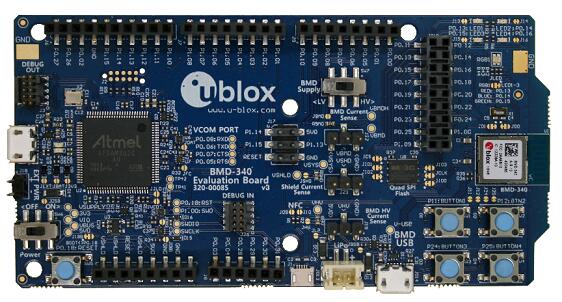
개요
BMD-380-EVAL은 Nordic Semiconductor nRF52840 Arm Cortex-M4F 기반 u-blox BMD-380 Bluetooth 5.0 module을 지원합니다. Bluetooth Low Energy와 IEEE 802.15.4, USB를 포함합니다.
하드웨어 clock
32MHz high-frequency oscillator와 32.768kHz slow oscillator를 사용합니다. Slow crystal은 BMD-380 module에는 없고 EVAL board에 있습니다. Custom design에 crystal이 없으면 internal RC oscillator를 사용합니다.
지원 기능
| Interface | Controller | Driver/Component |
|---|---|---|
| ADC | on-chip | adc |
| CLOCK | on-chip | clock_control |
| FLASH | on-chip | flash |
| GPIO | on-chip | gpio |
| I2C(M) | on-chip | i2c |
| MPU | on-chip | arch/arm |
| NVIC | on-chip | arch/arm |
| PWM | on-chip | pwm |
| RADIO | on-chip | Bluetooth, IEEE 802.15.4 |
| RTC | on-chip | system clock |
| RTT | Segger | console |
| SPI(M/S) | on-chip | spi |
| UART | on-chip | serial |
| USB | on-chip | usb |
| WDT | on-chip | watchdog |
표에 없는 기능은 아직 enable되지 않았습니다.
연결과 I/O
LED
- LED1 red P0.13
- LED2 red P0.14
- LED3 green P0.15
- LED4 green P0.16
- D5 red OB LED 1
- D6 green OB LED 2
Push buttons
- BUTTON1 SW1 P0.11
- BUTTON2 SW2 P0.12
- BUTTON3 SW3 P0.24
- BUTTON4 SW4 P0.25
- BOOT SW5 boot/reset
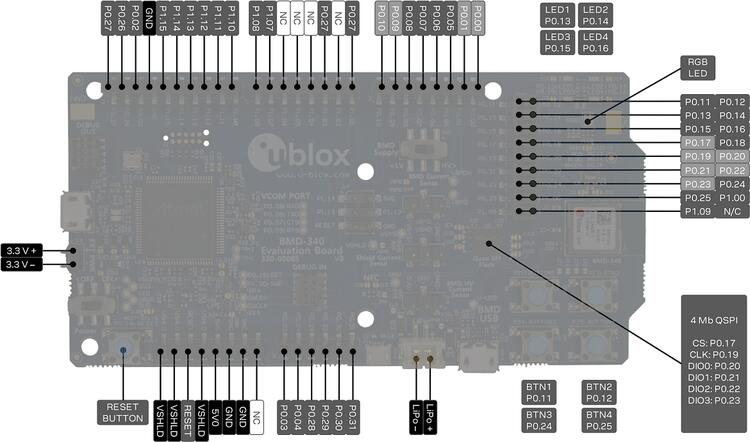
Pin 번호는 BMD-380-EVAL 각 header의 pin 1 marking 기준입니다.
J-Link Prog Connector (J2)
| PIN # | Signal Name |
|---|---|
| 1 | VDD |
| 2 | IMCU_TMSS |
| 3 | GND |
| 4 | IMCU_TCKS |
| 5 | V5V |
| 6 | IMCU_TDOS |
| 7 | Cut off |
| 8 | IMCU_TDIS |
| 9 | Cut off |
| 10 | IMCU_RESET |
Debug OUT (J3)
| PIN # | Signal Name |
|---|---|
| 1 | EXT_VTG |
| 2 | EXT_SWDIO |
| 3 | GND |
| 4 | EXT_SWDCLK |
| 5 | GND |
| 6 | EXT_SWO |
| 7 | N/C |
| 8 | N/C |
| 9 | EXT_GND_DETECT |
| 10 | EXT_RESET |
Debug IN (J26)
| PIN # | Signal Name |
|---|---|
| 1 | BMD-340_VCC |
| 2 | BMD-340_SWDIO |
| 3 | GND |
| 4 | BMD-340_SWDCLK |
| 5 | GND |
| 6 | BMD-340_SWO |
| 7 | N/C |
| 8 | N/C |
| 9 | GND |
| 10 | BMD-340_RESET |
Auxiliary (J9)
| PIN # | Signal Name |
|---|---|
| 1 | P0.10 / NFC2 |
| 2 | P0.09 / NFC1 |
| 3 | P0.08 |
| 4 | P0.07 |
| 5 | P0.06 |
| 6 | P0.05 / AIN3 |
| 7 | P0.01 / XL2 |
| 8 | P0.00 / XL1 |
Auxiliary (J10)
| PIN # | Signal Name |
|---|---|
| 1 | P0.11 / TRACED[2] |
| 2 | P0.12 / TRACED[1] |
| 3 | P0.13 |
| 4 | P0.14 |
| 5 | P0.15 |
| 6 | P0.16 |
| 7 | P0.17 / QSPI_CS |
| 8 | P0.18 / RESET |
| 9 | P0.19 / QSPI_CLK |
| 10 | P0.20 / QSPI_D0 |
| 11 | P0.21 / QSPI_D1 |
| 12 | P0.22 / QSPI_D2 |
| 13 | P0.23 / QSPI_D3 |
| 14 | P0.24 |
| 15 | P0.25 |
| 16 | P1.00 / TRACED[0] |
| 17 | P1.09 / TRACED[3] |
| 18 | No connection |
Power (J5)
| PIN # | Signal Name | BMD-380 Functions |
|---|---|---|
| 1 | VSHLD | N/A |
| 2 | VSHLD | N/A |
| 3 | RESET | P0.18 / RESET |
| 4 | VSHLD | N/A |
| 5 | V5V | N/A |
| 6 | GND | N/A |
| 7 | GND | N/A |
| 8 | N/C | N/A |
Analog in (J8)
| PIN # | Signal Name | BMD-380 Functions |
|---|---|---|
| 1 | A0 | P0.03 / AIN1 |
| 2 | A1 | P0.04 / AIN2 |
| 3 | A2 | P0.28 / AIN4 |
| 4 | A3 | P0.29 / AIN5 |
| 5 | A4 | P0.30 / AIN6 |
| 6 | A5 | P0.31 / AIN7 |
Digital I/O (J7)
| PIN # | Signal Name | BMD-380 Functions |
|---|---|---|
| 1 | D7 | P1.08 |
| 2 | - | No connection |
| 3 | D5 | P1.06 |
| 4 | D4 | No connection |
| 5 | - | No connection |
| 6 | - | No connection |
| 7 | D1 (TX) | P1.02 |
| 8 | - | No connection |
Digital I/O (J6)
| PIN # | Signal Name | BMD-380 Functions |
|---|---|---|
| 1 | SCL | P0.27 |
| 2 | SDA | P0.26 |
| 3 | AREF | P0.02 / AIN0 |
| 4 | GND | N/A |
| 5 | D13 (SCK) | P1.15 |
| 6 | D12 (MISO) | P1.14 |
| 7 | D11 (MOSI) | P1.13 |
| 8 | D10 (SS) | P1.12 |
| 9 | D9 | P1.11 |
| 10 | D8 | P1.10 |
J11
| PIN # | Signal Name | BMD-380 Functions |
|---|---|---|
| 1 | D12 (MISO) | P0.14 |
| 2 | V5V | N/A |
| 3 | D13 (SCK) | P0.15 |
| 4 | D11 (MOSI) | P0.13 |
| 5 | RESET | N/A |
| 6 | N/A | N/A |
Programming과 debugging
일반 방식으로 build·flash할 수 있지만 원문은 standard debugging target이 현재 제공되지 않는다고 명시합니다.
Flash
Terminal을 열고 Linux에서는 보통 /dev/ttyACM0에서 115200 baud로 출력합니다.
$ minicom -D <tty_device> -b 115200west build -b ubx_bmd380eval/nrf52840 samples/hello_world
west flashDebug
Nordic Semiconductor chip과 Segger IC를 사용하는 board debug는 Zephyr Nordic Segger 안내를 따릅니다.
LED와 button 시험
samples/basic/blinky
samples/basic/button
Button과 LED 정의는 boards/u-blox/ubx_bmd340eval/ubx_bmd340eval_nrf52840.dts에 있습니다.
UART1 사용
Peripheral 연결에 UART가 하나 더 필요하면 application main directory에 overlay를 추가합니다. P0.16은 RX, P0.14는 TX이며 CONFIG_PM_DEVICE=y에서는 sleep pinctrl이 필요합니다.
&pinctrl {
   uart1_default: uart1_default {
      group1 {
         psels = <NRF_PSEL(UART_TX, 0, 14)>,
                 <NRF_PSEL(UART_RX, 0, 16)>;
      };
   };
   /* required if CONFIG_PM_DEVICE=y */
   uart1_sleep: uart1_sleep {
      group1 {
         psels = <NRF_PSEL(UART_TX, 0, 14)>,
                 <NRF_PSEL(UART_RX, 0, 16)>;
         low-power-enable;
      };
   };
};

&uart1 {
  compatible = "nordic,nrf-uarte";
  current-speed = <115200>;
  status = "okay";
  pinctrl-0 = <&uart1_default>;
  pinctrl-1 = <&uart1_sleep>;
  pinctrl-names = "default", "sleep";
};DEVICE_DT_GET(DT_NODELABEL(uart1))로 UART1을 얻습니다. 자동 탐색하려면 <board>.overlay라는 이름으로 application main directory에 둡니다.
Pin 선택
BMD-380 data sheet section 2의 pin definition에서 GPIO로 표시된 pin을 선택합니다. Radio-sensitive 또는 low-frequency-only pin은 10kHz 미만에서만 사용해야 하므로 UART 115200에 적합하지 않습니다. Pin은 module pad 번호가 아니라 nRF52 pin 번호로 정의합니다.
참고 자료
Source
출처
영어 원문에는 문단, 문서 지시문, 표, 코드, 코드 심벌, 경로를 그대로 보존했습니다.