Part 1
요약·해설
지원표 11행, connector 4면·UART/I2C pin·최대 100MHz와 기본 84MHz 차이·hello_world workflow를 번역했습니다.
STM32F410RB
100MHz
84MHz
11 interfaces
Part 2
접을 수 있는 영어 원문 전체
영어 원문 전체 펼치기
DDA6FDD2A091C375C6F4F15E17A7A09DD86922CD7A264600EE3AED3769A14CCE
.. _nucleo_f410rb_board:

ST Nucleo F410RB
################

Overview
********

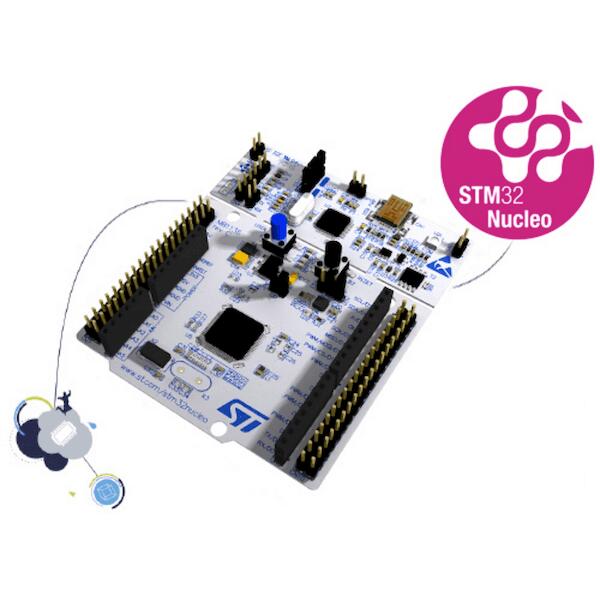
The Nucleo F410RB board features an ARM Cortex-M4 based STM32F410RB MCU
with a wide range of connectivity support and configurations. Here are
some highlights of the Nucleo F410RB board:

- STM32 microcontroller in QFP64 package
- Two types of extension resources:

  - Arduino Uno V3 connectivity
  - ST morpho extension pin headers for full access to all STM32 I/Os

- On-board ST-LINK/V2-1 debugger/programmer with SWD connector
- Flexible board power supply:

  - USB VBUS or external source(3.3V, 5V, 7 - 12V)
  - Power management access point

- Three LEDs: USB communication (LD1), user LED (LD2), power LED (LD3)
- Two push-buttons: USER and RESET

.. image:: ../../../../../../../boards/st/nucleo_f410rb/doc/img/nucleo_f410rb.jpg
   :align: center
   :alt: Nucleo F410RB

More information about the board can be found at the `Nucleo F410RB website`_.

Hardware
********

Nucleo F410RB provides the following hardware components:

- STM32F410RBT6 in LQFP64 package
- ARM |reg| 32-bit Cortex |reg|-M4 CPU with FPU
- Adaptive real-time accelerator (ART Accelerator)
- 100 MHz max CPU frequency
- VDD from 1.7 V to 3.6 V
- 128 KB Flash
- 32 KB SRAM
- General purpose timer (4)
- Low-power timer (1)
- Advanced-control timer (1)
- Random number generator (TRNG for HW entropy)
- SPI/I2S (3)
- I2C (3)
- USART (3)
- GPIO (50) with external interrupt capability
- 12-bit ADC with 16 channels
- 12-bit DAC with 1 channel
- RTC


More information about STM32F410RB can be found here:

- `STM32F410RB on www.st.com`_
- `STM32F410 reference manual`_

Supported Features
==================

The Zephyr nucleo_f410rb board configuration supports the following hardware features:

+-----------+------------+-------------------------------------+
| Interface | Controller | Driver/Component                    |
+===========+============+=====================================+
| NVIC      | on-chip    | nested vector interrupt controller  |
+-----------+------------+-------------------------------------+
| UART      | on-chip    | serial port                         |
+-----------+------------+-------------------------------------+
| PINMUX    | on-chip    | pinmux                              |
+-----------+------------+-------------------------------------+
| GPIO      | on-chip    | gpio                                |
+-----------+------------+-------------------------------------+
| PWM       | on-chip    | pwm                                 |
+-----------+------------+-------------------------------------+
| I2C       | on-chip    | i2c                                 |
+-----------+------------+-------------------------------------+
| I2S       | on-chip    | i2s                                 |
+-----------+------------+-------------------------------------+
| SPI       | on-chip    | spi                                 |
+-----------+------------+-------------------------------------+
| ADC       | on-chip    | ADC Controller                      |
+-----------+------------+-------------------------------------+
| DAC       | on-chip    | DAC Controller                      |
+-----------+------------+-------------------------------------+
| WATCHDOG  | on-chip    | window & independent                |
+-----------+------------+-------------------------------------+


Other hardware features are not yet supported on this Zephyr port.

The default configuration can be found in
:zephyr_file:`boards/st/nucleo_f410rb/nucleo_f410rb_defconfig`


Connections and IOs
===================

Nucleo F410RB Board has 8 GPIO controllers. These controllers are responsible for pin muxing,
input/output, pull-up, etc.

Available pins:
---------------
.. image:: ../../../../../../../boards/st/nucleo_f410rb/doc/img/nucleo_f410rb_arduino_top_left.jpg
   :align: center
   :alt: Nucleo F410RB Arduino connectors (top left)
.. image:: ../../../../../../../boards/st/nucleo_f410rb/doc/img/nucleo_f410rb_arduino_top_right.jpg
   :align: center
   :alt: Nucleo F410RB Arduino connectors (top right)
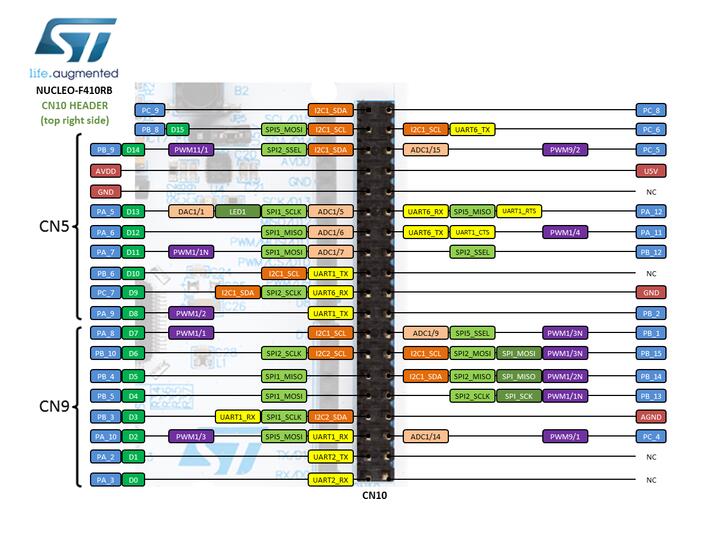
.. image:: ../../../../../../../boards/st/nucleo_f410rb/doc/img/nucleo_f410rb_morpho_top_left.jpg
   :align: center
   :alt: Nucleo F410RB Morpho connectors (top left)
.. image:: ../../../../../../../boards/st/nucleo_f410rb/doc/img/nucleo_f410rb_morpho_top_right.jpg
   :align: center
   :alt: Nucleo F410RB Morpho connectors (top right)

For more details please refer to `STM32 Nucleo-64 board User Manual`_.

Default Zephyr Peripheral Mapping:
----------------------------------

- UART_1_TX : PB6
- UART_1_RX : PB7
- UART_2_TX : PA2
- UART_2_RX : PA3
- USER_PB : PC13
- LD2 : PA5
- I2C1_SDA : PB9
- I2C1_SCL : PB8
- I2C2_SDA : PB3
- I2C2_SCL : PB10

System Clock
------------

Nucleo F410RB System Clock could be driven by an internal or external oscillator,
as well as the main PLL clock. By default, the System clock is driven by the PLL clock at 84MHz,
driven by an 8MHz high-speed external clock.

Serial Port
-----------

Nucleo F410RB board has 3 USARTs. The Zephyr console output is assigned to UART2.
Default settings are 115200 8N1.


Programming and Debugging
*************************

Applications for the ``nucleo_f410rb`` board configuration can be built and
flashed in the usual way (see :ref:`build_an_application` and
:ref:`application_run` for more details).

Flashing
========

Nucleo F410RB board includes an ST-LINK/V2-1 embedded debug tool interface.
This interface is supported by the openocd version included in the Zephyr SDK.

Flashing an application to Nucleo F410RB
----------------------------------------

Here is an example for the :ref:`hello_world` application.

Run a serial host program to connect with your Nucleo board.

.. code-block:: console

   $ minicom -b 115200 -D /dev/ttyACM0

Build and flash the application:

.. zephyr-app-commands::
   :zephyr-app: samples/hello_world
   :board: nucleo_f410rb
   :goals: build flash

You should see the following message on the console:

.. code-block:: console

   $ Hello World! arm

Debugging
=========

You can debug an application in the usual way.  Here is an example for the
:ref:`hello_world` application.

.. zephyr-app-commands::
   :zephyr-app: samples/hello_world
   :board: nucleo_f410rb
   :maybe-skip-config:
   :goals: debug

.. _Nucleo F410RB website:
   https://www.st.com/en/evaluation-tools/nucleo-F410RB.html

.. _STM32 Nucleo-64 board User Manual:
   https://www.st.com/resource/en/user_manual/dm00105823.pdf

.. _STM32F410RB on www.st.com:
   https://www.st.com/en/microcontrollers/stm32f410rb.html

.. _STM32F410 reference manual:
   https://www.st.com/resource/en/reference_manual/dm00180366.pdf
Part 3
한국어 전문 번역
개요
Nucleo F410RB는 Arm Cortex-M4 기반 STM32F410RB MCU와 여러 connectivity 구성을 제공하는 Nucleo-64 board입니다. QFP64 MCU, Arduino Uno V3, 모든 STM32 I/O에 접근하는 ST morpho header, SWD connector가 있는 onboard ST-LINK/V2-1을 갖춥니다.
- USB VBUS 또는 external 3.3V·5V·7~12V 전원과 power-management access point
- LD1 USB communication, LD2 user, LD3 power LED
- USER·RESET push-button
Hardware
- LQFP64 package의 STM32F410RBT6
- FPU가 있는 Arm 32-bit Cortex-M4 CPU와 ART Accelerator
- 최대 CPU frequency 100MHz, VDD 1.7~3.6V
- 128KB flash, 32KB SRAM
- General-purpose timer 4개, low-power timer 1개, advanced-control timer 1개
- Hardware entropy용 TRNG
- SPI/I2S 3개, I2C 3개, USART 3개
- External interrupt를 지원하는 GPIO 50개
- 16-channel 12-bit ADC, 1-channel 12-bit DAC, RTC
Zephyr 지원 기능
| Interface | Controller | Driver/Component |
|---|---|---|
| NVIC | on-chip | nested vector interrupt controller |
| UART | on-chip | serial port |
| PINMUX | on-chip | pinmux |
| GPIO | on-chip | gpio |
| PWM | on-chip | pwm |
| I2C | on-chip | i2c |
| I2S | on-chip | i2s |
| SPI | on-chip | spi |
| ADC | on-chip | ADC Controller |
| DAC | on-chip | DAC Controller |
| WATCHDOG | on-chip | window & independent |
표에 없는 hardware 기능은 이 Zephyr port에서 아직 지원하지 않습니다. 기본 설정은 boards/st/nucleo_f410rb/nucleo_f410rb_defconfig입니다.
Connection과 I/O
GPIO controller 8개가 pin muxing, input/output, pull-up 등을 담당합니다.
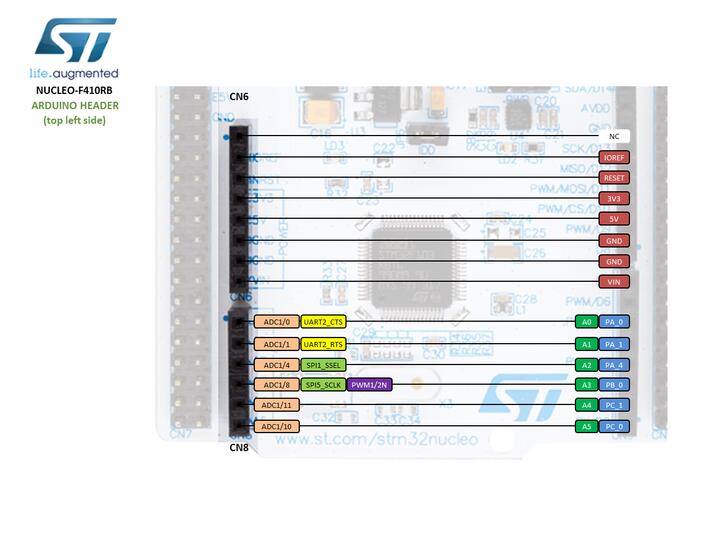
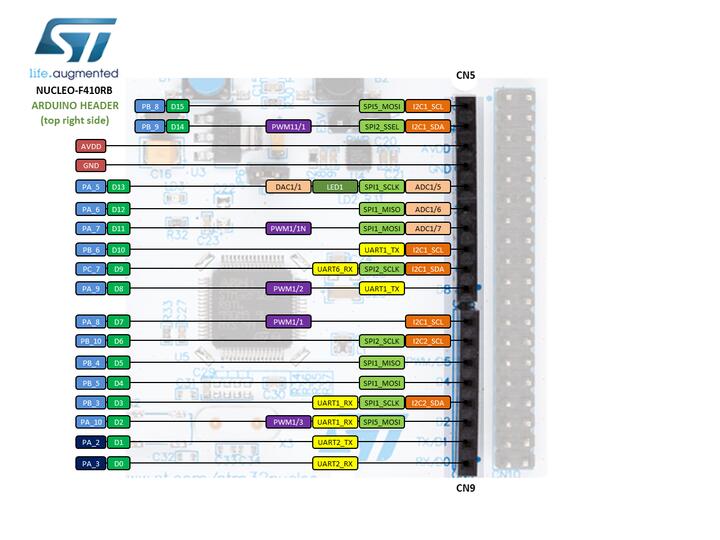
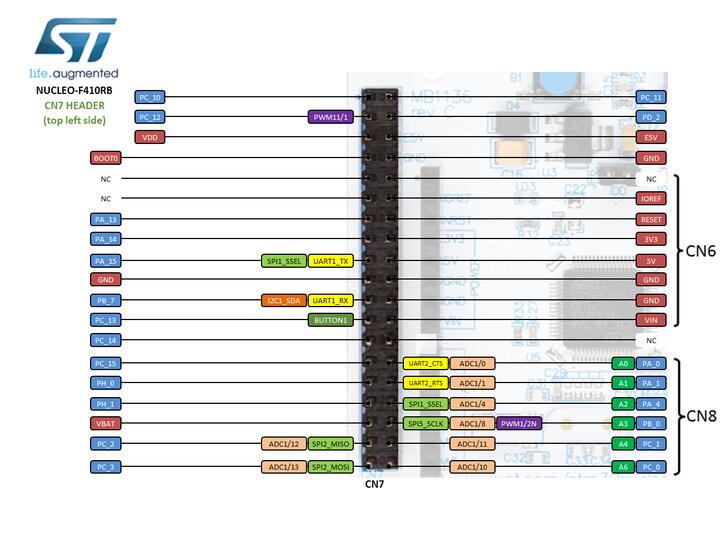
UART_1_TX : PB6,UART_1_RX : PB7UART_2_TX : PA2,UART_2_RX : PA3USER_PB : PC13LD2 : PA5I2C1_SDA : PB9,I2C1_SCL : PB8I2C2_SDA : PB3,I2C2_SCL : PB10
System clock과 serial port
MCU의 최대 CPU frequency는 100MHz지만 이 board의 기본 system clock은 8MHz high-speed external clock을 입력으로 한 84MHz PLL clock입니다. USART 3개 중 Zephyr console은 UART2이며 기본 설정은 115200 8N1입니다.
Programming and debugging
nucleo_f410rb application은 일반 Zephyr 방식으로 build·flash하며 ST-LINK/V2-1은 Zephyr SDK의 OpenOCD가 지원합니다.
Flashing
115200 baud로 serial host program을 연결합니다.
$ minicom -b 115200 -D /dev/ttyACM0hello_world를 build하고 flash합니다.
west build -b nucleo_f410rb samples/hello_world
west flash
Console 출력은 원문에서 다음과 같이 shell prompt까지 표시합니다.
$ Hello World! armDebugging
west build -b nucleo_f410rb samples/hello_world
west debug
참고 자료
Source
출처
영어 원문에는 문단, 문서 지시문, 표, 코드, 코드 심벌, 경로를 그대로 보존했습니다.