Part 1
요약·해설
지원 기능 9개와 pin 11개, 외부 USB-to-UART 연결 및 drive 복사 절차를 설명합니다.
EFM32PG1
40MHz
FT232 / CP2102
SLSTK3401A
Part 2
접을 수 있는 영어 원문 전체
영어 원문 전체 펼치기
0716E04B6A854968C05E017E546065B670B7B6563AA4310A4D4D9F0BCFBC1CA5
.. _slstk3401a:

EFM32 Pearl Gecko (SLSTK3401A)
##############################

Overview
********

The EFM32 Pearl Gecko Starter Kit SLSTK3401A contains an MCU from the
EFM32PG family built on an ARM® Cortex®-M4F processor with excellent low
power capabilities.

.. figure:: ../../../../../../../../boards/silabs/starter_kits/slstk3401a/doc/slstk3401a.jpg
   :align: center
   :alt: EFM32PG-SLSTK3401A

   EFM32PG-SLSTK3401A (image courtesy of Silicon Labs)

Hardware
********

- Advanced Energy Monitoring provides real-time information about the energy
  consumption of an application or prototype design.
- Ultra low power 128x128 pixel Memory-LCD
- 2 user buttons, 2 LEDs and 2 capacitive buttons
- Humidity and temperature sensor
- On-board Segger J-Link USB debugger

For more information about the EFM32PG SoC and SLSTK3401A board:

- `EFM32PG Website`_
- `EFM32PG1 Datasheet`_
- `EFM32PG1 Reference Manual`_
- `SLSTK3401A Website`_
- `SLSTK3401A User Guide`_

Supported Features
==================

The slstk3401a board configuration supports the following hardware features:

+-----------+------------+-------------------------------------+
| Interface | Controller | Driver/Component                    |
+===========+============+=====================================+
| MPU       | on-chip    | memory protection unit              |
+-----------+------------+-------------------------------------+
| NVIC      | on-chip    | nested vector interrupt controller  |
+-----------+------------+-------------------------------------+
| SYSTICK   | on-chip    | systick                             |
+-----------+------------+-------------------------------------+
| COUNTER   | on-chip    | rtcc                                |
+-----------+------------+-------------------------------------+
| FLASH     | on-chip    | flash memory                        |
+-----------+------------+-------------------------------------+
| GPIO      | on-chip    | gpio                                |
+-----------+------------+-------------------------------------+
| UART      | on-chip    | serial port-polling;                |
|           |            | serial port-interrupt               |
+-----------+------------+-------------------------------------+
| I2C       | on-chip    | i2c port-polling                    |
+-----------+------------+-------------------------------------+
| WATCHDOG  | on-chip    | watchdog                            |
+-----------+------------+-------------------------------------+

The default configuration can be found in
:zephyr_file:`boards/silabs/starter_kits/slstk3401a/slstk3401a_defconfig`

Other hardware features are currently not supported by the port.

Connections and IOs
===================

The EFM32PG1 SoC has five GPIO controllers (PORTA to PORTD and PORTF) and
all are enabled for the SLSTK3401A board.

In the following table, the column **Name** contains pin names. For example, PF4
means pin number 4 on PORTF, as used in the board's datasheets and manuals.

+-------+-------------+-------------------------------------+
| Name  | Function    | Usage                               |
+=======+=============+=====================================+
| PF4   | GPIO        | LED0                                |
+-------+-------------+-------------------------------------+
| PF5   | GPIO        | LED1                                |
+-------+-------------+-------------------------------------+
| PF6   | GPIO        | Push Button PB0                     |
+-------+-------------+-------------------------------------+
| PF7   | GPIO        | Push Button PB1                     |
+-------+-------------+-------------------------------------+
| PA5   | GPIO        | Board Controller Enable             |
|       |             | EFM_BC_EN                           |
+-------+-------------+-------------------------------------+
| PA0   | UART_TX     | UART TX Console VCOM_TX US0_TX #0   |
+-------+-------------+-------------------------------------+
| PA1   | UART_RX     | UART RX Console VCOM_RX US0_RX #0   |
+-------+-------------+-------------------------------------+
| PD10  | UART_TX     | EXP12_UART_TX LEU0_TX #18           |
+-------+-------------+-------------------------------------+
| PD11  | UART_RX     | EXP14_UART_RX LEU0_RX #18           |
+-------+-------------+-------------------------------------+
| PC10  | I2C_SDA     | ENV_I2C_SDA I2C0_SDA #15            |
+-------+-------------+-------------------------------------+
| PC11  | I2C_SCL     | ENV_I2C_SCL I2C0_SCL #15            |
+-------+-------------+-------------------------------------+


System Clock
============

The EFM32PG SoC is configured to use the 40 MHz external oscillator on the
board.

Serial Port
===========

The EFM32PG SoC has two USARTs and one Low Energy UART (LEUART).

Programming and Debugging
*************************

.. note::
   Before using the kit the first time, you should update the J-Link firmware
   from `J-Link-Downloads`_

Flashing
========

The SLSTK3401A includes an `J-Link`_ serial and debug adaptor built into the
board. The adaptor provides:

- A USB connection to the host computer, which exposes a mass storage device and a
  USB serial port.
- A serial flash device, which implements the USB flash disk file storage.
- A physical UART connection which is relayed over interface USB serial port.

Flashing an application to SLSTK3401A
-------------------------------------

The sample application :ref:`hello_world` is used for this example.
Build the Zephyr kernel and application:

.. zephyr-app-commands::
   :zephyr-app: samples/hello_world
   :board: slstk3401a
   :goals: build

Connect the SLSTK3401A to your host computer using the USB port and you
should see a USB connection which exposes a mass storage device(SLSTK3401A).
Copy the generated zephyr.bin to the SLSTK3401A drive.

Use a USB-to-UART converter such as an FT232/CP2102 to connect to the UART on the
expansion header.

Open a serial terminal (minicom, putty, etc.) with the following settings:

- Speed: 115200
- Data: 8 bits
- Parity: None
- Stop bits: 1

Reset the board and you'll see the following message on the corresponding serial port
terminal session:

.. code-block:: console

   Hello World! slstk3401a


.. _SLSTK3401A Website:
   https://www.silabs.com/development-tools/mcu/32-bit/efm32pg1-starter-kit

.. _SLSTK3401A User Guide:
   https://www.silabs.com/documents/public/user-guides/ug154-stk3401-user-guide.pdf

.. _EFM32PG Website:
   https://www.silabs.com/products/mcu/32-bit/efm32-pearl-gecko

.. _EFM32PG1 Datasheet:
   https://www.silabs.com/documents/public/data-sheets/efm32pg1-datasheet.pdf

.. _EFM32PG1 Reference Manual:
   https://www.silabs.com/documents/public/reference-manuals/efm32pg1-rm.pdf

.. _J-Link:
   https://www.segger.com/jlink-debug-probes.html

.. _J-Link-Downloads:
   https://www.segger.com/downloads/jlink
Part 3
한국어 전문 번역
개요
EFM32 Pearl Gecko Starter Kit SLSTK3401A에는 저전력 특성이 뛰어난 ARM Cortex-M4F 기반 EFM32PG family MCU가 탑재됩니다.
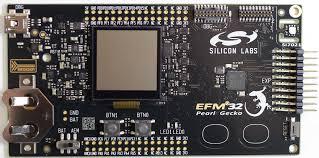
하드웨어
- Application 또는 prototype의 energy consumption을 실시간 제공하는 Advanced Energy Monitoring
- Ultra-low-power 128×128 pixel Memory-LCD
- 사용자 button 2개, LED 2개, capacitive button 2개
- Humidity·temperature sensor
- Onboard SEGGER J-Link USB debugger
상세 자료:
지원 기능
slstk3401a board configuration은 다음 기능을 지원합니다.
| Interface | Controller | Driver/Component |
|---|---|---|
| MPU | on-chip | memory protection unit |
| NVIC | on-chip | nested vector interrupt controller |
| SYSTICK | on-chip | systick |
| COUNTER | on-chip | rtcc |
| FLASH | on-chip | flash memory |
| GPIO | on-chip | gpio |
| UART | on-chip | serial port-polling; serial port-interrupt |
| I2C | on-chip | i2c port-polling |
| WATCHDOG | on-chip | watchdog |
기본 설정은 boards/silabs/starter_kits/slstk3401a/slstk3401a_defconfig에 있습니다. 그 밖의 hardware 기능은 현재 port에서 지원하지 않습니다.
연결과 I/O
EFM32PG1 SoC에는 PORTA~PORTD와 PORTF의 GPIO controller 5개가 있고 모두 활성화됩니다. 표의 Name은 pin 이름이며 PF4는 PORTF의 4번 pin을 뜻합니다.
| Name | Function | Usage |
|---|---|---|
| PF4 | GPIO | LED0 |
| PF5 | GPIO | LED1 |
| PF6 | GPIO | Push Button PB0 |
| PF7 | GPIO | Push Button PB1 |
| PA5 | GPIO | Board Controller Enable EFM_BC_EN |
| PA0 | UART_TX | UART TX Console VCOM_TX US0_TX #0 |
| PA1 | UART_RX | UART RX Console VCOM_RX US0_RX #0 |
| PD10 | UART_TX | EXP12_UART_TX LEU0_TX #18 |
| PD11 | UART_RX | EXP14_UART_RX LEU0_RX #18 |
| PC10 | I2C_SDA | ENV_I2C_SDA I2C0_SDA #15 |
| PC11 | I2C_SCL | ENV_I2C_SCL I2C0_SCL #15 |
System clock
EFM32PG SoC는 board의 40MHz external oscillator를 사용합니다.
Serial port
EFM32PG SoC에는 USART 2개와 Low Energy UART(LEUART) 1개가 있습니다.
Programming and debugging
Flashing
SLSTK3401A의 Onboard J-Link serial/debug adapter는 mass storage와 USB serial port를 노출하는 host USB 연결, USB flash-disk storage를 구현하는 serial flash, USB serial port로 relay되는 physical UART를 제공합니다.
hello_world를 build합니다.
west build -b slstk3401a samples/hello_worldUSB로 연결하면 SLSTK3401A mass-storage device가 나타납니다. 생성된 zephyr.bin을 SLSTK3401A drive에 복사합니다. Expansion header의 UART에는 FT232/CP2102 같은 USB-to-UART converter를 연결합니다. Serial terminal은 115200 baud, data 8 bit, parity 없음, stop bit 1로 설정합니다. Reset 후 다음 메시지가 표시됩니다.
Hello World! slstk3401aSource
출처
영어 원문에는 문단, 문서 지시문, 표, 코드, 코드 심벌, 경로를 그대로 보존했습니다.