Part 1
요약·해설
Rev A의 RISC-V OpenOCD와 Rev B의 J-Link OB 차이를 설명합니다.
SoC
FE310 RISC-V
Revisions
A · B
Rev A
OpenOCD
Rev B
J-Link OB
Part 2
접을 수 있는 영어 원문 전체
영어 원문 전체 펼치기
원문 SHA-256
093C0C32FFB979415DFEF17BE029947003E06999FE4A9147C0E7ADFD406F0D1D
.. _hifive1:

SiFive HiFive1
##############

Overview
********

The HiFive1 is an Arduino-compatible development board with
an FE310 RISC-V SoC. Two revisions of this board are supported in Zephyr:
`HiFive1 <https://www.sifive.com/boards/hifive1>`__ (also known as HiFive1 Rev A)
and `HiFive1 Rev B <https://www.sifive.com/boards/hifive1-rev-b>`__.

.. figure:: ../../../../../../../boards/sifive/hifive1/doc/img/hifive1.jpg
   :align: center
   :alt: SiFive HiFive1 board

   SiFive HiFive1 board (image courtesy of SiFive)

.. figure:: ../../../../../../../boards/sifive/hifive1/doc/img/hifive1_revb.jpg
   :align: center
   :alt: SiFive HiFive1 Rev B board

   SiFive HiFive1 Rev B board (image courtesy of SiFive)

Programming and debugging
*************************

Building
========

Applications for the HiFive1 board configuration can be built as usual (see
:ref:`build_an_application`) using the corresponding board name:

.. tabs::

   .. group-tab:: HiFive1

      .. zephyr-app-commands::
         :board: hifive1
         :goals: build

   .. group-tab:: HiFive1 Rev B

      .. zephyr-app-commands::
         :board: hifive1@B
         :goals: build

Flashing
========


HiFive1
-------

.. tabs::

   .. group-tab:: HiFive1

      In order to upload the application to the device, you'll need OpenOCD with
      RISC-V support. Download the tarball for your OS from the `SiFive website
      <https://www.sifive.com/boards>`_ and extract it.

      The Zephyr SDK uses a bundled version of OpenOCD by default. You can
      overwrite that behavior by adding the
      ``-DOPENOCD=<path/to/riscv-openocd/bin/openocd>`` parameter when building:

      .. zephyr-app-commands::
         :board: hifive1
         :goals: build
         :gen-args: -DOPENOCD=<path/to/riscv-openocd/bin/openocd>

      When using a custom toolchain it should be enough to have the downloaded
      version of the binary in your ``PATH``.

   .. group-tab:: HiFive1 Rev B

      The HiFive 1 Rev B uses Segger J-Link OB for flashing and debugging. To flash and
      debug the board, you'll need to install the
      `Segger J-Link Software and Documentation Pack
      <https://www.segger.com/downloads/jlink#J-LinkSoftwareAndDocumentationPack>`_
      and choose version V6.46a or later (Downloads for Windows, Linux, and macOS are
      available).

Now you can flash the application as usual (see :ref:`build_an_application` and
:ref:`application_run` for more details):

.. code-block:: console

   west flash

Depending on your OS you might have to run the flash command as superuser.

Debugging
=========

Refer to the detailed overview about :ref:`application_debugging`.
Part 3
한국어 전문 번역
개요
HiFive1은 FE310 RISC-V SoC를 탑재한 Arduino-compatible development board입니다. Zephyr는 HiFive1(Rev A)과 HiFive1 Rev B를 지원합니다.
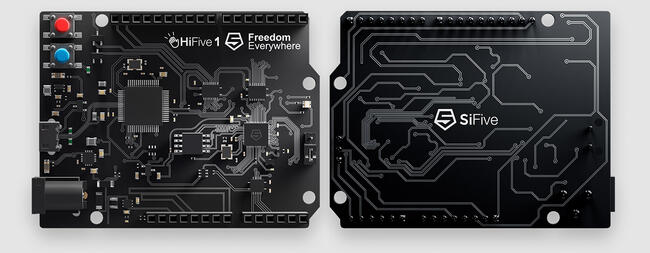
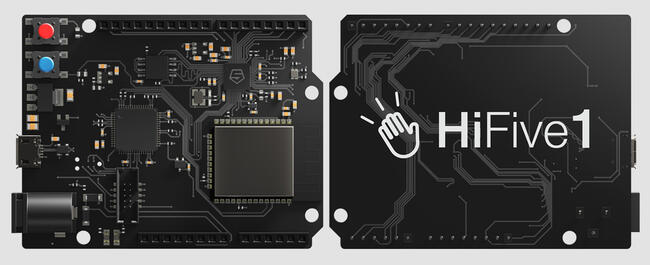
Programming and debugging
Build
Revision에 맞는 board name을 사용합니다.
west build -b hifive1 <application>west build -b hifive1@B <application>Flash 준비
HiFive1 Rev A는 RISC-V 지원 OpenOCD가 필요합니다. Zephyr SDK bundled OpenOCD를 바꾸려면 다음 인수를 사용하고, custom toolchain에서는 binary를 PATH에 둡니다.
west build -b hifive1 -DOPENOCD=<path/to/riscv-openocd/bin/openocd> <application>Rev B는 flashing/debugging에 Segger J-Link OB를 사용하며 J-Link Software and Documentation Pack V6.46a 이상이 필요합니다.
Flashing
west flashOS에 따라 superuser 권한이 필요할 수 있습니다. Debugging은 Zephyr application debugging 문서를 참고합니다.
Source
출처
영어 원문에는 문단, 문서 지시문, 표, 코드, 코드 심벌, 경로를 그대로 보존했습니다.