Part 1
요약·해설
세 revision의 USB/SATA topology, SPI flash와 LED strip, 조건부 HDD/USB pin, ST-Link/OpenOCD 절차를 설명합니다.
25hdd · 25ssd · 35
STM32F070 · Cortex-M0+
B1414 · SPI1 MOSI
ASM1153 · RTS5411S · GL3523-S
Part 2
접을 수 있는 영어 원문 전체
영어 원문 전체 펼치기
749AFEAA9A7344E853CC45B3EE287BFF29622076DD12BF19837D723B5149D9B4
.. _legend:

Legend
######

Overview
********
The Legend board family contains three revisions: 25hdd, 25ssd, and 35.

The Legend 2.5" HDD board (revision 25hdd) can be found in the Seagate FireCuda
Gaming Hard Drive, Gaming Drive for Xbox and Gaming Drive for PlayStation
devices. A 2.5" drive and two chips are embedded: an ASMedia ASM1153 USB-to-SATA
bridge controller and a STM32F070 MCU. The former is handling the USB to HDD I/Os
while the latter is dedicated to the LED effects. The two chips are connected
together through I2C.

The Legend 2.5" SSD board (revision 25ssd) is found in the Seagate SSD Gaming
Drive for Xbox. A Realtek RTS5411S USB hub is embedded and connected to a Phison
U17 2.5" SSD, as well as a STM32F070 MCU.

The Legend 3.5" board (revision 35) can be found in the Seagate FireCuda Gaming
Hub and Gaming Drive Hub for Xbox devices. A Genesys Logic GL3523-S USB hub is
connected to an ASMedia ASM1153 USB-to-SATA bridge controller and a STM32F070
MCU. The two chips are connected together using I2C.

On all boards, the Zephyr port is running on the STM32F070 MCU.

.. image:: ../../../../../../../boards/seagate/legend/doc/img/firecuda_gaming_hard_drive.jpg
   :align: center
   :alt: Seagate FireCuda Gaming Hard Drive

.. image:: ../../../../../../../boards/seagate/legend/doc/img/firecuda_gaming_hub.jpg
   :align: center
   :alt: Seagate FireCuda Gaming Hub

Hardware
********

- STM32F070cb MCU:

  - ARM Cortex-M0+
  - 16KB SRAM
  - 128KB on-chip flash

- External devices connected to the STM32F070cb MCU:

  - ASMedia ASM1153 USB-to-SATA bridge (I2C master on port 1) (HDD only)
  - 6 (hdd) or 4 (ssd) Everlight B1414 LEDs connected on SPI1 MOSI
  - 1 white LED (HDD only)
  - 64KB external SPI flash connected on SPI2

Supported Features
==================

All the hardware features available on the Legend boards are supported by
Zephyr.

+-----------+------------+-------------------------------------+
| Interface | Controller | Driver/Component                    |
+===========+============+=====================================+
| NVIC      | on-chip    | nested vector interrupt controller  |
+-----------+------------+-------------------------------------+
| SYSTICK   | on-chip    | systick                             |
+-----------+------------+-------------------------------------+
| CLOCK     | on-chip    | clock and reset control             |
+-----------+------------+-------------------------------------+
| GPIO      | on-chip    | gpio                                |
+-----------+------------+-------------------------------------+
| I2C       | on-chip    | i2c master/slave controller         |
+-----------+------------+-------------------------------------+
| UART      | on-chip    | serial                              |
+-----------+------------+-------------------------------------+
| SPI flash | on-chip    | spi_nor                             |
+-----------+------------+-------------------------------------+
| LED strip | on-chip    | ws2812                              |
+-----------+------------+-------------------------------------+
| USB       | on-chip    | usb                                 |
+-----------+------------+-------------------------------------+


Connections and IOs
===================

+---------+-----------------+----------------------------+
| Name    | Function        | Usage                      |
+=========+=================+============================+
| PB6     | I2C1            | I2C1 SCL (HDD only)        |
+---------+-----------------+----------------------------+
| PB7     | I2C1            | I2C1 SDA (HDD only)        |
+---------+-----------------+----------------------------+
| PA10    | UART            | USART0 RX                  |
+---------+-----------------+----------------------------+
| PA9     | UART            | USART0 TX                  |
+---------+-----------------+----------------------------+
| PB0     | PWM             | Activity LED (HDD only)    |
+---------+-----------------+----------------------------+
| PB12    | SPI2            | SPI2 Enable                |
+---------+-----------------+----------------------------+
| PB13    | SPI2            | SPI2 Clock                 |
+---------+-----------------+----------------------------+
| PB14    | SPI2            | SPI2 MISO                  |
+---------+-----------------+----------------------------+
| PB15    | SPI2            | SPI2 MOSI                  |
+---------+-----------------+----------------------------+
| PA7     | LED strip       | SPI1 MOSI                  |
+---------+-----------------+----------------------------+
| PA12    | USB             | USB DM (25ssd and 35 only) |
+---------+-----------------+----------------------------+
| PA13    | USB             | USB DP (25ssd and 35 only) |
+---------+-----------------+----------------------------+

Programming and Debugging
*************************

Flashing
========

The STM32F070cb MCU can be flashed by connecting an external debug probe to the
SWD port (on-board 4-pin header). In the default OpenOCD configuration, the
ST Link interface is selected. You may need to replace it with the interface of
your debug probe.

Once the debug probe is connected to both the Legend board and your host
computer, then you can simply run the ``west flash`` command to write a firmware
image into flash.

Debugging
=========

Please refer to the `Flashing`_ section and run the ``west debug`` command
instead of ``west flash``.

References
**********

- `STM32F070 reference manual`_

.. _STM32F070 reference manual:
   https://www.st.com/resource/en/reference_manual/dm00031936.pdf
Part 3
한국어 전문 번역
개요
Legend board family에는 25hdd, 25ssd, 35 세 revision이 있습니다.
Legend 2.5-inch HDD: revision 25hdd
Seagate FireCuda Gaming Hard Drive, Gaming Drive for Xbox, Gaming Drive for PlayStation 제품에서 찾을 수 있습니다. 2.5-inch drive와 ASMedia ASM1153 USB-to-SATA bridge controller, STM32F070 MCU가 내장됩니다. ASM1153은 USB와 HDD 사이의 I/O를 처리하고 STM32F070은 LED effect 전용입니다. 두 chip은 I2C로 연결됩니다.
Legend 2.5-inch SSD: revision 25ssd
Seagate SSD Gaming Drive for Xbox에 사용됩니다. Realtek RTS5411S USB hub가 내장되어 Phison U17 2.5-inch SSD와 STM32F070 MCU에 연결됩니다.
Legend 3.5-inch: revision 35
Seagate FireCuda Gaming Hub와 Gaming Drive Hub for Xbox 제품에서 찾을 수 있습니다. Genesys Logic GL3523-S USB hub가 ASMedia ASM1153 USB-to-SATA bridge controller와 STM32F070 MCU에 연결되며, 두 chip은 I2C를 사용해 연결됩니다.
모든 board에서 Zephyr port는 STM32F070 MCU에서 실행됩니다.
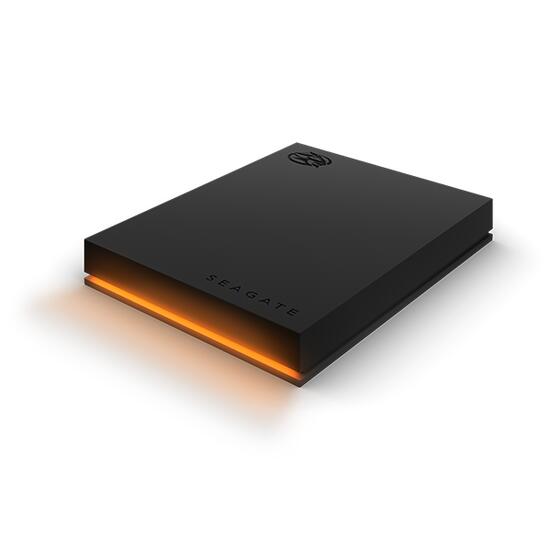
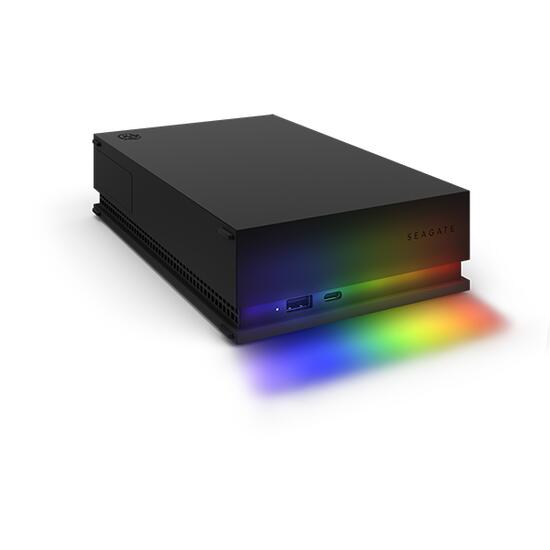
하드웨어
STM32F070cb MCU
- ARM Cortex-M0+
- 16 KB SRAM
- 128 KB on-chip flash
STM32F070cb에 연결된 외부 device
- ASMedia ASM1153 USB-to-SATA bridge: port 1의 I2C master, HDD revision만 해당
- SPI1 MOSI에 연결된 Everlight B1414 LED: HDD 6개 또는 SSD 4개
- white LED 1개: HDD revision만 해당
- SPI2에 연결된 64 KB external SPI flash
지원 기능
Legend board에서 사용할 수 있는 모든 hardware 기능을 Zephyr가 지원합니다.
| Interface | Controller | Driver / Component |
|---|---|---|
| NVIC | on-chip | nested vector interrupt controller |
| SYSTICK | on-chip | systick |
| CLOCK | on-chip | clock and reset control |
| GPIO | on-chip | gpio |
| I2C | on-chip | i2c master/slave controller |
| UART | on-chip | serial |
| SPI flash | on-chip | spi_nor |
| LED strip | on-chip | ws2812 |
| USB | on-chip | usb |
연결과 I/O
| Name | Function | Usage |
|---|---|---|
| PB6 | I2C1 | I2C1 SCL (HDD only) |
| PB7 | I2C1 | I2C1 SDA (HDD only) |
| PA10 | UART | USART0 RX |
| PA9 | UART | USART0 TX |
| PB0 | PWM | Activity LED (HDD only) |
| PB12 | SPI2 | SPI2 Enable |
| PB13 | SPI2 | SPI2 Clock |
| PB14 | SPI2 | SPI2 MISO |
| PB15 | SPI2 | SPI2 MOSI |
| PA7 | LED strip | SPI1 MOSI |
| PA12 | USB | USB DM (25ssd and 35 only) |
| PA13 | USB | USB DP (25ssd and 35 only) |
Programming과 debugging
Flashing
STM32F070cb MCU는 외부 debug probe를 board의 4-pin SWD header에 연결해 flash할 수 있습니다. 기본 OpenOCD configuration에서는 ST-Link interface가 선택되어 있으므로, 사용하는 debug probe에 맞는 interface로 교체해야 할 수 있습니다.
Debug probe를 Legend board와 host computer 양쪽에 연결한 뒤 west flash를 실행하면 firmware image를 flash에 기록할 수 있습니다.
Debugging
앞의 flashing 절차를 따르되 west flash 대신 west debug를 실행합니다.
참고 자료
Source
출처
영어 원문에는 문단, 문서 지시문, 표, 코드, 코드 심벌, 경로를 그대로 보존했습니다.