Part 1
요약·해설
WisBlock Base 연결, 지원 interface 15종, LED pin, JLinkExe·serial terminal·west debug 흐름을 설명합니다.
nRF52840 · Cortex-M4F · 64 MHz
BLE · IEEE 802.15.4 · SX1262 LoRa
rak4631/nrf52840
Part 2
접을 수 있는 영어 원문 전체
영어 원문 전체 펼치기
111DA60616665D9B7842677701561BF3202FF3BC4EE496D521C8210767DFFA24
.. _rak4631_nrf52840:

RAK4631
#######

Overview
********

RAK4631 is a WisBlock Core module for RAK WisBlock.
It extends the WisBlock series with a powerful
Nordic nRF52840 MCU that supports Bluetooth 5.0
(Bluetooth Low Energy) and the newest LoRa transceiver
from Semtech, the SX1262. The Semtech SX1262 has compared
to the older SX127x series a lower power consumption at
the same TX power. This makes the RAK4631 an ultra-low
power communication solution. RAK4631 can be comfortably
programmed with ZephyrRTOS.

.. image:: ../../../../../../../boards/rak/rak4631/doc/img/rak4631-front-parts.jpg
     :align: center
     :alt: RAK4631-NRF52840

Hardware
********

To use a RAK4631, you need at least a WisBlock Base
to plug the module in. WisBlock Base is the power
supply for the RAK4631 module and has the
programming/debug interface.

- nRF52840 ARM Cortex-M4F Processor
- 64 MHz CPU clock
- 1 Micro-AB USB OTG host/device
- Semtech SX1262 low power high range LoRa transceiver
- iPEX connectors for the LORA antenna and BLE antenna.
- Multiple interfaces, I2C, UART, GPIO, ADC
- 2 user LEDs on RAK5005 mother Board
- Powered by either Micro USB, 3.7V rechargeable battery or a 5V Solar Panel Port

Supported Features
==================

The ``rak4631/nrf52840`` board configuration supports the following hardware features:

+-----------+------------+----------------------+
| Interface | Controller | Driver/Component     |
+===========+============+======================+
| ADC       | on-chip    | adc                  |
+-----------+------------+----------------------+
| CLOCK     | on-chip    | clock_control        |
+-----------+------------+----------------------+
| FLASH     | on-chip    | flash                |
+-----------+------------+----------------------+
| GPIO      | on-chip    | gpio                 |
+-----------+------------+----------------------+
| I2C(M)    | on-chip    | i2c                  |
+-----------+------------+----------------------+
| MPU       | on-chip    | arch/arm             |
+-----------+------------+----------------------+
| NVIC      | on-chip    | arch/arm             |
+-----------+------------+----------------------+
| PWM       | on-chip    | pwm                  |
+-----------+------------+----------------------+
| RADIO     | on-chip    | Bluetooth,           |
|           |            | ieee802154           |
+-----------+------------+----------------------+
| RADIO     | on-board   | LoRa (SX1262)        |
+-----------+------------+----------------------+
| RTC       | on-chip    | system clock         |
+-----------+------------+----------------------+
| SPI(M/S)  | on-chip    | spi                  |
+-----------+------------+----------------------+
| UART      | on-chip    | serial               |
+-----------+------------+----------------------+
| USB       | on-chip    | usb                  |
+-----------+------------+----------------------+
| WDT       | on-chip    | watchdog             |
+-----------+------------+----------------------+

The default board configuration can be found in
:zephyr_file:`boards/rak/rak4631/rak4631_nrf52840_defconfig`

Connections and IOs
===================

LED
---

* LED1 (green) = P1.3
* LED2 (blue) = P1.4

Programming and Debugging
*************************

The RAK4631 board shall be connected to a Segger Embedded Debugger Unit
`J-Link OB <https://www.segger.com/jlink-ob.html>`_.  This provides a debug
interface to the NRF52840 chip. You can use JLink to communicate with
the NRF52840.

Flashing
========

#. Download JLink from the Segger `JLink Downloads Page`_.  Go to the section
   "J-Link Software and Documentation Pack" and install the "J-Link Software
   and Documentation pack for Linux".  The application JLinkExe needs to be
   accessible from your path.

#. Run your favorite terminal program to listen for output.  Under Linux the
   terminal should be :code:`/dev/ttyACM0`. For example:

   .. code-block:: console

      $ minicom -D /dev/ttyACM0 -o

   The -o option tells minicom not to send the modem initialization string.
   Connection should be configured as follows:

   - Speed: 115200
   - Data: 8 bits
   - Parity: None
   - Stop bits: 1

#. Connect the RAK4631 board to your host computer using the USB debug port.
   Then build and flash the :ref:`hello_world` application.

   .. zephyr-app-commands::
      :zephyr-app: samples/hello_world
      :board: rak4631/nrf52840
      :goals: build flash

   You should see "Hello World! rak4631_nrf52840" in your terminal.

Debugging
=========

You can debug an application in the usual way.  Here is an example for the
:ref:`hello_world` application.

.. zephyr-app-commands::
   :zephyr-app: samples/hello_world
   :board: rak4631/nrf52840
   :maybe-skip-config:
   :goals: debug

References
**********

.. target-notes::

.. _RAK4631 Product Description:
    https://docs.rakwireless.com/Product-Categories/WisBlock/RAK4631/Datasheet/#overview

.. _JLink Downloads Page:
    https://www.segger.com/downloads/jlink
Part 3
한국어 전문 번역
개요
RAK4631은 RAK WisBlock용 WisBlock Core module입니다. Bluetooth 5.0(Bluetooth Low Energy)을 지원하는 강력한 Nordic nRF52840 MCU와 Semtech의 최신 LoRa 송수신기 SX1262를 WisBlock series에 추가합니다. Semtech SX1262는 같은 TX power에서 이전 SX127x series보다 소비 전력이 낮습니다. 따라서 RAK4631은 초저전력 통신 solution이며 Zephyr RTOS로 편리하게 programming할 수 있습니다.
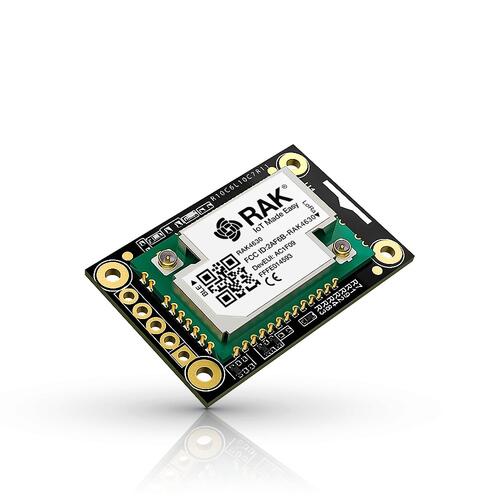
하드웨어
RAK4631을 사용하려면 module을 꽂을 WisBlock Base가 최소한 하나 필요합니다. WisBlock Base는 RAK4631 module에 전원을 공급하고 programming/debug interface를 제공합니다.
- nRF52840 ARM Cortex-M4F processor
- 64 MHz CPU clock
- Micro-AB USB OTG host/device 1개
- Semtech SX1262 저전력 장거리 LoRa 송수신기
- LoRa antenna와 BLE antenna용 iPEX connector
- I2C, UART, GPIO, ADC를 포함한 여러 interface
- RAK5005 motherboard의 user LED 2개
- Micro USB, 3.7 V rechargeable battery 또는 5 V solar panel port 전원
지원 기능
rak4631/nrf52840 board configuration은 다음 hardware feature를 지원합니다.
| 인터페이스 | 컨트롤러 | 드라이버/컴포넌트 |
|---|---|---|
ADC | on-chip | adc |
CLOCK | on-chip | clock_control |
FLASH | on-chip | flash |
GPIO | on-chip | gpio |
I2C(M) | on-chip | i2c |
MPU | on-chip | arch/arm |
NVIC | on-chip | arch/arm |
PWM | on-chip | pwm |
RADIO | on-chip | Bluetooth, ieee802154 |
RADIO | on-board | LoRa (SX1262) |
RTC | on-chip | system clock |
SPI(M/S) | on-chip | spi |
UART | on-chip | serial |
USB | on-chip | usb |
WDT | on-chip | watchdog |
기본 board configuration은 boards/rak/rak4631/rak4631_nrf52840_defconfig에서 확인할 수 있습니다.
연결과 I/O
LED
- LED1(green) =
P1.3 - LED2(blue) =
P1.4
프로그래밍과 디버깅
RAK4631 board는 Segger Embedded Debugger Unit인 J-Link OB에 연결해야 합니다. 이 장치는 nRF52840 chip용 debug interface를 제공하며, J-Link로 nRF52840과 통신할 수 있습니다.
플래시
- SEGGER J-Link download page에서 J-Link를 내려받습니다. “J-Link Software and Documentation Pack” section으로 이동해 Linux용 pack을 설치하고,
JLinkExeapplication이PATH에서 실행되는지 확인합니다. - 원하는 terminal program으로 출력을 수신합니다. Linux에서는 terminal이
/dev/ttyACM0여야 합니다. 예:
$ minicom -D /dev/ttyACM0 -o-o option은 minicom이 modem initialization string을 보내지 않도록 합니다. 연결은 속도 115200, data 8 bits, parity None, stop bits 1로 설정합니다.
- USB debug port로 RAK4631 board를 host computer에 연결한 다음
hello_worldapplication을 build하고 flash합니다.
west build -b rak4631/nrf52840 samples/hello_world
west flash
Terminal에 Hello World! rak4631_nrf52840가 표시되어야 합니다.
디버깅
Application은 일반적인 방법으로 debug할 수 있습니다. 다음은 hello_world application 예시입니다.
west build -b rak4631/nrf52840 samples/hello_world
west debug
참고 자료
Source
출처
영어 원문에는 문단, 문서 지시문, 표, 코드, 코드 심벌, 경로를 그대로 보존했습니다.