Part 1
요약·해설
Wearable hardware 전체, NRF52 pin 32개, SWD 접촉과 nrfjprog/Ozone 절차를 설명합니다.
NRF52832 · 64 MHz M4F
1.3-inch · 240×240 · ST7789
BMA421 · HRS3300 · CST816S
SWD · nrfjprog · Ozone
Part 2
접을 수 있는 영어 원문 전체
영어 원문 전체 펼치기
F1FE467ED626C19376B7DE1D88F584C602B4009CFA6E51227D47A518133CF5C5
.. _pinetime_devkit0:

Pine64 PineTime DevKit0
#######################

Overview
********

.. figure:: ../../../../../../../boards/pine64/pinetime_devkit0/doc/img/PineTime_leaflet.jpg
   :align: center
   :alt: Pine64 PineTime

   PineTime leaflet (Credit: Pine64)


The Pine64 smartwatch, dubbed "PineTime", is a product of a community effort
for an open source smartwatch in collaboration with wearable RTOS and Linux
app developers/communities.

.. figure:: ../../../../../../../boards/pine64/pinetime_devkit0/doc/img/PineTime_DevKit0.jpg
   :align: center
   :alt: Pine64 PineTime

   PineTime Dev Kit (Credit: Pine64)

Hardware
********

The PineTime is based on a Nordic NRF52832 chip and features:

- CPU: 64 MHz Cortex-M4 with FPU
- RAM: 64KB SRAM
- Flash: 512KB on board flash with additional 4MB SPI NOR XT25F32B
- Display: 1.3 inches (33mm), 240x240 pixels display with ST7789 driver
- Touchscreen: CST816S Capacitive Touch
- Battery: 170-180mAh 3.8V LiPo
- BMA421 Triaxial Acceleration Sensor
- HRS3300 PPG Heart Rate Sensor
- Vibration motor

PineTime schematics
========================

The `PineTime schematics`_ are available on the pine64 website. Below
is an overview of the NRF52 port assignment.

+----------------------+---------------------------------+-----------+
| NRF52 pins           | Function                        | Direction |
+======================+=================================+===========+
| P0.00/XL1            | 32.768 kHz –XL1                 |           |
+----------------------+---------------------------------+-----------+
| P0.01/XL2            | 32.768 kHz –XL2                 |           |
+----------------------+---------------------------------+-----------+
| P0.02/AIN0           | SPI-SCK, LCD_SCK                | OUT       |
+----------------------+---------------------------------+-----------+
| P0.03/AIN1           | SPI-MOSI, LCD_SDI               | OUT       |
+----------------------+---------------------------------+-----------+
| P0.04/AIN2           | SPI-MISO                        | IN        |
+----------------------+---------------------------------+-----------+
| P0.05/AIN3           | SPI-CE# (SPI-NOR)               | OUT       |
+----------------------+---------------------------------+-----------+
| P0.06                | BMA421-SDA, HRS3300-SDA, TP-SDA | I/O       |
+----------------------+---------------------------------+-----------+
| P0.07                | BMA421-SCL, HRS3300-SCL, TP-SCL | OUT       |
+----------------------+---------------------------------+-----------+
| P0.08                | BMA421-INT                      | IN        |
+----------------------+---------------------------------+-----------+
| P0.09/NFC1           | LCD_DET                         | OUT       |
+----------------------+---------------------------------+-----------+
| P0.10/NFC2           | TP_RESET                        | OUT       |
+----------------------+---------------------------------+-----------+
| P0.11                |                                 |           |
+----------------------+---------------------------------+-----------+
| P0.12                | CHARGE INDICATION               | IN        |
+----------------------+---------------------------------+-----------+
| P0.13                | PUSH BUTTON_IN                  | IN        |
+----------------------+---------------------------------+-----------+
| P0.14/TRACEDATA3     | LCD_BACKLIGHT_LOW               | OUT       |
+----------------------+---------------------------------+-----------+
| P0.15/TRACEDATA2     | PUSH BUTTON_OUT                 | OUT       |
+----------------------+---------------------------------+-----------+
| P0.16/TRACEDATA1     | VIBRATOR OUT                    | OUT       |
+----------------------+---------------------------------+-----------+
| P0.17                |                                 |           |
+----------------------+---------------------------------+-----------+
| P0.18/TRACEDATA0/SWO | LCD_RS OUT                      |           |
+----------------------+---------------------------------+-----------+
| P0.19                | POWER PRESENCE INDICATION       | IN        |
+----------------------+---------------------------------+-----------+
| P0.20/TRACECLK       |                                 |           |
+----------------------+---------------------------------+-----------+
| P0.21/nRESET         |                                 |           |
+----------------------+---------------------------------+-----------+
| P0.22                | LCD_BACKLIGHT_MID               | OUT       |
+----------------------+---------------------------------+-----------+
| P0.23                | LCD_BACKLIGHT_HIGH              | OUT       |
+----------------------+---------------------------------+-----------+
| P0.24                | 3V3 POWER CONTROL               | OUT       |
+----------------------+---------------------------------+-----------+
| P0.25                | LCD_CS                          | OUT       |
+----------------------+---------------------------------+-----------+
| P0.26                | LCD_RESET                       | OUT       |
+----------------------+---------------------------------+-----------+
| P0.27                | STATUS LED (NOT STAFF)          | OUT       |
+----------------------+---------------------------------+-----------+
| P0.28/AIN4           | TP_INT                          | IN        |
+----------------------+---------------------------------+-----------+
| P0.29/AIN5           |                                 |           |
+----------------------+---------------------------------+-----------+
| P0.30/AIN6           | HRS3300-TEST                    | IN        |
+----------------------+---------------------------------+-----------+
| P0.31/AIN7           | BATTERY VOLTAGE (Analog)        | IN        |
+----------------------+---------------------------------+-----------+

Building
********

In order to get started with Zephyr on the PineTime, you can use the
basic button sample:

.. zephyr-app-commands::
   :zephyr-app: samples/basic/button
   :board: pinetime_devkit0
   :goals: build

Programming and Debugging
*************************

The PineTime Dev Kit comes with the back not glued down to allow it to be
easily reprogrammed.

The kit does not include a hardware programmer, but existing debuggers
supporting SWD can be used.

These are the necessary steps for debugging:

- Unlock the device
- Upload new software
- Run a debugger

More infos to be found in the `Wiki Reprogramming the PineTime`_ page.

Debugger connection
===================

The dev kits have exposed SWD pins for flashing and debugging.

Only a few devs have soldered to these pins, most just use friction to make
contact with the programming cable.

The pinout is:

.. figure:: ../../../../../../../boards/pine64/pinetime_devkit0/doc/img/PineTime_SWD_location.jpg
   :align: center
   :alt: PineTime SWD location

Unlocking the Flash memory
==========================

Unlocking the device is a one-time action that is needed to enable to debug
port and provide full access to the device. This will erase all existing
software from the internal flash.

**Note: PineTime watches shipped after 20 Sep 2020 do not require unlocking. They are shipped unlocked.**

.. code-block:: console

   $ nrfjprog -f NRF52 --recover

Flashing
========

Using nrfjprog, flashing the PineTime is done with the command:

.. code-block:: console

   $ nrfjprog -f NRF52 --program firmware.hex --sectorerase

Debugging
=========

Using Segger Ozone debugger, debugging and flashing is made easy.

Simply load the .elf file containing the final firmware and
setup the debugger to use SWD over USB for the chip nRF52832_xxAA.
This setup can be done using the menu Tools/J-Link Settings. or by directly
typing the following in the debugger console:

.. code-block:: console

   $ Project.SetDevice ("nRF52832_xxAA");
   $ Project.SetHostIF ("USB", "");
   $ Project.SetTargetIF ("SWD");
   $ Project.SetTIFSpeed ("4 MHz");
   $ File.Open ("path/to/your/build/zephyr/zephyr.elf");

References
**********

.. target-notes::

.. _Pine64 PineTime presentation:
   https://www.pine64.org/pinetime

.. _Pine64 PineTime wiki page:
   https://wiki.pine64.org/index.php/PineTime

.. _Pine64 forum:
   https://forum.pine64.org

.. _PineTime schematics:
   http://files.pine64.org/doc/PineTime/PineTime%20Schematic-V1.0a-20191103.pdf

.. _Wiki Reprogramming the PineTime:
   https://wiki.pine64.org/index.php/Reprogramming_the_PineTime
Part 3
한국어 전문 번역
개요
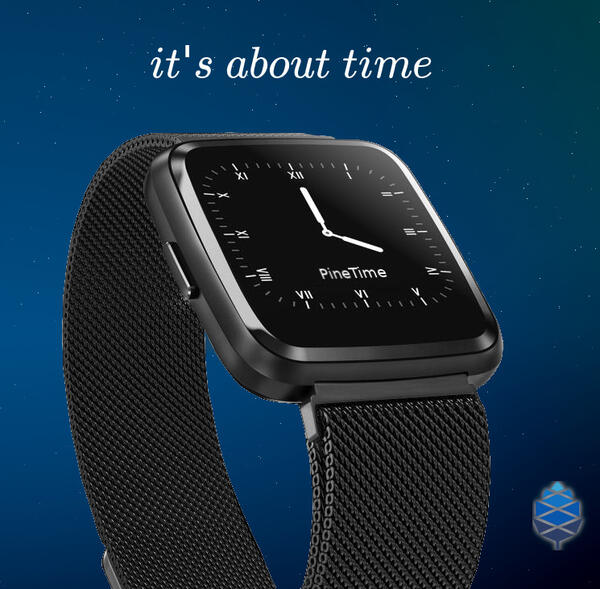
PineTime
이라는 이름의 Pine64 smartwatch는 wearable RTOS 및 Linux application developer/community와 협력해 만든 open-source smartwatch community project입니다.
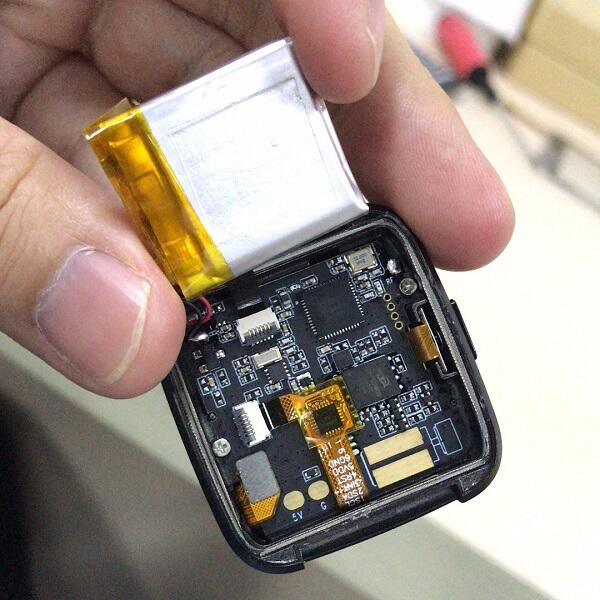
하드웨어
PineTime은 Nordic NRF52832 chip 기반이며 다음 하드웨어를 갖습니다.
- CPU: FPU가 있는 64 MHz Cortex-M4
- RAM: SRAM 64KB
- Flash: on-board flash 512KB와 추가 SPI NOR
XT25F32B4MB - Display: 1.3 inch(33mm), 240×240 pixel,
ST7789driver - Touchscreen:
CST816Scapacitive touch - Battery: 170~180mAh, 3.8V LiPo
BMA421triaxial acceleration sensorHRS3300PPG heart-rate sensor- Vibration motor
PineTime 회로와 pin assignment
PineTime schematic은 Pine64 사이트에서 제공됩니다. 다음 표는 NRF52 port assignment 전체입니다.
| NRF52 pin | 기능 | 방향 |
|---|---|---|
P0.00/XL1 | 32.768 kHz -XL1 | |
P0.01/XL2 | 32.768 kHz -XL2 | |
P0.02/AIN0 | SPI-SCK, LCD_SCK | OUT |
P0.03/AIN1 | SPI-MOSI, LCD_SDI | OUT |
P0.04/AIN2 | SPI-MISO | IN |
P0.05/AIN3 | SPI-CE# (SPI-NOR) | OUT |
P0.06 | BMA421-SDA, HRS3300-SDA, TP-SDA | I/O |
P0.07 | BMA421-SCL, HRS3300-SCL, TP-SCL | OUT |
P0.08 | BMA421-INT | IN |
P0.09/NFC1 | LCD_DET | OUT |
P0.10/NFC2 | TP_RESET | OUT |
P0.11 | | |
P0.12 | CHARGE INDICATION | IN |
P0.13 | PUSH BUTTON_IN | IN |
P0.14/TRACEDATA3 | LCD_BACKLIGHT_LOW | OUT |
P0.15/TRACEDATA2 | PUSH BUTTON_OUT | OUT |
P0.16/TRACEDATA1 | VIBRATOR OUT | OUT |
P0.17 | | |
P0.18/TRACEDATA0/SWO | LCD_RS OUT | |
P0.19 | POWER PRESENCE INDICATION | IN |
P0.20/TRACECLK | | |
P0.21/nRESET | | |
P0.22 | LCD_BACKLIGHT_MID | OUT |
P0.23 | LCD_BACKLIGHT_HIGH | OUT |
P0.24 | 3V3 POWER CONTROL | OUT |
P0.25 | LCD_CS | OUT |
P0.26 | LCD_RESET | OUT |
P0.27 | STATUS LED (NOT STAFF) | OUT |
P0.28/AIN4 | TP_INT | IN |
P0.29/AIN5 | | |
P0.30/AIN6 | HRS3300-TEST | IN |
P0.31/AIN7 | BATTERY VOLTAGE (Analog) | IN |
빌드
PineTime에서 Zephyr를 시작하려면 기본 button sample을 사용할 수 있습니다.
# Zephyr 저장소 루트에서
west build -b pinetime_devkit0 samples/basic/button
프로그래밍과 디버깅
PineTime Dev Kit은 쉽게 다시 program할 수 있도록 뒷면이 접착되지 않은 상태로 제공됩니다. Kit에는 hardware programmer가 포함되지 않지만 SWD를 지원하는 기존 debugger를 사용할 수 있습니다.
Debug 절차는 다음 세 단계입니다.
- Device unlock
- 새 software upload
- Debugger 실행
자세한 내용은 Wiki Reprogramming the PineTime에서 확인할 수 있습니다.
Debugger 연결
Dev kit에는 flash와 debug를 위한 SWD pin이 노출되어 있습니다. 일부 developer만 pin에 solder했고, 대부분은 programming cable을 눌러 접촉시키는 방식으로 사용합니다.
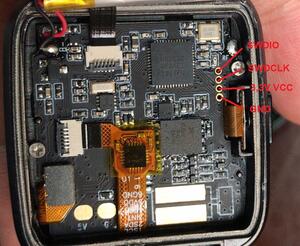
Flash memory unlock
Device unlock은 debug port를 활성화하고 device 전체 접근을 허용하기 위한 일회성 작업입니다.
$ nrfjprog -f NRF52 --recoverFlash
nrfjprog로 PineTime에 firmware를 기록하는 명령은 다음과 같습니다.
$ nrfjprog -f NRF52 --program firmware.hex --sectoreraseDebug
SEGGER Ozone debugger를 사용하면 debug와 flash를 쉽게 수행할 수 있습니다. 최종 firmware가 들어 있는 .elf file을 열고, chip을 nRF52832_xxAA로 선택한 뒤 USB를 통한 SWD를 사용하도록 설정합니다. Ozone의 Tools/J-Link Settings menu에서 설정하거나 debugger console에 다음을 입력합니다.
$ Project.SetDevice ("nRF52832_xxAA");
$ Project.SetHostIF ("USB", "");
$ Project.SetTargetIF ("SWD");
$ Project.SetTIFSpeed ("4 MHz");
$ File.Open ("path/to/your/build/zephyr/zephyr.elf");
참고 자료
Source
출처
영어 원문에는 문단, 문서 지시문, 표, 코드, 코드 심벌, 경로를 그대로 보존했습니다.