Part 1
요약·해설
M4F 지원 기능 4종, firmware 파일명과 U-Boot overlay, OpenOCD 0.12 조건을 설명합니다.
400 MHz
4kB · 0x9CC00000
XDS110 · OpenOCD 0.12+
Part 2
접을 수 있는 영어 원문 전체
영어 원문 전체 펼치기
8C528A93EA886ED48F83A67FAD9417A6D63BFEF1B841FEA35F5559C6445F1A88
.. _phyboard_lyra_am62xx_m4:

phyBOARD-Lyra AM62x M4F Core
############################

Overview
********

The phyBOARD-Lyra AM62x board configuration is used by Zephyr applications
that run on the TI AM62x platform. The board configuration provides support
for the ARM Cortex-M4F MCU core and the following features:

- Nested Vector Interrupt Controller (NVIC)
- System Tick System Clock (SYSTICK)

The board configuration also enables support for the semihosting debugging console.

See the `PHYTEC AM62x Product Page`_ for details.

.. figure:: ../../../../../../../boards/phytec/phyboard_lyra/doc/img/phyCORE-AM62x_Lyra_frontside.webp
   :align: center
   :alt: phyBOARD-Lyra AM62x

   PHYTEC phyBOARD-Lyra with the phyCORE-AM62x SoM

Hardware
********
The phyBOARD-Lyra AM62x kit features the AM62x SoC, which is composed of a
quad Cortex-A53 cluster and a single Cortex-M4 core in the MCU domain. Zephyr
is ported to run on the M4F core and the following listed hardware
specifications are used:

- Low-power ARM Cortex-M4F
- Memory

   - 256KB of SRAM
   - 2GB of DDR4

- Debug

   - XDS110 based JTAG

Supported Features
==================

The phyboard_lyra/am6234/m4 configuration supports the following hardware features:

+-----------+------------+-------------------------------------+
| Interface | Controller | Driver/Component                    |
+===========+============+=====================================+
| NVIC      | on-chip    | nested vector interrupt controller  |
+-----------+------------+-------------------------------------+
| SYSTICK   | on-chip    | systick                             |
+-----------+------------+-------------------------------------+
| PINCTRL   | on-chip    | pinctrl                             |
+-----------+------------+-------------------------------------+
| UART      | on-chip    | serial                              |
+-----------+------------+-------------------------------------+

Other hardware features are not currently supported by the port.

Devices
========
System Clock
------------

This board configuration uses a system clock frequency of 400 MHz.

DDR RAM
-------

The board has 2GB of DDR RAM available. This board configuration
allocates Zephyr 4kB of RAM (only for resource table: 0x9CC00000 to 0x9CC00400).

Serial Port
-----------

This board configuration uses a single serial communication channel with the
MCU domain UART (MCU_UART0).

SD Card
*******

Download PHYTEC's official `WIC`_ as well as `BMAP`_ and flash the WIC file with
an etching software onto an SD-card. This will boot Linux on the A53 application
cores of the SoM. These cores will then load the zephyr binary on the M4 core
using remoteproc.

The default configuration can be found in
:zephyr_file:`boards/phytec/phyboard_lyra/phyboard_lyra_am6234_m4_defconfig`

Flashing
********

The Linux running on the A53 uses the remoteproc framework to manage the M4F co-processor.
Therefore, the testing requires the binary to be copied to the SD card to allow the A53 cores to
load it while booting using remoteproc.

To test the M4F core, we build the `hello_world` sample with the following command.

.. code-block:: console

   # From the root of the Zephyr repository
   west build -p -b phyboard_lyra/am6234/m4 samples/hello_world

This builds the program and the binary is present in the `build/zephyr` directory as `zephyr.elf`.

We now copy this binary onto the SD card in the `/lib/firmware` directory and name it as `am62-mcu-m4f0_0-fw`.

.. code-block:: console

   # Mount the SD card at sdcard for example
   sudo mount /dev/sdX sdcard
   # copy the elf to the /lib/firmware directory
   sudo cp --remove-destination zephyr.elf sdcard/lib/firmware/am62-mcu-m4f0_0-fw

The SD card can now be used for booting. The binary will now be loaded onto the M4F core on boot.

To allow the board to boot using the SD card, set the boot pins to the SD Card boot mode. Refer to `phyBOARD SD Card Booting Essentials`_.

After changing the boot mode, stop in U-Boot to enable the M4F co-processor.

.. code-block:: console

   setenv overlays k3-am62-phyboard-lyra-rpmsg.dtbo
   # Save the overlays variable permanently
   saveenv
   boot

The board should boot into Linux and the binary will run and print Hello world to the MCU_UART0
port.


Debugging
*********

The board is equipped with an XDS110 JTAG debugger. To debug a binary, utilize the `debug` build target:

.. zephyr-app-commands::
   :zephyr-app: <my_app>
   :board: phyboard_lyra/am6234/m4
   :maybe-skip-config:
   :goals: debug

.. hint::
   To utilize this feature, you'll need OpenOCD version 0.12 or higher. Due to the possibility of
   older versions being available in package feeds, it's advisable to `build OpenOCD from source`_.


.. _PHYTEC AM62x Product Page:
   https://www.phytec.com/product/phycore-am62x/

.. _WIC:
   https://download.phytec.de/Software/Linux/BSP-Yocto-AM62x/BSP-Yocto-Ampliphy-AM62x-PD23.2.1/images/ampliphy-xwayland/phyboard-lyra-am62xx-3/phytec-qt5demo-image-phyboard-lyra-am62xx-3.wic.xz

.. _BMAP:
   https://download.phytec.de/Software/Linux/BSP-Yocto-AM62x/BSP-Yocto-Ampliphy-AM62x-PD23.2.1/images/ampliphy-xwayland/phyboard-lyra-am62xx-3/phytec-qt5demo-image-phyboard-lyra-am62xx-3.wic.bmap

.. _phyBOARD SD Card Booting Essentials:
   https://docs.phytec.com/projects/yocto-phycore-am62x/en/bsp-yocto-ampliphy-am62x-pd23.2.1/bootingessentials/sdcard.html

.. _build OpenOCD from source:
   https://docs.u-boot.org/en/latest/board/ti/k3.html#building-openocd-from-source
Part 3
한국어 전문 번역
개요
phyBOARD-Lyra AM62x 보드 구성은 TI AM62x 플랫폼에서 실행되는 Zephyr 애플리케이션에 사용됩니다. 이 구성은 Arm Cortex-M4F MCU core, Nested Vector Interrupt Controller(NVIC), System Tick System Clock(SYSTICK)을 지원하며 semihosting debugging console도 활성화합니다.
자세한 내용은 PHYTEC AM62x 제품 페이지에서 확인할 수 있습니다.
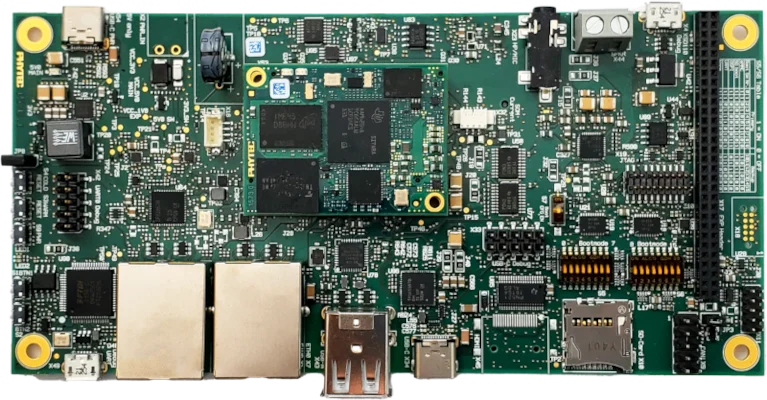
하드웨어
phyBOARD-Lyra AM62x kit의 AM62x SoC는 quad Cortex-A53 cluster와 MCU domain의 single Cortex-M4 core로 구성됩니다. Zephyr는 M4F core에서 실행되도록 port되어 있으며 다음 자원을 사용합니다.
- Low-power Arm Cortex-M4F
- Memory: SRAM 256KB, DDR4 2GB
- Debug: XDS110 기반 JTAG
지원 기능
phyboard_lyra/am6234/m4 구성은 다음 하드웨어 기능을 지원합니다.
| 인터페이스 | 컨트롤러 | 드라이버/컴포넌트 |
|---|---|---|
NVIC | on-chip | nested vector interrupt controller |
SYSTICK | on-chip | systick |
PINCTRL | on-chip | pinctrl |
UART | on-chip | serial |
표에 없는 다른 하드웨어 기능은 현재 이 port에서 지원하지 않습니다.
장치
System clock
이 보드 구성의 system clock frequency는 400 MHz입니다.
DDR RAM
보드에는 2GB DDR RAM이 있지만 이 구성에서 Zephyr가 할당하는 RAM은 resource table 전용 4kB뿐이며, 주소 범위는 0x9CC00000부터 0x9CC00400까지입니다.
Serial port
MCU domain UART인 MCU_UART0 하나를 serial communication channel로 사용합니다.
SD 카드
PHYTEC 공식 WIC와 BMAP을 내려받아 etching software로 WIC image를 SD card에 기록합니다. 이 카드로 SoM의 A53 application core에서 Linux를 부팅하고, A53 core가 remoteproc를 사용해 M4 core에 Zephyr binary를 적재합니다.
기본 구성은 boards/phytec/phyboard_lyra/phyboard_lyra_am6234_m4_defconfig에 있습니다.
플래시
A53에서 실행되는 Linux가 remoteproc framework로 M4F coprocessor를 관리합니다. 따라서 SD card에 binary를 복사해 두어야 A53 core가 부팅 중에 이를 적재할 수 있습니다. 먼저 hello_world sample을 build합니다.
# Zephyr 저장소 루트에서
west build -p -b phyboard_lyra/am6234/m4 samples/hello_world
결과 ELF는 build/zephyr/zephyr.elf에 생성됩니다. 이를 SD card의 /lib/firmware에 am62-mcu-m4f0_0-fw라는 이름으로 복사합니다.
# 예: SD card를 sdcard에 mount
sudo mount /dev/sdX sdcard
# ELF를 /lib/firmware에 복사
sudo cp --remove-destination zephyr.elf sdcard/lib/firmware/am62-mcu-m4f0_0-fw
Boot pin을 SD Card boot mode로 설정하는 방법은 phyBOARD SD Card Booting Essentials를 따릅니다. Boot mode를 바꾼 뒤 U-Boot에서 멈추고 M4F coprocessor를 활성화합니다.
setenv overlays k3-am62-phyboard-lyra-rpmsg.dtbo
# overlays 변수를 영구 저장
saveenv
boot
보드가 Linux로 부팅되면 M4F binary가 실행되어 MCU_UART0에 Hello world를 출력합니다.
디버깅
보드에는 XDS110 JTAG debugger가 있습니다. Binary를 debug하려면 debug build target을 사용합니다.
# Zephyr 저장소 루트에서
west build -b phyboard_lyra/am6234/m4 <my_app>
west debugSource
출처
영어 원문에는 문단, 문서 지시문, 표, 코드, 코드 심벌, 경로를 그대로 보존했습니다.