Part 1
요약·해설
기능 6종, 16 MHz/32.768 kHz oscillator와 VIN/GND 장착 방향 경고를 설명합니다.
SoC
nRF51822
Clock
16 MHz · 32.768 kHz
Probe
DAPLink USB disk
Part 2
접을 수 있는 영어 원문 전체
영어 원문 전체 펼치기
원문 SHA-256
7AD5CBBE9CAED3861FFAAF950453B99D0A0D39EF07F970AC8C396CE30333303D
.. _nrf51_blenano:

Redbear Labs Nano
#################

Overview
********

The Nano is a development board equipped with Nordic's nRF51822 Bluetooth Low Energy SOC.
This board is available on `RedBear Store`_.

Hardware
********

nRF51 BLE Nano has two external oscillators. The frequency of the slow clock
is 32.768 kHz. The frequency of the main clock is 16 MHz.

Supported Features
==================

The nrf51_blenano board configuration supports the following nRF51
hardware features:

+-----------+------------+----------------------+
| Interface | Controller | Driver/Component     |
+===========+============+======================+
| NVIC      | on-chip    | nested vectored      |
|           |            | interrupt controller |
+-----------+------------+----------------------+
| RTC       | on-chip    | system clock         |
+-----------+------------+----------------------+
| UART      | on-chip    | serial port          |
+-----------+------------+----------------------+
| GPIO      | on-chip    | gpio                 |
+-----------+------------+----------------------+
| FLASH     | on-chip    | flash                |
+-----------+------------+----------------------+
| RADIO     | on-chip    | Bluetooth            |
+-----------+------------+----------------------+

Connections and IOs
====================

BLE nano pinout

.. image:: ../../../../../../../boards/particle/nrf51_blenano/doc/img/nrf51_blenano.jpg
   :align: center
   :alt: BLE Nano

DAPLink board

.. image:: ../../../../../../../boards/particle/nrf51_blenano/doc/img/daplink.jpg
   :align: center
   :alt: DAPLink

The DAPLink USB board acts as a dongle. DAPLink debug probes appear on the host computer as a USB disk.
It also regulates 5V from USB to 3.3V via the onboard LDO to power Nano.

More information about Nano and DAPLink can be found at the `RedBear Github`_.

Programming and Debugging
*************************

Applications for the ``nrf51_blenano`` board configuration can be built and
flashed in the usual way (see :ref:`build_an_application` and
:ref:`application_run` for more details).

Flashing
========

To flash an application, you'll need to connect your BLE Nano with the
DAPLink board, then attach that to your computer via USB.

.. warning::

   Be careful to mount the BLE Nano correctly! The side of the board
   with the VIN and GND pins should face **towards** the USB connector.
   The `RedBear Store`_ page links to a tutorial video that shows how to
   properly solder headers and assemble the DAPLink and BLE Nano boards.

Now build and flash applications as usual. Here is an example for the
:ref:`hello_world` application.

.. zephyr-app-commands::
   :zephyr-app: samples/hello_world
   :board: nrf51_blenano
   :goals: build flash

Debugging
=========

After mounting the BLE Nano on its DAPLink board as described above,
you can debug an application in the usual way. Here is an example for
the :ref:`hello_world` application.

.. zephyr-app-commands::
   :zephyr-app: samples/hello_world
   :board: nrf51_blenano
   :maybe-skip-config:
   :goals: debug

References
**********

.. target-notes::

.. _RedBear Store: https://redbear.cc/product/ble-nano-kit.html
.. _RedBear Github: https://github.com/redbear/nRF5x
Part 3
한국어 전문 번역
개요
RedBear Labs Nano는 Nordic nRF51822 Bluetooth Low Energy SoC를 탑재한 development board입니다.
하드웨어
Slow clock 32.768 kHz와 main clock 16 MHz의 external oscillator 두 개가 있습니다.
지원 기능
| 인터페이스 | 컨트롤러 | 드라이버/컴포넌트 |
|---|---|---|
NVIC | on-chip | nested vectored interrupt controller |
RTC | on-chip | system clock |
UART | on-chip | serial port |
GPIO | on-chip | gpio |
FLASH | on-chip | flash |
RADIO | on-chip | Bluetooth |
연결과 I/O
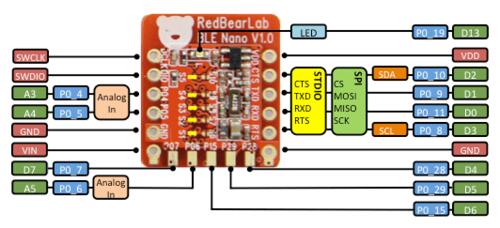
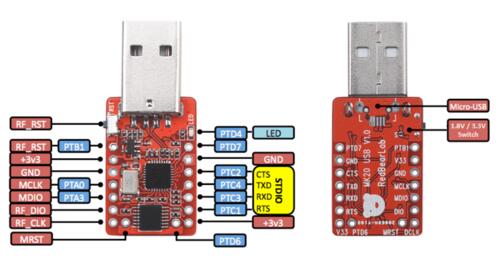
DAPLink USB board는 dongle로 동작하고 host에는 USB disk로 보입니다. On-board LDO로 USB 5 V를 3.3 V로 낮춰 Nano에 전원을 공급합니다.
Flash와 debug
BLE Nano를 DAPLink에 장착하고 USB로 computer에 연결합니다.
# Zephyr 저장소 루트에서
west build -b nrf51_blenano samples/hello_world
west flash
Debug
# Zephyr 저장소 루트에서
west build -b nrf51_blenano samples/hello_world
west debug
참고 자료
Source
출처
영어 원문에는 문단, 문서 지시문, 표, 코드, 코드 심벌, 경로를 그대로 보존했습니다.