Part 1
요약·해설
코드 실행 시간은 0이고 CPU가 sleep할 때만 HW 이벤트 시간이 진행된다는 가정이 전체 설계를 결정합니다.
호스트 CPU 네이티브 실행
SW 실행 시간 0 · HW 이벤트 점프
Zephyr thread 1개 = pthread 1개
Part 2
접을 수 있는 영어 원문 전체
영어 원문 전체 펼치기
065BE9A6EB72FEFFD27DD80C57C9D919A3175CA6B2FD1F4CC8C0CE289139D09D
.. _Posix arch:

The POSIX architecture
######################

.. contents::
   :depth: 1
   :backlinks: entry
   :local:

Overview
********

The POSIX architecture, in combination with the inf_clock SOC layer,
provides the foundation, architecture and SOC layers for a set of virtual test
boards.

Using these, a Zephyr application can be compiled together with
the Zephyr kernel, creating a normal executable that runs as
a native application on the host OS, without emulation. Instead,
you use native host tools for compiling, debugging, and analyzing your
Zephyr application, eliminating the need for architecture-specific
target hardware in the early phases of development.

.. note::

   The POSIX architecture is not related and should not be confused with the
   :ref:`POSIX OS abstraction<posix_support>`.
   The latter provides an adaptation shim that enables running applications
   which require POSIX APIs on Zephyr.


Types of POSIX arch based boards
================================

Today there are two types of POSIX boards: The native boards, :ref:`native_posix<native_posix>`
and :ref:`native_sim<native_sim>`, and the :ref:`bsim boards<bsim boards>`.
While they share the main objectives and principles, the first are intended as
a HW agnostic test platform which in some cases utilizes the host OS
peripherals, while the second intend to simulate a particular HW platform,
with focus on their radio (e.g. BT LE) and utilize the `BabbleSim`_ physical layer
simulation and framework, while being fully decoupled of the host.

.. _BabbleSim:
   https://BabbleSim.github.io

.. _posix_arch_deps:

Host system dependencies
========================

This port is designed and tested to run in Linux.

.. note::

   You must have the 32-bit C library installed in your system
   (in Ubuntu 16.04 install the gcc-multilib package)

.. note::

   The POSIX architecture is known to **not** work on macOS due to
   fundamental differences between macOS and other typical Unixes.

.. note::

   The 32 bit version of this port does not directly work in Windows Subsystem
   for Linux (WSL) because WSL does not support native 32-bit binaries.
   You may want to consider WSL2, or, if using :ref:`native_sim <native_sim>`,
   you can also just use the ``native_sim/native/64``
   target: Check :ref:`32 and 64bit versions<native_sim32_64>`.
   Otherwise `with some tinkering
   <https://github.com/microsoft/WSL/issues/2468#issuecomment-374904520>`_ it
   should be possible to make it work.


.. _posix_arch_limitations:

Important limitations
*********************

The underlying assumptions behind this port set some limitations on what
can and cannot be done.
These limitations are due to the code executing natively in
the host CPU without any instrumentation or means to interrupt it unless the
simulated CPU is sleeping.

You can imagine the code executes in a simulated CPU
which runs at an infinitely fast clock: No time passes while the CPU is
running.
Therefore interrupts, including timer interrupts, will not arrive
while code executes, except immediately after the SW enables or unmasks
them if they were pending.

This behavior is intentional, as it provides a deterministic environment to
develop and debug.
For more information please see the
`Rationale for this port`_ and :ref:`Architecture<posix_arch_architecture>`
sections

Therefore these limitations apply:

- There can **not** be busy wait loops in the application code that wait for
  something to happen without letting the CPU sleep.
  If busy wait loops do exist, they will behave as infinite loops and
  will stall the execution. For example, the following busy wait loop code,
  which could be interrupted on actual hardware, will stall the execution of
  all threads, kernel, and HW models:

  .. code-block:: c

     while (1){}

  Similarly the following code where we expect ``condition`` to be
  updated by an interrupt handler or another thread, will also stall
  the application when compiled for this port.

  .. code-block:: c

     volatile condition = true;
     while (condition){}


- Code that depends on its own execution speed will normally not
  work as expected. For example, code such as shown below, will likely not
  work as expected:

  .. code-block:: c

     peripheral_x->run = true;

     /* Wait for a number of CPU cycles */
     for (int i = 0; i < 100; i++) NOP;

     /* We expect the peripheral done and ready to do something else */


- This port is not meant to, and could not possibly help debug races between
  HW and SW, or similar timing related issues.

- You may not use hard coded memory addresses because there is no I/O or
  MMU emulation.


Working around these limitations
================================

If a busy wait loop exists, it will become evident as the application will be
stalled in it. To find the loop, you can run the binary in a debugger and
pause it after the execution is stuck; it will be paused in
some part of that loop.

The best solution is to remove that busy wait loop, and instead use
an appropriate kernel primitive to synchronize your threads.
Note that busy wait loops are in general a bad coding practice as they
keep the CPU executing and consuming power.

If removing the busy loop is really not an option, you may add a conditionally
compiled call to :c:func:`k_cpu_idle` if you are waiting for an
interrupt, or a call to :c:func:`k_busy_wait` with some small delay in
microseconds.
In the previous example, modifying the code as follows would work:

.. code-block:: c

   volatile condition = true;
   while (condition) {
    #if defined(CONFIG_ARCH_POSIX)
      k_cpu_idle();
    #endif
   }

.. _posix_arch_unsupported:

Significant unsupported features
********************************

Currently, these are the most significant features which are not supported in this architecture:

* :ref:`User mode/userspace <usermode_api>`: When building for these targets,
  :kconfig:option:`CONFIG_USERSPACE` will always be disabled,
  and all calls into the kernel will be done as normal calls.

* Stack checks: :kconfig:option:`CONFIG_HW_STACK_PROTECTION`,
  :kconfig:option:`CONFIG_STACK_CANARIES`, and
  :kconfig:option:`CONFIG_THREAD_ANALYZER`.
  This is due to how Zephyr allocated threads' stacks are not `actually` being used like they are
  in other architectures. Check
  :ref:`the architecture section's architecture layer paragraph <posix_arch_design_archl>`
  for more information.

.. _posix_arch_rationale:

Rationale for this port
***********************

The main intents of this port are:

- Allow functional debugging, instrumentation and analysis of the code with
  native tooling.
- Allow functional regression testing, and simulations in which we have the
  full functionality of the code.
- Run tests fast: several minutes of simulated time per wall time second.
- Possibility to connect to external tools which may be able to run much
  faster or much slower than real time.
- Deterministic, repeatable runs:
  There must not be any randomness or indeterminism (unless host peripherals
  are used).
  The result must **not** be affected by:

  - Debugging or instrumenting the code.
  - Pausing in a breakpoint and continuing later.
  - The host computer performance or its load.

The aim of this port is not to debug HW/SW races, missed HW programming
deadlines, or issues in which an interrupt comes when it was not expected.
Normally those would be debugged with a cycle accurate Instruction Set Simulator
(ISS) or with a development board.


.. _posix_arch_compare:

Comparison with other options
*****************************

This port does not try to replace cycle accurate instruction set simulators
(ISS), development boards, or QEMU, but to complement them. This port's main aim
is to meet the targets described in the previous `Rationale for this port`_
section.

.. figure:: ../../../../../../boards/native/doc/Port_vs_QEMU_vs.svg
    :align: center
    :alt: Comparison of different debugging targets
    :figclass: align-center

    Comparison of different debugging options. Note that realism has many
    dimensions: Having the real memory map or emulating the exact time an
    instruction executes is just some of it; Emulating peripherals accurately
    is another side.

This native port compiles your code directly for the host architecture
(typically x86), with no instrumentation or
monitoring code. Your code executes directly in the host CPU. That is, your code
executes just as fast as it possibly can.

Simulated time is normally decoupled from real host time.
The problem of how to emulate the instruction execution speed is solved
by assuming that code executes in zero simulated time.

There is no I/O or MMU emulation. If you try to access memory through hardcoded
addresses your binary will simply segfault.
The drivers and HW models for this architecture will hide this from the
application developers when it relates to those peripherals.
In general this port is not meant to help developing low level drivers for
target HW. But for developing application code.

Your code can be debugged, instrumented, or analyzed with all normal native
development tools just like any other Linux application.

Execution is fully reproducible, you can pause it without side-effects.

How does this port compare to QEMU:
===================================

With QEMU you compile your image targeting the board which is closer to
your desired board. For example an ARM based one. QEMU emulates the real memory
layout of the board, loads the compiled binary and through instructions
translation executes that ARM targeted binary on the host CPU.
Depending on configuration, QEMU also provides models of some peripherals
and, in some cases, can expose host HW as emulated target peripherals.

QEMU cannot provide any emulation of execution speed. It simply
executes code as fast as it can, and lets the host CPU speed determine the
emulated CPU speed. This produces highly indeterministic behavior,
as the execution speed depends on the host system performance and its load.

As instructions are translated to the host architecture, and the target CPU and
MMU are emulated, there is a performance penalty.

You can connect gdb to QEMU, but have few other instrumentation abilities.

Execution is not reproducible. Some bugs may be triggered only in some runs
depending on the computer and its load.

How does this port compare to an ISS:
======================================

With a cycle accurate instruction set simulator you compile targeting either
your real CPU/platform or a close enough relative. The memory layout is modeled
and some or all peripherals too.

The simulator loads your binary, slowly interprets each instruction, and
accounts for the time each instruction takes.
Time is simulated and is fully decoupled from real time.
Simulations are on the order of 10 to 100 times slower than real time.

Some instruction set simulators work with gdb, and may
provide some extra tools for analyzing your code.

Execution is fully reproducible. You can normally pause your execution without
side-effects.

.. _posix_arch_architecture:

Architecture and design
***********************

.. figure:: ../../../../../../boards/native/doc/layering.svg
    :align: center
    :alt: Zephyr layering in native build
    :figclass: align-center

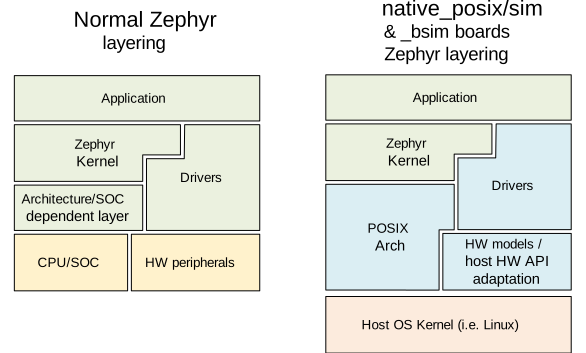
    Zephyr layering when built against an embedded target (left), and
    targeting a POSIX arch based board (right)

.. _posix_arch_design_archl:

Arch layer
==========

In this architecture each Zephyr thread is mapped to one POSIX pthread.
The POSIX architecture emulates a single threaded CPU/MCU by only allowing
one SW thread to execute at a time, as commanded by the Zephyr kernel.
Whenever the Zephyr kernel desires to context switch two threads,
the POSIX arch blocks and unblocks the corresponding pthreads.

This architecture provides the same interface to the Kernel as other
architectures and is therefore transparent for the application.

When using this architecture, the code is compiled natively for the host system,
and typically as a 32-bit binary assuming pointer and integer types are 32-bits
wide.

Note that all threads use a normal Linux pthread stack, and do not use
the Zephyr thread stack allocation for their call stacks or automatic
variables. The Zephyr stacks (which are allocated in "static memory") are
only used by the POSIX architecture for thread bookkeeping.

SOC and board layers
====================

.. note::

   This description applies to all current POSIX arch based boards on tree,
   but it is not a requirement for another board to follow what is described here.

When the executable process is started (that is the board
:c:func:`main`, which is the linux executable C :c:func:`main`),
first, early initialization steps are taken care of
(command line argument parsing, initialization of the HW models, etc).

After, the "CPU simulation" is started, by creating a new pthread
and provisionally blocking the original thread. The original thread will only
be used for HW models after this;
while this newly created thread will be the first "SW" thread and start
executing the boot of the embedded code (including the POSIX arch code).

During this MCU boot process, the Zephyr kernel will be initialized and
eventually this will call into the embedded application `main()`,
just like in the embedded target.
As the embedded SW execution progresses, more Zephyr threads may be spawned,
and for each the POSIX architecture will create a dedicated pthread.

Eventually the simulated CPU will be put to sleep by the embedded SW
(normally when the boot is completed). This whole simulated CPU boot,
until the first time it goes to sleep happens in 0 simulated time.

At this point the last executing SW pthread will be blocked,
and the first thread (reserved for the HW models now) will be allowed
to execute again. This thread will, from now on, be the one handling both the
HW models and the device simulated time.

The HW models are designed around timed events,
and this thread will check what is the next
scheduled HW event, advance simulated time until that point, and call the
corresponding HW model event function.

Eventually one of these HW models will raise an interrupt to the
simulated CPU. When the IRQ controller wants to wake the simulated
CPU, the HW thread is blocked, and the simulated CPU is awakened by
letting the last SW thread continue executing.

This process of getting the CPU to sleep, letting the HW models run,
and raising an interrupt which wake the CPU again is repeated until the end
of the simulation, where the CPU execution always takes 0 simulated time.

When a SW thread is awakened by an interrupt, it will be made to enter the
interrupt handler by the soc_inf code.

If the SW unmasks a pending interrupt while running, or triggers a SW
interrupt, the interrupt controller may raise the interrupt immediately
depending on interrupt priorities, masking, and locking state.

Interrupts are executed in the context (and using the stack) of the SW
thread in which they are received. Meaning, there is no dedicated thread or
stack for interrupt handling.

To ensure determinism when the Zephyr code is running,
and to ease application debugging,
the board uses a different time than real time: simulated time.
How and if simulated time relates to the host time, is up to the simulated
board.

The Zephyr application sees the code executing as if the CPU were running at
an infinitely fast clock, and fully decoupled from the underlying host CPU
speed.
No simulated time passes while the application or kernel code execute.

.. _posix_busy_wait:

Busy waits
==========

Busy waits work thanks to provided board functionality.
This does not need to be the same for all boards, but both native_sim and the
nrf52_bsim board work similarly thru the combination of a board specific
`arch_busy_wait()` and a special fake HW timer (provided by the board).

When a SW thread wants to busy wait, this fake timer will be programmed in
the future time corresponding to the end of the busy wait and the CPU will
be put immediately to sleep in the busy_wait caller context.
When this fake HW timer expires the CPU will be waken with a special
non-maskable phony interrupt which does not have a corresponding interrupt
handler but will resume the busy_wait SW execution.
Note that other interrupts may arrive while the busy wait is in progress,
which may delay the `k_busy_wait()` return just like in real life.

Interrupts may be locked out or masked during this time, but the special
fake-timer non-maskable interrupt will wake the CPU nonetheless.


NATIVE_TASKS
============

The soc_inf layer provides a special type of hook called the NATIVE_TASKS.

These allow registering (at build/link time) functions which will be called
at different stages during the process execution: Before command line parsing
(so dynamic command line arguments can be registered using this hook),
before initialization of the HW models, before the simulated CPU is started,
after the simulated CPU goes to sleep for the first time,
and when the application exists.
Part 3
한국어 전문 번역
개요
POSIX 아키텍처는 inf_clock SoC 계층과 결합해 여러 가상 테스트 보드의 기반·아키텍처·SoC 계층을 제공합니다.
이 구성을 사용하면 Zephyr 애플리케이션과 Zephyr 커널을 함께 컴파일해 호스트 운영체제에서 일반 네이티브 애플리케이션처럼 실행되는 실행 파일을 만들 수 있습니다. 에뮬레이션은 사용하지 않습니다. 대신 호스트의 네이티브 도구로 Zephyr 애플리케이션을 컴파일·디버깅·분석하므로 개발 초기에 특정 아키텍처의 실제 대상 하드웨어가 없어도 됩니다.
POSIX 아키텍처 기반 보드 유형
현재 POSIX 보드는 두 유형입니다. 첫째는 native_posix와 native_sim 같은 네이티브 보드이고, 둘째는 bsim 보드입니다.
두 유형은 주요 목표와 원칙을 공유하지만 용도가 다릅니다. 네이티브 보드는 하드웨어에 종속되지 않는 테스트 플랫폼이며 경우에 따라 호스트 OS 주변장치를 활용합니다. bsim 보드는 특정 하드웨어 플랫폼, 특히 BT LE 같은 무선 기능을 시뮬레이션합니다. bsim은 BabbleSim 물리 계층 시뮬레이션과 프레임워크를 사용하며 호스트로부터 완전히 분리됩니다.
호스트 시스템 의존성
이 포팅은 Linux에서 실행하도록 설계되고 시험되었습니다.
- 시스템에 32비트 C 라이브러리가 설치되어야 합니다. Ubuntu 16.04에서는
gcc-multilib패키지를 설치합니다. - macOS는 일반적인 다른 Unix와 근본적인 차이가 있어 POSIX 아키텍처가 동작하지 않는 것으로 알려져 있습니다.
- WSL은 네이티브 32비트 실행 파일을 지원하지 않으므로 이 포팅의 32비트 버전이 직접 동작하지 않습니다. WSL2를 고려하거나
native_sim사용 시native_sim/native/64대상을 사용할 수 있습니다. 그 밖에는 추가 조정 방법으로 실행할 가능성이 있습니다.
중요한 제한
이 포팅의 기본 가정은 가능한 동작에 몇 가지 제한을 둡니다. 코드는 호스트 CPU에서 네이티브로 실행되고 계측되지 않으며, 시뮬레이션 CPU가 잠든 때가 아니면 실행을 중단할 방법이 없습니다.
코드가 무한히 빠른 클록의 시뮬레이션 CPU에서 실행된다고 생각하면 됩니다. CPU가 실행되는 동안 시뮬레이션 시간은 흐르지 않습니다. 따라서 타이머 인터럽트를 포함한 인터럽트는 코드 실행 중 도착하지 않습니다. 예외는 대기 중이던 인터럽트를 소프트웨어가 활성화하거나 마스크 해제한 직후입니다.
이 동작은 개발과 디버깅을 결정론적으로 만들기 위한 의도적인 설계입니다. 그 결과 다음 제한이 적용됩니다.
- CPU를 재우지 않는 busy wait 금지: 어떤 사건을 기다리면서 CPU를 쉬게 하지 않는 루프는 무한 루프처럼 동작해 모든 스레드·커널·HW 모델을 멈춥니다.
while (1){}실제 하드웨어에서는 인터럽트 핸들러나 다른 스레드가 condition을 바꿀 수 있지만 이 포팅에서는 다음 코드도 애플리케이션을 멈춥니다.
volatile condition = true;
while (condition){}- 실행 속도 의존 코드: 자기 코드가 몇 CPU 사이클 안에 실행되리라 가정하는 코드는 보통 기대대로 동작하지 않습니다.
peripheral_x->run = true;

/* 여러 CPU 사이클을 기다린다 */
for (int i = 0; i < 100; i++) NOP;

/* 주변장치 작업이 끝났다고 가정하고 다음 동작을 수행한다 */- 이 포팅은 HW/SW 경쟁 조건이나 유사한 타이밍 문제를 디버깅하기 위한 것이 아니며 그렇게 할 수도 없습니다.
- I/O 또는 MMU 에뮬레이션이 없으므로 하드코딩한 메모리 주소를 사용할 수 없습니다.
제한을 우회하는 방법
busy wait 루프가 있으면 애플리케이션이 그 안에서 멈추므로 쉽게 드러납니다. 실행 파일을 디버거에서 실행한 뒤 멈춘 상태에서 일시 정지하면 해당 루프 내부에서 정지한 위치를 찾을 수 있습니다.
가장 좋은 해결책은 busy wait를 제거하고 적절한 커널 동기화 프리미티브로 스레드를 동기화하는 것입니다. busy wait는 CPU를 계속 실행해 전력을 소모하므로 일반적으로도 좋지 않은 코딩 방식입니다.
정말 제거할 수 없다면 인터럽트를 기다릴 때 조건부 컴파일한 k_cpu_idle() 호출을 넣거나, 수 마이크로초의 작은 지연으로 k_busy_wait()를 호출할 수 있습니다. 앞의 예는 다음처럼 바꿀 수 있습니다.
volatile condition = true;
while (condition) {
 #if defined(CONFIG_ARCH_POSIX)
   k_cpu_idle();
 #endif
}
주요 미지원 기능
현재 이 아키텍처에서 지원하지 않는 주요 기능은 다음과 같습니다.
- 사용자 모드/userspace: 이 대상을 빌드하면
CONFIG_USERSPACE는 항상 비활성화되고, 모든 커널 호출은 일반 함수 호출로 수행됩니다. - 스택 검사:
CONFIG_HW_STACK_PROTECTION,CONFIG_STACK_CANARIES,CONFIG_THREAD_ANALYZER를 지원하지 않습니다. Zephyr가 할당한 스레드 스택을 다른 아키텍처와 같은 실제 호출 스택으로 사용하지 않기 때문입니다.
이 포팅의 설계 목적
주요 목적은 다음과 같습니다.
- 네이티브 도구로 코드의 기능을 디버깅·계측·분석합니다.
- 코드의 전체 기능이 포함된 기능 회귀 테스트와 시뮬레이션을 수행합니다.
- 벽시계 1초당 시뮬레이션 시간 수 분을 실행할 정도로 테스트를 빠르게 수행합니다.
- 실시간보다 훨씬 빠르거나 느리게 동작할 수 있는 외부 도구와 연결합니다.
- 결정론적이고 반복 가능한 실행을 제공합니다. 호스트 주변장치를 사용하지 않는 한 임의성이나 비결정성이 없어야 하며, 디버깅·계측, 중단점에서의 일시 정지, 호스트 성능이나 부하가 결과에 영향을 주면 안 됩니다.
반대로 HW/SW 경쟁, 하드웨어 프로그래밍 기한 누락, 예상치 못한 시점의 인터럽트를 디버깅하는 것이 목적은 아닙니다. 이런 문제는 보통 사이클 정확도 명령어 집합 시뮬레이터(ISS)나 실제 개발 보드로 디버깅합니다.
다른 선택지와 비교
이 포팅은 사이클 정확도 ISS, 개발 보드 또는 QEMU를 대체하지 않고 보완합니다.
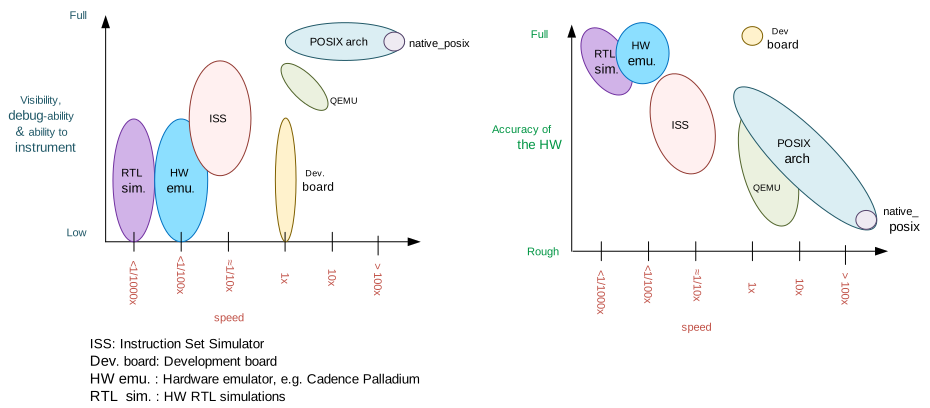
네이티브 포팅은 보통 x86인 호스트 아키텍처를 직접 대상으로 코드를 컴파일하며 계측·감시 코드를 넣지 않습니다. 코드는 호스트 CPU에서 가능한 한 빠르게 실행됩니다. 시뮬레이션 시간은 보통 호스트 실시간과 분리되고, 명령 실행 속도는 코드 실행에 시뮬레이션 시간이 0만큼 든다고 가정해 처리합니다.
I/O와 MMU 에뮬레이션이 없으므로 하드코딩한 주소에 접근하면 실행 파일은 segmentation fault로 종료됩니다. 제공되는 드라이버와 HW 모델은 해당 주변장치에 관한 이 차이를 애플리케이션 개발자에게 숨깁니다. 따라서 저수준 대상 하드웨어 드라이버보다 애플리케이션 코드 개발에 적합합니다.
일반 Linux 애플리케이션처럼 모든 네이티브 개발 도구로 디버깅·계측·분석할 수 있고, 실행은 완전히 재현 가능하며 부작용 없이 일시 정지할 수 있습니다.
QEMU와 비교
QEMU에서는 원하는 보드와 가까운 대상, 예를 들어 Arm 보드를 겨냥해 이미지를 컴파일합니다. QEMU는 실제 보드 메모리 배치를 에뮬레이션하고 대상 바이너리를 적재한 뒤 명령어 변환을 통해 호스트 CPU에서 실행합니다. 구성에 따라 일부 주변장치 모델과 호스트 하드웨어를 대상 주변장치처럼 노출하는 기능도 제공합니다.
QEMU는 실행 속도를 에뮬레이션하지 못합니다. 가능한 한 빨리 코드를 실행하고 호스트 CPU 속도가 에뮬레이션 CPU 속도를 결정하게 하므로 호스트 성능과 부하에 따라 동작이 크게 달라집니다. 명령어 변환과 대상 CPU·MMU 에뮬레이션에는 성능 비용도 있습니다.
GDB를 QEMU에 연결할 수 있지만 그 밖의 계측 수단은 적습니다. 실행은 재현 가능하지 않으며 컴퓨터와 부하에 따라 일부 실행에서만 버그가 나타날 수 있습니다.
ISS와 비교
사이클 정확도 ISS에서는 실제 CPU·플랫폼 또는 충분히 가까운 대상을 겨냥해 컴파일하고, 메모리 배치와 일부 또는 전체 주변장치를 모델링합니다.
시뮬레이터는 바이너리를 적재하고 각 명령을 천천히 해석하면서 명령별 소요 시간을 계산합니다. 시뮬레이션 시간은 실시간과 완전히 분리되며 보통 실제 시간보다 10~100배 느립니다.
일부 ISS는 GDB와 연동하고 추가 분석 도구를 제공합니다. 실행은 완전히 재현 가능하며 보통 부작용 없이 일시 정지할 수 있습니다.
아키텍처와 설계
아키텍처 계층
각 Zephyr 스레드는 POSIX pthread 하나에 대응합니다. POSIX 아키텍처는 Zephyr 커널의 명령에 따라 한 번에 소프트웨어 스레드 하나만 실행하게 하여 단일 스레드 CPU/MCU를 흉내 냅니다. 커널이 두 스레드의 문맥을 전환하려 할 때 대응 pthread를 차단하고 차단 해제합니다.
다른 아키텍처와 동일한 커널 인터페이스를 제공하므로 애플리케이션에는 투명합니다. 코드는 호스트 시스템용 네이티브 코드로 컴파일되며 보통 포인터와 정수형 폭을 32비트로 가정한 32비트 실행 파일입니다.
모든 스레드는 일반 Linux pthread 스택을 사용합니다. 함수 호출 스택이나 자동 변수에 Zephyr 스레드 스택 할당을 사용하지 않습니다. 정적 메모리에 할당되는 Zephyr 스택은 POSIX 아키텍처의 스레드 관리 정보에만 쓰입니다.
SoC와 보드 계층
실행 파일 프로세스, 즉 Linux 실행 파일의 C main()이 시작되면 명령행 인수 해석과 HW 모델 초기화 같은 초기 단계를 먼저 수행합니다.
그다음 새 pthread를 만들고 원래 스레드를 잠정 차단해 “CPU 시뮬레이션”을 시작합니다. 원래 스레드는 이후 HW 모델 전용으로 쓰이고, 새 스레드는 첫 “SW” 스레드로서 POSIX 아키텍처 코드를 포함한 임베디드 코드 부팅을 실행합니다.
MCU 부팅 과정에서 Zephyr 커널이 초기화되고 실제 임베디드 대상처럼 애플리케이션 main()을 호출합니다. SW 실행 중 Zephyr 스레드가 추가되면 POSIX 아키텍처는 각각 전용 pthread를 만듭니다.
부팅이 끝날 무렵 임베디드 SW는 시뮬레이션 CPU를 재웁니다. 첫 sleep까지 전체 CPU 부팅에 걸리는 시뮬레이션 시간은 0입니다. 마지막 SW pthread가 차단되고 HW 모델용 원래 스레드가 다시 실행되어 HW 모델과 장치 시뮬레이션 시간을 모두 담당합니다.
HW 모델은 시간 지정 이벤트를 중심으로 설계됩니다. HW 스레드는 다음 예약 이벤트를 찾고 그 시점까지 시뮬레이션 시간을 전진시킨 뒤 해당 모델의 이벤트 함수를 호출합니다.
HW 모델이 시뮬레이션 CPU에 인터럽트를 발생시키면 IRQ 컨트롤러는 HW 스레드를 차단하고 마지막 SW 스레드를 계속 실행시켜 CPU를 깨웁니다. CPU sleep→HW 모델 실행→인터럽트로 CPU wake 과정은 시뮬레이션 종료까지 반복되며 CPU 실행 자체에는 언제나 시뮬레이션 시간이 0만큼 듭니다.
인터럽트로 깨어난 SW 스레드는 soc_inf 코드에 의해 인터럽트 핸들러로 진입합니다. SW가 실행 중 대기 인터럽트를 마스크 해제하거나 소프트웨어 인터럽트를 발생시키면 우선순위·마스킹·잠금 상태에 따라 IRQ 컨트롤러가 즉시 인터럽트를 올릴 수 있습니다.
인터럽트는 수신한 SW 스레드의 문맥과 스택에서 실행됩니다. 인터럽트 전용 스레드나 스택은 없습니다.
결정성과 디버깅 편의성을 위해 보드는 실시간과 다른 시뮬레이션 시간을 사용합니다. 시뮬레이션 시간과 호스트 시간의 관계는 각 보드가 정합니다. Zephyr 애플리케이션에는 CPU가 무한히 빠른 클록으로 동작하고 호스트 CPU 속도와 완전히 분리된 것처럼 보입니다. 애플리케이션이나 커널 코드 실행 중에는 시뮬레이션 시간이 흐르지 않습니다.
Busy wait
Busy wait는 보드가 제공하는 기능 덕분에 동작합니다. 보드마다 구현이 같을 필요는 없지만 native_sim과 nrf52_bsim은 보드별 arch_busy_wait()와 보드가 제공하는 가짜 HW 타이머를 결합해 비슷하게 구현합니다.
SW 스레드가 busy wait를 요청하면 가짜 타이머를 대기 종료 시점에 맞춰 예약하고 호출자 문맥에서 CPU를 즉시 재웁니다. 타이머가 만료되면 대응 핸들러가 없는 특수 비마스킹 가상 인터럽트가 CPU를 깨워 busy wait 실행을 재개합니다.
대기 중 다른 인터럽트가 도착하면 실제 하드웨어와 마찬가지로 k_busy_wait() 반환이 늦어질 수 있습니다. 이때 일반 인터럽트가 잠기거나 마스킹되어도 가짜 타이머의 비마스킹 인터럽트는 CPU를 깨웁니다.
NATIVE_TASKS
soc_inf 계층은 NATIVE_TASKS라는 특수 hook을 제공합니다. 빌드·링크 시 함수를 등록하면 프로세스 실행의 여러 단계에서 호출됩니다.
- 명령행 해석 전: 동적 명령행 인수를 등록할 수 있습니다.
- HW 모델 초기화 전
- 시뮬레이션 CPU 시작 전
- 시뮬레이션 CPU가 처음 sleep한 뒤
- 애플리케이션이 종료될 때
Source
출처
영어 원문에는 문단, 문서 지시문, 표, 코드, 코드 심벌, 경로를 그대로 보존했습니다.