Part 1
요약·해설
innblue22는 nRF9160 SiP, NB-IoT/LTE-M, environmental sensor와 crypto element를 제공합니다.
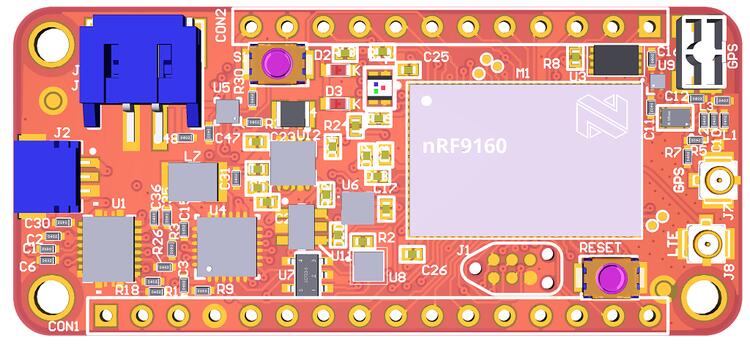
Nordic nRF9160
NB-IoT · LTE-M
Armv8-M · SPU · Secure boot
Part 2
접을 수 있는 영어 원문 전체
영어 원문 전체 펼치기
47B3472AB7ABBF426E8D04AC8798049014E9F66F06BF6D043743C6160C6B0159
.. _nrf9160_innblue22:

nRF9160 INNBLUE22
#################

Overview
********

The nRF9160 innblue22 is a cellular IoT sensor development board, which
is based on the nRF9160 SiP, and features NB-IoT and LTE-M connectivity.

.. figure:: ../../../../../../../boards/innblue/innblue22/doc/img/nrf9160_innblue22.jpg
	 :align: center
	 :alt: nRF9160 innblue22

	 nRF9160 innblue22 (Credit: innblue)

Hardware
********

The following parts are built into the board:

* Accelerometer: ST LIS2DH12
* CryptoElement: Atmel ATECC608a
* Humidity Sensor: ST HTS221
* Qi charger: TI BQ51013
* Battery fuel gauge: TI BQ27421

Supported Features
==================

The innblue22 board configuration supports the following
hardware (as of nRF9160) features:

+-----------+------------+----------------------+
| Interface | Controller | Driver/Component     |
+-----------+------------+----------------------+
| CLOCK     | on-chip    | clock_control        |
+-----------+------------+----------------------+
| FLASH     | on-chip    | flash                |
+-----------+------------+----------------------+
| GPIO      | on-chip    | gpio                 |
+-----------+------------+----------------------+
| I2C(M)    | on-chip    | i2c                  |
+-----------+------------+----------------------+
| MPU       | on-chip    | arch/arm             |
+-----------+------------+----------------------+
| NVIC      | on-chip    | arch/arm             |
+-----------+------------+----------------------+
| PWM       | on-chip    | pwm                  |
+-----------+------------+----------------------+
| RTT       | Segger     | console              |
+-----------+------------+----------------------+
| SPU       | on-chip    | system protection    |
+-----------+------------+----------------------+
| UARTE     | on-chip    | serial               |
+-----------+------------+----------------------+
| WDT       | on-chip    | watchdog             |
+-----------+------------+----------------------+

Connections and IOs
===================

LED
---

* LED1 ( red ) = P0.7
* LED2 (green) = P0.6
* LED3 ( blue) = P0.5
* LED4 ( red ) = P0.4

Push buttons and Switches
-------------------------

* BUTTON1 = P0.31

Security components
===================

- Implementation Defined Attribution Unit. The IDAU is implemented
  with the System Protection Unit and is used to define secure and non-secure
  memory maps.  By default, all of the memory space  (Flash, SRAM, and
  peripheral address space) is defined to be secure accessible only.
- Secure boot.

Programming and Debugging
*************************

innblue22 supports the Armv8m Security Extension, and by default boots
in the Secure state.

Building Secure/Non-Secure Zephyr applications
==============================================

The process requires the following steps:

1. Build the Secure Zephyr application using ``-DBOARD=innblue22`` and
   ``CONFIG_TRUSTED_EXECUTION_SECURE=y`` in the application project configuration file.
2. Build the Non-Secure Zephyr application using ``-DBOARD=innblue22/nrf9160/ns``.
3. Merge the two binaries together.

When building a Secure/Non-Secure application, the Secure application will
have to set the IDAU (SPU) configuration to allow Non-Secure access to all
CPU resources utilized by the Non-Secure application firmware. SPU
configuration shall take place before jumping to the Non-Secure application.

Building a Secure only application
==================================

Build the Zephyr app in the usual way (see :ref:`build_an_application`
and :ref:`application_run`), using ``-DBOARD=innblue22``.

Flashing
========

Follow the instructions in the :ref:`nordic_segger` page to install
and configure all the necessary software. Further information can be
found in :ref:`nordic_segger_flashing`. Then build and flash
applications as usual (see :ref:`build_an_application` and
:ref:`application_run` for more details).

Here is an example for the :ref:`hello_world` application.

First, run your favorite terminal program to listen for output.

.. code-block:: console

   $ minicom -D <tty_device> -b 115200

Replace :code:`<tty_device>` with the port where the nRF9160 innblue22
can be found. For example, under Linux, :code:`/dev/ttyACM0`.

Then build and flash the application in the usual way.

.. zephyr-app-commands::
   :zephyr-app: samples/hello_world
   :board: innblue22
   :goals: build flash

Debugging
=========

Refer to the :ref:`nordic_segger` page to learn about debugging Nordic boards with a
Segger IC.
Part 3
한국어 전문 번역
개요
nRF9160 innblue22은 nRF9160 SiP를 기반으로 하고 NB-IoT와 LTE-M connectivity를 제공하는 cellular IoT sensor development board입니다.
Hardware
Board에는 다음 부품이 내장되어 있습니다.
- Accelerometer: ST LIS2DH12
- CryptoElement: Atmel ATECC608a
- Humidity sensor: ST HTS221
- Qi charger: TI BQ51013
- Battery fuel gauge: TI BQ27421
지원 기능
innblue22 board configuration은 nRF9160의 다음 hardware 기능을 지원합니다.
| Interface | Controller | Driver/Component |
|---|---|---|
| CLOCK | on-chip | clock_control |
| FLASH | on-chip | flash |
| GPIO | on-chip | gpio |
| I2C(M) | on-chip | i2c |
| MPU | on-chip | arch/arm |
| NVIC | on-chip | arch/arm |
| PWM | on-chip | pwm |
| RTT | Segger | console |
| SPU | on-chip | system protection |
| UARTE | on-chip | serial |
| WDT | on-chip | watchdog |
연결과 I/O
LED
- LED1(red):
P0.7 - LED2(green):
P0.6 - LED3(blue):
P0.5 - LED4(red):
P0.4
Push button과 switch
- BUTTON1:
P0.31
보안 구성요소
- Implementation Defined Attribution Unit(IDAU): System Protection Unit(SPU)으로 구현되며 secure·non-secure memory map을 정의합니다. 기본적으로 Flash, SRAM과 peripheral address space를 포함한 전체 memory space는 Secure state에서만 접근할 수 있게 정의됩니다.
- Secure boot를 지원합니다.
Programming과 Debugging
innblue22은 Armv8-M Security Extension을 지원하며 기본적으로 Secure state로 boot합니다.
Secure/Non-Secure Zephyr application 빌드
다음 세 단계를 수행합니다.
- Application project configuration에
CONFIG_TRUSTED_EXECUTION_SECURE=y를 설정하고-DBOARD=innblue22로 Secure Zephyr application을 build합니다. -DBOARD=innblue22/nrf9160/ns로 Non-Secure Zephyr application을 build합니다.- 두 binary를 하나로 merge합니다.
Secure/Non-Secure application을 build할 때 Secure application은 Non-Secure firmware가 사용하는 모든 CPU resource에 Non-Secure access를 허용하도록 IDAU(SPU)를 구성해야 합니다. Non-Secure application으로 jump하기 전에 SPU configuration을 마쳐야 합니다.
Secure 전용 application 빌드
일반적인 Zephyr application build·run 절차에서 -DBOARD=innblue22를 사용합니다.
Flashing
필요한 software 설치와 설정은 Zephyr의 Nordic Segger 문서와 Nordic Segger flashing 문서를 따릅니다. 먼저 terminal program으로 출력을 수신합니다.
minicom -D <tty_device> -b 115200<tty_device>를 nRF9160 innblue22이 연결된 port로 바꿉니다. Linux에서는 예를 들어 /dev/ttyACM0입니다. 그런 다음 hello_world application을 build하고 flash합니다.
west build -b innblue22 samples/hello_world
west flash
Debugging
Segger IC를 사용하는 Nordic board의 debugging 방법은 Zephyr의 Nordic Segger 문서를 참고합니다.
Source
출처
영어 원문에는 문단, 문서 지시문, 표, 코드, 코드 심벌, 경로를 그대로 보존했습니다.