Part 1
요약·해설
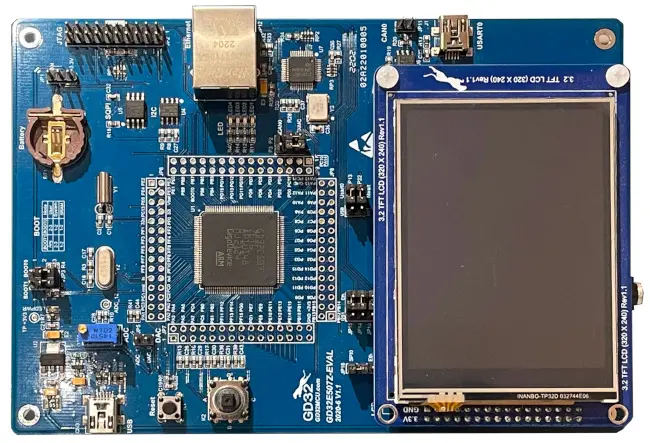
GD32E507Z-EVAL은 112 GPIO와 대용량 external memory, display·network peripheral, onboard GD-Link를 제공합니다.
Cortex-M33 · 180MHz
NOR · NAND · SDRAM
LCD · Ethernet · CAN
Part 2
접을 수 있는 영어 원문 전체
영어 원문 전체 펼치기
C780C0C2C047F44DE0F46DE50FF77790E7CC6A76680DE90574F738D74B40B9CD
.. _gd32e507z_eval:

GigaDevice GD32E507Z-EVAL
#########################

Overview
********

The GD32E507Z-EVAL board is a hardware platform that enables prototyping
on GD32E507ZE Cortex-M33 High Performance MCU.

The GD32E507ZE features a single-core ARM Cortex-M33 MCU which can run up
to 180 MHz with flash accesses zero wait states, 512kiB of Flash, 128kiB of
SRAM and 112 GPIOs.

.. image:: ../../../../../../../boards/gd/gd32e507z_eval/doc/img/gd32e507z_eval.webp
     :align: center
     :alt: gd32e507z_eval

Hardware
********

- GD32E507ZET6 MCU
- AT24C02C 2Kb EEPROM
- GD25Q16 16Mbit SPI and QSPI NOR Flash
- GD9FU1G8F2A 1Gbit NAND Flash
- Micron MT48LC16M16A2P-6AIT 256Mbit SDRAM
- 4 x User LEDs
- 1 x Joystick (L/R/U/D/C)
- 1 x USART (connected to USB VCOM at J1 connector)
- 1 x POT connected to an ADC input
- Headphone interface
- USB FS connector
- 1 x CAN (includes SN65HVD230 PHY)
- Ethernet Interface
- 3.2" RGB-LCD (320x240)
- GD-Link on board programmer
- J-Link/JTAG connector

For more information about the GD32E507 SoC and GD32E507Z-EVAL board:

- `GigaDevice Cortex-M33 High Performance SoC Website`_
- `GD32E507X Datasheet`_
- `GD32E50X User Manual`_
- `GD32E507Z-EVAL User Manual`_

Supported Features
==================

The board configuration supports the following hardware features:

.. list-table::
   :header-rows: 1

   * - Peripheral
     - Kconfig option
     - Devicetree compatible
   * - EXTI
     - :kconfig:option:`CONFIG_GD32_EXTI`
     - :dtcompatible:`gd,gd32-exti`
   * - GPIO
     - :kconfig:option:`CONFIG_GPIO`
     - :dtcompatible:`gd,gd32-gpio`
   * - NVIC
     - N/A
     - :dtcompatible:`arm,v8m-nvic`
   * - PWM
     - :kconfig:option:`CONFIG_PWM`
     - :dtcompatible:`gd,gd32-pwm`
   * - SYSTICK
     - N/A
     - N/A
   * - USART
     - :kconfig:option:`CONFIG_SERIAL`
     - :dtcompatible:`gd,gd32-usart`

Serial Port
===========

The GD32E507Z-EVAL board has one serial communication port. The default port
is USART0 with TX connected at PA9 and RX at PA10. USART0 is exposed as a
virtual COM port via the J1 USB connector.

Programming and Debugging
*************************

Before programming your board make sure to configure boot jumpers as
follows:

- JP3/4: Select 2-3 for both (boot from user memory)

Using GD-Link or J-Link
=======================

The board comes with an embedded GD-Link programmer. It can be used with pyOCD
provided you install the necessary CMSIS-Pack:

.. code-block:: console

   pyocd pack install gd32e507ze

J-Link can also be used to program the board using the JTAG interface exposed in
the JP2 header.

#. Build the Zephyr kernel and the :ref:`hello_world` sample application:

   .. zephyr-app-commands::
      :zephyr-app: samples/hello_world
      :board: gd32e507z_eval
      :goals: build
      :compact:

#. Run your favorite terminal program to listen for output. On Linux the
   terminal should be something like ``/dev/ttyUSB0``. For example:

   .. code-block:: console

      minicom -D /dev/ttyUSB0 -o

   The -o option tells minicom not to send the modem initialization
   string. Connection should be configured as follows:

      - Speed: 115200
      - Data: 8 bits
      - Parity: None
      - Stop bits: 1

#. To flash an image:

   .. zephyr-app-commands::
      :zephyr-app: samples/hello_world
      :board: gd32e507z_eval
      :goals: flash
      :compact:

   You should see "Hello World! gd32e507z_eval" in your terminal.

#. To debug an image:

   .. zephyr-app-commands::
      :zephyr-app: samples/hello_world
      :board: gd32e507z_eval
      :goals: debug
      :compact:

.. _GigaDevice Cortex-M33 High Performance SoC Website:
   https://www.gigadevice.com/products/microcontrollers/gd32/arm-cortex-m33/high-performance-line/

.. _GD32E507X Datasheet:
   https://gd32mcu.com/download/down/document_id/252/path_type/1

.. _GD32E50X User Manual:
   https://www.gd32mcu.com/download/down/document_id/249/path_type/1

.. _GD32E507Z-EVAL User Manual:
   https://www.gd32mcu.com/data/documents/evaluationBoard/GD32E50x_Demo_Suites_V1.2.1.rar
Part 3
한국어 전문 번역
개요
GD32E507Z-EVAL board는 GD32E507ZE Cortex-M33 high-performance MCU로 prototype을 제작할 수 있는 hardware platform입니다.
GD32E507ZE에는 최대 180MHz로 동작하는 single-core ARM Cortex-M33 MCU가 들어 있습니다. Flash 접근은 zero wait state이며 512KiB Flash, 128KiB SRAM, GPIO 112개를 제공합니다.
Hardware
- GD32E507ZET6 MCU
- AT24C02C 2Kb EEPROM
- GD25Q16 16Mbit SPI/QSPI NOR Flash
- GD9FU1G8F2A 1Gbit NAND Flash
- Micron MT48LC16M16A2P-6AIT 256Mbit SDRAM
- User LED 4개
- Joystick 1개(L/R/U/D/C)
- USART 1개(J1 connector의 USB VCOM에 연결)
- ADC input에 연결된 potentiometer 1개
- Headphone interface
- USB FS connector
- CAN 1개(SN65HVD230 PHY 포함)
- Ethernet interface
- 3.2-inch RGB-LCD(320x240)
- Onboard GD-Link programmer
- J-Link/JTAG connector
GD32E507 SoC와 board의 자세한 내용은 아래의 product page, datasheet와 user manual에서 확인할 수 있습니다.
지원 기능
Board configuration은 다음 hardware 기능을 지원합니다.
| 주변장치 | Kconfig option | Devicetree compatible |
|---|---|---|
| EXTI | CONFIG_GD32_EXTI | gd,gd32-exti |
| GPIO | CONFIG_GPIO | gd,gd32-gpio |
| NVIC | N/A | arm,v8m-nvic |
| PWM | CONFIG_PWM | gd,gd32-pwm |
| SYSTICK | N/A | N/A |
| USART | CONFIG_SERIAL | gd,gd32-usart |
Serial port
GD32E507Z-EVAL에는 serial communication port가 1개 있습니다. Default port는 TX가 PA9, RX가 PA10에 연결된 USART0이며 J1 USB connector를 통해 virtual COM port로 노출됩니다.
Programming과 Debugging
Programming하기 전에 JP3와 JP4를 모두 2-3으로 선택해 user memory에서 boot하도록 jumper를 설정합니다.
GD-Link 또는 J-Link 사용
Board의 embedded GD-Link programmer는 필요한 CMSIS-Pack을 설치하면 pyOCD에서 사용할 수 있습니다.
pyocd pack install gd32e507zeJP2 header에 노출된 JTAG interface에는 J-Link도 연결할 수 있습니다.
- Zephyr kernel과
hello_worldsample을 build합니다.west build -b gd32e507z_eval samples/hello_world - Linux의
/dev/ttyUSB0같은 terminal에서 output을 받습니다.minicom -D /dev/ttyUSB0 -o-o는 modem initialization string을 보내지 않습니다. Connection 설정은 다음과 같습니다.- Speed: 115200
- Data: 8 bits
- Parity: None
- Stop bits: 1
- Image를 flash합니다.
west flashHello World! gd32e507z_eval이 표시되어야 합니다. - Image를 debug합니다.
west debug
참고 자료
Source
출처
영어 원문에는 문단, 문서 지시문, 표, 코드, 코드 심벌, 경로를 그대로 보존했습니다.