Part 1
요약·해설
BeagleV Fire는 Microchip MPFS025T 5-core RISC-V SoC와 FPGA fabric을 사용합니다. Zephyr upload에는 RISC-V OpenOCD·GDB와 FlashPro5/6 debugger가 필요합니다.
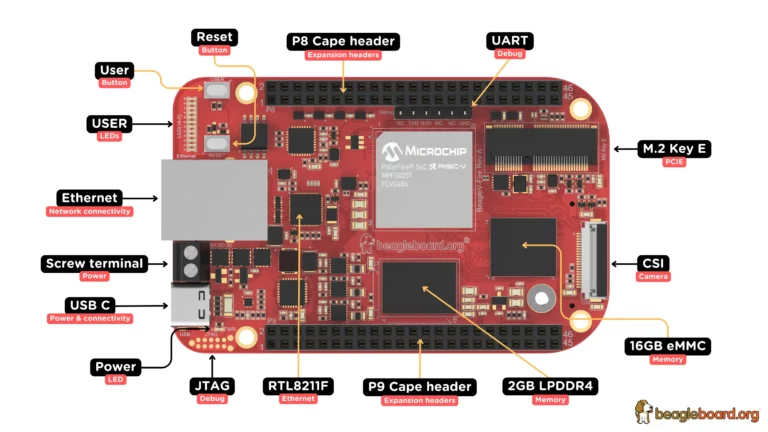
Microchip PolarFire MPFS025T
5-core RISC-V + FPGA fabric
FlashPro5/6 · OpenOCD · RISC-V GDB
Part 2
접을 수 있는 영어 원문 전체
영어 원문 전체 펼치기
7137D59E32645D389988AA09543ECD04C8612E2F5FBC3DD73E9BCA85078F19D5
.. _beaglev_fire:

BeagleV®-Fire
#############

Overview
********

BeagleV®-Fire is a revolutionary single-board computer (SBC) powered by the Microchip’s
PolarFire® MPFS025T 5x core RISC-V System on Chip (SoC) with FPGA fabric. BeagleV®-Fire opens up new
horizons for developers, tinkerers, and the open-source community to explore the vast potential of
RISC-V architecture and FPGA technology. It has the same P8 & P9 cape header pins as BeagleBone
Black allowing you to stack your favorite BeagleBone cape on top to expand it’s capability.
Built around the powerful and energy-efficient RISC-V instruction set architecture (ISA) along with
its versatile FPGA fabric, BeagleV®-Fire SBC offers unparalleled opportunities for developers,
hobbyists, and researchers to explore and experiment with RISC-V technology.

.. image:: ../../../../../../../boards/beagle/beaglev_fire/doc/img/BeagleV-Fire-Front-Annotated-768x432.webp
     :align: center
     :alt: beaglev_fire

Building
========

Applications for the ``beaglev_fire`` board configuration can be built as usual:

.. zephyr-app-commands::
   :zephyr-app: samples/hello_world
   :board: beaglev_fire
   :goals: build

Debugging
=========

In order to upload the application to the device, you'll need OpenOCD and GDB
with RISC-V support.
You can get them as a part of SoftConsole SDK.
Download and installation instructions can be found on
`Microchip's SoftConsole website
<https://www.microchip.com/en-us/products/fpgas-and-plds/fpga-and-soc-design-tools/programming-and-debug/softconsole>`_.

You will also require a Debugger such as Microchip's FlashPro5/6.

Connect to BeagleV-Fire UART debug port using a 3.3v USB to UART bridge.
Now you can run ``tio <port>`` in a terminal window to access the UART debug port connection. Once you
are connected properly you can press the Reset button which will show you a progress bar like:

.. image:: ../../../../../../../boards/beagle/beaglev_fire/doc/img/board-booting.png
     :align: center
     :alt: beaglev_fire

Once you see that progress bar on your screen you can start pressing any button (0-9/a-z) which
will interrupt the Hart Software Services from booting its payload.

With the necessary tools installed, you can connect to the board using OpenOCD.
from a different terminal, run:

.. code-block:: bash

   <softconsole_path>/openocd/bin/openocd --file \
   <softconsole_path>/openocd/share/openocd/scripts/board/microsemi-riscv.cfg


Leave it running, and in a different terminal, use GDB to upload the binary to
the board. You can use the RISC-V GDB from the Zephyr SDK.
launch GDB:

.. code-block:: bash

   <path_to_zephyr_sdk>/riscv64-zephyr-elf/bin/riscv64-zephyr-elf-gdb


Here is the GDB terminal command to connect to the device
and load the binary:

.. code-block:: bash

   set arch riscv:rv64
   set mem inaccessible-by-default off
   file <path_to_zehyr.elf>
   target extended-remote localhost:3333
   load
   break main
   continue
Part 3
한국어 전문 번역
개요
BeagleV Fire는 Microchip PolarFire MPFS025T 5-core RISC-V SoC와 FPGA fabric을 사용하는 single-board computer입니다. RISC-V architecture와 FPGA 기술을 개발자·maker·open-source community가 탐색할 수 있게 합니다. BeagleBone Black과 같은 P8·P9 cape header를 사용하므로 기존 cape를 쌓아 기능을 확장할 수 있습니다.
Building
beaglev_fire board configuration으로 일반적인 방법대로 build합니다.
west build -b beaglev_fire samples/hello_worldDebugging
application upload에는 RISC-V 지원 OpenOCD와 GDB가 필요하며 Microchip SoftConsole SDK에서 받을 수 있습니다. Microchip FlashPro5 또는 FlashPro6 같은 debugger도 필요합니다.
3.3 V USB-to-UART bridge를 BeagleV Fire UART debug port에 연결하고 tio <port>로 접속합니다. reset button을 누르면 progress bar가 나타납니다.

progress bar가 보이면 0~9 또는 a~z key를 눌러 Hart Software Services가 payload를 boot하는 과정을 중단합니다.
OpenOCD 연결
<softconsole_path>/openocd/bin/openocd --file \
<softconsole_path>/openocd/share/openocd/scripts/board/microsemi-riscv.cfg
OpenOCD를 실행한 채 다른 terminal에서 Zephyr SDK의 RISC-V GDB를 시작합니다.
<path_to_zephyr_sdk>/riscv64-zephyr-elf/bin/riscv64-zephyr-elf-gdbGDB upload
set arch riscv:rv64
set mem inaccessible-by-default off
file <path_to_zehyr.elf>
target extended-remote localhost:3333
load
break main
continue
Source
출처
영어 원문에는 문단, 문서 지시문, 표, 코드, 코드 심벌, 경로를 그대로 보존했습니다.