Part 1
요약·해설
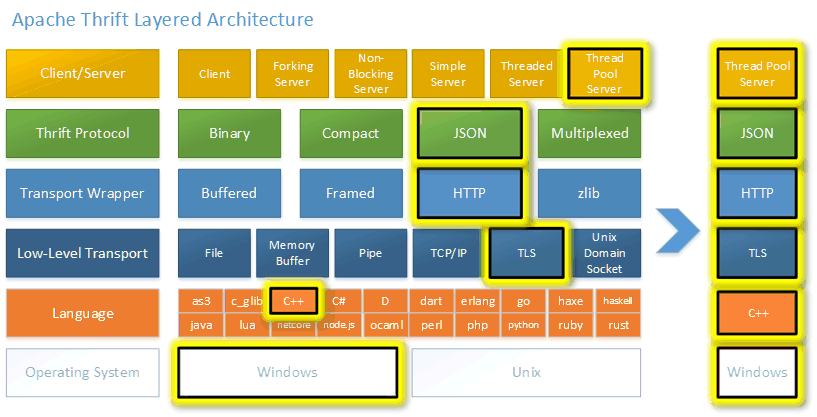
공식 계층 그림, stack 표 두 개, 13개 명령·출력과 양방향 client/server 절차를 보존합니다.
27+
7
6
Part 2
접을 수 있는 영어 원문 전체
영어 원문 전체 펼치기
E18859E04C9923BB657124DDD2E45155A16EEB9AA0A05AC42A04B8B1A78B3DB8
.. _thrift-hello-sample:

Thrift sample
#############

.. figure:: ../../../../../../../samples/modules/thrift/hello/thrift-layers.png
   :align: center
   :alt: Thrift Layers

What is Thrift?
***************

`Apache Thrift`_ is an `IDL`_ specification, `RPC`_ framework, and
`code generator`_. It works across all major operating systems, supports over
27 programming languages, 7 protocols, and 6 low-level transports. Thrift was
originally developed at `Facebook in 2006`_ and then shared with the
`Apache Software Foundation`_. Thrift supports a rich set of types and data
structures, and abstracts away transport and protocol details, which lets
developers focus on application logic.

.. _Apache Thrift:
    https://github.com/apache/thrift

.. _IDL:
    https://en.wikipedia.org/wiki/Interface_description_language

.. _RPC:
    https://en.wikipedia.org/wiki/Remote_procedure_call

.. _code generator:
    https://en.wikipedia.org/wiki/Automatic_programming

.. _Facebook in 2006:
    https://thrift.apache.org/static/files/thrift-20070401.pdf

.. _Apache Software Foundation:
    https://www.apache.org

Overview
********

This sample application includes a client and server implementing the RPC
interface described in :zephyr_file:`samples/modules/thrift/hello/hello.thrift`.
The purpose of this example is to demonstrate how components at different
layers in thrift can be combined to build an application with desired features.


Requirements
************

- Optional Modules

.. code-block:: console
   :caption: Download optional modules with west

   west config manifest.group-filter -- +optional
   west update

- QEMU Networking (described in :ref:`networking_with_qemu`)
- Thrift dependencies installed for your host OS

.. tabs::

   .. group-tab:: Ubuntu

      .. code-block:: bash
        :caption: Install thrift dependencies in Ubuntu

         sudo apt install -y libboost-all-dev thrift-compiler libthrift-dev

   .. group-tab:: macOS

      .. code-block:: bash
        :caption: Install thrift dependencies in macOS

         brew install boost openssl thrift

Building and Running
********************

This application can be run on a Linux host, with either the server or the
client in the QEMU environment, and the peer is built and run natively on
the host.

Building the Native Client and Server
=====================================

.. code-block:: console

   $ make -j -C samples/modules/thrift/hello/client/
   $ make -j -C samples/modules/thrift/hello/server/

Under ``client/``, 3 executables will be generated, and components
used in each layer of them are listed below:

+----------------------+------------+--------------------+------------------+
| hello_client         | TSocket    | TBufferedTransport | TBinaryProtocol  |
+----------------------+------------+--------------------+------------------+
| hello_client_compact | TSocket    | TBufferedTransport | TCompactProtocol |
+----------------------+------------+--------------------+------------------+
| hello_client_ssl     | TSSLSocket | TBufferedTransport | TBinaryProtocol  |
+----------------------+------------+--------------------+------------------+

The same applies for the server. Only the client and the server with the
same set of stacks can communicate.

Additionally, there is a ``hello_client.py`` Python script that can be used
interchangeably with the ``hello_client`` C++ application to illustrate the
cross-language capabilities of Thrift.

+----------------------+------------+--------------------+------------------+
| hello_client.py      | TSocket    | TBufferedTransport | TBinaryProtocol  |
+----------------------+------------+--------------------+------------------+

Running the Zephyr Server in QEMU
=================================

Build the Zephyr version of the ``hello/server`` sample application like this:

.. zephyr-app-commands::
   :zephyr-app: samples/modules/thrift/hello/server
   :board: board_name
   :goals: build
   :compact:

To enable advanced features, extra arguments should be passed accordingly:

- TCompactProtocol: ``-DCONFIG_THRIFT_COMPACT_PROTOCOL=y``
- TSSLSocket: ``-DCONF_FILE="prj.conf ../overlay-tls.conf"``

For example, to build for ``qemu_x86_64`` with TSSLSocket support:

.. zephyr-app-commands::
   :zephyr-app: samples/modules/thrift/hello/server
   :host-os: unix
   :board: qemu_x86_64
   :conf: "prj.conf ../overlay-tls.conf"
   :goals: run
   :compact:

In another terminal, run the ``hello_client`` sample app compiled for the
host OS:

.. code-block:: console

    $ ./hello_client 192.0.2.1
    $ ./hello_client_compact 192.0.2.1
    $ ./hello_client_ssl 192.0.2.1 ../native-cert.pem ../native-key.pem ../qemu-cert.pem

You should observe the following in the original ``hello/server`` terminal:

.. code-block:: console

    ping
    echo: Hello, world!
    counter: 1
    counter: 2
    counter: 3
    counter: 4
    counter: 5

In the client terminal, run ``hello_client.py`` app under the host OS (not
described for compact or ssl variants for brevity):

.. code-block:: console

    $ ./hello_client.py

You should observe the following in the original ``hello/server`` terminal.
Note that the server's state is not discarded (the counter continues to
increase).

.. code-block:: console

    ping
    echo: Hello, world!
    counter: 6
    counter: 7
    counter: 8
    counter: 9
    counter: 10

Running the Zephyr Client in QEMU
=================================

In another terminal, run the ``hello_server`` sample app compiled for the
host OS:

.. code-block:: console

    $ ./hello_server 0.0.0.0
    $ ./hello_server_compact 0.0.0.0
    $ ./hello_server_ssl 0.0.0.0 ../native-cert.pem ../native-key.pem ../qemu-cert.pem


Then, in annother terminal, run the corresponding ``hello/client`` sample:

.. zephyr-app-commands::
   :zephyr-app: samples/modules/thrift/hello/client
   :board: qemu_x86_64
   :goals: run
   :compact:

The additional arguments for advanced features are the same as
``hello/server``.

You should observe the following in the original ``hello_server`` terminal:

.. code-block:: console

    ping
    echo: Hello, world!
    counter: 1
    counter: 2
    counter: 3
    counter: 4
    counter: 5
Part 3
한국어 전문 번역
Thrift란?
Apache Thrift는 IDL specification, RPC framework이자 code generator입니다. 모든 주요 operating system에서 동작하고, 27개가 넘는 programming language와 7개 protocol, 6개 low-level transport를 지원합니다.
Thrift는 2006년 Facebook에서 처음 개발된 뒤 Apache Software Foundation과 공유됐습니다. 풍부한 type과 data structure를 지원하고 transport와 protocol 세부 사항을 추상화하므로 developer가 application logic에 집중할 수 있습니다.
개요
이 sample application에는 samples/modules/thrift/hello/hello.thrift에 기술된 RPC interface를 구현하는 client와 server가 들어 있습니다. Thrift의 서로 다른 layer에 있는 component를 조합해 원하는 기능을 갖춘 application을 만드는 방법을 보여주는 예제입니다.
요구 사항
Optional module을 내려받습니다.
west config manifest.group-filter -- +optional
west update- QEMU networking이 설정되어 있어야 합니다.
- Host OS에 Thrift dependency가 설치되어 있어야 합니다.
Ubuntu에서는 다음 package를 설치합니다.
sudo apt install -y libboost-all-dev thrift-compiler libthrift-devmacOS에서는 Homebrew로 다음 package를 설치합니다.
brew install boost openssl thriftBuild와 실행
Linux host에서 server나 client 중 하나를 QEMU 환경에서 실행하고, 상대 peer는 host용 native application으로 build해 실행할 수 있습니다.
Native client와 server Build
$ make -j -C samples/modules/thrift/hello/client/
$ make -j -C samples/modules/thrift/hello/server/
client/ 아래에는 executable 세 개가 생성되며 각 layer에서 사용하는 component는 다음과 같습니다.
| Executable | Socket | Transport wrapper | Protocol |
|---|---|---|---|
| hello_client | TSocket | TBufferedTransport | TBinaryProtocol |
| hello_client_compact | TSocket | TBufferedTransport | TCompactProtocol |
| hello_client_ssl | TSSLSocket | TBufferedTransport | TBinaryProtocol |
Server에도 같은 구성이 적용됩니다. Stack 조합이 같은 client와 server끼리만 통신할 수 있습니다.
Thrift의 cross-language capability를 보여주기 위해 hello_client C++ application과 서로 바꿔 쓸 수 있는 hello_client.py Python script도 제공합니다.
| Executable | Socket | Transport wrapper | Protocol |
|---|---|---|---|
| hello_client.py | TSocket | TBufferedTransport | TBinaryProtocol |
QEMU에서 Zephyr server 실행
다음과 같이 Zephyr version의 hello/server sample application을 build합니다.
west build -b board_name samples/modules/thrift/hello/server고급 기능을 활성화하려면 해당 argument를 추가합니다. TCompactProtocol은 -DCONFIG_THRIFT_COMPACT_PROTOCOL=y를 사용하고, TSSLSocket은 -DCONF_FILE="prj.conf ../overlay-tls.conf"를 사용합니다.
예를 들어 TSSLSocket 지원을 포함한 qemu_x86_64 build는 다음과 같습니다.
west build -b qemu_x86_64 samples/modules/thrift/hello/server -- -DCONF_FILE="prj.conf ../overlay-tls.conf"
west build -t run
다른 terminal에서 host OS용으로 compile한 대응 client를 실행합니다.
$ ./hello_client 192.0.2.1
$ ./hello_client_compact 192.0.2.1
$ ./hello_client_ssl 192.0.2.1 ../native-cert.pem ../native-key.pem ../qemu-cert.pem
원래 hello/server terminal에는 다음 내용이 나타납니다.
ping
echo: Hello, world!
counter: 1
counter: 2
counter: 3
counter: 4
counter: 5
Client terminal에서는 host OS에서 hello_client.py를 실행할 수도 있습니다. 간결성을 위해 compact와 SSL variant는 생략합니다.
$ ./hello_client.pyServer state가 버려지지 않으므로 원래 hello/server terminal의 counter는 이어서 증가합니다.
ping
echo: Hello, world!
counter: 6
counter: 7
counter: 8
counter: 9
counter: 10
QEMU에서 Zephyr client 실행
다른 terminal에서 host OS용으로 compile한 대응 server를 실행합니다.
$ ./hello_server 0.0.0.0
$ ./hello_server_compact 0.0.0.0
$ ./hello_server_ssl 0.0.0.0 ../native-cert.pem ../native-key.pem ../qemu-cert.pem
그다음 또 다른 terminal에서 대응하는 hello/client sample을 실행합니다.
west build -b qemu_x86_64 samples/modules/thrift/hello/client
west build -t run
고급 기능용 추가 argument는 hello/server와 같습니다. 원래 hello_server terminal에는 다음 내용이 나타납니다.
ping
echo: Hello, world!
counter: 1
counter: 2
counter: 3
counter: 4
counter: 5
Source
출처
영어 원문에는 문단, 문서 지시문, 표, 코드, 코드 심벌, 경로를 그대로 보존했습니다.