Part 1
요약·해설
Board target naming과 hierarchy를 이해하고 필수 file을 만든 뒤 generic application, west runner, revision과 downstream extension까지 검증하는 전체 절차입니다.
board.yml · DTS · Kconfig
west build · flash · debug
revision · contribution · extension
Part 2
접을 수 있는 영어 원문 전체
영어 원문 전체 펼치기
1125A9CF6A2D64C066FA4A2620AC37EB18D4DE8C109C5C299DEECA9C831447A4
.. _board_porting_guide:

Board Porting Guide
###################

To add Zephyr support for a new :term:`board`, you at least need a *board
directory* with various files in it. Files in the board directory inherit
support for at least one SoC and all of its features. Therefore, Zephyr must
support your :term:`SoC` as well.

.. _hw_model_v2:

Transition to the current hardware model
****************************************

Shortly after Zephyr 3.6.0 was released, a new hardware model was introduced to
Zephyr. This new model overhauls the way both SoCs and boards are named and
defined, and adds support for features that had been identified as important
over the years. Among them:

- Support for multi-core, multi-arch AMP (Asymmetrical Multi Processing) SoCs
- Support for multi-SoC boards
- Support for reusing the SoC and board Kconfig trees outside of the Zephyr
  build system
- Support for advanced use cases with :ref:`sysbuild`
- Removal of all existing arbitrary and inconsistent uses of Kconfig and folder
  names

All the documentation in this page refers to the current hardware model. Please
refer to the documentation in Zephyr v3.6.0 (or earlier) for information on the
previous, now obsolete, hardware model.

More information about the rationale, development and concepts behind the new
model can be found in the :github:`original issue <51831>`, the
:github:`original Pull Request <50305>` and, for a complete set of changes
introduced, the `hardware model v2 commit`_.

Some non-critical features, enhancements and improvements of the new hardware
model are still in development. Check the
:github:`hardware model v2 enhancements issue <69546>` for a complete list.

The transition from the previous hardware model to the current one (commonly
referred to as "hardware model v2") requires modifications to all existing board
and SoC definitions. A decision was made not to provide direct backwards
compatibility for the previous model, which leaves users transitioning from a
previous version of Zephyr to one including the new model (v3.7.0 and onwards)
with two options if they have an out-of-tree board (or SoC):

#. Convert the out-of-tree board to the current hardware model (recommended)
#. Take the SoC definition from Zephyr v3.6.0 and copy it to your downstream
   repository (ensuring that the build system can find it via a
   :ref:`zephyr module <modules>` or ``SOC_ROOT``). This will allow your board,
   defined in the previous hardware model, to continue to work

When converting your board from the previous to the current hardware model, we
recommend first reading through this page to understand the model in detail. You
can then use the `example-application conversion Pull Request`_ as an example on
how to port a simple board. Additionally, a `conversion script`_ is available
and works reliably in many cases (though multi-core SoCs may not be handled
entirely). Finally, the `hardware model v2 commit`_ contains the full conversion
of all existing boards from the old to the current model, so you can use it as a
complete conversion reference.

.. _hardware model v2 commit: https://github.com/zephyrproject-rtos/zephyr/commit/8dc3f856229ce083c956aa301c31a23e65bd8cd8
.. _example-application conversion Pull Request: https://github.com/zephyrproject-rtos/example-application/pull/58
.. _conversion script: https://github.com/zephyrproject-rtos/zephyr/blob/main/scripts/utils/board_v1_to_v2.py

.. _hw_support_hierarchy:

Hardware support hierarchy
**************************

Zephyr's hardware support is based on a series of hierarchical abstractions.
Primarily, each :term:`board` has one or more :term:`SoC`.
Each SoC can be optionally classed into an :term:`SoC series`, which in turn may optionally belong to an :term:`SoC family`.
Each SoC has one or more :term:`CPU cluster`, each containing one or more :term:`CPU core` of a particular :term:`architecture`.

You can visualize the hierarchy in the diagram below:

.. figure:: ../../../../hardware/porting/board/hierarchy.png
   :width: 500px
   :align: center
   :alt: Hardware support Hierarchy

   Hardware support Hierarchy

Below are some examples of the hierarchy described in this section, in the form
of a :term:`board` per row with its corresponding hierarchy entries. Notice how
the :term:`SoC series` and :term:`SoC family` levels are not always used.

.. table::

   +--------------------------------------------+--------------------------+-------------+--------------------+--------------------+----------------+----------------------+
   | :term:`board name`                         | :term:`board qualifiers` | :term:`SoC` | :term:`SoC Series` | :term:`SoC family` | CPU core       | :term:`architecture` |
   +============================================+==========================+=============+====================+====================+================+======================+
   | :ref:`nrf52dk <nrf52dk_nrf52832>`          | nrf52832                 | nRF52832    | nRF52              | Nordic nRF         | Arm Cortex-M4  | ARMv7-M              |
   +--------------------------------------------+--------------------------+-------------+--------------------+--------------------+----------------+----------------------+
   | :ref:`frdm_k64f <frdm_k64f>`               | mk64f12                  | MK64F12     | Kinetis K6x        | NXP Kinetis        | Arm Cortex-M4  | ARMv7-M              |
   +--------------------------------------------+--------------------------+-------------+--------------------+--------------------+----------------+----------------------+
   | :ref:`rv32m1_vega <rv32m1_vega>`           | openisa_rv32m1/ri5cy     | RV32M1      | (Not used)         | (Not used)         | RI5CY          | RISC-V RV32          |
   +--------------------------------------------+--------------------------+-------------+--------------------+--------------------+----------------+----------------------+
   | :ref:`nrf5340dk <nrf5340dk_nrf5340>`       | nrf5340/cpuapp           | nRF5340     | nRF53              | Nordic nRF         | Arm Cortex-M33 | ARMv8-M              |
   |                                            +--------------------------+-------------+--------------------+--------------------+----------------+----------------------+
   |                                            | nrf5340/cpunet           | nRF5340     | nRF53              | Nordic nRF         | Arm Cortex-M33 | ARMv8-M              |
   +--------------------------------------------+--------------------------+-------------+--------------------+--------------------+----------------+----------------------+
   | :ref:`mimx8mp_evk <imx8mp_evk>`            | mimx8ml8/a53             | i.MX8M Plus | i.MX8M             | NXP i.MX           | Arm Cortex-A53 | ARMv8-A              |
   |                                            +--------------------------+-------------+--------------------+--------------------+----------------+----------------------+
   |                                            | mimx8ml8/m7              | i.MX8M Plus | i.MX8M             | NXP i.MX           | Arm Cortex-M7  | ARMv7-M              |
   |                                            +--------------------------+-------------+--------------------+--------------------+----------------+----------------------+
   |                                            | mimx8ml8/adsp            | i.MX8M Plus | i.MX8M             | NXP i.MX           | Cadence HIFI4  | Xtensa LX6           |
   +--------------------------------------------+--------------------------+-------------+--------------------+--------------------+----------------+----------------------+

Additional details about terminology can be found in the next section.

.. _board_terminology:

Board terminology
*****************

The previous section introduced the hierarchical manner in which Zephyr
classifies and implements hardware support.
This section focuses on the terminology used around hardware support, and in
particular when defining and working with boards and SoCs.

The overall set of terms used around the concept of board in Zephyr is depicted
in the image below, which uses the :ref:`bl5340_dvk` board as reference.

.. figure:: ../../../../hardware/porting/board/board-terminology.svg
   :width: 500px
   :align: center
   :alt: Board terminology diagram

   Board terminology diagram

The diagram shows the different terms that are used to describe boards:

- The :term:`board name`: ``bl5340_dvk``
- The optional :term:`board revision`: ``1.2.0``
- The :term:`board qualifiers`, that optionally describe the :term:`SoC`,
  :term:`CPU cluster` and :term:`variant`: ``nrf5340/cpuapp/ns``
- The :term:`board target`, which uniquely identifies a combination of the above
  and can be used to specify the hardware to build for when using the tooling
  provided by Zephyr: ``[email protected]/nrf5340/cpuapp/ns``

Formally this can also be seen as
:samp:`{board name}[@{revision}][/{board qualifiers}]`, which can be extended to
:samp:`{board name}[@{revision}][/{SoC}[/{CPU cluster}][/{variant}]]`.

If a board contains only one single-core SoC, then the SoC can be omitted from
the board target. This implies that if the board does not define any board
qualifiers, the board name can be used as a board target. Conversely, if
board qualifiers are part of the board definition, then the SoC can be omitted
by leaving it out but including the corresponding forward-slashes: ``//``.

Continuing with the example above, The board :ref:`bl5340_dvk` is a single SoC
board where the SoC defines two CPU clusters: ``cpuapp`` and ``cpunet``. One of
the CPU clusters, ``cpuapp``, additionally defines a non-secure board variant,
``ns``.

The board qualifiers ``nrf5340/cpuapp/ns`` can be read as:


- ``nrf5340``: The SoC, which is a Nordic nRF5340 dual-core SoC
- ``cpuapp``: The CPU cluster ``cpuapp``, which consists of a single Cortex-M33
  CPU core. The number of cores in a CPU cluster cannot be determined from the
  board qualifiers.
- ``ns``: a variant, in this case ``ns`` is a common variant name is
  Zephyr denoting a non-secure build for boards supporting :ref:`tfm`.

Not all SoCs define CPU clusters or variants. For example a simple board
like the :ref:`thingy52_nrf52832` contains a single SoC with no CPU clusters and
no variants.
For ``thingy52`` the board target ``thingy52/nrf52832`` can be read as:

- ``thingy52``: board name.
- ``nrf52832``: The board qualifiers, in this case identical to the SoC, which
  is a Nordic nRF52832.


Make sure your SoC is supported
*******************************

Start by making sure your SoC is supported by Zephyr. If it is, it's time to
:ref:`create-your-board-directory`. If you don't know, try:

- checking :ref:`boards` for names that look relevant, and reading individual
  board documentation to find out for sure.
- asking your SoC vendor

If you need to add a SoC, CPU cluster, or even architecture support, this is the
wrong page, but here is some general advice.

Architecture
============

See :ref:`architecture_porting_guide`.

CPU Core
========

CPU core support files go in ``core`` subdirectories under :zephyr_file:`arch`,
e.g. :zephyr_file:`arch/x86/core`.

See :ref:`gs_toolchain` for information about toolchains (compiler, linker,
etc.) supported by Zephyr. If you need to support a new toolchain,
:ref:`build_overview` is a good place to start learning about the build system.
Please reach out to the community if you are looking for advice or want to
collaborate on toolchain support.

SoC
===

Zephyr SoC support files are in architecture-specific subdirectories of
:zephyr_file:`soc`. They are generally grouped by SoC family.

When adding a new SoC family or series for a vendor that already has SoC
support within Zephyr, please try to extract common functionality into shared
files to avoid duplication. If there is no support for your vendor yet, you can
add it in a new directory ``zephyr/soc/<VENDOR>/<YOUR-SOC>``; please use
self-explanatory directory names.

.. _create-your-board-directory:

Create your board directory
***************************

Once you've found an existing board that uses your SoC, you can usually start
by copy/pasting its board directory and changing its contents for your
hardware.

You need to give your board a unique name. Run ``west boards`` for a list of
names that are already taken, and pick something new. Let's say your board is
called ``plank`` (please don't actually use that name).

Start by creating the board directory ``zephyr/boards/<VENDOR>/plank``, where
``<VENDOR>`` is your vendor subdirectory. (You don't have to put your
board directory in the zephyr repository, but it's the easiest way to get
started. See :ref:`custom_board_definition` for documentation on moving your
board directory to a separate repository once it's working.)

.. note::
  A ``<VENDOR>`` subdirectory is mandatory if contributing your board
  to Zephyr, but if your board is placed in a local repo, then any folder
  structure under ``<your-repo>/boards`` is permitted.
  If the vendor is defined in the list in
  :zephyr_file:`dts/bindings/vendor-prefixes.txt` then you must use
  that vendor prefix as ``<VENDOR>``. ``others`` may be used as vendor prefix if
  the vendor is not defined.

.. note::

  The board directory name does not need to match the name of the board.
  Multiple boards can even defined be in one directory.

Your board directory should look like this:

.. code-block:: none

   boards/<VENDOR>/plank
   ├── board.yml
   ├── board.cmake
   ├── CMakeLists.txt
   ├── doc
   │   ├── plank.png
   │   └── index.rst
   ├── Kconfig.plank
   ├── Kconfig.defconfig
   ├── plank_defconfig
   ├── plank_<qualifiers>_defconfig
   ├── plank.dts
   ├── plank_<qualifiers>.dts
   └── plank.yaml

Replace ``plank`` with your board's name, of course.

The mandatory files are:

#. :file:`board.yml`: a YAML file describing the high-level meta data of the
   boards such as the boards names, their SoCs, and variants.
   CPU clusters for multi-core SoCs are not described in this file as they are
   inherited from the SoC's YAML description.

#. :file:`plank.dts` or :file:`plank_<qualifiers>.dts`: a hardware description
   in :ref:`devicetree <dt-guide>` format. This declares your SoC, connectors,
   and any other hardware components such as LEDs, buttons, sensors, or
   communication peripherals (USB, BLE controller, etc).

#. :file:`Kconfig.plank`: the base software configuration for selecting SoC and
   other board and SoC related settings. Kconfig settings outside of the board
   and SoC tree must not be selected. To select general Zephyr Kconfig settings
   the :file:`Kconfig` file must be used.


The optional files are:

- :file:`Kconfig`, :file:`Kconfig.defconfig` software configuration in
  :ref:`kconfig` formats. This provides default settings for software features
  and peripheral drivers.
- :file:`plank_defconfig` and :file:`plank_<qualifiers>_defconfig`: software
  configuration in Kconfig ``.conf`` format.
- :file:`board.cmake`: used for :ref:`flash-and-debug-support`
- :file:`CMakeLists.txt`: if you need to add additional source files to
  your build.
- :file:`doc/index.rst`, :file:`doc/plank.png`: documentation for and a picture
  of your board. You only need this if you're :ref:`contributing-your-board` to
  Zephyr.
- :file:`plank.yaml`: a YAML file with miscellaneous metadata used by the
  :ref:`twister_script`.

Board qualifiers of the form ``<soc>/<cpucluster>/<variant>`` are normalized so
that ``/`` is replaced with ``_`` when used for filenames, for example:
``soc1/foo`` becomes ``soc1_foo`` when used in filenames.

.. _board_description:

Write your board YAML
*********************

The board YAML file describes the board at a high level.
This includes the SoC, board variants, and board revisions.

Detailed configurations, such as hardware description and configuration are done
in devicetree and Kconfig.

The skeleton of the board YAML file is:

.. code-block:: yaml

   board:
     name: <board-name>
     vendor: <board-vendor>
     revision:
       format: <major.minor.patch|letter|number|custom>
       default: <default-revision-value>
       exact: <true|false>
       revisions:
       - name: <revA>
       - name: <revB>
         ...
     socs:
     - name: <soc-1>
       variants:
       - name: <variant-1>
       - name: <variant-2>
         variants:
         - name: <sub-variant-2-1>
           ...
     - name: <soc-2>
       ...

It is possible to have multiple boards located in the board folder.
If multiple boards are placed in the same board folder, then the file
:file:`board.yml` must describe those in a list as:

.. code-block:: yaml

   boards:
   - name: <board-name-1>
     vendor: <board-vendor>
     ...
   - name: <board-name-2>
     vendor: <board-vendor>
     ...
   ...


.. _default_board_configuration:

Write your devicetree
*********************

The devicetree file :file:`boards/<vendor>/plank/plank.dts` or
:file:`boards/<vendor>/plank/plank_<qualifiers>.dts` describes your board
hardware in the Devicetree Source (DTS) format (as usual, change ``plank`` to
your board's name). If you're new to devicetree, see :ref:`devicetree-intro`.

In general, :file:`plank.dts` should look like this:

.. code-block:: devicetree

   /dts-v1/;
   #include <your_soc_vendor/your_soc.dtsi>

   / {
           model = "A human readable name";
           compatible = "yourcompany,plank";

           chosen {
                   zephyr,console = &your_uart_console;
                   zephyr,sram = &your_memory_node;
                   /* other chosen settings  for your hardware */
           };

           /*
            * Your board-specific hardware: buttons, LEDs, sensors, etc.
            */

           leds {
                   compatible = "gpio-leds";
                   led0: led_0 {
                           gpios = < /* GPIO your LED is hooked up to */ >;
                           label = "LED 0";
                   };
                   /* ... other LEDs ... */
           };

           buttons {
                   compatible = "gpio-keys";
                   /* ... your button definitions ... */
           };

           /* These aliases are provided for compatibility with samples */
           aliases {
                   led0 = &led0; /* now you support the blinky sample! */
                   /* other aliases go here */
           };
   };

   &some_peripheral_you_want_to_enable { /* like a GPIO or SPI controller */
           status = "okay";
   };

   &another_peripheral_you_want {
           status = "okay";
   };

Only one ``.dts`` file will be used, and the most specific file which exists
will be used.

This means that if both :file:`plank.dts` and :file:`plank_soc1_foo.dts` exist,
then when building for ``plank`` / ``plank/soc1``, then :file:`plank.dts` is
used. When building for ``plank//foo`` / ``plank/soc1/foo`` the
:file:`plank_soc1_foo.dts` is used.

This allows board maintainers to write a base devicetree file for the board
or write specific devicetree files for a given board's SoC or variant.

If you're in a hurry, simple hardware can usually be supported by copy/paste
followed by trial and error. If you want to understand details, you will need
to read the rest of the devicetree documentation and the devicetree
specification.

.. _dt_k6x_example:

Example: FRDM-K64F and Hexiwear K64
===================================

.. Give the filenames instead of the full paths below, as it's easier to read.
   The cramped 'foo.dts<path>' style avoids extra spaces before commas.

This section contains concrete examples related to writing your board's
devicetree.

The FRDM-K64F and Hexiwear K64 board devicetrees are defined in
:zephyr_file:`frdm_k64fs.dts <boards/nxp/frdm_k64f/frdm_k64f.dts>` and
:zephyr_file:`hexiwear_k64.dts <boards/nxp/hexiwear/hexiwear_mk64f12.dts>`
respectively. Both boards have NXP SoCs from the same Kinetis SoC family, the
K6X.

Common devicetree definitions for K6X are stored in :zephyr_file:`nxp_k6x.dtsi
<dts/arm/nxp/nxp_k6x.dtsi>`, which is included by both board :file:`.dts`
files. :zephyr_file:`nxp_k6x.dtsi<dts/arm/nxp/nxp_k6x.dtsi>` in turn includes
:zephyr_file:`armv7-m.dtsi<dts/arm/armv7-m.dtsi>`, which has common definitions
for Arm v7-M cores.

Since :zephyr_file:`nxp_k6x.dtsi<dts/arm/nxp/nxp_k6x.dtsi>` is meant to be
generic across K6X-based boards, it leaves many devices disabled by default
using ``status`` properties.  For example, there is a CAN controller defined as
follows (with unimportant parts skipped):

.. code-block:: devicetree

   can0: can@40024000 {
        ...
        status = "disabled";
        ...
   };

It is up to the board :file:`.dts` or application overlay files to enable these
devices as desired, by setting ``status = "okay"``. The board :file:`.dts`
files are also responsible for any board-specific configuration of the device,
such as adding nodes for on-board sensors, LEDs, buttons, etc.

For example, FRDM-K64 (but not Hexiwear K64) :file:`.dts` enables the CAN
controller and sets the bus speed:

.. code-block:: devicetree

   &can0 {
        status = "okay";
   };

The ``&can0 { ... };`` syntax adds/overrides properties on the node with label
``can0``, i.e. the ``can@4002400`` node defined in the :file:`.dtsi` file.

Other examples of board-specific customization is pointing properties in
``aliases`` and ``chosen`` to the right nodes (see :ref:`dt-alias-chosen`), and
making GPIO/pinmux assignments.

.. _board_kconfig_files:

Write Kconfig files
*******************

Zephyr uses the Kconfig language to configure software features. Your board
needs to provide some Kconfig settings before you can compile a Zephyr
application for it.

Setting Kconfig configuration values is documented in detail in
:ref:`setting_configuration_values`.

There is one mandatory Kconfig file in the board directory, and several optional
files for a board named ``plank``:

.. code-block:: none

   boards/<vendor>/plank
   ├── Kconfig
   ├── Kconfig.plank
   ├── Kconfig.defconfig
   ├── plank_defconfig
   └── plank_<qualifiers>_defconfig

:file:`Kconfig.plank`
  A shared Kconfig file which can be sourced both in Zephyr Kconfig and sysbuild
  Kconfig trees.

  This file selects the SoC in the Kconfig tree and potential other SoC related
  Kconfig settings. This file must not select anything outside the re-usable
  Kconfig board and SoC trees.

  A :file:`Kconfig.plank` may look like this:

  .. code-block:: kconfig

     config BOARD_PLANK
             select SOC_SOC1

  The Kconfig symbols :samp:`BOARD_{board}` and
  :samp:`BOARD_{normalized_board_target}` are constructed by the build
  system, therefore no type shall be defined in above code snippet.

:file:`Kconfig`
  Included by :zephyr_file:`boards/Kconfig`.

  This file can add Kconfig settings which are specific to the current board.

  Not all boards have a :file:`Kconfig` file.

  A board specific setting should be defining a custom setting and usually with
  a prompt, like this:

  .. code-block:: kconfig

     config BOARD_FEATURE
             bool "Board specific feature"

  If the setting name is identical to an existing Kconfig setting in Zephyr and
  only modifies the default value of said setting, then
  :file:`Kconfig.defconfig` should be used  instead.

:file:`Kconfig.defconfig`
  Board-specific default values for Kconfig options.

  Not all boards have a :file:`Kconfig.defconfig` file.

  The entire file should be inside an ``if BOARD_PLANK`` / ``endif`` pair of
  lines, like this:

  .. code-block:: kconfig

     if BOARD_PLANK

     config FOO
             default y

     if NETWORKING
     config SOC_ETHERNET_DRIVER
             default y
     endif # NETWORKING

     endif # BOARD_PLANK

:file:`plank_defconfig` / :file:`plank_<qualifiers>_defconfig`
  A Kconfig fragment that is merged as-is into the final build directory
  :file:`.config` whenever an application is compiled for your board.

  If both the common :file:`plank_defconfig` file and one or more board
  qualifiers specific :file:`plank_<qualifiers>_defconfig` files exist, then
  all matching files will be used.
  This allows you to place configuration which is common for all board SoCs,
  CPU clusters, and board variants in the base :file:`plank_defconfig` and only
  place the adjustments specific for a given SoC or board variant in the
  :file:`plank_<qualifiers>_defconfig`.

  The ``_defconfig`` should contain mandatory settings for your system clock,
  console, etc. The results are architecture-specific, but typically look
  something like this:

  .. code-block:: cfg

     CONFIG_SYS_CLOCK_HW_CYCLES_PER_SEC=120000000  # set up your clock, etc
     CONFIG_SERIAL=y

:file:`plank_x_y_z_defconfig` / :file:`plank_<qualifiers>_x_y_z_defconfig`
  A Kconfig fragment that is merged as-is into the final build directory
  :file:`.config` whenever an application is compiled for your board revision
  ``x.y.z``.

Build, test, and fix
********************

Now it's time to build and test the application(s) you want to run on your
board until you're satisfied.

For example:

.. code-block:: console

   west build -b plank samples/hello_world
   west flash

For ``west flash`` to work, see :ref:`flash-and-debug-support` below. You can
also just flash :file:`build/zephyr/zephyr.elf`, :file:`zephyr.hex`, or
:file:`zephyr.bin` with any other tools you prefer.

.. _porting-general-recommendations:

General recommendations
***********************

For consistency and to make it easier for users to build generic applications
that are not board specific for your board, please follow these guidelines
while porting.

- Unless explicitly recommended otherwise by this section, leave peripherals
  and their drivers disabled by default.

- Configure and enable a system clock, along with a tick source.

- Provide pin and driver configuration that matches the board's valuable
  components such as sensors, buttons or LEDs, and communication interfaces
  such as USB, Ethernet connector, or Bluetooth/Wi-Fi chip.

- If your board uses a well-known connector standard (like Arduino, Mikrobus,
  Grove, or 96Boards connectors), add connector nodes to your DTS and configure
  pin muxes accordingly.

- Configure components that enable the use of these pins, such as
  configuring an SPI instance to use the usual Arduino SPI pins.

- If available, configure and enable a serial output for the console
  using the ``zephyr,console`` chosen node in the devicetree.

- If your board supports networking, configure a default interface.

- Enable all GPIO ports connected to peripherals or expansion connectors.

- If available, enable pinmux and interrupt controller drivers.

- It is recommended to enable the MPU by default, if there is support for it
  in hardware. For boards with limited memory resources it is acceptable to
  disable it. When the MPU is enabled, it is recommended to also enable
  hardware stack protection (CONFIG_HW_STACK_PROTECTION=y) and, thus, allow the
  kernel to detect stack overflows when the system is running in privileged
  mode.

.. _flash-and-debug-support:

Flash and debug support
***********************

Zephyr supports :ref:`west-build-flash-debug` via west extension commands.

To add ``west flash`` and ``west debug`` support for your board, you need to
create a :file:`board.cmake` file in your board directory. This file's job is
to configure a "runner" for your board. (There's nothing special you need to
do to get ``west build`` support for your board.)

"Runners" are Zephyr-specific Python classes that wrap :ref:`flash and debug
host tools <flash-debug-host-tools>` and integrate with west and the zephyr build
system to support ``west flash`` and related commands. Each runner supports
flashing, debugging, or both. You need to configure the arguments to these
Python scripts in your :file:`board.cmake` to support those commands like this
example :file:`board.cmake`:

.. code-block:: cmake

   board_runner_args(jlink "--device=nrf52" "--speed=4000")
   board_runner_args(pyocd "--target=nrf52" "--frequency=4000000")

   include(${ZEPHYR_BASE}/boards/common/nrfjprog.board.cmake)
   include(${ZEPHYR_BASE}/boards/common/jlink.board.cmake)
   include(${ZEPHYR_BASE}/boards/common/pyocd.board.cmake)

This example configures the ``nrfjprog``, ``jlink``, and ``pyocd`` runners.

.. warning::

   Runners usually have names which match the tools they wrap, so the ``jlink``
   runner wraps Segger's J-Link tools, and so on. But the runner command line
   options like ``--speed`` etc. are specific to the Python scripts.

.. note::

   Runners and board configuration should be created without being targeted to
   a single operating system if the tool supports multiple operating systems,
   nor should it rely upon special system setup/configuration. For example; do
   not assume that a user will have prior knowledge/configuration or (if using
   Linux) special udev rules installed, do not assume one specific ``/dev/X``
   device for all platforms as this will not be compatible with Windows or
   macOS, and allow for overriding of the selected device so that multiple
   boards can be connected to a single system and flashed/debugged at the
   choice of the user.

For more details:

- Run ``west flash --context`` to see a list of available runners which support
  flashing, and ``west flash --context -r <RUNNER>`` to view the specific options
  available for an individual runner.
- Run ``west debug --context`` and ``west debug --context <RUNNER>`` to get
  the same output for runners which support debugging.
- Run ``west flash --help`` and ``west debug --help`` for top-level options
  for flashing and debugging.
- See :ref:`west-runner` for Python APIs.
- Look for :file:`board.cmake` files for other boards similar to your own for
  more examples.

To see what a ``west flash`` or ``west debug`` command is doing exactly, run it
in verbose mode:

.. code-block:: sh

   west --verbose flash
   west --verbose debug

Verbose mode prints any host tool commands the runner uses.

The order of the ``include()`` calls in your :file:`board.cmake` matters. The
first ``include`` sets the default runner if it's not already set. For example,
including ``nrfjprog.board.cmake`` first means that ``nrfjprog`` is the default
flash runner for this board. Since ``nrfjprog`` does not support debugging,
``jlink`` is the default debug runner.

.. _porting_board_revisions:

Multiple board revisions
************************

See :ref:`application_board_version` for basics on this feature from the user
perspective.

Board revisions are described in the ``revision`` entry of the
:file:`board.yml`.

.. code-block:: yaml

   board:
     revision:
       format: <major.minor.patch|letter|number|custom>
       default: <default-revision-value>
       exact: <true|false>
       revisions:
       - name: <revA>
       - name: <revB>

Zephyr natively supports the following revision formats:

- ``major.minor.patch``: match a three digit revision, such as ``1.2.3``.
- ``number``: matches integer revisions
- ``letter``: matches single letter revisions from ``A`` to ``Z`` only

.. _board_fuzzy_revision_matching:

Fuzzy revision matching
=======================

Fuzzy revision matching is enabled per default.

If the user selects a revision between those available, the closest revision
number that is not larger than the user's choice is used. For example, if the
board ``plank`` defines revisions ``0.5.0``, and ``1.5.0`` and the user builds
for ``[email protected]``, the build system will target revision ``0.5.0``.

The build system will print this at CMake configuration time:

.. code-block:: console

   -- Board: plank, Revision: 0.7.0 (Active: 0.5.0)

This allows you to only create revision configuration files for board revision
numbers that introduce incompatible changes.

Similar for ``letter`` where revision ``A``, ``D``, and ``F`` could be defined
and the user builds for ``plank@E``, the build system will target revision ``D``
.

Exact revision matching
=======================

Exact revision matching is enabled when ``exact: true`` is specified in the
revision section in :file:`board.yml`.

When exact is defined then building for ``[email protected]`` in the above example
will result in the following error message:

.. code-block:: console

   Board revision `0.7.0` not found.  Please specify a valid board revision.

Board revision configuration adjustment
=======================================

When the user builds for board ``plank@<revision>`` it is possible to make
adjustments to the board's normal configuration.

As described in the :ref:`default_board_configuration` and
:ref:`board_kconfig_files` sections the board default configuration is created
from the files :file:`<board>.dts` / :file:`<board>_<qualifiers>.dts` and
:file:`<board>_defconfig` / :file:`<board>_<qualifiers>_defconfig`.
When building for a specific board revision, the above files are used as a
starting point and the following board files will be used in addition:

- :file:`<board>_<qualifiers>_<revision>_defconfig`: a specific revision
  defconfig which is only used for the board and SOC / variants identified by
  ``<board>_<qualifiers>``.

- :file:`<board>_<revision>_defconfig`: a specific revision defconfig which is
  used for the board regardless of the SOC / variants.

- :file:`<board>_<qualifiers>_<revision>.overlay`: a specific revision dts
  overlay which is only used for the board and SOC / variants identified by
  ``<board>_<qualifiers>``.

- :file:`<board>_<revision>.overlay`: a specific revision dts overlay which is
  used for the board regardless of the SOC / variants.

This split allows boards with multiple SoCs, multi-core SoCs, or variants to
place common revision adjustments which apply to all SoCs and variants in a
single file, while still providing the ability to place SoC or variant specific
adjustments in a dedicated revision file.

Using the ``plank`` board from previous sections, then we could have the following
revision adjustments:

.. code-block:: none

   boards/zephyr/plank
   ├── plank_0_5_0_defconfig          # Kconfig adjustment for all plank board qualifiers on revision 0.5.0
   ├── plank_0_5_0.overlay            # DTS overlay for all plank board qualifiers on revision 0.5.0
   └── plank_soc1_foo_1_5_0_defconfig # Kconfig adjustment for plank board when building for soc1 variant foo on revision 1.5.0

Custom revision.cmake files
***************************

Some boards may not use board revisions supported natively by Zephyr.
For example string revisions.

One reason why Zephyr doesn't support string revisions is that strings can take
many forms and it's not always clear if the given strings are just strings, such
as ``blue``, ``green``, ``red``, etc. or if they provide an order which can be
matched against higher or lower revisions, such as ``alpha``, ``beta```,
``gamma``.

Due to the sheer number of possibilities with strings, including the possibility
of doing regex matches internally, then string revisions must be done using
``custom`` revision type.

To indicate to the build system that ``custom`` revisions are used, the format
field in the ``revision`` section of the :file:`board.yml` must be written as:

.. code-block:: yaml

   board:
     revision:
       format: custom

When using custom revisions then a :file:`revision.cmake` must be created in the
board directory.

The :file:`revision.cmake` will be included by the build system when building
for the board and it is the responsibility of the file to validate the revision
specified by the user.

The :makevar:`BOARD_REVISION` variable holds the revision value specified by the
user.

To signal to the build system that it should use a different revision than the
one specified by the user, :file:`revision.cmake` can set the variable
``ACTIVE_BOARD_REVISION`` to the revision to use instead. The corresponding
Kconfig files and devicetree overlays must be named
:file:`<board>_<ACTIVE_BOARD_REVISION>_defconfig` and
:file:`<board>_<ACTIVE_BOARD_REVISION>.overlay`.

.. _contributing-your-board:

Contributing your board
***********************

If you want to contribute your board to Zephyr, first -- thanks!

There are some extra things you'll need to do:

#. Make sure you've followed all the :ref:`porting-general-recommendations`.
   They are requirements for boards included with Zephyr.

#. Add documentation for your board using the template file
   :zephyr_file:`doc/templates/board.tmpl`. See :ref:`zephyr_doc` for
   information on how to build your documentation before submitting
   your pull request.

#. Prepare a pull request adding your board which follows the
   :ref:`contribute_guidelines`.

Board extensions
****************

Boards already supported by Zephyr can be extended by downstream users, such as
``example-application`` or vendor SDKs. In some situations, certain hardware
description or :ref:`choices <devicetree-chosen-nodes>` can not be added in the
upstream Zephyr repository, but they can be in a downstream project, where
custom bindings or driver classes can also be created. This feature may also be
useful in development phases, when the board skeleton lives upstream, but other
features are developed in a downstream module.

Board extensions are board fragments that can be present in an out-of-tree board
root folder, under ``${BOARD_ROOT}/boards/extensions``. Here is an example
structure of an extension for the ``plank`` board and its revisions:

.. code-block:: none

   boards/extensions/plank
   ├── plank.conf                # optional
   ├── plank_<revision>.conf     # optional
   ├── plank.overlay             # optional
   └── plank_<revision>.overlay  # optional

A board extension directory must follow the naming structure of the original
board it extends. It may contain Kconfig fragments and/or devicetree overlays.
Extensions are, by default, automatically loaded and applied on top of board
files, before anything else. There is no guarantee on which order extensions are
applied, in case multiple exist. This feature can be disabled by passing
``-DBOARD_EXTENSIONS=OFF`` when building.

Note that board extensions need to follow the
:ref:`same guidelines <porting-general-recommendations>` as regular boards. For
example, it is wrong to enable extra peripherals or subsystems in a board
extension.

.. warning::

   Board extensions are not allowed in any module referenced in Zephyr's
   ``west.yml`` manifest file. Any board changes are required to be submitted to
   the main Zephyr repository.
Part 3
한국어 전문 번역
새 board를 Zephyr에서 지원하려면 최소한 여러 정의 file을 담은 board directory가 필요합니다. Board directory는 하나 이상의 SoC와 그 기능을 상속하므로 해당 SoC도 Zephyr에서 지원돼야 합니다.
Transition to the current hardware model
Zephyr 3.6.0 release 직후 SoC와 board의 이름·정의 방식을 전면 개편한 새 hardware model이 도입됐습니다. 오랫동안 필요성이 확인된 다음 기능도 추가했습니다.
- Multi-core·multi-architecture AMP(Asymmetrical Multi Processing) SoC
- Multi-SoC board
- Zephyr build system 밖에서 SoC·board Kconfig tree 재사용
- Sysbuild의 고급 사용 사례
- Kconfig와 directory 이름에 남아 있던 임의적이고 일관되지 않은 사용 제거
이 페이지는 모두 현재 hardware model을 기준으로 합니다. 이제 obsolete인 이전 model은 Zephyr 3.6.0 이하 문서를 참고해야 합니다.
새 model의 배경과 설계 과정은 original issue #51831, original pull request #50305, 전체 변경은 hardware model v2 commit에서 볼 수 있습니다. 중요도가 낮은 enhancement 일부는 계속 개발 중이며 issue #69546에 목록이 있습니다.
Hardware model v2로 전환하려면 기존 board와 SoC 정의를 모두 수정해야 합니다. 이전 model과 직접적인 backward compatibility는 제공하지 않으므로 Zephyr 3.7.0 이상으로 옮기는 out-of-tree board·SoC 사용자에게 선택지는 두 가지입니다.
- Out-of-tree board를 현재 hardware model로 변환합니다. 권장 방법입니다.
- Zephyr 3.6.0의 SoC definition을 downstream repository로 복사하고 Zephyr module 또는
SOC_ROOT로 build system이 찾게 합니다. 그러면 이전 model로 정의한 board를 계속 사용할 수 있습니다.
변환 전 이 페이지 전체를 읽어 model을 이해하는 것이 좋습니다. 간단한 board 변환은 example-application conversion PR을 참고합니다. conversion script도 많은 경우 안정적으로 동작하지만 multi-core SoC는 완전히 처리하지 못할 수 있습니다. 모든 기존 board의 변환 예는 hardware model v2 commit에 있습니다.
Hardware support hierarchy
Zephyr hardware support는 계층적 abstraction으로 구성됩니다. Board는 하나 이상의 SoC를 가지며, SoC는 선택적으로 SoC series에 속하고 그 series도 선택적으로 SoC family에 속합니다. SoC는 하나 이상의 CPU cluster를 가지며 각 cluster에는 특정 architecture의 CPU core가 하나 이상 들어 있습니다.
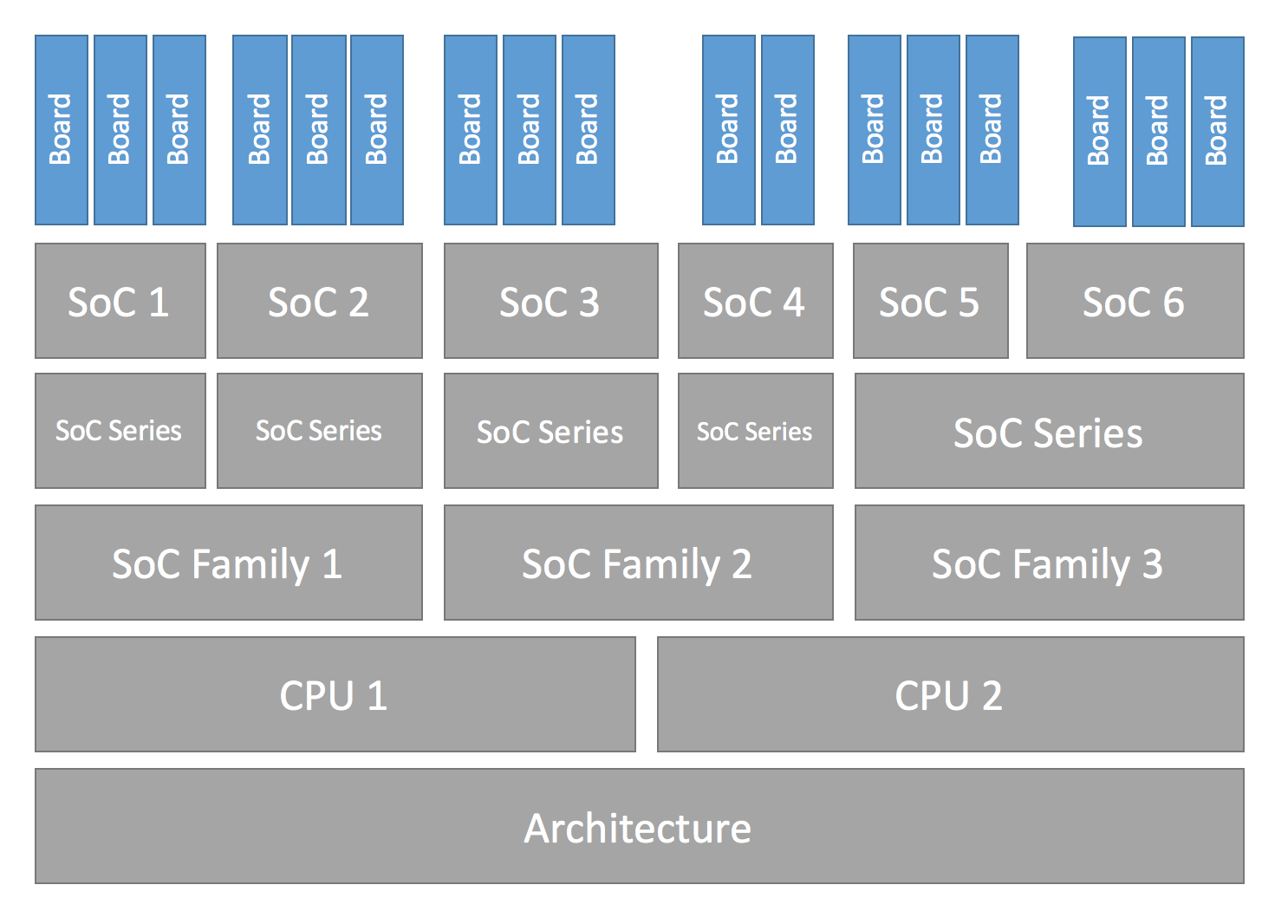
다음 표는 board 한 행을 기준으로 hierarchy를 연결한 예입니다. SoC series와 family level은 항상 사용되는 것이 아닙니다.
| Board name | Board qualifiers | SoC | SoC series | SoC family | CPU core | Architecture |
|---|---|---|---|---|---|---|
| nrf52dk | nrf52832 | nRF52832 | nRF52 | Nordic nRF | Arm Cortex-M4 | ARMv7-M |
| frdm_k64f | mk64f12 | MK64F12 | Kinetis K6x | NXP Kinetis | Arm Cortex-M4 | ARMv7-M |
| rv32m1_vega | openisa_rv32m1/ri5cy | RV32M1 | (Not used) | (Not used) | RI5CY | RISC-V RV32 |
| nrf5340dk | nrf5340/cpuapp | nRF5340 | nRF53 | Nordic nRF | Arm Cortex-M33 | ARMv8-M |
| nrf5340/cpunet | nRF5340 | nRF53 | Nordic nRF | Arm Cortex-M33 | ARMv8-M | |
| mimx8mp_evk | mimx8ml8/a53 | i.MX8M Plus | i.MX8M | NXP i.MX | Arm Cortex-A53 | ARMv8-A |
| mimx8ml8/m7 | i.MX8M Plus | i.MX8M | NXP i.MX | Arm Cortex-M7 | ARMv7-M | |
| mimx8ml8/adsp | i.MX8M Plus | i.MX8M | NXP i.MX | Cadence HIFI4 | Xtensa LX6 |
Hardware support 용어의 자세한 의미는 다음 절에서 설명합니다.
Board terminology
앞 절은 Zephyr가 hardware support를 계층적으로 분류·구현하는 방식을 설명했습니다. 여기서는 board와 SoC를 정의하고 사용할 때의 용어를 BL5340 DVK 예로 정리합니다.

- Board name:
bl5340_dvk - Optional board revision:
1.2.0 - Board qualifiers: SoC, CPU cluster, variant를 선택적으로 기술하는
nrf5340/cpuapp/ns - Board target: 위 요소의 조합을 고유하게 식별하고 build 대상 지정에 사용하는
[email protected]/nrf5340/cpuapp/ns
Formal syntax는 {board name}[@{revision}][/{board qualifiers}]이고, 더 풀어 쓰면 {board name}[@{revision}][/{SoC}[/{CPU cluster}][/{variant}]]입니다.
Board가 single-core SoC 하나만 포함하면 board target에서 SoC를 생략할 수 있습니다. Board qualifier가 전혀 없다면 board name 자체가 target입니다. Qualifier 정의는 있지만 SoC만 생략하려면 해당 slash를 남겨 `//`로 표시합니다.
bl5340_dvk는 SoC 하나에 cpuapp과 cpunet CPU cluster가 있고 cpuapp에 non-secure ns variant가 있습니다. nrf5340/cpuapp/ns는 다음처럼 읽습니다.
nrf5340: Nordic nRF5340 dual-core SoCcpuapp: Cortex-M33 core 하나로 구성된 CPU cluster. Qualifier만 보고 cluster의 core 수를 알아낼 수는 없습니다.ns: TFM 지원 board에서 non-secure build를 뜻하는 일반적인 variant name
모든 SoC가 CPU cluster나 variant를 정의하지는 않습니다. 예를 들어 Thingy:52는 cluster와 variant가 없는 single SoC board입니다. Target thingy52/nrf52832에서 thingy52는 board name, nrf52832는 SoC와 동일한 board qualifier입니다.
Make sure your SoC is supported
먼저 SoC가 Zephyr에서 지원되는지 확인합니다. 지원된다면 board directory를 만들 수 있습니다. 확실하지 않으면 board 목록에서 관련 이름을 찾고 개별 문서를 읽거나 SoC vendor에게 문의합니다.
SoC, CPU cluster, architecture 지원까지 새로 추가해야 한다면 이 페이지의 범위를 벗어나지만 기본 방향은 다음과 같습니다.
Architecture
Architecture Porting Guide를 참고합니다.
CPU Core
CPU-core support file은 arch 아래 core subdirectory에 둡니다. 예는 arch/x86/core입니다.
Compiler·linker 등 Zephyr가 지원하는 toolchain은 Getting Started Toolchain 문서를 참고합니다. 새 toolchain을 지원하려면 Build System Overview에서 build system을 익히고 community와 조언·협업을 논의하는 것이 좋습니다.
SoC
soc의 architecture별 subdirectory에 SoC support file을 두며 보통 SoC family별로 묶습니다.
이미 Zephyr에 지원이 있는 vendor의 새 family·series를 추가할 때는 duplication을 피하도록 공통 기능을 shared file로 추출합니다. Vendor support가 전혀 없다면 zephyr/soc/<VENDOR>/<YOUR-SOC> directory를 만들고 의미가 분명한 이름을 사용합니다.
Create your board directory
같은 SoC를 사용하는 기존 board를 찾았다면 그 directory를 복사한 뒤 hardware에 맞게 바꾸는 방식으로 시작할 수 있습니다.
west boards로 이미 사용 중인 board name을 확인하고 고유한 이름을 정합니다. 이 문서는 실제로 사용하면 안 되는 예시 이름 plank를 사용합니다.
처음에는 zephyr/boards/<VENDOR>/plank directory를 만듭니다. Zephyr repository 밖에서도 가능하지만 내부에서 시작하는 편이 쉽습니다. 동작한 뒤 별도 repository로 옮기는 방법은 custom board definition 문서를 참고합니다.
Board directory의 기본 구조는 다음과 같습니다.
boards/<VENDOR>/plank
├── board.yml
├── board.cmake
├── CMakeLists.txt
├── doc
│   ├── plank.png
│   └── index.rst
├── Kconfig.plank
├── Kconfig.defconfig
├── plank_defconfig
├── plank_<qualifiers>_defconfig
├── plank.dts
├── plank_<qualifiers>.dts
└── plank.yamlplank는 실제 board name으로 바꿉니다.
필수 file은 다음과 같습니다.
board.yml: board name, SoC, variant 같은 high-level metadata를 기술합니다. Multi-core SoC의 CPU cluster는 SoC YAML description에서 상속하므로 여기에는 쓰지 않습니다.plank.dts또는plank_<qualifiers>.dts: Devicetree 형식의 hardware description입니다. SoC, connector, LED, button, sensor, USB·BLE controller 같은 component를 선언합니다.Kconfig.plank: SoC와 board·SoC 관련 설정을 선택하는 base software configuration입니다. 재사용 가능한 board·SoC tree 밖의 일반 Zephyr setting을 선택하면 안 되며 그런 설정은Kconfig에 둡니다.
선택 file은 다음과 같습니다.
Kconfig,Kconfig.defconfig: software feature와 peripheral driver의 default 설정plank_defconfig,plank_<qualifiers>_defconfig: Kconfig.conffragmentboard.cmake: flash·debug runner 구성CMakeLists.txt: 추가 source file을 build에 넣어야 할 때 사용doc/index.rst,doc/plank.png: Zephyr에 contribution할 때 필요한 board 문서와 사진plank.yaml: Twister가 사용하는 기타 metadata
Filename에 board qualifier <soc>/<cpucluster>/<variant>를 넣을 때 slash는 underscore로 normalize합니다. 예를 들어 soc1/foo는 filename에서 soc1_foo입니다.
Write your board YAML
Board YAML은 SoC, board variant, revision 같은 high-level 내용을 기술합니다. 구체적인 hardware와 software configuration은 Devicetree와 Kconfig에 둡니다.
기본 skeleton은 다음과 같습니다.
board:
  name: <board-name>
  vendor: <board-vendor>
  revision:
    format: <major.minor.patch|letter|number|custom>
    default: <default-revision-value>
    exact: <true|false>
    revisions:
    - name: <revA>
    - name: <revB>
      ...
  socs:
  - name: <soc-1>
    variants:
    - name: <variant-1>
    - name: <variant-2>
      variants:
      - name: <sub-variant-2-1>
        ...
  - name: <soc-2>
    ...
Board folder 하나에 여러 board를 둘 수도 있습니다. 이 경우 `board.yml`의 `boards` list로 각각을 기술합니다.
boards:
- name: <board-name-1>
  vendor: <board-vendor>
  ...
- name: <board-name-2>
  vendor: <board-vendor>
  ...
...
Write your devicetree
boards/<vendor>/plank/plank.dts 또는 plank_<qualifiers>.dts는 board hardware를 DTS(Devicetree Source) 형식으로 기술합니다. Devicetree를 처음 사용한다면 introduction 문서를 먼저 참고합니다.
일반적인 `plank.dts` 구조는 다음과 같습니다.
/dts-v1/;
#include <your_soc_vendor/your_soc.dtsi>

/ {
        model = "A human readable name";
        compatible = "yourcompany,plank";

        chosen {
                zephyr,console = &your_uart_console;
                zephyr,sram = &your_memory_node;
                /* other chosen settings  for your hardware */
        };

        /*
         * Your board-specific hardware: buttons, LEDs, sensors, etc.
         */

        leds {
                compatible = "gpio-leds";
                led0: led_0 {
                        gpios = < /* GPIO your LED is hooked up to */ >;
                        label = "LED 0";
                };
                /* ... other LEDs ... */
        };

        buttons {
                compatible = "gpio-keys";
                /* ... your button definitions ... */
        };

        /* These aliases are provided for compatibility with samples */
        aliases {
                led0 = &led0; /* now you support the blinky sample! */
                /* other aliases go here */
        };
};

&some_peripheral_you_want_to_enable { /* like a GPIO or SPI controller */
        status = "okay";
};

&another_peripheral_you_want {
        status = "okay";
};
Build에는 `.dts` file 하나만 사용하며 존재하는 file 중 가장 구체적인 것을 선택합니다.
plank.dts와 plank_soc1_foo.dts가 모두 있다면 plank 또는 plank/soc1 build에는 base plank.dts를 사용합니다. plank//foo 또는 plank/soc1/foo build에는 plank_soc1_foo.dts를 사용합니다.
이 방식으로 board 전체의 base Devicetree와 특정 SoC·variant용 Devicetree를 나눌 수 있습니다. 단순 hardware는 기존 file을 복사한 뒤 trial and error로 지원할 수 있지만 세부 동작을 이해하려면 나머지 Devicetree 문서와 specification을 읽어야 합니다.
Example: FRDM-K64F and Hexiwear K64
frdm_k64f.dts와 hexiwear_mk64f12.dts는 같은 NXP Kinetis K6X family SoC를 사용하는 두 board의 구체적인 예입니다.
nxp_k6x.dtsi는 K6X 공통 정의를 담고 두 board DTS가 이를 include합니다. 다시 nxp_k6x.dtsi는 Arm v7-M core 공통 정의가 있는 armv7-m.dtsi를 include합니다.
K6X board 전체에서 재사용하는 SoC `.dtsi`는 많은 device를 `status = "disabled"`로 둡니다. 예를 들어 CAN controller는 다음처럼 정의됩니다.
can0: can@40024000 {
     ...
     status = "disabled";
     ...
};
Board .dts 또는 application overlay가 필요한 device의 status = "okay"를 설정합니다. On-board sensor, LED, button 같은 board별 node와 device configuration도 board DTS의 책임입니다.
FRDM-K64F는 Hexiwear와 달리 CAN controller를 다음처럼 활성화합니다.
&can0 {
     status = "okay";
};
&can0 { ... }; syntax는 nxp_k6x.dtsi의 can0 label이 붙은 can@4002400 node에 property를 추가하거나 override합니다.
그 밖의 board별 customization에는 `aliases`·`chosen` property를 올바른 node로 연결하고 GPIO와 pinmux를 할당하는 작업이 있습니다.
Write Kconfig files
Zephyr는 Kconfig로 software feature를 구성합니다. Board application을 compile하려면 몇 가지 Kconfig 설정을 제공해야 합니다.
`plank` board directory에는 필수 Kconfig file 하나와 여러 선택 file이 있습니다.
boards/<vendor>/plank
├── Kconfig
├── Kconfig.plank
├── Kconfig.defconfig
├── plank_defconfig
└── plank_<qualifiers>_defconfigKconfig.plank는 Zephyr Kconfig tree와 sysbuild Kconfig tree 모두가 source할 수 있는 shared file입니다. SoC와 다른 SoC 관련 설정만 선택하며 재사용 가능한 board·SoC tree 밖의 symbol을 선택하면 안 됩니다.
config BOARD_PLANK
select SOC_SOC1BOARD_{board}와 BOARD_{normalized_board_target} symbol은 build system이 만들므로 위 snippet에 type을 정의하지 않습니다.
Kconfig는 boards/Kconfig에서 include하며 current board 전용 custom setting을 추가할 수 있습니다. 모든 board에 필요한 file은 아닙니다. Board-specific setting은 보통 prompt가 있는 custom symbol로 정의합니다.
config BOARD_FEATURE
        bool "Board specific feature"
기존 Zephyr Kconfig symbol과 이름이 같고 default value만 바꾸는 경우에는 `Kconfig` 대신 `Kconfig.defconfig`를 사용합니다.
Kconfig.defconfig는 board별 Kconfig default를 정의하는 선택 file입니다. File 전체를 if BOARD_PLANK와 endif로 감쌉니다.
if BOARD_PLANK

config FOO
        default y

if NETWORKING
config SOC_ETHERNET_DRIVER
        default y
endif # NETWORKING

endif # BOARD_PLANKplank_defconfig과 plank_<qualifiers>_defconfig는 해당 board를 build할 때 최종 .config에 그대로 merge되는 Kconfig fragment입니다.
Base와 qualifier별 defconfig가 함께 있으면 일치하는 file을 모두 사용합니다. 모든 SoC·cluster·variant에 공통인 설정은 base에, 특정 SoC·variant 조정만 qualifier별 file에 둡니다.
`_defconfig`에는 system clock, console처럼 반드시 필요한 값을 넣습니다. Architecture마다 다르지만 일반적인 예는 다음과 같습니다.
CONFIG_SYS_CLOCK_HW_CYCLES_PER_SEC=120000000  # set up your clock, etc
CONFIG_SERIAL=y
plank_x_y_z_defconfig 또는 plank_<qualifiers>_x_y_z_defconfig는 revision x.y.z build에 추가로 merge되는 Kconfig fragment입니다.
Build, test, and fix
이제 board에서 실행할 application을 만족할 때까지 build하고 test하며 수정합니다.
west build -b plank samples/hello_world
west flash
west flash 지원은 뒤의 Flash and debug support 절을 따릅니다. 다른 tool로 build/zephyr/zephyr.elf, zephyr.hex, zephyr.bin을 직접 flash해도 됩니다.
General recommendations
사용자가 board별 code가 아닌 generic application을 쉽게 build할 수 있고 전체 board 동작이 일관되도록 다음 guideline을 따릅니다.
- 이 절에서 명시적으로 권장하지 않는 한 peripheral과 driver는 기본 disable 상태로 둡니다.
- Tick source와 함께 system clock을 구성하고 활성화합니다.
- Sensor, button, LED 같은 board component와 USB, Ethernet connector, Bluetooth·Wi-Fi chip 같은 communication interface에 맞는 pin·driver 설정을 제공합니다.
- Arduino, Mikrobus, Grove, 96Boards 같은 표준 connector를 사용한다면 DTS에 connector node를 추가하고 pin mux를 맞춥니다.
- 일반적인 Arduino SPI pin에 SPI instance를 연결하는 것처럼 connector pin 사용에 필요한 component도 구성합니다.
- 가능하면 Devicetree의
zephyr,consolechosen node로 serial console output을 활성화합니다. - Networking을 지원하면 default interface를 구성합니다.
- Peripheral 또는 expansion connector에 연결된 모든 GPIO port를 enable합니다.
- 가능하면 pinmux와 interrupt-controller driver를 enable합니다.
- Hardware가 지원하면 MPU를 기본 enable하는 것을 권장합니다. Memory가 매우 제한된 board는 disable할 수 있습니다. MPU를 enable하면
CONFIG_HW_STACK_PROTECTION=y도 켜 privileged-mode stack overflow를 감지하는 것이 좋습니다.
Flash and debug support
Zephyr는 west extension command로 build·flash·debug를 지원합니다. `west flash`와 `west debug`를 추가하려면 board directory에 runner를 설정하는 `board.cmake`를 만듭니다. `west build` 자체에는 별도 설정이 필요 없습니다.
Runner는 host flash/debug tool을 감싸 west와 Zephyr build system에 연결하는 Zephyr 전용 Python class입니다. 각 runner는 flash, debug 또는 둘 다 지원합니다. `board.cmake`에서 Python script argument를 다음처럼 설정합니다.
board_runner_args(jlink "--device=nrf52" "--speed=4000")
board_runner_args(pyocd "--target=nrf52" "--frequency=4000000")

include(${ZEPHYR_BASE}/boards/common/nrfjprog.board.cmake)
include(${ZEPHYR_BASE}/boards/common/jlink.board.cmake)
include(${ZEPHYR_BASE}/boards/common/pyocd.board.cmake)
이 예는 `nrfjprog`, `jlink`, `pyocd` runner를 구성합니다.
Runner 정보를 확인하는 방법은 다음과 같습니다.
west flash --context: flash runner 목록,west flash --context -r <RUNNER>: runner별 optionwest debug --context와west debug --context <RUNNER>: debug runner 정보west flash --help,west debug --help: top-level option- West runner Python API와 비슷한 board의
board.cmake참고
Runner가 실제 실행하는 host command는 verbose mode로 확인합니다.
west --verbose flash
west --verbose debug
`board.cmake`의 `include()` 순서는 중요합니다. 아직 default가 없다면 첫 include가 default runner가 됩니다. `nrfjprog.board.cmake`를 먼저 include하면 nrfjprog가 default flash runner입니다. nrfjprog는 debug를 지원하지 않으므로 이 예에서는 jlink가 default debug runner가 됩니다.
Multiple board revisions
board.yml의 revision entry가 board revision을 정의합니다.
board:
  revision:
    format: <major.minor.patch|letter|number|custom>
    default: <default-revision-value>
    exact: <true|false>
    revisions:
    - name: <revA>
    - name: <revB>
Zephyr가 native 지원하는 revision format은 다음과 같습니다.
major.minor.patch:1.2.3같은 세 자리 revisionnumber: integer revisionletter: A부터 Z까지 단일 대문자 revision
Fuzzy revision matching
Fuzzy matching은 기본 enable입니다. 사용자가 정의된 revision 사이의 값을 선택하면 사용자 값보다 크지 않은 가장 가까운 revision을 사용합니다.
plank가 0.5.0과 1.5.0을 정의하고 사용자가 [email protected]을 build하면 active revision은 0.5.0입니다. CMake configuration은 다음을 출력합니다.
-- Board: plank, Revision: 0.7.0 (Active: 0.5.0)이 방식은 incompatible change가 생긴 revision만 configuration file로 만들 수 있게 합니다. Letter format도 A·D·F가 정의된 상태에서 `plank@E`를 build하면 D를 선택합니다.
Exact revision matching
board.yml revision section에 exact: true를 지정하면 exact matching을 사용합니다. 위 예에서 [email protected]을 build하면 다음 error가 납니다.
Board revision `0.7.0` not found. Please specify a valid board revision.Board revision configuration adjustment
plank@<revision>을 build할 때 base <board>.dts·<board>_<qualifiers>.dts와 <board>_defconfig·<board>_<qualifiers>_defconfig를 시작점으로 사용하고 다음 revision file을 추가합니다.
<board>_<qualifiers>_<revision>_defconfig: 특정 board·SoC·variant에만 적용<board>_<revision>_defconfig: SoC·variant와 무관하게 board 전체에 적용<board>_<qualifiers>_<revision>.overlay: 특정 board·SoC·variant에만 적용하는 DTS overlay<board>_<revision>.overlay: SoC·variant와 무관하게 board 전체에 적용하는 DTS overlay
이 분리는 multi-SoC·multi-core·variant board의 공통 revision 조정을 한 file에 두면서 특정 SoC·variant 조정도 별도 file로 제공하게 합니다.
`plank`의 revision adjustment 예는 다음과 같습니다.
boards/zephyr/plank
├── plank_0_5_0_defconfig          # Kconfig adjustment for all plank board qualifiers on revision 0.5.0
├── plank_0_5_0.overlay            # DTS overlay for all plank board qualifiers on revision 0.5.0
└── plank_soc1_foo_1_5_0_defconfig # Kconfig adjustment for plank board when building for soc1 variant foo on revision 1.5.0
Custom revision.cmake files
Zephyr native format이 아닌 string revision 같은 형식을 쓰는 board가 있습니다. String은 blue·green·red처럼 단순 집합일 수도 있고 alpha·beta·gamma처럼 순서가 있을 수도 있어 higher/lower matching을 일반화하기 어렵습니다. Regex를 포함한 다양한 가능성 때문에 string revision은 `custom` type으로 처리합니다.
`board.yml`에서 custom revision을 다음처럼 지정합니다.
board:
  revision:
    format: custom
custom revision을 사용하면 board directory에 revision.cmake를 만들어야 합니다. Build system이 이 file을 include하며 사용자가 지정한 revision을 검증할 책임도 file에 있습니다.
BOARD_REVISION CMake variable에는 사용자 값이 들어 있습니다. 다른 revision을 사용해야 한다면 revision.cmake에서 ACTIVE_BOARD_REVISION을 설정합니다. 대응 file 이름은 <board>_<ACTIVE_BOARD_REVISION>_defconfig과 <board>_<ACTIVE_BOARD_REVISION>.overlay입니다.
Contributing your board
Board를 Zephyr에 contribution하려면 다음 추가 작업을 수행합니다.
- General recommendations를 모두 따릅니다. Zephyr에 포함되는 board에는 권장이 아니라 요구사항입니다.
doc/templates/board.tmpltemplate으로 board 문서를 추가하고 pull request 전 local documentation build를 확인합니다.- Contribution guideline을 따르는 board 추가 pull request를 준비합니다.
Board extensions
Zephyr가 이미 지원하는 board는 example-application이나 vendor SDK 같은 downstream project에서 확장할 수 있습니다. Upstream에 넣기 어려운 hardware description·chosen node, custom binding·driver class를 downstream에 추가하거나, board skeleton만 upstream에 있고 기능을 downstream module에서 개발하는 단계에 유용합니다.
Board extension은 out-of-tree board root의 ${BOARD_ROOT}/boards/extensions 아래에 두는 board fragment입니다. plank와 revision용 구조 예는 다음과 같습니다.
boards/extensions/plank
├── plank.conf                # optional
├── plank_<revision>.conf     # optional
├── plank.overlay             # optional
└── plank_<revision>.overlay  # optional
Extension directory는 원래 board의 naming structure를 따라야 하며 Kconfig fragment와 Devicetree overlay를 담을 수 있습니다. 기본적으로 board file 위에 자동 load·apply되며 여러 extension이 있을 때 적용 순서는 보장되지 않습니다. Build에 `-DBOARD_EXTENSIONS=OFF`를 전달하면 끌 수 있습니다.
Board extension도 일반 board와 같은 guideline을 따라야 하므로 extra peripheral이나 subsystem을 extension에서 enable하면 안 됩니다.
Source
출처
영어 원문에는 문단, 문서 지시문, 표, 코드, 코드 심벌, 경로를 그대로 보존했습니다.