Part 1
요약·해설
Network stack의 5개 계층과 RX·TX 각 7단계를 공식 구조도 3개로 연결해 설명합니다.
App · Protocol · Iface · L2 · Driver
Driver → Socket → App
App → Headers → Driver
Part 2
접을 수 있는 영어 원문 전체
영어 원문 전체 펼치기
3536591581FA1A91FD72EC6C0E1FBB96162A8671F04F36EEC2391D93306D3530
.. _network_stack_architecture:

Network Stack Architecture
##########################

.. toctree::
   :maxdepth: 1
   :hidden:

   net_pkt_processing_stats.rst

The Zephyr network stack is a native network stack specifically designed
for Zephyr OS. It consists of layers, each meant to provide certain services
to other layers. Network stack functionality is highly configurable via Kconfig
options.

.. contents::
    :local:
    :depth: 2

High level overview of the network stack
****************************************

.. figure:: ../../../../connectivity/networking/zephyr_netstack_overview.svg
    :alt: Overview of the network stack architecture
    :figclass: align-center

    Network stack overview

The network stack is layered and consists of the following parts:

* **Network Application.** The network application can either use the provided
  application-level protocol libraries or access the
  :ref:`BSD socket API <bsd_sockets_interface>` directly to create a network
  connection, send or receive data, and close a connection. The application can
  also use the :ref:`network management API <net_mgmt_interface>` to configure
  the network and set related parameters such as network link options,
  starting a scan (when applicable), listen network configuration events, etc.
  The :ref:`network interface API <net_if_interface>` can be used to set IP
  address to a network interface, taking the network interface down, etc.

* **Network Protocols.** This provides implementations for
  various protocols such as

  * Application-level network protocols like CoAP, LWM2M, and MQTT.
    See :ref:`application protocols chapter <net_protocols>` for information
    about them.
  * Core network protocols like IPv6, IPv4, UDP, TCP, ICMPv4, and ICMPv6.
    You access these protocols by using the
    :ref:`BSD socket API <bsd_sockets_interface>`.

* **Network Interface Abstraction.** This provides functionality
  that is common in all the network interfaces, such as setting network
  interface down, etc. There can be multiple network interfaces in the system.
  See :ref:`network interface overview <net_if_interface>` for more details.

* **L2 Network Technologies.** This provides a common API for sending and
  receiving data to and from an actual network device.
  See :ref:`L2 overview <net_l2_interface>` for more details.
  These network technologies include :ref:`Ethernet <ethernet_interface>`,
  :ref:`IEEE 802.15.4 <ieee802154_interface>`,
  :ref:`Bluetooth <bluetooth_api>`, :ref:`CANBUS <can_api>`, etc.
  Some of these technologies support IPv6 header compression (6Lo),
  see `RFC 6282 <https://tools.ietf.org/html/rfc6282>`_ for details.
  For example `ARP <https://tools.ietf.org/html/rfc826>`_ for IPv4 is done by
  the :ref:`Ethernet component <ethernet_interface>`.

* **Network Device Drivers.** The actual low-level device drivers handle the
  physical sending or receiving of network packets.

Network data flow
*****************

An application typically consists of one or more :ref:`threads <threads_v2>`
that execute the application logic. When using the
:ref:`BSD socket API <bsd_sockets_interface>`, the following things will
happen.

.. figure:: ../../../../connectivity/networking/zephyr_netstack_overview-rx_sequence.svg
    :alt: Network RX data flow
    :figclass: align-center

    Network RX data flow

Data receiving (RX)
-------------------

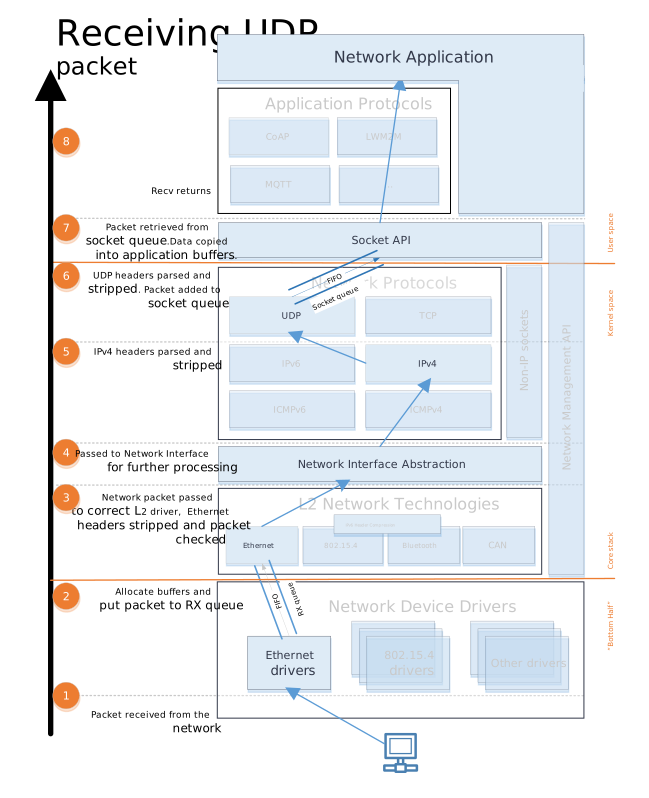
1. A network data packet is received by a device driver.

2. The device driver allocates enough network buffers to store the received
   data. The network packet is placed in the proper RX queue (implemented by
   :ref:`k_fifo <fifos_v2>`). By default there is only one receive queue in
   the system, but it is possible to have up to 8 receive queues.
   These queues will process incoming packets with different priority.
   See :ref:`traffic-class-support` for more details. The receive queues also
   act as a way to separate the data processing pipeline (bottom-half) as
   the device driver is running in an interrupt context and it must do its
   processing as fast as possible.

3. The network packet is then passed to the correct L2 driver. The L2 driver
   can check if the packet is proper and modify it if needed, e.g. strip L2
   header and frame check sequence, etc.

4. The packet is processed by a network interface. The network statistics are
   collected if enabled by :kconfig:option:`CONFIG_NET_STATISTICS`.

5. The packet is then passed to L3 processing. If the packet is IP based,
   then the L3 layer checks if the packet is a proper IPv6 or IPv4 packet.

6. A socket handler then finds an active socket to which the network packet
   belongs and puts it in a queue for that socket, in order to separate the
   networking code from the application. Typically the application is run in
   userspace context and the network stack is run in kernel context.

7. The application will then receive the data and can process it as needed.
   The application should have used the
   :ref:`BSD socket API <bsd_sockets_interface>` to create a socket
   that will receive the data.


.. figure:: ../../../../connectivity/networking/zephyr_netstack_overview-tx_sequence.svg
    :alt: Network TX data flow
    :figclass: align-center

    Network TX data flow

Data sending (TX)
-----------------

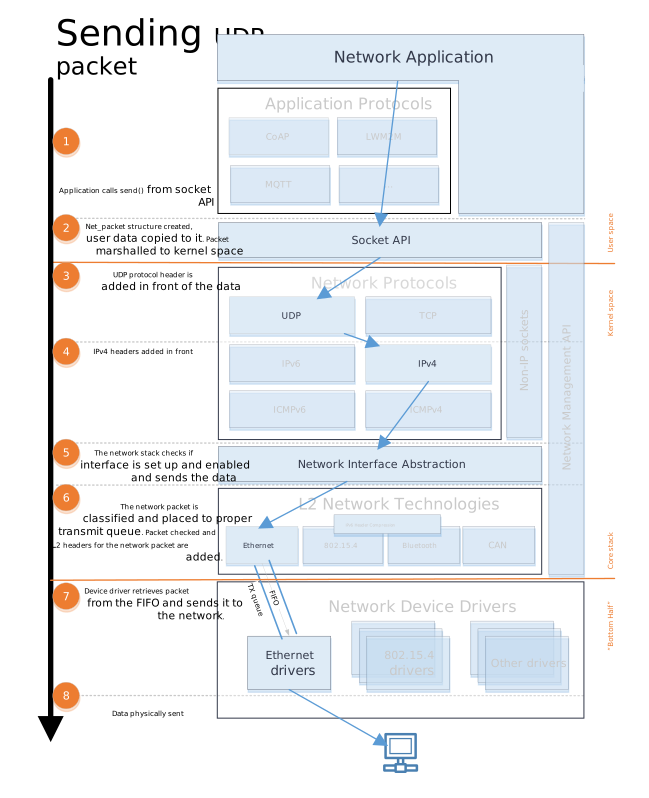
1. The application should use the
   :ref:`BSD socket API <bsd_sockets_interface>` when sending the data.

2. The application data is prepared for sending to kernel space and then
   copied to internal net_buf structures.

3. Depending on the socket type, a protocol header is added in front of the
   data. For example, if the socket is a UDP socket, then a UDP header is
   constructed and placed in front of the data.

4. An IP header is added to the network packet for a UDP or TCP packet.

5. The network stack will check that the network interface is properly set
   for the network packet, and also will make sure that the network interface
   is enabled before the data is queued to be sent.

6. The network packet is then classified and placed to the proper transmit
   queue (implemented by :ref:`k_fifo <fifos_v2>`). By default there is only
   one transmit queue in the system, but it is possible to have up to 8
   transmit queues. These queues will process the sent packets with different
   priority. See :ref:`traffic-class-support` for more details.
   After the transmit packet classification, the packet is checked by the
   correct L2 layer module. The L2 module will do additional checks for the
   data and it will also create any L2 headers for the network packet.
   If everything is ok, the data is given to the network device driver to be
   sent out.

7. The device driver will send the packet to the network.

Note that in both the TX and RX data paths, the queues
(:ref:`k_fifo's <fifos_v2>`) form separation points where data is passed from
one :ref:`thread <threads_v2>` to another.
These :ref:`threads <threads_v2>` might run in different contexts
(:ref:`kernel <kernel_api>` vs. :ref:`userspace <usermode_api>`) and with different
:ref:`priorities <scheduling_v2>`.


Network packet processing statistics
************************************

See information about network processing statistics
:ref:`here <net_pkt_processing_stats>`.
Part 3
한국어 전문 번역
Network Stack Architecture
Zephyr network stack은 Zephyr OS를 위해 특별히 설계된 native network stack입니다. 여러 layer로 구성되며 각 layer는 다른 layer에 특정 service를 제공합니다. Network stack 기능은 Kconfig option으로 폭넓게 구성할 수 있습니다.
Network stack 상위 구조
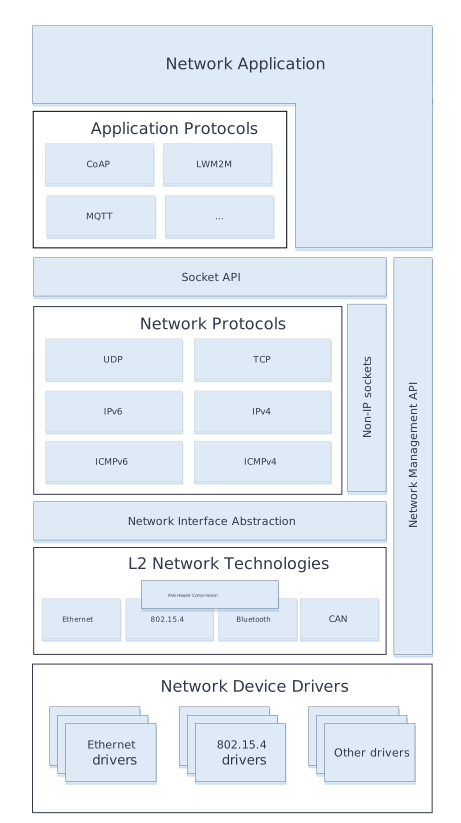
Network stack은 layer 구조이며 다음 부분으로 구성됩니다.
- Network Application. Application-level protocol library를 사용하거나 BSD socket API에 직접 접근해 network connection을 생성하고 data를 송수신하며 connection을 닫습니다. Network management API로 link option, scan 시작, network configuration event 수신 같은 설정을 수행할 수 있습니다. Network interface API로 iface에 IP address를 설정하거나 iface를 down 상태로 만들 수도 있습니다.
- Network Protocols. 여러 protocol implementation을 제공합니다.
- CoAP, LwM2M, MQTT 같은 application-level network protocol
- IPv6, IPv4, UDP, TCP, ICMPv4, ICMPv6 같은 core network protocol. 이 protocol에는 BSD socket API로 접근합니다.
- Network Interface Abstraction. Network interface를 down 상태로 설정하는 것처럼 모든 iface에 공통인 기능을 제공합니다. 한 system에 여러 network interface가 존재할 수 있습니다.
- L2 Network Technologies. 실제 network device와 data를 주고받는 공통 API를 제공합니다. Ethernet, IEEE 802.15.4, Bluetooth, CANBUS 등이 포함됩니다. 일부 technology는 RFC 6282의 IPv6 header compression(6Lo)을 지원합니다. IPv4의 ARP는 Ethernet component가 수행하는 예입니다.
- Network Device Drivers. 실제 low-level device driver가 network packet의 물리적 송수신을 처리합니다.
Network data flow
Application은 일반적으로 application logic을 실행하는 하나 이상의 thread로 구성됩니다. BSD socket API를 사용할 때 data는 다음 흐름으로 이동합니다.
Data 수신(RX)
- Network device driver가 network data packet을 수신합니다.
- Device driver가 수신 data를 저장할 만큼 network buffer를 할당하고 packet을 올바른 RX queue에 넣습니다. Queue는 k_fifo로 구현됩니다. 기본값은 system 전체에 RX queue 하나이지만 최대 8개까지 만들 수 있으며 서로 다른 priority로 packet을 처리합니다. Interrupt context에서 최대한 빨리 끝나야 하는 driver 처리와 이후 data pipeline(bottom-half)을 분리하는 지점이기도 합니다.
- Network packet을 올바른 L2 driver에 전달합니다. L2 driver는 packet 유효성을 검사하고 필요하면 L2 header와 frame check sequence를 제거하는 등의 수정을 수행합니다.
CONFIG_NET_STATISTICS를 켰다면 network interface 처리 단계에서 network statistic을 수집합니다.- Packet을 L3 처리로 전달합니다. IP 기반 packet이면 L3 layer가 올바른 IPv6 또는 IPv4 packet인지 검사합니다.
- Socket handler가 packet이 속한 active socket을 찾아 해당 socket queue에 넣습니다. 이 queue는 network code와 application을 분리합니다. 일반적으로 application은 userspace context에서, network stack은 kernel context에서 실행됩니다.
- Application은 BSD socket API로 만들어 둔 socket에서 data를 받아 필요한 처리를 수행합니다.
Data 송신(TX)
- Application은 data를 전송할 때 BSD socket API를 사용합니다.
- Application data를 kernel space로 보낼 준비를 한 뒤 internal net_buf structure에 복사합니다.
- Socket type에 따라 data 앞에 protocol header를 추가합니다. 예를 들어 UDP socket이면 UDP header를 만들고 data 앞에 배치합니다.
- UDP 또는 TCP packet에 IP header를 추가합니다.
- Network stack은 packet에 맞는 network interface가 올바르게 설정됐는지와 해당 interface가 활성화됐는지 확인한 뒤 전송 queue에 넣습니다.
- Packet을 분류해 k_fifo로 구현된 올바른 TX queue에 넣습니다. 기본값은 TX queue 하나이고 최대 8개까지 구성해 서로 다른 priority로 처리할 수 있습니다. 분류 뒤 올바른 L2 module이 data를 추가 검사하고 L2 header를 만듭니다. 모든 검사를 통과하면 network device driver에 data를 전달합니다.
- Device driver가 packet을 실제 network로 전송합니다.
TX와 RX path 모두에서 k_fifo queue는 한 thread에서 다른 thread로 data를 넘기는 분리 지점입니다. 이 thread들은 kernel과 userspace처럼 서로 다른 context에서, 그리고 서로 다른 scheduling priority로 실행될 수 있습니다.
Network packet processing statistic
Network packet 처리 statistic의 자세한 내용은 Network Packet Processing Statistics 문서를 참고하십시오.
Source
출처
영어 원문에는 문단, 문서 지시문, 표, 코드, 코드 심벌, 경로를 그대로 보존했습니다.