Part 1
요약·해설
CoAP 기반 object/resource model, RD bootstrap·registration, PSK/X.509, SenML cache, event state machine, lifetime과 shell을 설명합니다.
Object · Instance · Resource
Bootstrap · Register · Update
NoSec · PSK · X.509
Part 2
접을 수 있는 영어 원문 전체
영어 원문 전체 펼치기
E9529507C64C9A755B863873C13B18326FD6FC65C40AF4E9EEF6113893D56141
.. _lwm2m_interface:

Lightweight M2M (LWM2M)
#######################

.. contents::
    :local:
    :depth: 2

Overview
********

Lightweight Machine to Machine (LwM2M) is an application layer protocol
designed with device management, data reporting and device actuation in mind.
Based on CoAP/UDP, `LwM2M`_ is a
`standard <http://openmobilealliance.org/release/LightweightM2M/>`_ defined by
the Open Mobile Alliance and suitable for constrained devices by its use of
CoAP packet-size optimization and a simple, stateless flow that supports a
REST API.

One of the key differences between LwM2M and CoAP is that an LwM2M client
initiates the connection to an LwM2M server.  The server can then use the
REST API to manage various interfaces with the client.

LwM2M uses a simple resource model with the core set of objects and resources
defined in the specification.

The LwM2M library can be enabled with :kconfig:option:`CONFIG_LWM2M` Kconfig option.

Example LwM2M object and resources: Device
******************************************

*Object definition*

.. list-table::
   :header-rows: 1

   * - Object ID
     - Name
     - Instance
     - Mandatory

   * - 3
     - Device
     - Single
     - Mandatory

*Resource definitions*

``* R=Read, W=Write, E=Execute``

.. list-table::
   :header-rows: 1

   * - ID
     - Name
     - OP\*
     - Instance
     - Mandatory
     - Type

   * - 0
     - Manufacturer
     - R
     - Single
     - Optional
     - String

   * - 1
     - Model
     - R
     - Single
     - Optional
     - String

   * - 2
     - Serial number
     - R
     - Single
     - Optional
     - String

   * - 3
     - Firmware version
     - R
     - Single
     - Optional
     - String

   * - 4
     - Reboot
     - E
     - Single
     - Mandatory
     -

   * - 5
     - Factory Reset
     - E
     - Single
     - Optional
     -

   * - 6
     - Available Power Sources
     - R
     - Multiple
     - Optional
     - Integer 0-7

   * - 7
     - Power Source Voltage (mV)
     - R
     - Multiple
     - Optional
     - Integer

   * - 8
     - Power Source Current (mA)
     - R
     - Multiple
     - Optional
     - Integer

   * - 9
     - Battery Level %
     - R
     - Single
     - Optional
     - Integer

   * - 10
     - Memory Free (Kb)
     - R
     - Single
     - Optional
     - Integer

   * - 11
     - Error Code
     - R
     - Multiple
     - Optional
     - Integer 0-8

   * - 12
     - Reset Error
     - E
     - Single
     - Optional
     -

   * - 13
     - Current Time
     - RW
     - Single
     - Optional
     - Time

   * - 14
     - UTC Offset
     - RW
     - Single
     - Optional
     - String

   * - 15
     - Timezone
     - RW
     - Single
     - Optional
     - String

   * - 16
     - Supported Binding
     - R
     - Single
     - Mandatory
     - String

   * - 17
     - Device Type
     - R
     - Single
     - Optional
     - String

   * - 18
     - Hardware Version
     - R
     - Single
     - Optional
     - String

   * - 19
     - Software Version
     - R
     - Single
     - Optional
     - String

   * - 20
     - Battery Status
     - R
     - Single
     - Optional
     - Integer 0-6

   * - 21
     - Memory Total (Kb)
     - R
     - Single
     - Optional
     - Integer

   * - 22
     - ExtDevInfo
     - R
     - Multiple
     - Optional
     - ObjLnk

The server could query the ``Manufacturer`` resource for ``Device`` object
instance 0 (the default and only instance) by sending a ``READ 3/0/0``
operation to the client.

The full list of registered objects and resource IDs can be found in the
`LwM2M registry`_.

Zephyr's LwM2M library lives in the :zephyr_file:`subsys/net/lib/lwm2m`, with a
client sample in :zephyr_file:`samples/net/lwm2m_client`.  For more information
about the provided sample see: :zephyr:code-sample:`lwm2m-client`. The sample can be
configured to use normal unsecure network sockets or sockets secured via DTLS.

The Zephyr LwM2M library implements the following items:

* engine to process networking events and core functions
* RD client which performs BOOTSTRAP and REGISTRATION functions
* SenML CBOR, SenML JSON, CBOR, TLV, JSON, and plain text formatting functions
* LwM2M Technical Specification Enabler objects such as Security, Server,
  Device, Firmware Update, etc.
* Extended IPSO objects such as Light Control, Temperature Sensor, and Timer

By default, the library implements `LwM2M specification 1.0.2`_ and can be set to
`LwM2M specification 1.1.1`_ with a Kconfig option.

For more information about LwM2M visit `OMA Specworks LwM2M`_.

Sample usage
************

To use the LwM2M library, start by creating an LwM2M client context
:c:struct:`lwm2m_ctx` structure:

.. code-block:: c

	/* LwM2M client context */
	static struct lwm2m_ctx client;

Create callback functions for LwM2M resource executions:

.. code-block:: c

	static int device_reboot_cb(uint16_t obj_inst_id, uint8_t *args,
				    uint16_t args_len)
	{
		LOG_INF("Device rebooting.");
		LOG_PANIC();
		sys_reboot(0);
		return 0; /* won't reach this */
	}

The LwM2M RD client can send events back to the sample.  To receive those
events, setup a callback function:

.. code-block:: c

	static void rd_client_event(struct lwm2m_ctx *client,
				    enum lwm2m_rd_client_event client_event)
	{
		switch (client_event) {

		case LWM2M_RD_CLIENT_EVENT_NONE:
			/* do nothing */
			break;

		case LWM2M_RD_CLIENT_EVENT_BOOTSTRAP_REG_FAILURE:
			LOG_DBG("Bootstrap registration failure!");
			break;

		case LWM2M_RD_CLIENT_EVENT_BOOTSTRAP_REG_COMPLETE:
			LOG_DBG("Bootstrap registration complete");
			break;

		case LWM2M_RD_CLIENT_EVENT_BOOTSTRAP_TRANSFER_COMPLETE:
			LOG_DBG("Bootstrap transfer complete");
			break;

		case LWM2M_RD_CLIENT_EVENT_REGISTRATION_FAILURE:
			LOG_DBG("Registration failure!");
			break;

		case LWM2M_RD_CLIENT_EVENT_REGISTRATION_COMPLETE:
			LOG_DBG("Registration complete");
			break;

		case LWM2M_RD_CLIENT_EVENT_REG_TIMEOUT:
			LOG_DBG("Registration timeout!");
			break;

		case LWM2M_RD_CLIENT_EVENT_REG_UPDATE_COMPLETE:
			LOG_DBG("Registration update complete");
			break;

		case LWM2M_RD_CLIENT_EVENT_DEREGISTER_FAILURE:
			LOG_DBG("Deregister failure!");
			break;

		case LWM2M_RD_CLIENT_EVENT_DISCONNECT:
			LOG_DBG("Disconnected");
			break;

		case LWM2M_RD_CLIENT_EVENT_REG_UPDATE:
			LOG_DBG("Registration update");
			break;

		case LWM2M_RD_CLIENT_EVENT_DEREGISTER:
			LOG_DBG("Deregistration client");
			break;

		case LWM2M_RD_CLIENT_EVENT_SERVER_DISABLED:
			LOG_DBG("LwM2M server disabled");
		  break;
		}
	}

Next we assign ``Security`` resource values to let the client know where and how
to connect as well as set the ``Manufacturer`` and ``Reboot`` resources in the
``Device`` object with some data and the callback we defined above:

.. code-block:: c

	/*
	 * Server URL of default Security object = 0/0/0
	 * Use leshan.eclipse.org server IP (5.39.83.206) for connection
	 */
	lwm2m_set_string(&LWM2M_OBJ(0, 0, 0), "coap://5.39.83.206");

	/*
	 * Security Mode of default Security object = 0/0/2
	 * 3 = NoSec mode (no security beware!)
	 */
	lwm2m_set_u8(&LWM2M_OBJ(0, 0, 2), 3);

	#define CLIENT_MANUFACTURER "Zephyr Manufacturer"

	/*
	 * Manufacturer resource of Device object = 3/0/0
	 * We use lwm2m_set_res_data() function to set a pointer to the
	 * CLIENT_MANUFACTURER string.
	 * Note the LWM2M_RES_DATA_FLAG_RO flag which stops the engine from
	 * trying to assign a new value to the buffer.
	 */
	lwm2m_set_res_data(&LWM2M_OBJ(3, 0, 0), CLIENT_MANUFACTURER,
			   sizeof(CLIENT_MANUFACTURER),
			   LWM2M_RES_DATA_FLAG_RO);

	/* Reboot resource of Device object = 3/0/4 */
	lwm2m_register_exec_callback(&LWM2M_OBJ(3, 0, 4), device_reboot_cb);

Lastly, we start the LwM2M RD client (which in turn starts the LwM2M engine).
The second parameter of :c:func:`lwm2m_rd_client_start` is the client
endpoint name.  This is important as it needs to be unique per LwM2M server:

.. code-block:: c

	(void)memset(&client, 0x0, sizeof(client));
	lwm2m_rd_client_start(&client, "unique-endpoint-name", 0, rd_client_event);

.. _lwm2m_security:

LwM2M security modes
********************

The Zephyr LwM2M library can be used either without security or use DTLS to secure the communication channel.
When using DTLS with the LwM2M engine, PSK (Pre-Shared Key) and X.509 certificates are the security modes that can be used to secure the communication.
The engine uses LwM2M Security object (Id 0) to read the stored credentials and feed keys from the security object into
the TLS credential subsystem, see :ref:`secure sockets documentation <secure_sockets_interface>`.
Enable the :kconfig:option:`CONFIG_LWM2M_DTLS_SUPPORT` Kconfig option to use the security.

Depending on the selected mode, the security object must contain following data:

PSK
  Security Mode (Resource ID 2) set to zero (Pre-Shared Key mode).
  Identity (Resource ID 3) contains PSK ID in binary form.
  Secret key (Resource ID 5) contains the PSK key in binary form.
  If the key or identity is provided as a hex string, it must be converted to binary before storing into the security object.

X509
  When X509 certificates are used, set Security Mode (ID 2) to ``2`` (Certificate mode).
  Identity (ID 3) is used to store the client certificate and Secret key (ID 5) must have a private key associated with the certificate.
  Server Public Key resource (ID 4) must contain a server certificate or CA certificate used to sign the certificate chain.
  If the :kconfig:option:`CONFIG_MBEDTLS_PEM_CERTIFICATE_FORMAT` Kconfig option is enabled, certificates and private key can be entered in PEM format.
  Otherwise, they must be in binary DER format.

NoSec
  When no security is used, set Security Mode (Resource ID 2) to ``3`` (NoSec).

In all modes, Server URI resource (ID 0) must contain the full URI for the target server.
When DNS names are used, the DNS resolver must be enabled.

When DTLS is used, following options are recommended to reduce DTLS handshake traffic when connection is re-established:

* :kconfig:option:`CONFIG_LWM2M_DTLS_CID` enables DTLS Connection Identifier support. When server supports it, this completely removes the handshake when device resumes operation after long idle period. Greatly helps when NAT mappings have timed out.
* :kconfig:option:`CONFIG_LWM2M_TLS_SESSION_CACHING` uses session cache when before falling back to full DTLS handshake. Reduces few packets from handshake, when session is still cached on server side. Most significant effect is to avoid full registration.

LwM2M stack provides callbacks in the :c:struct:`lwm2m_ctx` structure.
They are used to feed keys from the LwM2M security object into the TLS credential subsystem.
By default, these callbacks can be left as NULL pointers, in which case default callbacks are used.
When an external TLS stack, or non-default socket options are required, you can overwrite the :c:func:`lwm2m_ctx.load_credentials` or :c:func:`lwm2m_ctx.set_socketoptions` callbacks.

An example of setting up the security object for PSK mode:

.. code-block:: c

	/* "000102030405060708090a0b0c0d0e0f" */
	static unsigned char client_psk[] = {
		0x00, 0x01, 0x02, 0x03, 0x04, 0x05, 0x06, 0x07,
		0x08, 0x09, 0x0a, 0x0b, 0x0c, 0x0d, 0x0e, 0x0f
	};

	static const char client_identity[] = "Client_identity";

	lwm2m_set_string(&LWM2M_OBJ(LWM2M_OBJECT_SECURITY_ID, 0, 0), "coaps://lwm2m.example.com");
	lwm2m_set_u8(&LWM2M_OBJ(LWM2M_OBJECT_SECURITY_ID, 0, 2), LWM2M_SECURITY_PSK);
	/* Set the client identity as a string, but this could be binary as well */
	lwm2m_set_string(&LWM2M_OBJ(LWM2M_OBJECT_SECURITY_ID, 0, 3), client_identity);
	/* Set the client pre-shared key (PSK) */
	lwm2m_set_opaque(&LWM2M_OBJ(LWM2M_OBJECT_SECURITY_ID, 0, 5), client_psk, sizeof(client_psk));

An example of setting up the security object for X509 certificate mode:

.. code-block:: c

	static const char certificate[] = "-----BEGIN CERTIFICATE-----\nMIIB6jCCAY+gAw...";
	static const char key[] = "-----BEGIN EC PRIVATE KEY-----\nMHcCAQ...";
	static const char root_ca[] = "-----BEGIN CERTIFICATE-----\nMIIBaz...";

	lwm2m_set_string(&LWM2M_OBJ(LWM2M_OBJECT_SECURITY_ID, 0, 0), "coaps://lwm2m.example.com");
	lwm2m_set_u8(&LWM2M_OBJ(LWM2M_OBJECT_SECURITY_ID, 0, 2), LWM2M_SECURITY_CERT);
	lwm2m_set_string(&LWM2M_OBJ(LWM2M_OBJECT_SECURITY_ID, 0, 3), certificate);
	lwm2m_set_string(&LWM2M_OBJ(LWM2M_OBJECT_SECURITY_ID, 0, 5), key);
	lwm2m_set_string(&LWM2M_OBJ(LWM2M_OBJECT_SECURITY_ID, 0, 4), root_ca);

Before calling :c:func:`lwm2m_rd_client_start` assign the tls_tag # where the
LwM2M library should store the DTLS information prior to connection (normally a
value of 1 is ok here).

.. code-block:: c

	(void)memset(&client, 0x0, sizeof(client));
	client.tls_tag = 1; /* <---- */
	lwm2m_rd_client_start(&client, "endpoint-name", 0, rd_client_event);

For a more detailed LwM2M client sample see: :zephyr:code-sample:`lwm2m-client`.

Multi-thread usage
******************
Writing a value to a resource can be done using functions like lwm2m_set_u8. When writing
to multiple resources, the function lwm2m_registry_lock will ensure that the
client halts until all writing operations are finished:

.. code-block:: c

  lwm2m_registry_lock();
  lwm2m_set_u32(&LWM2M_OBJ(1, 0, 1), 60);
  lwm2m_set_u8(&LWM2M_OBJ(5, 0, 3), 0);
  lwm2m_set_f64(&LWM2M_OBJ(3303, 0, 5700), value);
  lwm2m_registry_unlock();

This is especially useful if the server is composite-observing the resources being
written to. Locking will then ensure that the client only updates and sends notifications
to the server after all operations are done, resulting in fewer messages in general.

Support for time series data
****************************

LwM2M version 1.1 adds support for SenML CBOR and SenML JSON data formats. These data formats add
support for time series data. Time series formats can be used for READ, NOTIFY and SEND operations.
When data cache is enabled for a resource, each write will create a timestamped entry in a cache,
and its content is then returned as a content in READ, NOTIFY or SEND operation for a given
resource.

Data cache is only supported for resources with a fixed data size.

Supported resource types:

* Signed and unsigned 8-64-bit integers
* Float
* Boolean

Enabling and configuring
========================

Enable data cache by selecting :kconfig:option:`CONFIG_LWM2M_RESOURCE_DATA_CACHE_SUPPORT`.
Application needs to allocate an array of :c:struct:`lwm2m_time_series_elem` structures and then
enable the cache by calling :c:func:`lwm2m_engine_enable_cache` for a given resource. Each resource
must be enabled separately and each resource needs their own storage.

.. code-block:: c

  /* Allocate data cache storage */
  static struct lwm2m_time_series_elem temperature_cache[10];
  /* Enable data cache */
  lwm2m_engine_enable_cache(LWM2M_PATH(IPSO_OBJECT_TEMP_SENSOR_ID, 0, SENSOR_VALUE_RID),
          temperature_cache, ARRAY_SIZE(temperature_cache));

LwM2M engine have room for four resources that have cache enabled. Limit can be increased by
changing :kconfig:option:`CONFIG_LWM2M_MAX_CACHED_RESOURCES`. This affects a static memory usage of
engine.

Data caches depends on one of the SenML data formats
:kconfig:option:`CONFIG_LWM2M_RW_SENML_CBOR_SUPPORT` or
:kconfig:option:`CONFIG_LWM2M_RW_SENML_JSON_SUPPORT` and needs :kconfig:option:`CONFIG_POSIX_TIMERS`
so it can request a timestamp from the system and :kconfig:option:`CONFIG_RING_BUFFER` for ring
buffer.

Read and Write operations
=========================

Full content of data cache is written into a payload when any READ, SEND or NOTIFY operation
internally reads the content of a given resource. This has a side effect that any read callbacks
registered for a that resource are ignored when cache is enabled.
Data is written into a cache when any of the ``lwm2m_set_*`` functions are called. To filter
the data entering the cache, application may register a validation callback using
:c:func:`lwm2m_register_validate_callback`.

Limitations
===========

Cache size should be manually set so small that the content can fit normal packets sizes.
When cache is full, new values are dropped.

LwM2M engine and application events
***********************************

The Zephyr LwM2M engine defines events that can be sent back to the application through callback
functions.
The engine state machine shows when the events are spawned.
Events depicted in the diagram are listed in the table.
The events are prefixed with ``LWM2M_RD_CLIENT_EVENT_``.

.. figure:: ../../../../../connectivity/networking/api/images/lwm2m_engine_state_machine.svg
    :alt: LwM2M engine state machine

    State machine for the LwM2M engine

.. list-table:: LwM2M RD Client events
   :widths: auto
   :header-rows: 1

   * - Event ID
     - Event Name
     - Description
   * - 0
     - NONE
     - No event
   * - 1
     - BOOTSTRAP_REG_FAILURE
     - Bootstrap registration failed.
       Occurs if there is a timeout or failure in bootstrap registration.
   * - 2
     - BOOTSTRAP_REG_COMPLETE
     - Bootstrap registration complete.
       Occurs after successful bootstrap registration.
   * - 3
     - BOOTSTRAP_TRANSFER_COMPLETE
     - Bootstrap finish command received from the server.
   * - 4
     - REGISTRATION_FAILURE
     - Registration to LwM2M server failed.
       Occurs if there is a failure in the registration.
   * - 5
     - REGISTRATION_COMPLETE
     - Registration to LwM2M server successful.
       Occurs after a successful registration reply from the LwM2M server
       or when session resumption is used.
   * - 6
     - REG_TIMEOUT
     - Registration or registration update timeout.
       Occurs if there is a timeout during registration. Client have lost connection to the server.
   * - 7
     - REG_UPDATE_COMPLETE
     - Registration update completed.
       Occurs after successful registration update reply from the LwM2M server.
   * - 8
     - DEREGISTER_FAILURE
     - Deregistration to LwM2M server failed.
       Occurs if there is a timeout or failure in the deregistration.
   * - 9
     - DISCONNECT
     - LwM2M client have de-registered from server and is now stopped.
       Triggered only if the application have requested the client to stop.
   * - 10
     - QUEUE_MODE_RX_OFF
     - Used only in queue mode, not actively listening for incoming packets.
       In queue mode the client is not required to actively listen for the incoming packets
       after a configured time period.
   * - 11
     - ENGINE_SUSPENDED
     - Indicate that client has now paused as a result of calling :c:func:`lwm2m_engine_pause`.
       State machine is no longer running and the handler thread is suspended.
       All timers are stopped so notifications are not triggered.
   * - 12
     - SERVER_DISABLED
     - Server have executed the disable command.
       Client will deregister and stay idle for the disable period.
   * - 13
     - NETWORK_ERROR
     - Sending messages to the network failed too many times.
       Client cannot reach any servers or fallback to bootstrap.
       LwM2M engine cannot recover and have stopped.

The LwM2M client engine handles most of the state transitions automatically. The application
needs to handle only the events that indicate that the client have stopped or is in a state
where it cannot recover.

.. list-table:: How application should react to events
   :widths: auto
   :header-rows: 1

   * - Event Name
     - How application should react
   * - NONE
     - Ignore the event.
   * - BOOTSTRAP_REG_FAILURE
     - Try to recover network connection. Then restart the client by calling :c:func:`lwm2m_rd_client_start`.
       This might also indicate configuration issue.
   * - BOOTSTRAP_REG_COMPLETE
     - No actions needed
   * - BOOTSTRAP_TRANSFER_COMPLETE
     - No actions needed
   * - REGISTRATION_FAILURE
     - No actions needed
   * - REGISTRATION_COMPLETE
     - No actions needed.
       Application can send or receive data.
   * - REG_TIMEOUT
     - No actions needed.
       Client proceeds to re-registration automatically. Cannot send or receive data.
   * - REG_UPDATE_COMPLETE
     - No actions needed
       Application can send or receive data.
   * - DEREGISTER_FAILURE
     - No actions needed, client proceeds to idle state automatically. Cannot send or receive data.
   * - DISCONNECT
     - Engine have stopped as a result of calling :c:func:`lwm2m_rd_client_stop`.
       If connection is required, the application should restart the client by calling :c:func:`lwm2m_rd_client_start`.
   * - QUEUE_MODE_RX_OFF
     - No actions needed.
       Application can send but cannot receive data.
       Any data transmission will trigger a registration update.
   * - ENGINE_SUSPENDED
     - Engine can be resumed by calling :c:func:`lwm2m_engine_resume`.
       Cannot send or receive data.
   * - SERVER_DISABLED
     - No actions needed, client will re-register once the disable period is over.
       Cannot send or receive data.
   * - NETWORK_ERROR
     - Try to recover network connection. Then restart the client by calling :c:func:`lwm2m_rd_client_start`.
       This might also indicate configuration issue.

Sending of data in the table above refers to calling :c:func:`lwm2m_send_cb` or by writing into one of the observed resources where observation would trigger a notify message.
Receiving of data refers to receiving read, write or execute operations from the server. Application can register callbacks for these operations.

Configuring lifetime and activity period
****************************************

In LwM2M engine, there are three Kconfig options and one runtime value that configures how often the
client will send LwM2M Update message.

.. list-table:: Update period variables
   :widths: auto
   :header-rows: 1

   * - Variable
     - Effect
   * - LwM2M registration lifetime
     - The lifetime parameter in LwM2M specifies how long a device's registration with an LwM2M server remains valid.
       Device is expected to send LwM2M Update message before the lifetime exprires.
   * - :kconfig:option:`CONFIG_LWM2M_ENGINE_DEFAULT_LIFETIME`
     - Default lifetime value, unless set by the bootstrap server.
       Also defines lower limit that client accepts as a lifetime.
   * - :kconfig:option:`CONFIG_LWM2M_UPDATE_PERIOD`
     - How long the client can stay idle before sending a next update.
   * - :kconfig:option:`CONFIG_LWM2M_SECONDS_TO_UPDATE_EARLY`
     - Minimum time margin to send the update message before the registration lifetime expires.

.. figure:: ../../../../../connectivity/networking/api/images/lwm2m_lifetime_seconds_early.png
    :alt: LwM2M seconds to update early

    Default way of calculating when to update registration.

By default, the client uses :kconfig:option:`CONFIG_LWM2M_SECONDS_TO_UPDATE_EARLY` to calculate how
many seconds before the expiration of lifetime it is going to send the registration update.
The problem with default mode is when the server changes the lifetime of the registration.
This is then affecting the period of updates the client is doing.
If this is used with the QUEUE mode, which is typical in IPv4 networks, it is also affecting the
period of when the device is reachable from the server.

.. figure:: ../../../../../connectivity/networking/api/images/lwm2m_lifetime_both.png
    :alt: LwM2M update time when both values are set

    Update time is controlled by UPDATE_PERIOD.

When also the :kconfig:option:`CONFIG_LWM2M_UPDATE_PERIOD` is set, time to send the update message
is the earliest when any of these values expire. This allows setting long lifetime for the
registration and configure the period accurately, even if server changes the lifetime parameter.

In runtime, the update frequency is limited to once in 15 seconds to avoid flooding.

.. _lwm2m_shell:

LwM2M shell
***********
For testing the client it is possible to enable Zephyr's shell and LwM2M specific commands which
support changing the state of the client. Operations supported are read, write and execute
resources. Client start, stop, pause and resume are also available. The feature is enabled by
selecting :kconfig:option:`CONFIG_LWM2M_SHELL`. The shell is meant for testing so productions
systems should not enable it.

One imaginable scenario, where to use the shell, would be executing client side actions over UART
when a server side tests would require those. It is assumed that not all tests are able to trigger
required actions from the server side.

.. code-block:: console

  uart:~$ lwm2m
  lwm2m - LwM2M commands
  Subcommands:
    send    :send PATHS
            LwM2M SEND operation

    exec    :exec PATH [PARAM]
            Execute a resource

    read    :read PATH [OPTIONS]
            Read value from LwM2M resource
            -x   Read value as hex stream (default)
            -s   Read value as string
            -b   Read value as bool (1/0)
            -uX  Read value as uintX_t
            -sX  Read value as intX_t
            -f   Read value as float
            -t   Read value as time_t

    write   :write PATH [OPTIONS] VALUE
            Write into LwM2M resource
            -s   Write value as string (default)
            -b   Write value as bool
            -uX  Write value as uintX_t
            -sX  Write value as intX_t
            -f   Write value as float
            -t   Write value as time_t

    create  :create PATH
            Create object or resource instance

    delete  :delete PATH
            Delete object or resource instance

    cache   :cache PATH NUM
            Enable data cache for resource
            PATH is LwM2M path
            NUM how many elements to cache

    start   :start EP_NAME [BOOTSTRAP FLAG]
            Start the LwM2M RD (Registration / Discovery) Client
            -b   Set the bootstrap flag (default 0)

    stop    :stop [OPTIONS]
            Stop the LwM2M RD (De-register) Client
            -f   Force close the connection

    update  :Trigger Registration Update of the LwM2M RD Client

    pause   :LwM2M engine thread pause
    resume  :LwM2M engine thread resume
    lock    :Lock the LwM2M registry
    unlock  :Unlock the LwM2M registry


.. _lwm2m_api_reference:

API Reference
*************

.. doxygengroup:: lwm2m_api

.. _LwM2M:
   https://www.omaspecworks.org/what-is-oma-specworks/iot/lightweight-m2m-lwm2m/

.. _LwM2M registry:
   http://www.openmobilealliance.org/wp/OMNA/LwM2M/LwM2MRegistry.html

.. _OMA Specworks LwM2M:
   https://www.omaspecworks.org/what-is-oma-specworks/iot/lightweight-m2m-lwm2m/

.. _LwM2M specification 1.0.2:
   http://openmobilealliance.org/release/LightweightM2M/V1_0_2-20180209-A/OMA-TS-LightweightM2M-V1_0_2-20180209-A.pdf

.. _LwM2M specification 1.1.1:
   http://openmobilealliance.org/release/LightweightM2M/V1_1_1-20190617-A/
Part 3
한국어 전문 번역
Lightweight M2M (LwM2M)
Overview
Lightweight Machine to Machine(LwM2M)은 device management, data reporting, device actuation을 위해 설계한 application-layer protocol입니다. CoAP/UDP를 기반으로 하며 Open Mobile Alliance 표준입니다. CoAP packet-size 최적화와 REST API를 지원하는 단순한 stateless 흐름을 사용해 constrained device에 적합합니다.
LwM2M과 CoAP의 중요한 차이 하나는 LwM2M client가 LwM2M server로 connection을 시작한다는 점입니다. Connection이 만들어지면 server가 REST API를 사용해 client의 여러 interface를 관리할 수 있습니다.
LwM2M은 specification에 정의된 core object와 resource 집합으로 단순한 resource model을 구성합니다.
CONFIG_LWM2M Kconfig option으로 LwM2M library를 활성화할 수 있습니다.
Example LwM2M object and resources: Device
Object definition
| Object ID | Name | Instance | Mandatory |
|---|---|---|---|
| 3 | Device | Single | Mandatory |
Resource definitions
R은 Read, W는 Write, E는 Execute입니다.
| ID | Name | OP | Instance | Mandatory | Type |
|---|---|---|---|---|---|
| 0 | Manufacturer | R | Single | Optional | String |
| 1 | Model | R | Single | Optional | String |
| 2 | Serial number | R | Single | Optional | String |
| 3 | Firmware version | R | Single | Optional | String |
| 4 | Reboot | E | Single | Mandatory | |
| 5 | Factory Reset | E | Single | Optional | |
| 6 | Available Power Sources | R | Multiple | Optional | Integer 0-7 |
| 7 | Power Source Voltage (mV) | R | Multiple | Optional | Integer |
| 8 | Power Source Current (mA) | R | Multiple | Optional | Integer |
| 9 | Battery Level % | R | Single | Optional | Integer |
| 10 | Memory Free (Kb) | R | Single | Optional | Integer |
| 11 | Error Code | R | Multiple | Optional | Integer 0-8 |
| 12 | Reset Error | E | Single | Optional | |
| 13 | Current Time | RW | Single | Optional | Time |
| 14 | UTC Offset | RW | Single | Optional | String |
| 15 | Timezone | RW | Single | Optional | String |
| 16 | Supported Binding | R | Single | Mandatory | String |
| 17 | Device Type | R | Single | Optional | String |
| 18 | Hardware Version | R | Single | Optional | String |
| 19 | Software Version | R | Single | Optional | String |
| 20 | Battery Status | R | Single | Optional | Integer 0-6 |
| 21 | Memory Total (Kb) | R | Single | Optional | Integer |
| 22 | ExtDevInfo | R | Multiple | Optional | ObjLnk |
Server는 client에 READ 3/0/0 operation을 보내 Device object instance 0의 Manufacturer resource를 조회할 수 있습니다. Instance 0은 default이자 유일한 instance입니다.
등록된 object와 resource ID 전체 목록은 LwM2M registry에 있습니다.
Zephyr LwM2M library는 subsys/net/lib/lwm2m에 있고 client sample은 samples/net/lwm2m_client에 있습니다. lwm2m-client sample은 일반 insecure network socket 또는 DTLS로 보호한 socket을 사용하도록 설정할 수 있습니다.
Zephyr LwM2M library는 다음 기능을 구현합니다.
- Networking event와 core function을 처리하는 engine
- BOOTSTRAP과 REGISTRATION 기능을 수행하는 RD client
- SenML CBOR, SenML JSON, CBOR, TLV, JSON, plain text formatting function
- Security, Server, Device, Firmware Update 같은 LwM2M Technical Specification Enabler object
- Light Control, Temperature Sensor, Timer 같은 Extended IPSO object
기본 library는 LwM2M 1.0.2를 구현하며 Kconfig option으로 LwM2M 1.1.1을 선택할 수 있습니다. 추가 정보는 OMA SpecWorks LwM2M에 있습니다.
Sample usage
LwM2M library를 사용하려면 먼저 lwm2m_ctx structure로 client context를 만듭니다.
/* LwM2M client context */
static struct lwm2m_ctx client;
LwM2M resource execute operation에 사용할 callback function을 만듭니다.
static int device_reboot_cb(uint16_t obj_inst_id, uint8_t *args,
			    uint16_t args_len)
{
	LOG_INF("Device rebooting.");
	LOG_PANIC();
	sys_reboot(0);
	return 0; /* won't reach this */
}device_reboot_cb()은 reboot 요청을 log에 남기고 log를 flush한 뒤 sys_reboot(0)을 호출합니다.
LwM2M RD client가 sample로 event를 돌려보낼 수 있으므로 event를 받을 callback을 설정합니다.
static void rd_client_event(struct lwm2m_ctx *client,
			    enum lwm2m_rd_client_event client_event)
{
	switch (client_event) {

	case LWM2M_RD_CLIENT_EVENT_NONE:
		/* do nothing */
		break;

	case LWM2M_RD_CLIENT_EVENT_BOOTSTRAP_REG_FAILURE:
		LOG_DBG("Bootstrap registration failure!");
		break;

	case LWM2M_RD_CLIENT_EVENT_BOOTSTRAP_REG_COMPLETE:
		LOG_DBG("Bootstrap registration complete");
		break;

	case LWM2M_RD_CLIENT_EVENT_BOOTSTRAP_TRANSFER_COMPLETE:
		LOG_DBG("Bootstrap transfer complete");
		break;

	case LWM2M_RD_CLIENT_EVENT_REGISTRATION_FAILURE:
		LOG_DBG("Registration failure!");
		break;

	case LWM2M_RD_CLIENT_EVENT_REGISTRATION_COMPLETE:
		LOG_DBG("Registration complete");
		break;

	case LWM2M_RD_CLIENT_EVENT_REG_TIMEOUT:
		LOG_DBG("Registration timeout!");
		break;

	case LWM2M_RD_CLIENT_EVENT_REG_UPDATE_COMPLETE:
		LOG_DBG("Registration update complete");
		break;

	case LWM2M_RD_CLIENT_EVENT_DEREGISTER_FAILURE:
		LOG_DBG("Deregister failure!");
		break;

	case LWM2M_RD_CLIENT_EVENT_DISCONNECT:
		LOG_DBG("Disconnected");
		break;

	case LWM2M_RD_CLIENT_EVENT_REG_UPDATE:
		LOG_DBG("Registration update");
		break;

	case LWM2M_RD_CLIENT_EVENT_DEREGISTER:
		LOG_DBG("Deregistration client");
		break;

	case LWM2M_RD_CLIENT_EVENT_SERVER_DISABLED:
		LOG_DBG("LwM2M server disabled");
	  break;
	}
}rd_client_event()는 bootstrap registration·transfer, server registration·update·timeout, deregistration·disconnect, server disable 같은 client event를 분기해 처리합니다.
다음으로 client가 어디에 어떤 방식으로 연결할지 알 수 있도록 Security resource 값을 지정합니다. Device object에는 Manufacturer data와 앞에서 만든 Reboot callback을 설정합니다.
/*
 * Server URL of default Security object = 0/0/0
 * Use leshan.eclipse.org server IP (5.39.83.206) for connection
 */
lwm2m_set_string(&LWM2M_OBJ(0, 0, 0), "coap://5.39.83.206");

/*
 * Security Mode of default Security object = 0/0/2
 * 3 = NoSec mode (no security beware!)
 */
lwm2m_set_u8(&LWM2M_OBJ(0, 0, 2), 3);

#define CLIENT_MANUFACTURER "Zephyr Manufacturer"

/*
 * Manufacturer resource of Device object = 3/0/0
 * We use lwm2m_set_res_data() function to set a pointer to the
 * CLIENT_MANUFACTURER string.
 * Note the LWM2M_RES_DATA_FLAG_RO flag which stops the engine from
 * trying to assign a new value to the buffer.
 */
lwm2m_set_res_data(&LWM2M_OBJ(3, 0, 0), CLIENT_MANUFACTURER,
		   sizeof(CLIENT_MANUFACTURER),
		   LWM2M_RES_DATA_FLAG_RO);

/* Reboot resource of Device object = 3/0/4 */
lwm2m_register_exec_callback(&LWM2M_OBJ(3, 0, 4), device_reboot_cb);0/0/0은 default Security object의 Server URL이고 0/0/2는 Security Mode입니다. 예제 값 3은 보안이 없는 NoSec mode입니다. 3/0/0 Manufacturer resource는 read-only buffer를 가리키고 3/0/4 Reboot resource에는 execute callback을 등록합니다.
마지막으로 LwM2M engine도 함께 시작하는 RD client를 시작합니다. lwm2m_rd_client_start()의 두 번째 parameter인 client endpoint name은 LwM2M server마다 고유해야 합니다.
(void)memset(&client, 0x0, sizeof(client));
lwm2m_rd_client_start(&client, "unique-endpoint-name", 0, rd_client_event);
LwM2M security modes
Zephyr LwM2M library는 security 없이 사용하거나 DTLS로 communication channel을 보호할 수 있습니다. DTLS를 쓰는 engine은 PSK(Pre-Shared Key)와 X.509 certificate mode를 지원합니다. Engine은 LwM2M Security object(ID 0)의 credential을 읽어 TLS credential subsystem에 key를 공급합니다. CONFIG_LWM2M_DTLS_SUPPORT로 security 기능을 활성화합니다.
선택한 mode에 따라 Security object에 다음 data가 있어야 합니다.
PSK
- Security Mode(resource ID 2)를 0, 즉 Pre-Shared Key mode로 설정합니다.
- Identity(resource ID 3)에 binary PSK ID를 저장합니다.
- Secret key(resource ID 5)에 binary PSK key를 저장합니다.
- Key나 identity가 hex string이면 Security object에 저장하기 전에 binary로 변환해야 합니다.
X.509
- Security Mode(ID 2)를
2, 즉 Certificate mode로 설정합니다. - Identity(ID 3)에 client certificate를 저장하고 Secret key(ID 5)에 해당 certificate의 private key를 저장합니다.
- Server Public Key resource(ID 4)에 server certificate 또는 certificate chain을 서명한 CA certificate를 저장합니다.
CONFIG_MBEDTLS_PEM_CERTIFICATE_FORMAT을 활성화하면 certificate와 private key를 PEM format으로 넣을 수 있습니다. 아니면 binary DER format을 사용해야 합니다.
NoSec
Security를 사용하지 않으면 Security Mode(resource ID 2)를 3, 즉 NoSec로 설정합니다.
모든 mode에서 Server URI resource(ID 0)에 target server의 전체 URI가 있어야 합니다. DNS name을 사용하면 DNS resolver도 활성화해야 합니다.
DTLS connection을 다시 만들 때 handshake traffic을 줄이려면 다음 option을 권장합니다.
CONFIG_LWM2M_DTLS_CID: DTLS Connection Identifier를 활성화합니다. Server가 지원하면 긴 idle 뒤 device가 동작을 재개할 때 handshake를 완전히 없애며 NAT mapping timeout 상황에 특히 유용합니다.CONFIG_LWM2M_TLS_SESSION_CACHING: Full DTLS handshake 전에 session cache를 사용합니다. Server에 session이 남아 있으면 handshake packet을 줄이고 특히 full registration을 피하는 효과가 큽니다.
lwm2m_ctx에는 Security object의 key를 TLS credential subsystem에 공급하는 callback이 있습니다. 기본적으로 NULL로 두면 default callback을 사용합니다. External TLS stack이나 기본이 아닌 socket option이 필요하면 lwm2m_ctx.load_credentials 또는 lwm2m_ctx.set_socketoptions callback을 덮어쓸 수 있습니다.
다음은 PSK mode용 Security object 설정 예입니다.
/* "000102030405060708090a0b0c0d0e0f" */
static unsigned char client_psk[] = {
	0x00, 0x01, 0x02, 0x03, 0x04, 0x05, 0x06, 0x07,
	0x08, 0x09, 0x0a, 0x0b, 0x0c, 0x0d, 0x0e, 0x0f
};

static const char client_identity[] = "Client_identity";

lwm2m_set_string(&LWM2M_OBJ(LWM2M_OBJECT_SECURITY_ID, 0, 0), "coaps://lwm2m.example.com");
lwm2m_set_u8(&LWM2M_OBJ(LWM2M_OBJECT_SECURITY_ID, 0, 2), LWM2M_SECURITY_PSK);
/* Set the client identity as a string, but this could be binary as well */
lwm2m_set_string(&LWM2M_OBJ(LWM2M_OBJECT_SECURITY_ID, 0, 3), client_identity);
/* Set the client pre-shared key (PSK) */
lwm2m_set_opaque(&LWM2M_OBJ(LWM2M_OBJECT_SECURITY_ID, 0, 5), client_psk, sizeof(client_psk));
다음은 X.509 certificate mode용 Security object 설정 예입니다.
static const char certificate[] = "-----BEGIN CERTIFICATE-----\nMIIB6jCCAY+gAw...";
static const char key[] = "-----BEGIN EC PRIVATE KEY-----\nMHcCAQ...";
static const char root_ca[] = "-----BEGIN CERTIFICATE-----\nMIIBaz...";

lwm2m_set_string(&LWM2M_OBJ(LWM2M_OBJECT_SECURITY_ID, 0, 0), "coaps://lwm2m.example.com");
lwm2m_set_u8(&LWM2M_OBJ(LWM2M_OBJECT_SECURITY_ID, 0, 2), LWM2M_SECURITY_CERT);
lwm2m_set_string(&LWM2M_OBJ(LWM2M_OBJECT_SECURITY_ID, 0, 3), certificate);
lwm2m_set_string(&LWM2M_OBJ(LWM2M_OBJECT_SECURITY_ID, 0, 5), key);
lwm2m_set_string(&LWM2M_OBJ(LWM2M_OBJECT_SECURITY_ID, 0, 4), root_ca);lwm2m_rd_client_start()를 호출하기 전에 LwM2M library가 connection 전에 DTLS 정보를 저장할 TLS tag 번호를 tls_tag에 지정합니다. 일반적으로 1이면 충분합니다.
(void)memset(&client, 0x0, sizeof(client));
client.tls_tag = 1; /* <---- */
lwm2m_rd_client_start(&client, "endpoint-name", 0, rd_client_event);
더 자세한 client 구현은 lwm2m-client sample을 참고합니다.
Multi-thread usage
lwm2m_set_u8() 같은 함수로 resource 값을 쓸 수 있습니다. 여러 resource에 연속으로 쓸 때 lwm2m_registry_lock()을 사용하면 모든 write operation이 끝날 때까지 client를 멈출 수 있습니다.
lwm2m_registry_lock();
lwm2m_set_u32(&LWM2M_OBJ(1, 0, 1), 60);
lwm2m_set_u8(&LWM2M_OBJ(5, 0, 3), 0);
lwm2m_set_f64(&LWM2M_OBJ(3303, 0, 5700), value);
lwm2m_registry_unlock();
Server가 쓰는 resource들을 composite observe 중일 때 특히 유용합니다. Lock을 사용하면 모든 operation이 끝난 뒤에만 client가 update와 notification을 보내므로 전체 message 수가 줄어듭니다.
Support for time series data
LwM2M 1.1은 SenML CBOR와 SenML JSON data format을 지원하며 이 format으로 time-series data를 표현할 수 있습니다. READ, NOTIFY, SEND operation에서 사용할 수 있습니다. Resource data cache를 활성화하면 write마다 timestamp가 붙은 entry가 생기고 해당 resource의 READ, NOTIFY, SEND content로 cache 내용이 반환됩니다.
Data cache는 data size가 고정된 resource만 지원합니다.
지원 resource type은 다음과 같습니다.
- Signed·unsigned 8~64-bit integer
- Float
- Boolean
Enabling and configuring
CONFIG_LWM2M_RESOURCE_DATA_CACHE_SUPPORT를 선택해 data cache를 활성화합니다. Application은 lwm2m_time_series_elem array를 할당한 뒤 resource별로 lwm2m_engine_enable_cache()를 호출해야 합니다. 각 resource를 따로 활성화하고 고유한 storage를 제공해야 합니다.
/* Allocate data cache storage */
static struct lwm2m_time_series_elem temperature_cache[10];
/* Enable data cache */
lwm2m_engine_enable_cache(LWM2M_PATH(IPSO_OBJECT_TEMP_SENSOR_ID, 0, SENSOR_VALUE_RID),
        temperature_cache, ARRAY_SIZE(temperature_cache));
LwM2M engine은 기본적으로 cache-enabled resource 네 개를 수용합니다. CONFIG_LWM2M_MAX_CACHED_RESOURCES로 limit을 늘릴 수 있지만 engine의 static memory 사용량도 증가합니다.
Data cache는 SenML format option인 CONFIG_LWM2M_RW_SENML_CBOR_SUPPORT 또는 CONFIG_LWM2M_RW_SENML_JSON_SUPPORT 가운데 하나가 필요합니다. System timestamp를 요청하려면 CONFIG_POSIX_TIMERS, ring buffer를 사용하려면 CONFIG_RING_BUFFER도 필요합니다.
Read and Write operations
READ, SEND, NOTIFY operation이 해당 resource content를 내부적으로 읽으면 data cache 전체가 payload에 기록됩니다. Cache를 활성화한 resource에서는 등록된 read callback이 무시되는 부작용이 있습니다.
lwm2m_set_* 함수가 호출될 때 data가 cache에 기록됩니다. Cache에 들어갈 data를 걸러내려면 lwm2m_register_validate_callback()으로 validation callback을 등록할 수 있습니다.
Limitations
Cache content가 일반 packet 크기에 들어갈 수 있도록 cache size를 수동으로 작게 정해야 합니다. Cache가 가득 차면 새 값은 버려집니다.
LwM2M engine and application events
Zephyr LwM2M engine은 callback을 통해 application으로 event를 보냅니다. 다음 state machine은 event 발생 시점을 보여주며 event 이름에는 LWM2M_RD_CLIENT_EVENT_ prefix가 붙습니다.

| Event ID | Event Name | Description |
|---|---|---|
| 0 | NONE | Event 없음 |
| 1 | BOOTSTRAP_REG_FAILURE | Bootstrap registration 실패. Bootstrap registration timeout 또는 failure 때 발생합니다. |
| 2 | BOOTSTRAP_REG_COMPLETE | Bootstrap registration 완료. 성공한 bootstrap registration 뒤 발생합니다. |
| 3 | BOOTSTRAP_TRANSFER_COMPLETE | Server에서 bootstrap finish command를 받았습니다. |
| 4 | REGISTRATION_FAILURE | LwM2M server registration 실패. Registration failure 때 발생합니다. |
| 5 | REGISTRATION_COMPLETE | LwM2M server registration 성공. 성공 응답 또는 session resumption 때 발생합니다. |
| 6 | REG_TIMEOUT | Registration 또는 update timeout. Client가 server connection을 잃었습니다. |
| 7 | REG_UPDATE_COMPLETE | Registration update 성공 응답 뒤 update가 완료됐습니다. |
| 8 | DEREGISTER_FAILURE | LwM2M server deregistration timeout 또는 failure입니다. |
| 9 | DISCONNECT | Client가 server에서 deregister되어 정지했습니다. Application이 stop을 요청한 경우에만 발생합니다. |
| 10 | QUEUE_MODE_RX_OFF | Queue mode에서 incoming packet을 적극적으로 듣지 않는 상태입니다. 설정된 시간이 지나면 listening 의무가 없습니다. |
| 11 | ENGINE_SUSPENDED | lwm2m_engine_pause() 호출로 client가 pause됐습니다. State machine과 handler thread가 멈추고 timer도 정지해 notification이 발생하지 않습니다. |
| 12 | SERVER_DISABLED | Server가 disable command를 실행했습니다. Client는 deregister한 뒤 disable 기간 동안 idle 상태를 유지합니다. |
| 13 | NETWORK_ERROR | Network 전송이 너무 많이 실패했습니다. Server나 bootstrap에 도달할 수 없어 engine이 복구하지 못하고 정지했습니다. |
LwM2M client engine이 대부분의 state transition을 자동으로 처리합니다. Application은 client가 정지했거나 스스로 복구할 수 없는 상태를 알리는 event만 처리하면 됩니다.
| Event Name | Application reaction |
|---|---|
| NONE | 무시합니다. |
| BOOTSTRAP_REG_FAILURE | Network connection을 복구한 뒤 lwm2m_rd_client_start()로 client를 재시작합니다. Configuration 문제일 수도 있습니다. |
| BOOTSTRAP_REG_COMPLETE | 조치가 필요 없습니다. |
| BOOTSTRAP_TRANSFER_COMPLETE | 조치가 필요 없습니다. |
| REGISTRATION_FAILURE | 조치가 필요 없습니다. |
| REGISTRATION_COMPLETE | 조치가 필요 없습니다. Application이 data를 보내고 받을 수 있습니다. |
| REG_TIMEOUT | 조치가 필요 없습니다. Client가 자동으로 re-registration을 진행하며 그동안 data를 보내거나 받을 수 없습니다. |
| REG_UPDATE_COMPLETE | 조치가 필요 없습니다. Application이 data를 보내고 받을 수 있습니다. |
| DEREGISTER_FAILURE | 조치가 필요 없습니다. Client가 자동으로 idle state로 이동하며 data를 보내거나 받을 수 없습니다. |
| DISCONNECT | lwm2m_rd_client_stop()으로 engine이 정지했습니다. Connection이 필요하면 lwm2m_rd_client_start()로 재시작합니다. |
| QUEUE_MODE_RX_OFF | 조치가 필요 없습니다. Data를 보낼 수 있지만 받을 수는 없습니다. 전송하면 registration update가 시작됩니다. |
| ENGINE_SUSPENDED | lwm2m_engine_resume()으로 engine을 재개할 수 있습니다. Suspend 중에는 data를 보내거나 받을 수 없습니다. |
| SERVER_DISABLED | 조치가 필요 없습니다. Disable 기간이 끝나면 client가 다시 register하며 그전에는 data를 보내거나 받을 수 없습니다. |
| NETWORK_ERROR | Network connection을 복구한 뒤 lwm2m_rd_client_start()로 재시작합니다. Configuration 문제일 수도 있습니다. |
lwm2m_send_cb() 호출 또는 observed resource write가 notify message를 유발하는 경우를 위 표에서 data 전송이라고 합니다. Data 수신은 server에서 read, write, execute operation을 받는 것을 뜻하며 application은 이 operation의 callback을 등록할 수 있습니다.
Configuring lifetime and activity period
LwM2M engine에는 client가 LwM2M Update message를 보내는 빈도를 정하는 Kconfig option 세 개와 runtime 값 하나가 있습니다.
| Variable | Effect |
|---|---|
| LwM2M registration lifetime | Device registration이 server에서 유효한 시간입니다. Device는 lifetime 만료 전에 Update message를 보내야 합니다. |
CONFIG_LWM2M_ENGINE_DEFAULT_LIFETIME | Bootstrap server가 값을 설정하지 않았을 때 쓰는 default lifetime이며 client가 허용하는 lifetime의 lower limit이기도 합니다. |
CONFIG_LWM2M_UPDATE_PERIOD | 다음 update를 보내기 전에 client가 idle로 머물 수 있는 시간입니다. |
CONFIG_LWM2M_SECONDS_TO_UPDATE_EARLY | Registration lifetime 만료 전에 update를 보내기 위한 최소 time margin입니다. |
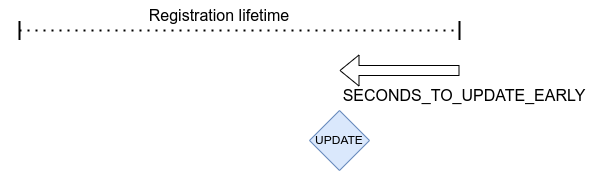
CONFIG_LWM2M_SECONDS_TO_UPDATE_EARLY는 lifetime 만료 몇 초 전에 registration update를 보낼지 정합니다. 이 default mode에서는 server가 registration lifetime을 바꾸면 client update 주기도 함께 달라집니다. IPv4 network에서 흔한 QUEUE mode라면 server가 device에 도달할 수 있는 주기에도 영향을 줍니다.
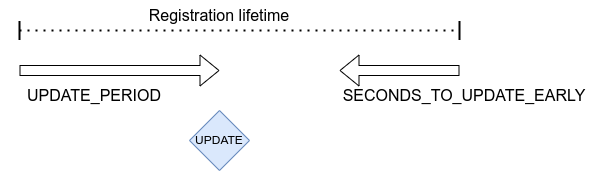
CONFIG_LWM2M_UPDATE_PERIOD도 설정하면 두 값 가운데 먼저 만료하는 시점에 update message를 보냅니다. Registration lifetime을 길게 설정하면서도 server가 lifetime을 바꾸는 것과 독립적으로 update period를 정확히 정할 수 있습니다.
Runtime에는 flooding을 막기 위해 update frequency가 15초에 한 번으로 제한됩니다.
LwM2M shell
CONFIG_LWM2M_SHELL을 선택하면 Zephyr shell과 LwM2M command로 client를 시험할 수 있습니다. Resource read·write·execute, client start·stop·pause·resume을 지원합니다. Test용 기능이므로 production system에서는 활성화하지 않아야 합니다.
Server-side test만으로 필요한 action을 모두 유발할 수 없을 때 UART에서 client-side action을 실행하는 용도로 사용할 수 있습니다.
uart:~$ lwm2m
lwm2m - LwM2M commands
Subcommands:
  send    :send PATHS
          LwM2M SEND operation

  exec    :exec PATH [PARAM]
          Execute a resource

  read    :read PATH [OPTIONS]
          Read value from LwM2M resource
          -x   Read value as hex stream (default)
          -s   Read value as string
          -b   Read value as bool (1/0)
          -uX  Read value as uintX_t
          -sX  Read value as intX_t
          -f   Read value as float
          -t   Read value as time_t

  write   :write PATH [OPTIONS] VALUE
          Write into LwM2M resource
          -s   Write value as string (default)
          -b   Write value as bool
          -uX  Write value as uintX_t
          -sX  Write value as intX_t
          -f   Write value as float
          -t   Write value as time_t

  create  :create PATH
          Create object or resource instance

  delete  :delete PATH
          Delete object or resource instance

  cache   :cache PATH NUM
          Enable data cache for resource
          PATH is LwM2M path
          NUM how many elements to cache

  start   :start EP_NAME [BOOTSTRAP FLAG]
          Start the LwM2M RD (Registration / Discovery) Client
          -b   Set the bootstrap flag (default 0)

  stop    :stop [OPTIONS]
          Stop the LwM2M RD (De-register) Client
          -f   Force close the connection

  update  :Trigger Registration Update of the LwM2M RD Client

  pause   :LwM2M engine thread pause
  resume  :LwM2M engine thread resume
  lock    :Lock the LwM2M registry
  unlock  :Unlock the LwM2M registry
API Reference
Doxygen group lwm2m_api가 API reference를 제공합니다.
Source
출처
영어 원문에는 문단, 문서 지시문, 표, 코드, 코드 심벌, 경로를 그대로 보존했습니다.