Part 1
요약·해설
세 role과 stage, firmware metadata format, effect 4종 및 distribution procedure 전체를 공식 도식과 함께 설명합니다.
Initiator · Distributor · Target
Upload · Check · Distribution
BLOB
4
Part 2
접을 수 있는 영어 원문 전체
영어 원문 전체 펼치기
1B54586CD6568443335A6B76B3E018D823F10C0F58ABB9A20AA03C70E0AADD60
.. _bluetooth_mesh_dfu:

Device Firmware Update (DFU)
############################

Bluetooth Mesh supports the distribution of firmware images across a mesh network. The Bluetooth
mesh DFU subsystem implements the Bluetooth Mesh Device Firmware Update Model specification version
1.0.

Bluetooth Mesh DFU implements a distribution mechanism for firmware images, and does not put any
restrictions on the size, format or usage of the images. The primary design goal of the subsystem is
to provide the qualifiable parts of the Bluetooth Mesh DFU specification, and leave the usage,
firmware validation and deployment to the application.

The DFU specification is implemented in the Zephyr Bluetooth Mesh DFU subsystem as three separate
models:

.. toctree::
   :maxdepth: 1

   dfu_srv
   dfu_cli
   dfd_srv

Overview
********

DFU roles
=========

The Bluetooth Mesh DFU subsystem defines three different roles the mesh nodes have to assume in the
distribution of firmware images:

Target node
   Target node is the receiver and user of the transferred firmware images. All its functionality is
   implemented by the :ref:`bluetooth_mesh_dfu_srv` model. A transfer may be targeting any number of
   Target nodes, and they will all be updated concurrently.

Distributor
   The Distributor role serves two purposes in the DFU process. First, it's acting as the Target
   node in the Upload Firmware procedure, then it distributes the uploaded image to other Target
   nodes as the Distributor. The Distributor does not select the parameters of the transfer, but
   relies on an Initiator to give it a list of Target nodes and transfer parameters. The Distributor
   functionality is implemented in two models, :ref:`bluetooth_mesh_dfd_srv` and
   :ref:`bluetooth_mesh_dfu_cli`. The :ref:`bluetooth_mesh_dfd_srv` is responsible for communicating
   with the Initiator, and the :ref:`bluetooth_mesh_dfu_cli` is responsible for distributing the
   image to the Target nodes.

Initiator
   The Initiator role is typically implemented by the same device that implements the Bluetooth Mesh
   :ref:`Provisioner <bluetooth_mesh_provisioning>` and :ref:`Configurator
   <bluetooth_mesh_models_cfg_cli>` roles. The Initiator needs a full overview of the potential
   Target nodes and their firmware, and will control (and initiate) all firmware updates. The
   Initiator role is not implemented in the Zephyr Bluetooth Mesh DFU subsystem.

.. figure:: ../../../../../../connectivity/bluetooth/api/mesh/images/dfu_roles_mesh.svg
   :align: center
   :alt: Graphic overview of the DFU roles mesh nodes can have during the process of image
         distribution

   DFU roles and the associated Bluetooth Mesh models

Bluetooth Mesh applications may combine the DFU roles in any way they'd like, and even take on
multiple instances of the same role by instantiating the models on separate elements. For instance,
the Distributor and Initiator role can be combined by instantiating the
:ref:`bluetooth_mesh_dfu_cli` on the Initiator node and calling its API directly.

It's also possible to combine the Initiator and Distributor devices into a single device, and
replace the Firmware Distribution Server model with a proprietary mechanism that will access the
Firmware Update Client model directly, e.g. over a serial protocol.

.. note::
   All DFU models instantiate one or more :ref:`bluetooth_mesh_blob`, and may need to be spread over
   multiple elements for certain role combinations.

Stages
======

The Bluetooth Mesh DFU process is designed to act in three stages:

Upload stage
   First, the image is uploaded to a Distributor in a mesh network by an external entity, such as a
   phone or gateway (the Initiator). During the Upload stage, the Initiator transfers the firmware
   image and all its metadata to the Distributor node inside the mesh network. The Distributor
   stores the firmware image and its metadata persistently, and awaits further instructions from the
   Initiator. The time required to complete the upload process depends on the size of the image.
   After the upload completes, the Initiator can disconnect from the network during the much more
   time-consuming Distribution stage. Once the firmware has been uploaded to the Distributor, the
   Initiator may trigger the Distribution stage at any time.

Firmware Capability Check stage (optional)
  Before starting the Distribution stage, the Initiator may optionally check if Target nodes can
  accept the new firmware. Nodes that do not respond, or respond that they can't receive the new
  firmware, are excluded from the firmware distribution process.

Distribution stage
   Before the firmware image can be distributed, the Initiator transfers the list of Target nodes
   and their designated firmware image index to the Distributor. Next, it tells the Distributor to
   start the firmware distributon process, which runs in the background while the Initiator and the
   mesh network perform other duties. Once the firmware image has been transferred to the Target
   nodes, the Distributor may ask them to apply the firmware image immediately and report back with
   their status and new firmware IDs.

Firmware images
===============

All updatable parts of a mesh node's firmware should be represented as a firmware image. Each Target
node holds a list of firmware images, each of which should be independently updatable and
identifiable.

Firmware images are represented as a BLOB (the firmware itself) with the following additional
information attached to it:

Firmware ID
   The firmware ID is used to identify a firmware image. The Initiator node may ask the Target nodes
   for a list of its current firmware IDs to determine whether a newer version of the firmware is
   available. The format of the firmware ID is vendor specific, but generally, it should include
   enough information for an Initiator node with knowledge of the format to determine the type of
   image as well as its version. The firmware ID is optional, and its max length is determined by
   :kconfig:option:`CONFIG_BT_MESH_DFU_FWID_MAXLEN`.

Firmware metadata
   The firmware metadata is used by the Target node to determine whether it should accept an
   incoming firmware update, and what the effect of the update would be. The metadata format is
   vendor specific, and should contain all information the Target node needs to verify the image, as
   well as any preparation the Target node has to make before the image is applied. Typical metadata
   information can be image signatures, changes to the node's Composition Data and the format of the
   BLOB. The Target node may perform a metadata check before accepting incoming transfers to
   determine whether the transfer should be started. The firmware metadata can be discarded by the
   Target node after the metadata check, as other nodes will never request the metadata from the
   Target node. The firmware metadata is optional, and its maximum length is determined by
   :kconfig:option:`CONFIG_BT_MESH_DFU_METADATA_MAXLEN`.

   The Bluetooth Mesh DFU subsystem in Zephyr provides its own metadata format
   (:c:struct:`bt_mesh_dfu_metadata`) together with a set of related functions that can be used by
   an end product. The support for it is enabled using the
   :kconfig:option:`CONFIG_BT_MESH_DFU_METADATA` option. The format of the metadata is presented in
   the table below.

+------------------------+--------------+----------------------------------------+
| Field                  | Size (Bytes) | Description                            |
+========================+==============+========================================+
| New firmware version   | 8 B          | 1 B: Major version                     |
|                        |              | 1 B: Minor version                     |
|                        |              | 2 B: Revision                          |
|                        |              | 4 B: Build number                      |
+------------------------+--------------+----------------------------------------+
| New firmware size      | 3 B          | Size in bytes for a new firmware       |
+------------------------+--------------+----------------------------------------+
| New firmware core type | 1 B          | Bit field:                             |
|                        |              | Bit 0: Application core                |
|                        |              | Bit 1: Network core                    |
|                        |              | Bit 2: Applications specific BLOB.     |
|                        |              | Other bits: RFU                        |
+------------------------+--------------+----------------------------------------+
| Hash of incoming       | 4 B          | Lower 4 octets of AES-CMAC             |
| composition data       | (Optional)   | (app-specific-key, composition data).  |
|                        |              | This field is present, if Bit 0 is set |
|                        |              | in the New firmware core type field.   |
+------------------------+--------------+----------------------------------------+
| New number of elements | 2 B          | Number of elements on the node         |
|                        | (Optional)   | after firmware is applied.             |
|                        |              | This field is present, if Bit 0 is set |
|                        |              | in the New firmware core type field.   |
+------------------------+--------------+----------------------------------------+
| Application-specific   | <variable>   | Application-specific data to allow     |
| data for new firmware  | (Optional)   | application to execute some            |
|                        |              | vendor-specific behaviors using        |
|                        |              | this data before it can respond        |
|                        |              | with a status message.                 |
+------------------------+--------------+----------------------------------------+

  .. note::

      The AES-CMAC algorithm serves as a hashing function with a fixed key and is not used for
      encryption in Bluetooth Mesh DFU metadata. The resulting hash is not secure since the key is
      known.

Firmware URI
   The firmware URI gives the Initiator information about where firmware updates for the image can
   be found. The URI points to an online resource the Initiator can interact with to get new
   versions of the firmware. This allows Initiators to perform updates for any node in the mesh
   network by interacting with the web server pointed to in the URI. The URI must point to a
   resource using the ``http`` or ``https`` schemes, and the targeted web server must behave
   according to the Firmware Check Over HTTPS procedure defined by the specification. The firmware
   URI is optional, and its max length is determined by
   :kconfig:option:`CONFIG_BT_MESH_DFU_URI_MAXLEN`.

   .. note::

      The out-of-band distribution mechanism is not supported.

.. _bluetooth_mesh_dfu_firmware_effect:

Firmware effect
---------------

A new image may have the Composition Data Page 0 different from the one allocated on a Target node.
This may have an effect on the provisioning data of the node and how the Distributor finalizes the
DFU. Depending on the availability of the Remote Provisioning Server model on the old and new image,
the device may either boot up unprovisioned after applying the new firmware or require to be
re-provisioned. The complete list of available options is defined in :c:enum:`bt_mesh_dfu_effect`:

:c:enumerator:`BT_MESH_DFU_EFFECT_NONE`
   The device stays provisioned after the new firmware is programmed. This effect is chosen if the
   composition data of the new firmware doesn't change.
:c:enumerator:`BT_MESH_DFU_EFFECT_COMP_CHANGE_NO_RPR`
   This effect is chosen when the composition data changes and the device doesn't support the remote
   provisioning. The new composition data takes place only after re-provisioning.
:c:enumerator:`BT_MESH_DFU_EFFECT_COMP_CHANGE`
   This effect is chosen when the composition data changes and the device supports the remote
   provisioning. In this case, the device stays provisioned and the new composition data takes place
   after re-provisioning using the Remote Provisioning models.
:c:enumerator:`BT_MESH_DFU_EFFECT_UNPROV`
  This effect is chosen if the composition data in the new firmware changes, the device doesn't
  support the remote provisioning, and the new composition data takes effect after applying the
  firmware.

When the Target node receives the Firmware Update Firmware Metadata Check message, the Firmware
Update Server model calls the :c:member:`bt_mesh_dfu_srv_cb.check` callback, the application can
then process the metadata and provide the effect value. If the effect is
:c:enumerator:`BT_MESH_DFU_EFFECT_COMP_CHANGE`, the application must call functions
:c:func:`bt_mesh_comp_change_prepare` and :c:func:`bt_mesh_models_metadata_change_prepare` to
prepare the Composition Data Page and Models Metadata Page contents before applying the new
firmware image. See :ref:`bluetooth_mesh_dfu_srv_comp_data_and_models_metadata` for more
information.


DFU procedures
**************

The DFU protocol is implemented as a set of procedures that must be performed in a certain order.

The Initiator controls the Upload stage of the DFU protocol, and all Distributor side handling of
the upload subprocedures is implemented in the :ref:`bluetooth_mesh_dfd_srv`.

The Distribution stage is controlled by the Distributor, as implemented by the
:ref:`bluetooth_mesh_dfu_cli`. The Target node implements all handling of these procedures in the
:ref:`bluetooth_mesh_dfu_srv`, and notifies the application through a set of callbacks.

.. figure:: ../../../../../../connectivity/bluetooth/api/mesh/images/dfu_stages_procedures_mesh.svg
   :align: center
   :alt: Overview of DFU stages and procedures

   DFU stages and procedures as seen from the Distributor

Uploading the firmware
======================

The Upload Firmware procedure uses the :ref:`bluetooth_mesh_blob` to transfer the firmware image
from the Initiator to the Distributor. The Upload Firmware procedure works in two steps:

1. The Initiator generates a BLOB ID, and sends it to the Distributor's Firmware Distribution Server
   along with the firmware information and other input parameters of the BLOB transfer. The Firmware
   Distribution Server stores the information, and prepares its BLOB Transfer Server for the
   incoming transfer before it responds with a status message to the Initiator.
#. The Initiator's BLOB Transfer Client model transfers the firmware image to the Distributor's BLOB
   Transfer Server, which stores the image in a predetermined flash partition.

When the BLOB transfer finishes, the firmware image is ready for distribution. The Initiator may
upload several firmware images to the Distributor, and ask it to distribute them in any order or at
any time. Additional procedures are available for querying and deleting firmware images from the
Distributor.

The following Distributor's capabilities related to firmware images can be configured using the
configuration options:

* :kconfig:option:`CONFIG_BT_MESH_DFU_SLOT_CNT`: Amount of image slots available on the device.
* :kconfig:option:`CONFIG_BT_MESH_DFD_SRV_SLOT_MAX_SIZE`: Maximum allowed size for each image.
* :kconfig:option:`CONFIG_BT_MESH_DFD_SRV_SLOT_SPACE`: Available space for all images.

Populating the Distributor's receivers list
===========================================

Before the Distributor can start distributing the firmware image, it needs a list of Target nodes to
send the image to. The Initiator gets the full list of Target nodes either by querying the potential
targets directly, or through some external authority. The Initiator uses this information to
populate the Distributor's receivers list with the address and relevant firmware image index of each
Target node. The Initiator may send one or more Firmware Distribution Receivers Add messages to
build the Distributor's receivers list, and a Firmware Distribution Receivers Delete All message to
clear it.

The maximum number of receivers that can be added to the Distributor is configured through the
:kconfig:option:`CONFIG_BT_MESH_DFD_SRV_TARGETS_MAX` configuration option.

Initiating the distribution
===========================

Once the Distributor has stored a firmware image and received a list of Target nodes, the Initiator
may initiate the distribution procedure. The BLOB transfer parameters for the distribution are
passed to the Distributor along with an update policy. The update policy decides whether the
Distributor should request that the firmware is applied on the Target nodes or not. The Distributor
stores the transfer parameters and starts distributing the firmware image to its list of Target
nodes.

Firmware distribution
---------------------

The Distributor's Firmware Update Client model uses its BLOB Transfer Client model's broadcast
subsystem to communicate with all Target nodes. The firmware distribution is performed with the
following steps:

1. The Distributor's Firmware Update Client model generates a BLOB ID and sends it to each Target
   node's Firmware Update Server model, along with the other BLOB transfer parameters, the Target
   node firmware image index and the firmware image metadata. Each Target node performs a metadata
   check and prepares their BLOB Transfer Server model for the transfer, before sending a status
   response to the Firmware Update Client, indicating if the firmware update will have any effect on
   the Bluetooth Mesh state of the node.
#. The Distributor's BLOB Transfer Client model transfers the firmware image to all Target nodes.
#. Once the BLOB transfer has been received, the Target nodes' applications verify that the firmware
   is valid by performing checks such as signature verification or image checksums against the image
   metadata.
#. The Distributor's Firmware Update Client model queries all Target nodes to ensure that they've
   all verified the firmware image.

If the distribution procedure completed with at least one Target node reporting that the image has
been received and verified, the distribution procedure is considered successful.

.. note::
   The firmware distribution procedure only fails if *all* Target nodes are lost. It is up to the
   Initiator to request a list of failed Target nodes from the Distributor and initiate additional
   attempts to update the lost Target nodes after the current attempt is finished.

Suspending the distribution
---------------------------

The Initiator can also request the Distributor to suspend the firmware distribution. In this case,
the Distributor will stop sending any messages to Target nodes. When the firmware distribution is
resumed, the Distributor will continue sending the firmware from the last successfully transferred
block.

Applying the firmware image
===========================

If the Initiator requested it, the Distributor can initiate the Apply Firmware on Target Node
procedure on all Target nodes that successfully received and verified the firmware image. The Apply
Firmware on Target Node procedure takes no parameters, and to avoid ambiguity, it should be
performed before a new transfer is initiated. The Apply Firmware on Target Node procedure consists
of the following steps:

1. The Distributor's Firmware Update Client model instructs all Target nodes that have verified the
   firmware image to apply it. The Target nodes' Firmware Update Server models respond with a status
   message before calling their application's ``apply`` callback.
#. The Target node's application performs any preparations needed before applying the transfer, such
   as storing a snapshot of the Composition Data or clearing its configuration.
#. The Target node's application swaps the current firmware with the new image and updates its
   firmware image list with the new firmware ID.
#. The Distributor's Firmware Update Client model requests the full list of firmware images from
   each Target node, and scans through the list to make sure that the new firmware ID has replaced
   the old.

.. note::
   During the metadata check in the distribution procedure, the Target node may have reported that
   it will become unprovisioned after the firmware image is applied. In this case, the Distributor's
   Firmware Update Client model will send a request for the full firmware image list, and expect no
   response.

Cancelling the distribution
===========================

The firmware distribution can be cancelled at any time by the Initiator. In this case, the
Distributor starts the cancelling procedure by sending a cancelling message to all Target nodes. The
Distributor waits for the response from all Target nodes. Once all Target nodes have replied, or the
request has timed out, the distribution procedure is cancelled. After this the distribution
procedure can be started again from the ``Firmware distribution`` section.


API reference
*************

This section lists the types common to the Device Firmware Update mesh models.

.. doxygengroup:: bt_mesh_dfd
   :project: Zephyr
   :members:

.. doxygengroup:: bt_mesh_dfu
   :project: Zephyr
   :members:

.. doxygengroup:: bt_mesh_dfu_metadata
   :project: Zephyr
   :members:
Part 3
한국어 전문 번역
Device Firmware Update
Bluetooth Mesh는 mesh network 전체에 firmware image를 배포할 수 있습니다. Zephyr Bluetooth Mesh DFU subsystem은 Bluetooth Mesh Device Firmware Update Model specification 1.0을 구현합니다.
Mesh DFU는 firmware image를 전달하는 distribution mechanism이며 image의 size, format 또는 용도를 제한하지 않습니다. Subsystem의 주된 설계 목표는 Bluetooth Mesh DFU specification에서 qualification 가능한 부분을 제공하고, image 사용·firmware validation·deployment는 application에 맡기는 것입니다.
Specification은 Firmware Update Server, Firmware Update Client와 Firmware Distribution Server의 세 model로 나뉘어 구현됩니다.
개요
DFU role
Target node
전송된 firmware image를 받고 사용하는 node입니다. 모든 기능은 Firmware Update Server model이 구현합니다. Transfer 하나가 Target 여러 개를 대상으로 할 수 있으며 모든 Target을 동시에 update합니다.
Distributor
DFU 과정에서 두 역할을 수행합니다. 먼저 Upload Firmware procedure에서는 Target으로 동작해 image를 받고, 그 다음 Distributor로서 다른 Target node에 upload된 image를 배포합니다.
Distributor가 transfer parameter를 직접 선택하지는 않습니다. Initiator가 Target list와 transfer parameter를 제공합니다. Firmware Distribution Server가 Initiator와 통신하고 Firmware Update Client가 Target node에 image를 배포합니다.
Initiator
일반적으로 Bluetooth Mesh Provisioner와 Configurator role을 수행하는 device에 함께 구현합니다. 가능한 Target node와 각 firmware를 전체적으로 파악하고 모든 firmware update를 제어하고 시작합니다. Zephyr Bluetooth Mesh DFU subsystem은 Initiator role 자체를 구현하지 않습니다.
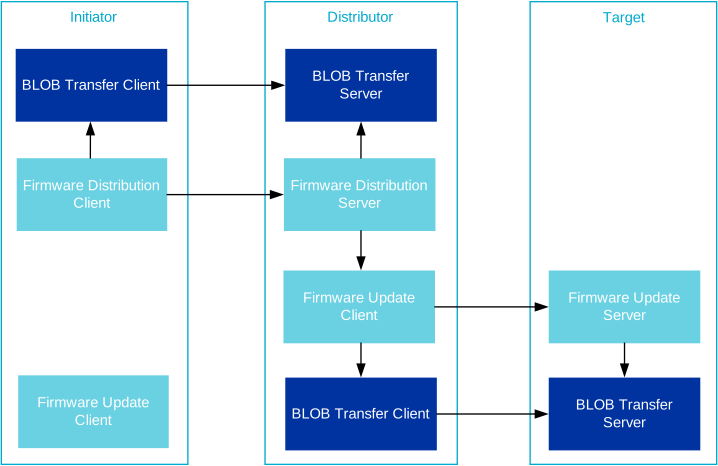
Application은 DFU role을 자유롭게 조합할 수 있습니다. 별도 element에 model을 instance화하면 같은 role을 여러 instance로 가질 수도 있습니다. 예를 들어 Initiator node에 Firmware Update Client를 두고 API를 직접 호출하면 Distributor와 Initiator를 결합할 수 있습니다.
Initiator와 Distributor를 device 하나로 합치고 Firmware Distribution Server 대신 serial protocol 같은 proprietary mechanism이 Firmware Update Client에 직접 접근하도록 만들 수도 있습니다.
세 stage
Upload stage
Phone이나 gateway 같은 외부 Initiator가 mesh network 안의 Distributor로 image와 metadata를 전송합니다. Distributor는 이를 persistent storage에 보관하고 다음 지시를 기다립니다. Upload 시간은 image size에 따라 달라집니다.
Upload가 끝나면 더 오래 걸리는 Distribution stage 동안 Initiator가 network에서 disconnect해도 됩니다. Distributor에 image가 올라간 뒤 Initiator는 원하는 시점에 Distribution stage를 시작할 수 있습니다.
Firmware Capability Check stage, optional
Distribution 전에 Target이 새 firmware를 받아들일 수 있는지 Initiator가 선택적으로 확인합니다. 응답하지 않거나 수신할 수 없다고 응답한 node는 distribution에서 제외합니다.
Distribution stage
Initiator가 Target node list와 각 node의 지정 firmware image index를 Distributor에 전달한 뒤 distribution 시작을 명령합니다. 이 process는 background에서 실행되어 Initiator와 mesh network가 다른 작업을 계속할 수 있습니다.
Image가 Target에 전송되면 Distributor는 즉시 적용하도록 요청하고 각 Target의 status와 새 firmware ID를 보고받을 수 있습니다.
Firmware image
Mesh node에서 update 가능한 각 부분은 별도의 firmware image로 표현해야 합니다. Target은 각자 독립적으로 update하고 식별할 수 있는 firmware image list를 가집니다. Firmware 자체인 BLOB에는 아래 정보가 붙습니다.
Firmware ID
Firmware image를 식별합니다. Initiator는 Target의 현재 firmware ID list를 조회해 더 새 버전이 있는지 판단할 수 있습니다. Format은 vendor-specific이지만 format을 아는 Initiator가 image type과 version을 판별할 만큼 충분한 정보를 담는 것이 일반적입니다.
Firmware ID는 optional이며 최대 길이는 CONFIG_BT_MESH_DFU_FWID_MAXLEN으로 정합니다.
Firmware metadata
Target은 metadata로 incoming update를 받을지, update가 어떤 영향을 줄지 판단합니다. Format은 vendor-specific이며 image signature, Composition Data 변경, BLOB format과 적용 전에 필요한 준비처럼 image 검증에 필요한 정보를 담아야 합니다.
Target은 transfer를 받기 전에 metadata check를 수행할 수 있습니다. 다른 node가 Target의 metadata를 요청하지 않으므로 check 후 metadata를 버려도 됩니다. Metadata는 optional이며 최대 길이는 CONFIG_BT_MESH_DFU_METADATA_MAXLEN으로 정합니다.
Zephyr는 end product에서 사용할 수 있는 bt_mesh_dfu_metadata format과 helper를 제공합니다. CONFIG_BT_MESH_DFU_METADATA로 활성화하며 format은 다음과 같습니다.
| Field | 크기 | 설명 |
|---|---|---|
| New firmware version | 8 B | Major 1 B, Minor 1 B, Revision 2 B, Build number 4 B |
| New firmware size | 3 B | 새 firmware의 byte 단위 크기 |
| New firmware core type | 1 B | Bit 0: Application core Bit 1: Network core Bit 2: Application-specific BLOB 나머지 bit: RFU |
| Hash of incoming composition data | 4 B, optional | AES-CMAC(app-specific-key, composition data)의 하위 4 octet. Core type의 Bit 0이 설정된 경우 존재합니다. |
| New number of elements | 2 B, optional | Firmware 적용 후 node의 element 수. Core type의 Bit 0이 설정된 경우 존재합니다. |
| Application-specific data | 가변, optional | Status message에 응답하기 전에 vendor-specific behavior를 실행할 수 있도록 application에 전달하는 data입니다. |
Firmware URI
Initiator가 firmware update를 찾을 online resource를 나타냅니다. URI의 web server와 상호작용해 새 version을 얻을 수 있어 Initiator는 mesh 안의 어떤 node든 update할 수 있습니다.
URI scheme은 http 또는 https여야 하며 web server는 specification의 Firmware Check Over HTTPS procedure에 따라 동작해야 합니다. URI는 optional이고 최대 길이는 CONFIG_BT_MESH_DFU_URI_MAXLEN으로 정합니다.
Firmware effect
새 image의 Composition Data Page 0이 기존 Target과 다를 수 있습니다. 이 차이는 node provisioning data와 Distributor가 DFU를 마무리하는 방식에 영향을 줍니다. 이전·새 image의 Remote Provisioning Server 지원 여부에 따라 적용 후 unprovisioned로 boot하거나 reprovision이 필요할 수 있습니다.
BT_MESH_DFU_EFFECT_NONE: 새 firmware의 Composition Data가 바뀌지 않아 programming 뒤에도 provisioned 상태를 유지합니다.BT_MESH_DFU_EFFECT_COMP_CHANGE_NO_RPR: Composition Data가 바뀌지만 remote provisioning을 지원하지 않습니다. Reprovision 후에 새 Composition Data가 적용됩니다.BT_MESH_DFU_EFFECT_COMP_CHANGE: Composition Data가 바뀌고 remote provisioning을 지원합니다. Device는 provisioned 상태를 유지하며 Remote Provisioning model을 이용한 reprovision 후 새 data가 적용됩니다.BT_MESH_DFU_EFFECT_UNPROV: Composition Data가 바뀌고 remote provisioning을 지원하지 않으며 firmware 적용 직후 새 Composition Data가 적용되어 device가 unprovisioned 상태가 됩니다.
Target이 Firmware Update Firmware Metadata Check message를 받으면 Server가 bt_mesh_dfu_srv_cb.check callback을 호출하고 application이 metadata를 처리해 effect를 반환합니다.
Effect가 BT_MESH_DFU_EFFECT_COMP_CHANGE이면 새 firmware 적용 전에 bt_mesh_comp_change_prepare와 bt_mesh_models_metadata_change_prepare를 호출해 Composition Data Page와 Models Metadata Page content를 준비해야 합니다.
DFU procedure
DFU protocol은 정해진 순서로 실행해야 하는 procedure set입니다. Initiator가 Upload stage를 제어하고 Distributor의 upload subprocedure는 Firmware Distribution Server가 처리합니다.
Distribution stage는 Firmware Update Client로 구현된 Distributor가 제어합니다. Target의 Firmware Update Server가 모든 procedure를 처리하고 callback으로 application에 알립니다.
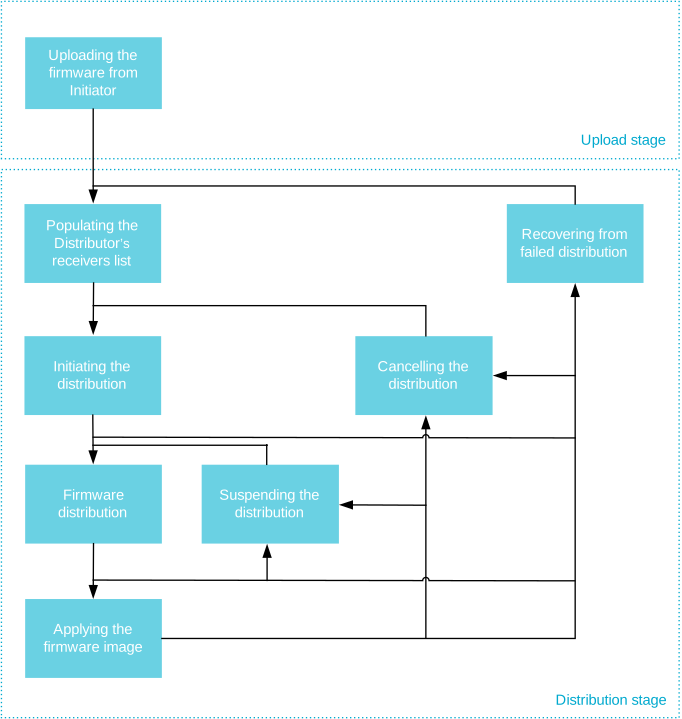
Firmware upload
Upload Firmware procedure는 BLOB transfer로 Initiator에서 Distributor로 firmware image를 보냅니다.
- Initiator가 BLOB ID를 생성해 firmware 정보 및 다른 BLOB input parameter와 함께 Distributor의 Firmware Distribution Server로 보냅니다. Server는 정보를 저장하고 incoming transfer를 받을 BLOB Transfer Server를 준비한 뒤 status를 응답합니다.
- Initiator의 BLOB Transfer Client가 Distributor의 BLOB Transfer Server로 image를 보내고 Server는 predetermined flash partition에 저장합니다.
BLOB transfer가 끝나면 distribution 준비가 완료됩니다. Initiator는 image 여러 개를 upload하고 원하는 순서와 시점에 distribution을 요청할 수 있으며 Distributor의 image 조회·삭제 procedure도 사용할 수 있습니다.
CONFIG_BT_MESH_DFU_SLOT_CNT: Device의 image slot 수CONFIG_BT_MESH_DFD_SRV_SLOT_MAX_SIZE: Slot별 최대 image sizeCONFIG_BT_MESH_DFD_SRV_SLOT_SPACE: 전체 image에 사용할 수 있는 공간
Distributor receiver list 채우기
Distribution 전 Distributor에는 image를 보낼 Target list가 필요합니다. Initiator는 잠재 Target을 직접 조회하거나 외부 authority에서 전체 list를 얻고, 각 Target의 address와 firmware image index를 Distributor receiver list에 추가합니다.
Firmware Distribution Receivers Add message를 한 번 이상 보내 list를 만들고 Firmware Distribution Receivers Delete All message로 비웁니다. 최대 receiver 수는 CONFIG_BT_MESH_DFD_SRV_TARGETS_MAX로 정합니다.
Distribution 시작
Distributor가 image를 저장하고 Target list를 받으면 Initiator가 distribution procedure를 시작할 수 있습니다. BLOB transfer parameter와 update policy를 함께 전달합니다. Policy는 Distributor가 Target에 firmware 적용까지 요청할지 결정합니다. Distributor는 parameter를 저장하고 Target list로 image 배포를 시작합니다.
Firmware distribution
Distributor의 Firmware Update Client는 BLOB Transfer Client의 broadcast subsystem으로 모든 Target과 통신합니다.
- Firmware Update Client가 BLOB ID를 생성해 transfer parameter, Target firmware image index와 metadata와 함께 각 Target의 Firmware Update Server에 보냅니다. Target은 metadata를 확인하고 BLOB Transfer Server를 준비한 뒤 update가 Mesh state에 미칠 effect를 status로 응답합니다.
- Distributor의 BLOB Transfer Client가 모든 Target에 firmware image를 보냅니다.
- 수신 뒤 각 Target application이 signature verification이나 metadata 대비 checksum 검사를 수행해 image가 유효한지 확인합니다.
- Firmware Update Client가 모든 Target을 조회해 image verification 완료 여부를 확인합니다.
Target 하나 이상이 image 수신과 검증 성공을 보고하면 distribution procedure는 성공입니다.
Distribution suspend
Initiator는 Distributor에 suspend를 요청할 수 있습니다. Distributor는 Target으로 message 전송을 중단하고, resume 시 마지막으로 성공한 block 다음부터 계속 보냅니다.
Firmware image 적용
Initiator가 요청했다면 Distributor는 image를 성공적으로 받고 검증한 모든 Target에서 Apply Firmware procedure를 시작할 수 있습니다. Parameter가 없는 procedure이며 모호성을 피하려면 새 transfer 전에 실행해야 합니다.
- Firmware Update Client가 검증 완료 Target에 적용을 지시합니다. 각 Server는 status를 응답한 뒤 application의
applycallback을 호출합니다. - Target application이 Composition Data snapshot 저장이나 configuration 정리 같은 적용 전 준비를 수행합니다.
- Target application이 현재 firmware를 새 image로 교체하고 firmware image list의 firmware ID를 갱신합니다.
- Firmware Update Client가 각 Target의 전체 firmware image list를 요청해 새 firmware ID가 기존 ID를 대체했는지 확인합니다.
Distribution 취소
Initiator는 언제든 distribution을 취소할 수 있습니다. Distributor가 모든 Target에 cancel message를 보내고 응답을 기다립니다. 모든 Target이 응답하거나 request timeout이 발생하면 procedure를 취소하며 이후 Firmware distribution 단계부터 다시 시작할 수 있습니다.
API Reference
공식 bt_mesh_dfd, bt_mesh_dfu, bt_mesh_dfu_metadata Doxygen group이 DFU model 공통 type과 metadata API를 생성합니다.
Source
출처
영어 원문에는 문단, 문서 지시문, 표, 코드, 코드 심벌, 경로를 그대로 보존했습니다.