Part 1
요약·해설
공식 이미지와 5개 명령·출력 블록, Wi-Fi/Bluetooth blob 및 0/RST bootloader 순서를 보존했습니다.
CPU
ESP32-S2 · single-core
Network
Wi-Fi
Security
RSA-3072 · AES-XTS-256
Flash
0 + RST bootloader
Part 2
접을 수 있는 영어 원문 전체
영어 원문 전체 펼치기
원문 SHA-256
7B709EB15FA9158C1AB1ABE18B8A964E0A11FD1FB2EA770E440C76CCD79F96E5
.. _esp32s2_lolin_mini:

ESP32-S2 Lolin Mini
###################

Overview
********

ESP32-S2 is a highly integrated, low-power, single-core Wi-Fi Microcontroller SoC, designed to be secure and
cost-effective, with a high performance and a rich set of IO capabilities. [1]_

The features include the following:

- RSA-3072-based secure boot
- AES-XTS-256-based flash encryption
- Protected private key and device secrets from software access
- Cryptographic accelerators for enhanced performance
- Protection against physical fault injection attacks
- Various peripherals:

  - 43x programmable GPIOs
  - 14x configurable capacitive touch GPIOs
  - USB OTG
  - LCD interface
  - camera interface
  - SPI
  - I2S
  - UART
  - ADC
  - DAC
  - LED PWM with up to 8 channels

.. figure:: ../../../../../../../boards/wemos/esp32s2_lolin_mini/doc/img/esp32_s2_lolin_mini.jpg
        :align: center
        :alt: ESP32-S2 LOLIN MINI

System requirements
*******************

Prerequisites
-------------

Espressif HAL requires WiFi and Bluetooth binary blobs in order work. Run the command
below to retrieve those files.

.. code-block:: console

   west blobs fetch hal_espressif

.. note::

   It is recommended running the command above after :file:`west update`.

Building & Flashing
-------------------

Build and flash applications as usual (see :ref:`build_an_application` and
:ref:`application_run` for more details).

.. zephyr-app-commands::
   :zephyr-app: samples/hello_world
   :board: esp32s2_lolin_mini
   :goals: build

The usual ``flash`` target will work with the ``esp32s2_lolin_mini`` board
configuration after putting the board into bootloader mode by holding the '0'
button then pressing 'RST' and releasing the 'RST' button.

Here is an example for the :ref:`hello_world`
application.

.. zephyr-app-commands::
   :zephyr-app: samples/hello_world
   :board: esp32s2_lolin_mini
   :goals: flash

Open a serial port using e.g. screen

.. code-block:: shell

   screen /dev/ttyUSB0 115200

After the board has been manually reset and booted, you should see the following
message in the monitor:

.. code-block:: console

   ***** Booting Zephyr OS vx.x.x-xxx-gxxxxxxxxxxxx *****
   Hello World! esp32s2_lolin_mini

References
**********

.. [1] https://www.espressif.com/en/products/socs/esp32-s2
.. _`ESP32S2 Technical Reference Manual`: https://espressif.com/sites/default/files/documentation/esp32-s2_technical_reference_manual_en.pdf
.. _`ESP32S2 Datasheet`: https://www.espressif.com/sites/default/files/documentation/esp32-s2_datasheet_en.pdf
Part 3
한국어 전문 번역
개요
ESP32-S2는 보안성과 비용 효율을 목표로 설계된 고집적·저전력 single-core Wi-Fi microcontroller SoC입니다. 높은 성능과 풍부한 I/O 기능을 제공합니다.
- RSA-3072 기반 secure boot
- AES-XTS-256 기반 flash encryption
- Software access로부터 private key와 device secret 보호
- 성능 향상을 위한 cryptographic accelerator
- Physical fault injection attack 방어
- 다양한 peripheral:
- Programmable GPIO 43개
- 설정 가능한 capacitive touch GPIO 14개
- USB OTG
- LCD interface
- Camera interface
- SPI
- I2S
- UART
- ADC
- DAC
- 최대 8-channel LED PWM
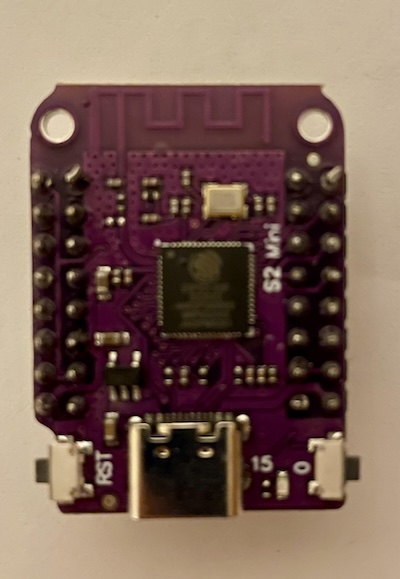
시스템 요구 사항
사전 준비
Espressif HAL이 동작하려면 Wi-Fi와 Bluetooth binary blob이 필요합니다. 다음 명령으로 해당 파일을 가져옵니다.
west blobs fetch hal_espressif빌드와 플래시
일반 application과 같은 방식으로 빌드하고 플래시합니다. 다음은 samples/hello_world를 esp32s2_lolin_mini board용으로 빌드하는 예입니다.
west build -b esp32s2_lolin_mini samples/hello_world보드를 bootloader mode로 전환하면 일반 flash target을 사용할 수 있습니다. 0 button을 누른 채 RST를 눌렀다가 RST만 먼저 놓습니다.
hello_world application을 플래시하는 예는 다음과 같습니다.
west build -b esp32s2_lolin_mini samples/hello_world
west flash
예를 들어 screen으로 serial port를 엽니다.
screen /dev/ttyUSB0 115200보드를 수동으로 reset하고 boot하면 monitor에 다음 메시지가 표시됩니다.
***** Booting Zephyr OS vx.x.x-xxx-gxxxxxxxxxxxx *****
Hello World! esp32s2_lolin_mini
참고 자료
Source
출처
영어 원문에는 문단, 문서 지시문, 표, 코드, 코드 심벌, 경로를 그대로 보존했습니다.