Part 1
요약·해설
공식 이미지 4개, clock·power·interface 목록과 pyOCD flash·debug 절차를 보존했습니다.
nRF51822 Cortex-M0
256K flash · 32K RAM
DAPLink · pyOCD
Arduino Uno Rev3
Part 2
접을 수 있는 영어 원문 전체
영어 원문 전체 펼치기
DE869BFFD6C36694286EF4C962FF3D90E17CD420395CE671358452642360DB34
.. _nrf51_vbluno51:

nRF51-VBLUno51
##############

Overview
********

Zephyr uses the nrf51_vbluno51 board configuration to run on the VBLUno51 board,
a VNG Bluetooth Low Energy UNO using an nRF51822 ARM processor.

.. figure:: ../../../../../../../boards/vngiotlab/nrf51_vbluno51/doc/img/nrf51_vbluno51.jpg
     :align: center
     :alt: nRF51_VBLUno51

     nrf51_vbluno51 Top

.. figure:: ../../../../../../../boards/vngiotlab/nrf51_vbluno51/doc/img/nrf51_vbluno51_bot.jpg
     :align: center
     :alt: nRF51_VBLUno51 Bottom

     nrf51_vbluno51 Bottom

More information about the board can be found at the
`VBLUno51 wiki page`_.

Hardware
********

VBLUno51 board has two external oscillators. The frequency of
the slow clock is 32.768 kHz. The frequency of the main clock
is 16 MHz.

Supported Features
==================

- CPU:
	+ Nordic nRF51822: ARM |reg| Cortex |trade| M0 32bit.
	+ *Bluetooth Low Energy interface.*
	+ 256KB Flash, 32KB RAM.
	+ UART(1), I2C(2), SPI(1), PWM(3), SWD, Timer 16bit(3).
	+ 21 digital channels, 6 ADC 10bit channels.
	+ 1 Led and 1 Button onboard.
	+ GPIO Voltage: 0 - 3.3V.
- DAPLink (CMSIS-DAP) interface for program and debug:
	+ USB MSD: Drag and Drop programming flash memory.
	+ USB HID (DAP): CMSIS-DAP compliant debug channel.
	+ USB CDC: Virtual COM port for log, trace and terminal emulation.

- Supports hardware flow control features (RTS/CTS).
- *Energy monitoring for BLE module by current measurement (Only VBLUno51_EM)*
- FOTA (Firmware over the air): Upgrade firmware over BLE interface.
- Build good applications with:
	+ Compiler and IDE: GCC, Keil MDK, IAR, Eclipse, Qt Creator.
	+ Frameworks: Arduino, ARM mbed-OS, Zephyr-OS, Nordic SDK, RIOT-OS, MyNewt-OS, ChibiOS, NuttX RTOS
	+ A lot of tutorials for Arduino, mbed-os and more.
- Pinout: Arduino Uno Rev3 compliant.
- Power:
	+ USB port.
	+ Power adapter: +9 -> +12V.
	+ 3V Battery: CR20xx holder
	+ Rechargeable battery jump: +3.7 -> +12V
- Open source: Hardware design, firmware, packages, tutorial and example codes

See `VBLUno51 wiki page`_ for full documents and tutorials about the VBLUno51 board.

Connections and IOs
===================

LED
---

* LED = LED0 (green) = P0.7

Push buttons
------------

* BUTTON = BUT = SW0 = P0.15

More details
------------

.. figure:: ../../../../../../../boards/vngiotlab/nrf51_vbluno51/doc/img/vbluno51_nordic_pinout.jpg
     :align: center
     :alt: nRF51_VBLUno51 Pinout

     nrf51_vbluno51 Pinout

.. figure:: ../../../../../../../boards/vngiotlab/nrf51_vbluno51/doc/img/vbluno51_frizting.jpg
     :align: center
     :alt: nRF51_VBLUno51 Fritzing part

     nrf51_vbluno51 Fritzing part

Programming and Debugging
*************************

Applications for the ``nrf51_vbluno51`` board configuration can be
built and flashed in the usual way (see :ref:`build_an_application`
and :ref:`application_run` for more details).

Flashing
========

The VBLUno51 board has on-board DAPLink (CMSIS-DAP) interface for flashing and debugging.
You do not need any other programming device.
You only need to install pyOCD tool (https://pypi.python.org/pypi/pyOCD)

This tutorial uses the blinky application :zephyr:code-sample:`blinky`.

See the :ref:`getting_started` for general information on setting up
your development environment. Then build and flash the application in
the usual way.

.. zephyr-app-commands::
   :zephyr-app: samples/basic/blinky
   :board: nrf51_vbluno51
   :goals: build flash

Debugging
=========

You can debug an application in the usual way.  Here is an example for the
:zephyr:code-sample:`blinky` application.

.. zephyr-app-commands::
   :zephyr-app: samples/basic/blinky
   :board: nrf51_vbluno51
   :maybe-skip-config:
   :goals: debug

Testing the VBLUno51 with Zephyr: buttons, LEDs, UART, BLE
**********************************************************

 Here are some sample applications that you can use to test different
 components on the VBLUno51 board:

 * :ref:`hello_world`
 * :zephyr:code-sample:`blinky`
 * :zephyr:code-sample:`button`
 * :ref:`bluetooth-beacon-sample`
 * :ref:`peripheral_hr`

References
**********

.. target-notes::

.. _VBLUno51 website: http://iotviet.com.vn/store/detail?id=2
.. _VBLUno51 wiki page: https://vngiotlab.github.io/vbluno/
Part 3
한국어 전문 번역
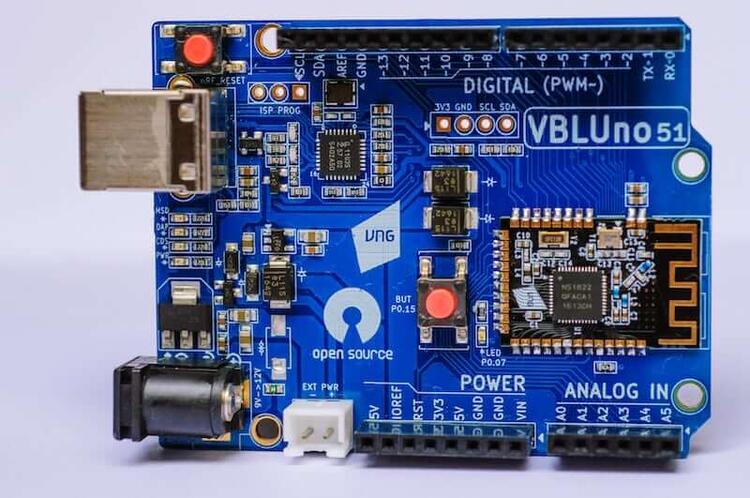
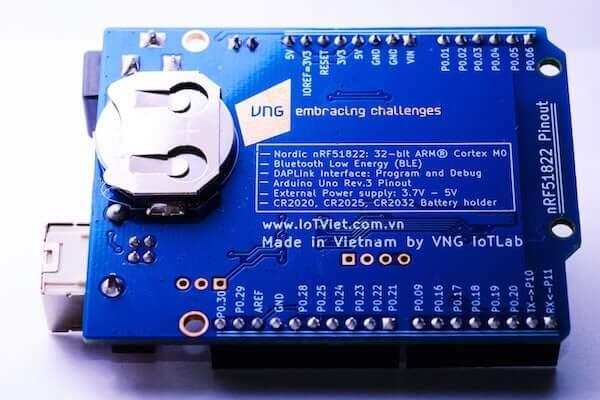
nRF51-VBLUno51 개요
Zephyr는 nrf51_vbluno51 board configuration으로 nRF51822 ARM processor 기반 VNG Bluetooth Low Energy UNO인 VBLUno51에서 실행됩니다. 자세한 내용은 VBLUno51 wiki를 참고합니다.
하드웨어
외부 oscillator가 두 개 있으며 slow clock은 32.768kHz, main clock은 16MHz입니다.
지원 기능
- Nordic nRF51822 ARM Cortex-M0 32-bit CPU와 Bluetooth Low Energy
- Flash 256KB, RAM 32KB
- UART 1개, I2C 2개, SPI 1개, PWM 3개, SWD, 16-bit timer 3개
- Digital channel 21개, 10-bit ADC channel 6개
- Onboard LED 1개와 button 1개, GPIO 0~3.3V
- Hardware RTS/CTS flow control
- VBLUno51_EM에서만 BLE module current 측정 energy monitoring
- BLE FOTA firmware upgrade
- Arduino Uno Rev3 compatible pinout
- USB, +9~+12V adapter, CR20xx 3V battery holder, +3.7~+12V rechargeable battery jumper
- Hardware design·firmware·package·tutorial·example code open source
DAPLink(CMSIS-DAP)
- USB MSD: drag-and-drop flash programming
- USB HID(DAP): CMSIS-DAP compliant debug channel
- USB CDC: log·trace·terminal용 virtual COM port
GCC, Keil MDK, IAR, Eclipse, Qt Creator와 Arduino, ARM mbed-OS, Zephyr, Nordic SDK, RIOT, MyNewt, ChibiOS, NuttX 등 다양한 toolchain·framework를 지원합니다.
연결과 I/O
LED
LED = LED0(green) = P0.7
Push button
BUTTON = BUT = SW0 = P0.15
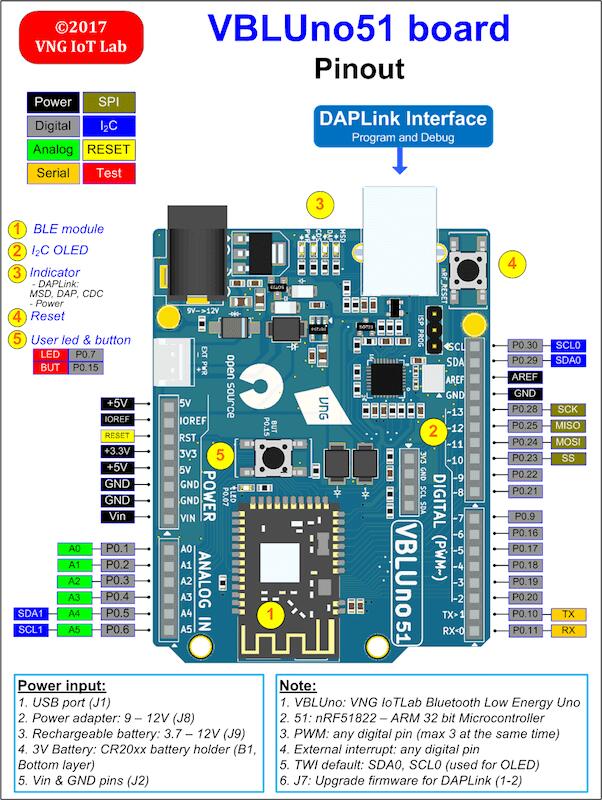
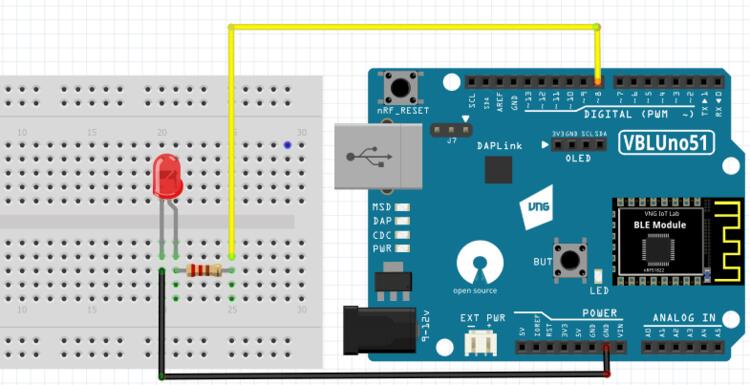
Programming과 debugging
nrf51_vbluno51 application은 일반적인 방식으로 build·flash할 수 있습니다.
Flash
Onboard DAPLink(CMSIS-DAP)가 flash와 debug를 지원하므로 별도 programmer가 필요 없습니다. pyOCD를 설치한 뒤 blinky를 build·flash합니다.
west build -b nrf51_vbluno51 samples/basic/blinky
west flash
Debug
같은 sample을 일반적인 방식으로 debug합니다.
west debugButton·LED·UART·BLE 시험
- hello_world
- blinky
- button
- Bluetooth beacon sample
- peripheral_hr
참고 자료
Source
출처
영어 원문에는 문단, 문서 지시문, 표, 코드, 코드 심벌, 경로를 그대로 보존했습니다.