Part 1
요약·해설
지원표 14행, 공식 이미지와 arduino_gpio 비활성 조건을 보존했습니다.
nRF52832 M4F
Bluetooth LE
D5 · D8
SWDIO · SWDCLK
Part 2
접을 수 있는 영어 원문 전체
영어 원문 전체 펼치기
FAD0A3AB1C5F17006716E473C3B722F62E83BB484675E2D5AF9DF91657A24BDF
.. _ubx_evkninab1_nrf52832:

u-blox EVK NINA-B11x
####################

Overview
********

The u-blox NINA-B1 Evaluation Kit hardware is a Bluetooth
low energy module based on the Nordic Semiconductor nRF52832
ARM Cortex-M4F CPU and has support for the following features:

* :abbr:`ADC (Analog to Digital Converter)`
* CLOCK
* FLASH
* :abbr:`GPIO (General Purpose Input Output)`
* :abbr:`I2C (Inter-Integrated Circuit)`
* :abbr:`MPU (Memory Protection Unit)`
* :abbr:`NVIC (Nested Vectored Interrupt Controller)`
* :abbr:`PWM (Pulse Width Modulation)`
* RADIO (Bluetooth Low Energy)
* :abbr:`RTC (nRF RTC System Clock)`
* Segger RTT (RTT Console)
* :abbr:`SPI (Serial Peripheral Interface)`
* :abbr:`UART (Universal asynchronous receiver-transmitter)`
* :abbr:`WDT (Watchdog Timer)`

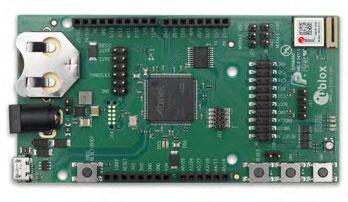
.. figure:: ../../../../../../../boards/u-blox/ubx_evkninab1/doc/img/EVK-NINA-B1.jpg

	EVK NINA-B1

More information about the NINA-B1 module and the EVK NINA-B1
can be found at `NINA-B1 product page`_ and
`EVK-NINA-B1 product page`_.

Supported Features
==================

The ubx_evkninab1/nrf52832 board configuration supports the
following hardware features:

+-----------+------------+----------------------+
| Interface | Controller | Driver/Component     |
+===========+============+======================+
| ADC       | on-chip    | adc                  |
+-----------+------------+----------------------+
| CLOCK     | on-chip    | clock_control        |
+-----------+------------+----------------------+
| FLASH     | on-chip    | flash                |
+-----------+------------+----------------------+
| GPIO      | on-chip    | gpio                 |
+-----------+------------+----------------------+
| I2C(M)    | on-chip    | i2c                  |
+-----------+------------+----------------------+
| MPU       | on-chip    | arch/arm             |
+-----------+------------+----------------------+
| NVIC      | on-chip    | arch/arm             |
+-----------+------------+----------------------+
| PWM       | on-chip    | pwm                  |
+-----------+------------+----------------------+
| RADIO     | on-chip    | Bluetooth Low Energy |
+-----------+------------+----------------------+
| RTC       | on-chip    | system clock         |
+-----------+------------+----------------------+
| RTT       | Segger     | console              |
+-----------+------------+----------------------+
| SPI(M/S)  | on-chip    | spi                  |
+-----------+------------+----------------------+
| UART      | on-chip    | serial               |
+-----------+------------+----------------------+
| WDT       | on-chip    | watchdog             |
+-----------+------------+----------------------+

.. note::
	Most Arduino interfaces are supported. Arduino pins
	D5 and D8 are not available, so arduino_gpio is
	disabled. On the EVK-NINA-B1, these pins are
	assigned to SWDIO and SWDCLK, respectively.

Other hardware features have not been enabled yet for this board.
See `EVK-NINA-B1 product page`_ and `NINA-B1 Data Sheet`_
for a complete list of EVK NINA-B1 hardware features.

Connections and IOs
===================

LED
---

* LED0 (red) = P0.08
* LED1 (green) = P0.16
* LED2 (blue) = P0.18

Push buttons
------------

* BUTTON1 = SW1 = P0.16
* BUTTON2 = SW2 = P0.30


General information on module pin numbering
-------------------------------------------

The numbering of the pins on the module and EVK do not follow the GPIO
numbering on the nRF52832 SoC. Please see the `NINA-B1 Data Sheet`_ for
information on how to map NINA-B1 pins to the pin numbering on the
nRF52832 SoC.

The reason for this is the u-blox module family concept where different
modules share the same pinout and can be interchanged, see
`NINA module family Nested design`_.

Programming and Debugging
*************************

Applications for the ``ubx_evkninab1/nrf52832`` board configuration can be
built and flashed in the usual way (see :ref:`build_an_application`
and :ref:`application_run` for more details); however, the standard
debugging targets are not currently available.

Flashing
========

Build and flash applications as usual (see
:ref:`build_an_application` and :ref:`application_run` for more details).

Here is an example for the :ref:`hello_world` application.

Open a terminal program to the USB Serial Port installed when connecting
the board and listen for output.

Settings: 115200, 8N1, no flow control.

Then build and flash the application in the usual way.

.. zephyr-app-commands::
   :zephyr-app: samples/hello_world
   :board: ubx_evkninab1/nrf52832
   :goals: build flash

Debugging
=========

Refer to the :ref:`nordic_segger` page to learn about debugging boards
containing a Nordic Semiconductor chip with a Segger IC.


Testing the LEDs and buttons in the EVK NINA-B11x
*************************************************

There are 2 samples that allow you to test that the buttons (switches)
and LEDs on the board are working properly with Zephyr:

.. code-block:: console

   samples/basic/blinky
   samples/basic/button

You can build and flash the examples to make sure Zephyr is running
correctly on your board. The button and LED definitions can be found in
:zephyr_file:`boards/u-blox/ubx_evkninab1/ubx_evkninab1_nrf52832.dts`.

Note that the buttons on the EVK-NINA-B1 are marked SW1 and SW2, which
are named sw0 and sw1 in the dts file.
Also note that the SW1 button and the green LED are connected on HW level.


References
**********

.. target-notes::

.. _NINA-B1 product page: https://www.u-blox.com/en/product/nina-b1-series-open-cpu
.. _EVK-NINA-B1 product page: https://www.u-blox.com/en/product/evk-nina-b1
.. _Nordic Semiconductor Infocenter: https://infocenter.nordicsemi.com
.. _J-Link Software and documentation pack: https://www.segger.com/jlink-software.html
.. _NINA-B1 Data Sheet: https://www.u-blox.com/en/docs/UBX-15019243
.. _NINA module family Nested design: https://www.u-blox.com/en/docs/UBX-17065600
Part 3
한국어 전문 번역
개요
EVK-NINA-B1는 Nordic Semiconductor nRF52832 Arm Cortex-M4F 기반 NINA-B1 Bluetooth Low Energy module 평가 kit입니다.
지원 기능
| Interface | Controller | Driver/Component |
|---|---|---|
| ADC | on-chip | adc |
| CLOCK | on-chip | clock_control |
| FLASH | on-chip | flash |
| GPIO | on-chip | gpio |
| I2C(M) | on-chip | i2c |
| MPU | on-chip | arch/arm |
| NVIC | on-chip | arch/arm |
| PWM | on-chip | pwm |
| RADIO | on-chip | Bluetooth Low Energy |
| RTC | on-chip | system clock |
| RTT | Segger | console |
| SPI(M/S) | on-chip | spi |
| UART | on-chip | serial |
| WDT | on-chip | watchdog |
표에 없는 기능은 아직 enable되지 않았습니다.
연결과 I/O
LED
- LED0 red P0.08
- LED1 green P0.16
- LED2 blue P0.18
Push buttons
- BUTTON1 SW1 P0.16
- BUTTON2 SW2 P0.30
Module pin 번호
NINA-B1 module과 EVK의 pin 번호는 nRF52832 SoC GPIO 번호를 따르지 않습니다. u-blox module family는 서로 다른 module이 같은 pinout을 공유하고 교환될 수 있도록 설계됐기 때문에 module·EVK pin 번호와 nRF52832 GPIO 번호가 일치하지 않습니다. Data sheet의 mapping을 확인해야 합니다.
Programming과 debugging
일반 방식으로 build·flash할 수 있지만 원문은 standard debugging target이 현재 제공되지 않는다고 명시합니다.
Flash
USB Serial Port를 115200, 8N1, flow control 없음으로 엽니다.
west build -b ubx_evkninab1/nrf52832 samples/hello_world
west flash
Debug
Nordic Semiconductor chip과 Segger IC를 사용하는 board debug는 Zephyr Nordic Segger 안내를 따릅니다.
LED와 button 시험
samples/basic/blinky
samples/basic/button
Button과 LED 정의는 boards/u-blox/ubx_evkninab1/ubx_evkninab1_nrf52832.dts에 있습니다.
EVK의 SW1·SW2는 DTS에서 각각 sw0·sw1입니다. SW1과 green LED는 hardware level에서 함께 연결됩니다.
참고 자료
Source
출처
영어 원문에는 문단, 문서 지시문, 표, 코드, 코드 심벌, 경로를 그대로 보존했습니다.