Part 1
요약·해설
지원표 3행, 공식 이미지와 XDS110 firmware·UART0 절차를 보존했습니다.
Cortex-M4F
32k · 48MHz
XDS110-ET
USB backchannel
Part 2
접을 수 있는 영어 원문 전체
영어 원문 전체 펼치기
271D22FEBA067E3AD4917C3BEFA1227AD151826CCE0624980D775E57A47BB6B9
.. _msp_exp432p401r_launchxl:

MSP-EXP432P401R LaunchXL
########################

Overview
********

The SimpleLink MSP‐EXP432P401R LaunchPad development kit is an easy-to-use evaluation
module for the SimpleLink MSP432P401R microcontroller. It contains everything needed to start
developing on the SimpleLink MSP432 low-power + performance ARM |reg| 32-bit Cortex |reg|-M4F
microcontroller (MCU).

.. figure:: ../../../../../../../boards/ti/msp_exp432p401r_launchxl/doc/img/msp_exp432p401r_launchxl.jpg
     :align: center
     :alt: MSP-EXP432P401R LaunchXL development board

Features:
=========

* Low-power ARM Cortex-M4F MSP432P401R
* 40-pin LaunchPad development kit standard that leverages the BoosterPack plug-in module ecosystem
* XDS110-ET, an open-source onboard debug probe featuring EnergyTrace+ technology and application
  UART
* Two buttons and two LEDs for user interaction
* Backchannel UART through USB to PC

Details on the MSP-EXP432P401R LaunchXL development board can be found in the
MSP-EXP432P401R LaunchXL User's Guide.

Supported Features
==================

* The on-board 32-kHz crystal allows for lower LPM3 sleep currents and a higher-precision clock source than the
  default internal 32-kHz REFOCLK. Therefore, the presence of the crystal allows the full range of low-
  power modes to be used.
* The on-board 48-MHz crystal allows the device to run at its maximum operating speed for MCLK and HSMCLK.

The MSP-EXP432P401R LaunchXL development board configuration supports the following hardware features:

+-----------+------------+-----------------------+
| Interface | Controller | Driver/Component      |
+===========+============+=======================+
| NVIC      | on-chip    | nested vectored       |
|           |            | interrupt controller  |
+-----------+------------+-----------------------+
| SYSTICK   | on-chip    | system clock          |
+-----------+------------+-----------------------+
| UART      | on-chip    | serial port           |
+-----------+------------+-----------------------+

More details about the supported peripherals are available in MSP432P4XX TRM
Other hardware features are not currently supported by the Zephyr kernel.

Building and Flashing
*********************

Prerequisites:
==============

#. Ensure the XDS-110 emulation firmware is updated.

   Download and install the latest `XDS-110 emulation package`_.

   Follow these `xds110 firmware update directions
   <http://software-dl.ti.com/ccs/esd/documents/xdsdebugprobes/emu_xds110.html#updating-the-xds110-firmware>`_

   Note that the emulation package install may place the xdsdfu utility
   in ``<install_dir>/ccs_base/common/uscif/xds110/``.

#. Install OpenOCD

   You can obtain OpenOCD by following these
   :ref:`installing the latest Zephyr SDK instructions <toolchain_zephyr_sdk>`.

   After the installation, add the directory containing the OpenOCD executable
   to your environment's PATH variable. For example, use this command in Linux:

   .. code-block:: console

      export PATH=$ZEPHYR_SDK_INSTALL_DIR/sysroots/x86_64-pokysdk-linux/usr/bin/openocd:$PATH

   If you had previously installed TI OpenOCD, you can simply switch to use
   the one in the Zephyr SDK. If for some reason you wish to continue to use
   your TI OpenOCD installation, you can set the OPENOCD and
   OPENOCD_DEFAULT_PATH variables in
   :zephyr_file:`boards/ti/msp_exp432p401r_launchxl/board.cmake` to point the build
   to the paths of the OpenOCD binary and its scripts, before
   including the common openocd.board.cmake file:

   .. code-block:: cmake

      set(OPENOCD "/usr/local/bin/openocd" CACHE FILEPATH "" FORCE)
      set(OPENOCD_DEFAULT_PATH /usr/local/share/openocd/scripts)
      include(${ZEPHYR_BASE}/boards/common/openocd.board.cmake)

Flashing
========

Follow the :ref:`getting_started` instructions for Zephyr application
development.

For example, to build and flash the :ref:`hello_world` application for the
MSP-EXP432P401R LaunchXL:

.. zephyr-app-commands::
   :zephyr-app: samples/hello_world
   :board: msp_exp432p401r_launchxl
   :goals: flash

This will load the image into flash.

To see program output from UART0, connect a separate terminal window:

.. code-block:: console

  % screen /dev/ttyACM0 115200 8N1

Then press the reset button (S3) on the board to run the program.

Debugging
=========

To debug a previously flashed image, after resetting the board, use the 'debug'
build target:

.. zephyr-app-commands::
   :zephyr-app: samples/hello_world
   :board: msp_exp432p401r_launchxl
   :maybe-skip-config:
   :goals: debug

References
**********

TI MSP432 Wiki:
   https://en.wikipedia.org/wiki/TI_MSP432

TI MSP432P401R Product Page:
   http://www.ti.com/product/msp432p401r

TI MSP432 SDK:
   http://www.ti.com/tool/SIMPLELINK-MSP432-SDK

.. _UniFlash:
   http://processors.wiki.ti.com/index.php/UniFlash_v4_Quick_Guide#Command_Line_Interface

.. _CCS IDE:
   http://www.ti.com/tool/ccstudio

..  _XDS-110 emulation package:
   http://processors.wiki.ti.com/index.php/XDS_Emulation_Software_Package#XDS_Emulation_Software_.28emupack.29_Download
Part 3
한국어 전문 번역
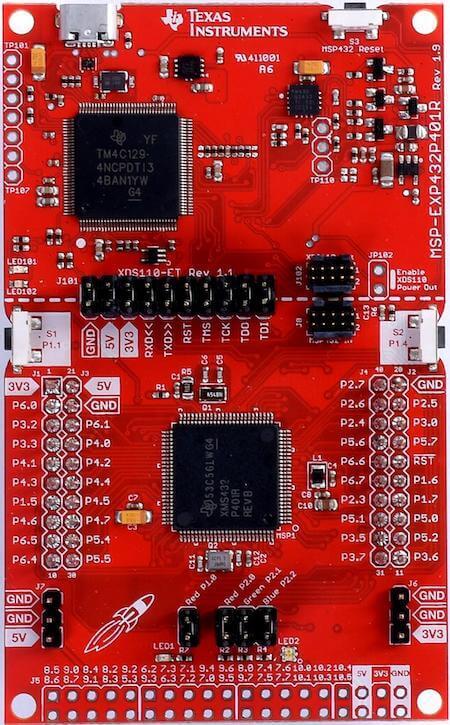
개요
SimpleLink MSP-EXP432P401R LaunchPad 개발 키트는 SimpleLink MSP432P401R microcontroller를 평가하기 위한 사용하기 쉬운 module입니다. 저전력과 성능을 함께 제공하는 32-bit Arm Cortex-M4F MCU 개발에 필요한 요소를 갖춥니다.
주요 특징
- 저전력 Arm Cortex-M4F MSP432P401R
- BoosterPack plug-in module 생태계를 이용하는 40-pin LaunchPad 표준
- EnergyTrace+와 application UART를 갖춘 open-source on-board XDS110-ET debug probe
- 사용자 button 2개와 LED 2개
- USB를 통한 PC backchannel UART
지원 기능
On-board 32kHz crystal은 내부 32kHz REFOCLK보다 LPM3 sleep current를 낮추고 정밀한 clock source를 제공하므로 모든 low-power mode를 사용할 수 있게 합니다. On-board 48MHz crystal은 MCLK와 HSMCLK를 최대 동작 속도로 구동합니다.
| Interface | Controller | Driver/Component |
|---|---|---|
| NVIC | on-chip | nested vectored interrupt controller |
| SYSTICK | on-chip | system clock |
| UART | on-chip | serial port |
지원 peripheral의 자세한 내용은 MSP432P4XX TRM에 있으며, 표에 없는 기능은 현재 Zephyr kernel에서 지원하지 않습니다.
빌드와 Flash
사전 준비
- 최신 XDS-110 emulation package를 설치하고 안내에 따라 firmware를 update합니다.
xdsdfu는<install_dir>/ccs_base/common/uscif/xds110/에 설치될 수 있습니다. - 최신 Zephyr SDK에 포함된 OpenOCD를 설치하고 executable directory를 PATH에 추가합니다.
export PATH=$ZEPHYR_SDK_INSTALL_DIR/sysroots/x86_64-pokysdk-linux/usr/bin/openocd:$PATH기존 TI OpenOCD를 계속 사용하려면 boards/ti/msp_exp432p401r_launchxl/board.cmake에서 common file을 include하기 전에 binary와 script 경로를 지정합니다.
set(OPENOCD "/usr/local/bin/openocd" CACHE FILEPATH "" FORCE)
set(OPENOCD_DEFAULT_PATH /usr/local/share/openocd/scripts)
include(${ZEPHYR_BASE}/boards/common/openocd.board.cmake)
Flash
hello_world를 빌드해 Flash에 적재합니다.
west build -b msp_exp432p401r_launchxl samples/hello_world
west flash
별도 terminal에서 UART0 출력을 열고 board의 reset button S3을 누릅니다.
% screen /dev/ttyACM0 115200 8N1Debug
이미 Flash한 image를 debug하려면 board를 reset한 뒤 debug target을 사용합니다.
west build -b msp_exp432p401r_launchxl samples/hello_world
west debug
참고 자료
Source
출처
영어 원문에는 문단, 문서 지시문, 표, 코드, 코드 심벌, 경로를 그대로 보존했습니다.