Part 1
요약·해설
지원표 6행, Type-C analyzer hardware와 14개 mapping, flash/debug 절을 전문 번역했습니다.
STM32G071RB
3–20V VBUS
128×64 OLED
Type-C · PD
Part 2
접을 수 있는 영어 원문 전체
영어 원문 전체 펼치기
1188A0E3A0317852F0A8ECD64D26FBC5FB09DFFA3F3E2F5E9D58CFB1BA600A23
.. _stm32g071b_disco_board:

ST STM32G071B Discovery
#######################

Overview
********
The STM32G071B-DISCO Discovery board is a demonstration and development platform
for the STMicroelectronics Arm® Cortex® -M0+ core-based STM32G071RB USB Type-C™
and Power Delivery microcontroller. The STM32G071B-DISCO Discovery board is
presented with all necessary interfaces for easy connection and
interoperability with other USB Type-C™ devices. The STM32G071B-DISCO Discovery
board is intended for discovery and display of USB Type-C™ port characteristics
such as data role, power role, VBUS and IBUS monitoring. It offers an advanced
user mode when associated with the STM32CubeMonUCPD software GUI and can be used
as a USB Type-C™ and Power Delivery analyzer.

- STM32G071RBT6 microcontroller featuring 128 Kbytes of Flash memory and
  32 Kbytes of RAM in LQFP64 package
- Plastic case
- 1” 128 x 64 pixels OLED LCD module with SPI interface
- USB Type-C™ interface plug cable and receptacle connector accessible by door
  with reed sensor detection
- 3 bidirectional current and power monitors with I2C interface to measure VBUS,
  CC1 and CC2 protected and isolated lines
- On-board DC/DC converter to sustain power supply with VBUS varying from 3 V to
  20 V (+/- 5 %)
- 4 user status LEDs about USB Type-C™ configuration
- 3 LEDs for power and ST-LINK communication
- 4-way joystick with selection button
- 1 reset push-button
- Board external connectors:
    - USB Type-C™ plug cable
    - USB Type-C™ receptacle connector
    - 8-pin user extension connector including ADC, SPI, USART and
      I2C communication signals
    - USB with Micro-AB (ST-LINK)
- Board internal connectors:
    - 2 x 8-pin GPIOs free pins from microcontroller
	  (accessible internally when case is removed)
    - USB Type-C™ test points for main signals
- Flexible power-supply options: ST-LINK USB VBUS or USB Type-C™ VBUS
- On-board ST-LINK/V2-1 debugger/programmer with USB enumeration capability:
  mass storage, Virtual COM port and debug port

.. image:: ../../../../../../../boards/st/stm32g071b_disco/doc/img/stm32g071b_disco.jpg
   :align: center
   :alt: STM32G071B-DISCO

More information about the board can be found at the `STM32G071B-DISCO website`_.


More information about STM32G071RB can be found here:

- `G071RB on www.st.com`_
- `STM32G071 reference manual`_


Supported Features
==================

The Zephyr stm32g071b_disco board configuration supports the following hardware features:

+-----------+------------+-------------------------------------+
| Interface | Controller | Driver/Component                    |
+===========+============+=====================================+
| NVIC      | on-chip    | nested vector interrupt controller  |
+-----------+------------+-------------------------------------+
| UART      | on-chip    | serial port-polling;                |
|           |            | serial port-interrupt               |
+-----------+------------+-------------------------------------+
| I2C       | on-chip    | i2c                                 |
+-----------+------------+-------------------------------------+
| UCPD      | on-chip    | ucpd                                |
+-----------+------------+-------------------------------------+
| GPIO      | on-chip    | gpio                                |
+-----------+------------+-------------------------------------+
| WATCHDOG  | on-chip    | independent watchdog                |
+-----------+------------+-------------------------------------+

Other hardware features are not yet supported in this Zephyr port.

The default configuration can be found in the defconfig file:
:zephyr_file:`boards/st/stm32g071b_disco/stm32g071b_disco_defconfig`

Connections and IOs
===================

Each of the GPIO pins can be configured by software as output (push-pull or open-drain), as
input (with or without pull-up or pull-down), or as peripheral alternate function. Most of the
GPIO pins are shared with digital or analog alternate functions. All GPIOs are high current
capable except for analog inputs.

Default Zephyr Peripheral Mapping:
----------------------------------

- UART_3 TX/RX       : PC10/PC11 (ST-Link Virtual Port Com)
- UCPD1              : PA8/PB15
- BUTTON (JOY_SEL)   : PC0
- BUTTON (JOY_LEFT)  : PC1
- BUTTON (JOY_DOWN)  : PC2
- BUTTON (JOY_RIGHT) : PC3
- BUTTON (JOY_UP)    : PC4
- LED (TO_REC)       : PD9
- LED (TO_PLUG)      : PD8
- LED (SINK_SPY)     : PD5
- LED (SOURCE)       : PC12
- ENCC1              : PB10 (Enable CC1)
- ENCC2              : PB11 (Enable CC2)
- RDCC1              : PB12 (Enable Door Sense on CC1)


For more details please refer to `STM32G0 Discovery board User Manual`_.

Programming and Debugging
*************************

Applications for the ``stm32g071b_disco`` board configuration can be built and
flashed in the usual way (see :ref:`build_an_application` and
:ref:`application_run` for more details).

Flashing
========

The STM32G071B Discovery board includes an ST-LINK/V2-1 embedded debug tool interface.

.. code-block:: console

   $ west flash

Flashing an application to the STM32G071B_DISCO
-----------------------------------------------

Here is an example for the :zephyr:code-sample:`blinky` application.

.. zephyr-app-commands::
   :zephyr-app: samples/basic/blinky
   :board: stm32g071b_disco
   :goals: build flash

You will see the LED blinking every second.

Debugging
=========

You can debug an application in the usual way.  Here is an example for the
:ref:`hello_world` application.

.. zephyr-app-commands::
   :zephyr-app: samples/hello_world
   :board: stm32g071b_disco
   :maybe-skip-config:
   :goals: debug

References
**********

.. target-notes::

.. _STM32G071B-DISCO website:
   https://www.st.com/en/evaluation-tools/stm32g071b-disco.html

.. _STM32G071 reference manual:
   https://www.st.com/resource/en/reference_manual/dm00371828.pdf

.. _STM32G0 Discovery board User Manual:
   https://www.st.com/resource/en/user_manual/dm00496511.pdf

.. _G071RB on www.st.com:
   https://www.st.com/en/microcontrollers/stm32g071rb.html
Part 3
한국어 전문 번역
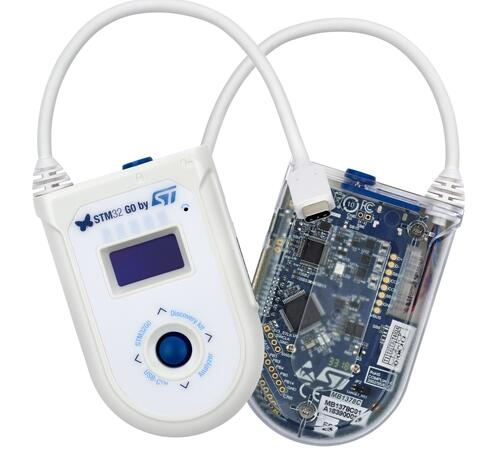
개요
STM32G071B-DISCO는 STM32G071RB USB Type-C·Power Delivery MCU의 demonstration/development platform입니다. 다른 USB Type-C device와 연결하는 interface를 갖추고 data role, power role, VBUS·IBUS를 표시·분석합니다. STM32CubeMonUCPD GUI와 결합하면 advanced user mode의 USB Type-C/PD analyzer로 사용할 수 있습니다.
- LQFP64 STM32G071RBT6: Flash 128KB, RAM 32KB
- plastic case
- SPI 1-inch 128×64 OLED LCD
- door와 reed sensor detection이 있는 USB Type-C plug cable·receptacle
- VBUS·CC1·CC2 protected/isolated line을 측정하는 bidirectional I2C current/power monitor 3개
- 3~20V VBUS(±5%)에서 전원을 유지하는 DC/DC converter
- Type-C configuration user LED 4개
- power·ST-LINK LED 3개
- selection button 포함 4-way joystick
- reset button
- 외부 connector
- USB Type-C plug cable
- USB Type-C receptacle
- ADC·SPI·USART·I2C를 포함한 8-pin extension
- Micro-AB ST-LINK USB
- 내부 connector
- case 제거 시 접근하는 2×8-pin MCU free GPIO
- USB Type-C main signal test point
- ST-LINK USB VBUS 또는 USB Type-C VBUS power
- mass storage·Virtual COM·debug USB enumeration이 가능한 ST-LINK/V2-1
Zephyr 지원 기능
| Interface | Controller | Driver/Component |
|---|---|---|
| NVIC | on-chip | nested vector interrupt controller |
| UART | on-chip | serial port-polling; serial port-interrupt |
| I2C | on-chip | i2c |
| UCPD | on-chip | ucpd |
| GPIO | on-chip | gpio |
| WATCHDOG | on-chip | independent watchdog |
그 밖의 기능은 아직 지원하지 않습니다. 기본 설정은 boards/st/stm32g071b_disco/stm32g071b_disco_defconfig입니다.
Connections and I/O
GPIO는 push-pull/open-drain output, pull-up/down 유무가 있는 input, peripheral alternate function으로 설정할 수 있습니다. 대부분 digital·analog alternate function을 공유하고 analog input을 제외하면 high-current capable입니다.
기본 Zephyr peripheral mapping
UART_3 TX/RX : PC10/PC11 (ST-Link Virtual Port Com)UCPD1 : PA8/PB15BUTTON (JOY_SEL) : PC0BUTTON (JOY_LEFT) : PC1BUTTON (JOY_DOWN) : PC2BUTTON (JOY_RIGHT) : PC3BUTTON (JOY_UP) : PC4LED (TO_REC) : PD9LED (TO_PLUG) : PD8LED (SINK_SPY) : PD5LED (SOURCE) : PC12ENCC1 : PB10 (Enable CC1)ENCC2 : PB11 (Enable CC2)RDCC1 : PB12 (Enable Door Sense on CC1)
Programming and debugging
embedded ST-LINK/V2-1을 사용하며 일반 flash 명령은 다음과 같습니다.
$ west flashwest build -b stm32g071b_disco samples/basic/blinky
west flashLED가 1초마다 깜박입니다.
Debug
west build -b stm32g071b_disco samples/hello_world
west debug
참고 자료
Source
출처
영어 원문에는 문단, 문서 지시문, 표, 코드, 코드 심벌, 경로를 그대로 보존했습니다.