Part 1
요약·해설
지원표 10행과 H745 전체 hardware, M7/M4 resource sharing 3단계, 두 boot address, core별 flash·debug 제한을 번역했습니다.
Cortex-M7 480MHz
Cortex-M4
0x80000000
0x81000000
Part 2
접을 수 있는 영어 원문 전체
영어 원문 전체 펼치기
FAACA7E3DBBCD156545520FC1CF86F99C55082827BBD7EA12CB2EB2A7968984A
.. _nucleo_h745zi_q_board:

ST Nucleo H745ZI-Q
###################

Overview
********

The STM32 Nucleo-144 board provides an affordable and flexible way for users
to try out new concepts and build prototypes by choosing from the various combinations
of performance and power consumption features, provided by the STM32 microcontroller.
For the compatible boards, the internal or external SMPS significantly reduces power
consumption in Run mode.

The ST Zio connector, which extends the ARDUINO® Uno V3 connectivity, and
the ST morpho headers provide an easy means of expanding the functionality of the Nucleo
open development platform with a wide choice of specialized shields.
The STM32 Nucleo-144 board does not require any separate probe as it integrates
the ST-LINK V3 debugger/programmer.

The STM32 Nucleo-144 board comes with the STM32 comprehensive free software
libraries and examples available with the STM32Cube MCU Package.

Key Features

- STM32 microcontroller in LQFP144 package
- Ethernet compliant with IEEE-802.3-2002 (depending on STM32 support)
- USB OTG or full-speed device (depending on STM32 support)
- 3 user LEDs
- 2 user and reset push-buttons
- 32.768 kHz crystal oscillator
- Board connectors:

 - USB with Micro-AB
 - Ethernet RJ45 (depending on STM32 support)
 - SWDST Zio connector including Arduino* Uno V3ST
 - ST morpho expansion

- Flexible power-supply options: ST-LINK USB VBUS or external sources
- External or internal SMPS to generate Vcore logic supply
- On-board ST-LINK/V3 debugger/programmer with USB re-enumeration
- capability: mass storage, virtual COM port and debug port
- USB OTG full speed or device only
- Comprehensive free software libraries and examples available with the
  STM32Cube MCU package.
- Arm* Mbed Enabled* compliant (only for some Nucleo part numbers)

.. image:: ../../../../../../../boards/st/nucleo_h745zi_q/doc/img/nucleo_h745zi_q.jpg
   :align: center
   :alt: Nucleo H745ZI-Q

More information about the board can be found at the `Nucleo H745ZI-Q website`_.

Hardware
********

Nucleo H745ZI-Q provides the following hardware components:

- STM32H745ZI in LQFP144 package
- ARM 32-bit Cortex-M7 CPU with FPU
- ARM 32-bit Cortex-M4 CPU with FPU
- Chrom-ART Accelerator
- Hardware JPEG Codec
- 480 MHz max CPU frequency
- VDD from 1.62 V to 3.6 V
- 2 MB Flash
- 1 MB SRAM
- High-resolution timer (2.1 ns)
- 32-bit timers(2)
- 16-bit timers(12)
- SPI(6)
- I2C(4)
- I2S (3)
- USART(4)
- UART(4)
- USB OTG Full Speed and High Speed(1)
- USB OTG Full Speed(1)
- CAN FD(2)
- SAI(2)
- SPDIF_Rx(4)
- HDMI_CEC(1)
- Dual Mode Quad SPI(1)
- Camera Interface
- GPIO (up to 114) with external interrupt capability
- 16-bit ADC(3) with 36 channels / 3.6 MSPS
- 12-bit DAC with 2 channels(2)
- True Random Number Generator (RNG)
- 16-channel DMA
- LCD-TFT Controller with XGA resolution

Supported Features
==================

The Zephyr nucleo_h745zi_q board configuration supports the following hardware
features:

+-------------+------------+-------------------------------------+
| Interface   | Controller | Driver/Component                    |
+=============+============+=====================================+
| NVIC        | on-chip    | nested vector interrupt controller  |
+-------------+------------+-------------------------------------+
| UART        | on-chip    | serial port                         |
+-------------+------------+-------------------------------------+
| PINMUX      | on-chip    | pinmux                              |
+-------------+------------+-------------------------------------+
| GPIO        | on-chip    | gpio                                |
+-------------+------------+-------------------------------------+
| RTC         | on-chip    | counter                             |
+-------------+------------+-------------------------------------+
| I2C         | on-chip    | i2c                                 |
+-------------+------------+-------------------------------------+
| PWM         | on-chip    | pwm                                 |
+-------------+------------+-------------------------------------+
| ETHERNET    | on-chip    | ethernet                            |
+-------------+------------+-------------------------------------+
| RNG         | on-chip    | True Random number generator        |
+-------------+------------+-------------------------------------+
| USB OTG FS  | on-chip    | USB device                          |
+-------------+------------+-------------------------------------+

Other hardware features are not yet supported on this Zephyr port.

The default configuration per core can be found in the defconfig files:
:zephyr_file:`boards/st/nucleo_h745zi_q/nucleo_h745zi_q_stm32h745xx_m7_defconfig` and
:zephyr_file:`boards/st/nucleo_h745zi_q/nucleo_h745zi_q_stm32h745xx_m4_defconfig`

For more details please refer to `STM32 Nucleo-144 board User Manual`_.

Default Zephyr Peripheral Mapping:
----------------------------------

The Nucleo H745ZI board features a ST Zio connector (extended Arduino Uno V3)
and a ST morpho connector. Board is configured as follows:

- UART_3 TX/RX : PD8/PD9 (ST-Link Virtual Port Com)
- USER_PB : PC13
- LD1 : PB0
- LD2 : PB7
- LD3 : PB14
- I2C : PB8, PB9

System Clock
------------

Nucleo H745ZI-Q System Clock could be driven by an internal or external
oscillator, as well as the main PLL clock. By default, the System clock is
driven by the PLL clock at 480MHz, driven by an 8MHz high-speed external clock.

Serial Port
-----------

Nucleo H745ZI-Q board has 4 UARTs and 4 USARTs. The Zephyr console output is
assigned to UART3. Default settings are 115200 8N1.

Resources sharing
-----------------

The dual core nature of STM32H745 SoC requires sharing HW resources between the
two cores. This is done in 3 ways:

- **Compilation**: Clock configuration is only accessible to M7 core. M4 core only
  has access to bus clock activation and deactivation.
- **Static pre-compilation assignment**: Peripherals such as a UART are assigned in
  devicetree before compilation. The user must ensure peripherals are not assigned
  to both cores at the same time.
- **Run time protection**: Interrupt-controller and GPIO configurations could be
  accessed by both cores at run time. Accesses are protected by a hardware semaphore
  to avoid potential concurrent access issues.

Programming and Debugging
*************************

Applications for the ``nucleo_h745zi_q`` board should be built per core target,
using either ``nucleo_h745zi_q_m7`` or ```nucleo_h745zi_q_m4`` as the target
(see :ref:`build_an_application` and :ref:`application_run` for more details).

.. note::

   If using OpenOCD you will need a recent development version as the last
   official release does not support H7 series and ST-LINK V3 yet.
   Following links may be helpful: `OpenOCD installing Debug Version`_
   and `OpenOCD installing with ST-LINK V3 support`_

.. note::

   Check if your ST-LINK V3 has newest FW version. It can be done with `STM32CubeIDE`_

Flashing
========

Nucleo H745ZI-Q board includes an ST-LINK/V3 embedded debug tool interface.

Flashing operation will depend on the target to be flashed and the SoC
option bytes configuration.

By default:

  - CPU0 (Cortex-M7) boot address is set to 0x80000000 (OB: BOOT_CM7_ADD0)
  - CPU1 (Cortex-M4) boot address is set to 0x81000000 (OB: BOOT_CM4_ADD0)

Also, default out of the box board configuration enables CM7 and CM4 boot when
board is powered (Option bytes BCM7 and BCM4 are checked).
In that configuration, Kconfig boot option ``STM32H7_BOOT_CM4_CM7`` should be selected.
Zephyr flash configuration has been set to meet these default settings.

Flashing an application to STM32H745ZI M7 Core
----------------------------------------------
First, connect the NUCLEO-H745ZI-Q to your host computer using
the USB port to prepare it for flashing. Then build and flash your application.

Here is an example for the :ref:`hello_world` application.

Run a serial host program to connect with your NUCLEO-H745ZI-Q board.

.. code-block:: console

   $ minicom -b 115200 -D /dev/ttyACM0

or use screen:

.. code-block:: console

   $ screen /dev/ttyACM0 115200

Build and flash the application:

.. zephyr-app-commands::
   :zephyr-app: samples/hello_world
   :board: nucleo_h745zi_q_m7
   :goals: build flash

You should see the following message on the console:

.. code-block:: console

   $ Hello World! nucleo_h745zi_q_m7

.. note::
  Sometimes, flashing is not working. It is necessary to erase the flash
  (with STM32CubeProgrammer for example) to make it work again.

Similarly, you can build and flash samples on the M4 target. For this, please
take care of the resource sharing (UART port used for console for instance).

Here is an example for the :zephyr:code-sample:`blinky` application on M4 core.

.. zephyr-app-commands::
   :zephyr-app: samples/basic/blinky
   :board: nucleo_h745zi_q_m4
   :goals: build flash

.. note::

   Flashing both M4 and M7 and pushing RESTART button on the board leads
   to LD1 and LD2 flashing simultaneously.

Debugging
=========

You can debug an application in the usual way.  Here is an example for the
:ref:`hello_world` application.

.. zephyr-app-commands::
   :zephyr-app: samples/hello_world
   :board: nucleo_h745zi_q_m7
   :maybe-skip-config:
   :goals: debug

Debugging with west is currently not available on Cortex M4 side.
In order to debug a Zephyr application on Cortex M4 side, you can use
`STM32CubeIDE`_.

.. _Nucleo H745ZI-Q website:
   https://www.st.com/en/evaluation-tools/nucleo-h745zi-q.html

.. _STM32 Nucleo-144 board User Manual:
   https://www.st.com/resource/en/user_manual/dm00499171-stm32h7-nucleo144-boards-mb1363-stmicroelectronics.pdf

.. _STM32H745ZI on www.st.com:
   https://www.st.com/en/microcontrollers-microprocessors/stm32h745zi.html

.. _STM32H745 reference manual:
   https://www.st.com/resource/en/reference_manual/dm00176879-stm32h745755-and-stm32h747757-advanced-armbased-32bit-mcus-stmicroelectronics.pdf

.. _OpenOCD installing Debug Version:
   https://github.com/zephyrproject-rtos/openocd

.. _OpenOCD installing with ST-LINK V3 support:
   https://mbd.kleier.net/integrating-st-link-v3.html

.. _STM32CubeIDE:
   https://www.st.com/en/development-tools/stm32cubeide.html
Part 3
한국어 전문 번역
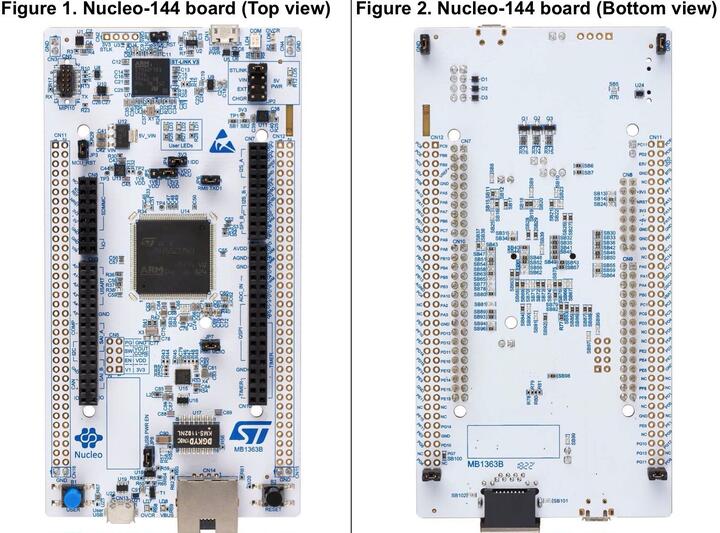
개요
STM32 Nucleo-144는 여러 성능·전력 조합으로 prototype과 새 개념을 시험하는 platform입니다. 호환 board의 SMPS는 Run-mode 전력을 줄이고, Arduino Uno V3를 확장한 ST Zio와 ST morpho header로 shield를 연결합니다. 별도 probe 없이 ST-LINK/V3와 STM32Cube MCU package의 library/example을 사용합니다.
- LQFP144 STM32 microcontroller
- STM32 지원 여부에 따른 IEEE 802.3-2002 Ethernet
- STM32 지원 여부에 따른 USB OTG 또는 full-speed device
- User LED 3개, USER·RESET button, 32.768kHz crystal
- Mass storage·Virtual COM·debug port USB re-enumeration이 있는 ST-LINK/V3
- ST-LINK USB VBUS 또는 external source 전원
- 일부 Nucleo part number의 Arm Mbed Enabled compliance
Connector는 Micro-AB USB, Ethernet RJ45, 원문에 SWDST Zio connector including Arduino* Uno V3ST라고 적힌 ST Zio, ST morpho입니다. External/internal SMPS로 Vcore logic supply를 만들며 USB OTG FS 또는 device-only를 지원합니다.
Hardware
- LQFP144 STM32H745ZI
- FPU가 있는 32-bit Cortex-M7
- FPU가 있는 32-bit Cortex-M4
- Chrom-ART accelerator와 hardware JPEG codec
- 최대 480MHz, VDD 1.62~3.6V
- Flash 2MB, SRAM 1MB
- 2.1ns high-resolution timer
- 32-bit timer 2개, 16-bit timer 12개
- SPI 6개, I2C 4개, I2S 3개, USART 4개, UART 4개
- USB OTG Full Speed+High Speed 1개, USB OTG Full Speed 1개
- CAN FD 2개, SAI 2개, SPDIF_Rx 4개, HDMI_CEC
- Dual-mode Quad SPI, camera interface, external-interrupt GPIO 최대 114개
- 36-channel 3.6MSPS 16-bit ADC 3개
- 2-channel 12-bit DAC 2개
- True RNG, 16-channel DMA, XGA LCD-TFT controller
Zephyr 지원 기능
| Interface | Controller | Driver/Component |
|---|---|---|
| NVIC | on-chip | nested vector interrupt controller |
| UART | on-chip | serial port |
| PINMUX | on-chip | pinmux |
| GPIO | on-chip | gpio |
| RTC | on-chip | counter |
| I2C | on-chip | i2c |
| PWM | on-chip | pwm |
| ETHERNET | on-chip | ethernet |
| RNG | on-chip | True Random number generator |
| USB OTG FS | on-chip | USB device |
표 밖 기능은 아직 지원하지 않습니다. Core별 기본 파일은 boards/st/nucleo_h745zi_q/nucleo_h745zi_q_stm32h745xx_m7_defconfig와 boards/st/nucleo_h745zi_q/nucleo_h745zi_q_stm32h745xx_m4_defconfig입니다.
Connection과 I/O
UART_3 TX/RX : PD8/PD9(ST-Link Virtual COM)USER_PB : PC13LD1 : PB0,LD2 : PB7,LD3 : PB14I2C : PB8/PB9
System clock과 serial port
기본 system clock은 8MHz HSE가 구동하는 PLL의 480MHz입니다. UART 4개와 USART 4개 중 Zephyr console은 UART3이며 기본값은 115200 8N1입니다.
Dual-core resource sharing
STM32H745의 두 core가 hardware resource를 공유하는 방식은 세 가지입니다.
- Compilation: clock configuration은 M7만 접근하며 M4는 bus clock activate/deactivate만 수행
- Static pre-compilation assignment: UART 같은 peripheral은 compile 전에 devicetree에서 한 core에 할당하며 두 core에 동시에 배정하지 않아야 함
- Runtime protection: 양쪽 core가 접근할 수 있는 interrupt-controller와 GPIO configuration은 hardware semaphore로 동시 접근을 방지
Programming and debugging
Core별 target nucleo_h745zi_q_m7 또는 nucleo_h745zi_q_m4로 build합니다. 원문의 M4 target 표기에는 backtick이 하나 더 있지만 영어 원문을 그대로 보존했습니다. OpenOCD는 H7과 ST-LINK V3를 지원하는 recent development version이 필요하며 ST-LINK V3 firmware도 STM32CubeIDE로 확인합니다.
Boot와 option byte
- CPU0 Cortex-M7 boot address:
0x80000000, option byteBOOT_CM7_ADD0 - CPU1 Cortex-M4 boot address:
0x81000000, option byteBOOT_CM4_ADD0 - Factory board는
BCM7·BCM4를 모두 켜 두므로 KconfigSTM32H7_BOOT_CM4_CM7를 선택 - Zephyr flash configuration은 이 기본 상태에 맞춰져 있음
M7 flash
$ minicom -b 115200 -D /dev/ttyACM0또는 screen을 사용합니다.
$ screen /dev/ttyACM0 115200west build -b nucleo_h745zi_q_m7 samples/hello_world
west flash$ Hello World! nucleo_h745zi_q_m7M4 flash
M4 target에서도 sample을 build·flash할 수 있지만 console UART 같은 공유 resource를 확인해야 합니다.
west build -b nucleo_h745zi_q_m4 samples/basic/blinky
west flash
M4와 M7을 모두 flash하고 board의 RESTART button을 누르면 LD1과 LD2가 동시에 깜박입니다.
Debugging
west build -b nucleo_h745zi_q_m7 samples/hello_world
west debug
Cortex-M4 쪽은 현재 west debugging을 지원하지 않으므로 STM32CubeIDE를 사용합니다.
참고 자료
Source
출처
영어 원문에는 문단, 문서 지시문, 표, 코드, 코드 심벌, 경로를 그대로 보존했습니다.