Part 1
요약·해설
지원 기능 5개와 pin 7개를 보존하고 GPIO·USART 원문 불일치를 별도로 설명합니다.
Cortex-M0+
64kB + 8kB
24MHz
STK3400
Part 2
접을 수 있는 영어 원문 전체
영어 원문 전체 펼치기
F2DC3B424F64CA29EDDC7CF6CC12331DD2AA39E582471045AC7AD4E256D5FC8D
.. _slstk3400a:

EFM32 Happy Gecko (SLSTK3400A)
##############################

Overview
********

The EFM32 Happy Gecko Starter Kit SLSTK3400A contains a MCU from the
EFM32HG family built on ARM® Cortex®-M0+ processor with excellent low
power capabilities.

.. figure:: ../../../../../../../../boards/silabs/starter_kits/slstk3400a/doc/slstk3400a.jpg
   :align: center
   :alt: SLSTK3400A

   SLSTK3400A (image courtesy of Silicon Labs)

Hardware
********

- Advanced Energy Monitoring system for precise current tracking
- Real-time energy and power profiling
- ARM Cortex M0+ with 64 kB Flash and 8 kB RAM
- 128 X 128 pixel Memory LCD
- 2 user buttons, 2 user LEDs and 2 touch buttons
- 20 pin expansion header
- Silicon Labs Si7021 Relative Humidity/Temperature sensor
- USB device interface
- Integrated SEGGER J-Link USB debugger/emulator with debug out functionality


See these documents for more information

- `EFM32HG Website`_
- `EFM32HG Datasheet`_
- `EFM32HG Reference Manual`_
- `SLSTK3400A Website`_
- `SLSTK3400A User Guide`_
- `SLSTK3400A Schematics`_

Supported Features
==================

The efm32hg_slstk3400 board configuration supports the following hardware features:

+-----------+------------+-------------------------------------+
| Interface | Controller | Driver/Component                    |
+===========+============+=====================================+
| NVIC      | on-chip    | nested vector interrupt controller  |
+-----------+------------+-------------------------------------+
| SYSTICK   | on-chip    | systick                             |
+-----------+------------+-------------------------------------+
| FLASH     | on-chip    | flash memory                        |
+-----------+------------+-------------------------------------+
| GPIO      | on-chip    | gpio                                |
+-----------+------------+-------------------------------------+
| USART     | on-chip    | serial port-polling;                |
|           |            | serial port-interrupt               |
+-----------+------------+-------------------------------------+

The default configuration can be found in
:zephyr_file:`boards/silabs/starter_kit/slstk3400a/slstk3400a_defconfig`

Other hardware features are currently not supported by the port.

Connections and IOs
===================

The EFM32HG SoC has six GPIO controllers (PORTA to PORTF), but only three are
currently enabled (PORTB, PORTE and PORTF) for the SLSTK3400A board.

In the following table, the column Name contains Pin names. For example, PF4
means Pin number 4 on PORTF, as used in the board's datasheets and manuals.

+-------+-------------+-------------------------------------+
| Name  | Function    | Usage                               |
+=======+=============+=====================================+
| PF4   | GPIO        | LED0                                |
+-------+-------------+-------------------------------------+
| PF5   | GPIO        | LED1                                |
+-------+-------------+-------------------------------------+
| PC9   | GPIO        | Push Button PB0                     |
+-------+-------------+-------------------------------------+
| PC10  | GPIO        | Push Button PB1                     |
+-------+-------------+-------------------------------------+
| PF7   | GPIO        | Board Controller Enable             |
|       |             | EFM_BC_EN                           |
+-------+-------------+-------------------------------------+
| PF2   | USART0_TX   | USART Console EFM_BC_TX U0_TX #4    |
+-------+-------------+-------------------------------------+
| PA9   | USART0_RX   | USART Console EFM_BC_RX U0_RX #4    |
+-------+-------------+-------------------------------------+

System Clock
============

The EFM32HG SoC is configured to use the 24 MHz external oscillator on the
board.

Serial Port
===========

The EFM32HG SoC has two USARTs, two UARTs and two Low Energy UARTs (LEUART).
USART1 is connected to the board controller and is used for the console.

Programming and Debugging
*************************

.. note::
   Before using the kit the first time, you should update the J-Link firmware
   from `J-Link-Downloads`_

Flashing
========

The SLSTK3400 includes an `J-Link`_ serial and debug adaptor built into the
board. The adaptor provides:

- A USB connection to the host computer, which exposes a Mass Storage and a
  USB Serial Port.
- A Serial Flash device, which implements the USB flash disk file storage.
- A physical UART connection which is relayed over interface USB Serial port.

Flashing an application to EFM32-SLSTK3400A
-------------------------------------------

The sample application :ref:`hello_world` is used for this example.
Build the Zephyr kernel and application:

.. zephyr-app-commands::
   :zephyr-app: samples/hello_world
   :board: slstk3400a
   :goals: build

Connect the SLSTK3400A to your host computer using the USB port and
you should see a USB connection that exposes a mass storage device (STK3400)
and a USB Serial Port. Copy the generated ``zephyr.bin`` in the STK3400 drive.

Open a serial terminal (minicom, putty, etc.) with the following settings:

- Speed: 115200
- Data: 8 bits
- Parity: None
- Stop bits: 1

Reset the board and you will see this message written to the serial port:

.. code-block:: console

   Hello World! slstk3400a


.. _SLSTK3400A Website:
   https://www.silabs.com/products/development-tools/mcu/32-bit/efm32-happy-gecko-starter-kit

.. _SLSTK3400A User Guide:
   https://www.silabs.com/documents/public/user-guides/ug255-stk3400-user-guide.pdf

.. _SLSTK3400A Schematics:
   https://www.silabs.com/documents/public/schematic-files/BRD2012A-B01-schematic.pdf

.. _EFM32HG Website:
   https://www.silabs.com/products/mcu/32-bit/efm32-happy-gecko

.. _EFM32HG Datasheet:
   https://www.silabs.com/documents/public/data-sheets/EFM32HG322.pdf

.. _EFM32HG Reference Manual:
   https://www.silabs.com/documents/public/reference-manuals/EFM32HG-RM.pdf

.. _J-Link:
   https://www.segger.com/jlink-debug-probes.html

.. _J-Link-Downloads:
   https://www.segger.com/downloads/jlink
Part 3
한국어 전문 번역
개요
EFM32 Happy Gecko Starter Kit SLSTK3400A에는 저전력 특성이 뛰어난 ARM Cortex-M0+ 기반 EFM32HG family MCU가 탑재됩니다.
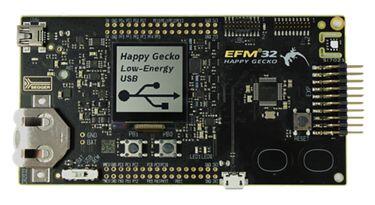
하드웨어
- 정밀한 current tracking용 Advanced Energy Monitoring system
- 실시간 energy·power profiling
- Flash 64kB·RAM 8kB의 ARM Cortex-M0+
- 128×128 pixel Memory LCD
- 사용자 button 2개, LED 2개, touch button 2개
- 20-pin expansion header
- Si7021 상대 습도·온도 sensor
- USB device interface
- Debug-out 기능이 있는 integrated SEGGER J-Link USB debugger/emulator
상세 자료:
- EFM32HG 웹사이트
- EFM32HG Datasheet
- EFM32HG Reference Manual
- SLSTK3400A 웹사이트
- SLSTK3400A User Guide
- SLSTK3400A schematic
지원 기능
efm32hg_slstk3400 board configuration은 다음 기능을 지원합니다.
| Interface | Controller | Driver/Component |
|---|---|---|
| NVIC | on-chip | nested vector interrupt controller |
| SYSTICK | on-chip | systick |
| FLASH | on-chip | flash memory |
| GPIO | on-chip | gpio |
| USART | on-chip | serial port-polling; serial port-interrupt |
공식 원문의 기본 설정 경로는 boards/silabs/starter_kit/slstk3400a/slstk3400a_defconfig입니다. 그 밖의 hardware 기능은 현재 port에서 지원하지 않습니다.
연결과 I/O
공식 본문은 EFM32HG의 PORTA~PORTF 가운데 PORTB·PORTE·PORTF만 활성화됐다고 설명합니다. 표의 Name은 pin 이름이며 PF4는 PORTF의 4번 pin을 뜻합니다.
| Name | Function | Usage |
|---|---|---|
| PF4 | GPIO | LED0 |
| PF5 | GPIO | LED1 |
| PC9 | GPIO | Push Button PB0 |
| PC10 | GPIO | Push Button PB1 |
| PF7 | GPIO | Board Controller Enable EFM_BC_EN |
| PF2 | USART0_TX | USART Console EFM_BC_TX U0_TX #4 |
| PA9 | USART0_RX | USART Console EFM_BC_RX U0_RX #4 |
System clock
EFM32HG SoC는 board의 24MHz external oscillator를 사용합니다.
Serial port
EFM32HG SoC에는 USART 2개, UART 2개, Low Energy UART(LEUART) 2개가 있습니다. 공식 본문은 USART1이 board controller에 연결되어 console로 쓰인다고 설명합니다.
Programming and debugging
Flashing
SLSTK3400의 Onboard J-Link serial/debug adapter는 mass storage와 USB serial port를 노출하는 host USB 연결, USB flash-disk storage를 구현하는 serial flash, USB serial port로 relay되는 physical UART를 제공합니다.
hello_world를 build합니다.
west build -b slstk3400a samples/hello_worldUSB로 연결하면 STK3400 mass-storage device와 USB serial port가 나타납니다. 생성된 zephyr.bin을 STK3400 drive에 복사합니다. Serial terminal은 115200 baud, data 8 bit, parity 없음, stop bit 1로 설정합니다. Reset 후 다음 메시지가 표시됩니다.
Hello World! slstk3400aSource
출처
영어 원문에는 문단, 문서 지시문, 표, 코드, 코드 심벌, 경로를 그대로 보존했습니다.