Part 1
요약·해설
CDC-ACM console, SWD/SWO, Commander 경로와 J-Link serial 선택까지 세 가지 flashing 형태를 설명합니다.
EFR32BG27
Cortex-M33
SWD · SWO
Simplicity Commander
Part 2
접을 수 있는 영어 원문 전체
영어 원문 전체 펼치기
B8735D7A59F635CB099B8DAC7A3114F348963D114EFE4B39102CC4805E000534
.. _xg27_dk2602a:

EFR32xG27 Dev Kit (xG27-DK2602A)
################################

Silicon Labs xG27-DK2602A is a Dev Kit using the EFR32BG27 SoC. The kit
consists of the EFR32BG27 +8 dBm Dev Kit Board (BRD2602A).

.. figure:: ../../../../../../../../boards/silabs/dev_kits/xg27_dk2602a/doc/xg27_dk2602a.png
   :height: 260px
   :align: center
   :alt: xG27-DK2602A

   xG27-DK2602A (image courtesy of Silicon Labs)

Hardware
********

- EFR32BG27 Blue Gecko Wireless SoC with up to 76.8 MHz operating frequency
- ARM® Cortex® M33 core with 64 kB RAM and 768 kB Flash
- Macronix ultra low power 8-Mbit SPI flash (MX25R8035F)
- 2.4 GHz ceramic antenna for wireless transmission
- Silicon Labs Si7021 relative humidity and temperature sensor
- Vishay VEML6035 low power, high sensitivity ambient light Sensor
- Silicon Labs Si7210 hall effect sensor
- TDK InvenSense ICM-20689 6-axis inertial sensor
- Pair of PDM microphones
- One LED and one push button
- Power enable signals and isolation switches for ultra low power operation
- On-board SEGGER J-Link debugger for easy programming and debugging, which
  includes a USB virtual COM port and Packet Trace Interface (PTI)
- Mini Simplicity connector for access to energy profiling and advanced wireless
  network debugging
- Breakout pads for GPIO access and connection to external hardware
- Reset button
- CR2032 coin cell holder and external battery connector

For more information, refer to these documents:

- `xG27 Dev Kit User's Guide`_

Supported Features
==================

The xg27_dk2602a board configuration supports the following hardware features:

+-----------+------------+-------------------------------------+
| Interface | Controller | Driver/Component                    |
+===========+============+=====================================+
| NVIC      | on-chip    | nested vector interrupt controller  |
+-----------+------------+-------------------------------------+
| SYSTICK   | on-chip    | systick                             |
+-----------+------------+-------------------------------------+
| FLASH     | on-chip    | flash memory                        |
+-----------+------------+-------------------------------------+
| GPIO      | on-chip    | gpio                                |
+-----------+------------+-------------------------------------+
| UART      | on-chip    | serial                              |
+-----------+------------+-------------------------------------+

Flashing
========

The xG27 Dev Kit includes an embedded `J-Link`_ adapter built around
EFM32GG12 microcontroller (not user-programmable).
The adapter provides:

- SWD interface to EFR32BG27 for flashing and debugging.
- SWO trace interface to EFR32BG27 for tracing.
- UART interface to EFR32BG27 for console access.
- A USB connection to the host computer, which exposes CDC-ACM Serial Port
  endpoints for access to the console UART interface and proprietary J-Link
  endpoints for access to the SWD and SWO interfaces.

UART functionality of the adapter is accessible via standard CDC-ACM USB driver
present in most desktop operating systems and any standard serial port terminal
program e.g. `picocom`_.

SWD and SWO functionality is accessible via `Simplicity Commander`_.

The simplest way to flash the board is by using West, which runs Simplicity
Commander in unattended mode and passes all the necessary arguments to it.

- If Simplicity Commander is installed in the system and the directory in
  which `commander` executable is located is present in the `PATH` environment
  variable:

  .. code-block:: console

   west flash

- Otherwise, one should specify full path to the `commander` executable:

  .. code-block:: console

   west flash --commander <path_to_commander_directory>/commander

- In case several J-Link adapters are connected, you must specify serial number
  of the adapter which should be used for flashing:

  .. code-block:: console

   west flash --dev-id <J-Link serial number>

Programming and Debugging
=========================

The sample application :ref:`hello_world` is used for this example.
Build the Zephyr kernel and application:

.. zephyr-app-commands::
   :zephyr-app: samples/hello_world
   :board: xg27_dk2602a
   :goals: build

Connect your device to your host computer using the USB port and you
should see a USB connection. Use `west`'s flash command

Open a serial terminal (minicom, putty, etc.) with the following settings:

- Speed: 115200
- Data: 8 bits
- Parity: None
- Stop bits: 1

Reset the board and you should be able to see on the corresponding Serial Port
the following message:

.. code-block:: console

   Hello World! xg27_dk2602a

.. _picocom:
   https://github.com/npat-efault/picocom

.. _J-Link:
   https://www.segger.com/jlink-debug-probes.html

.. _Simplicity Commander:
   https://www.silabs.com/developers/mcu-programming-options

.. _xG27 Dev Kit User's Guide:
   https://www.silabs.com/documents/public/user-guides/ug554-brd2602a-user-guide.pdf
Part 3
한국어 전문 번역
개요
Silicon Labs xG27-DK2602A는 EFR32BG27 SoC를 사용하는 development kit이며, EFR32BG27 +8dBm Dev Kit Board(BRD2602A)로 구성됩니다.
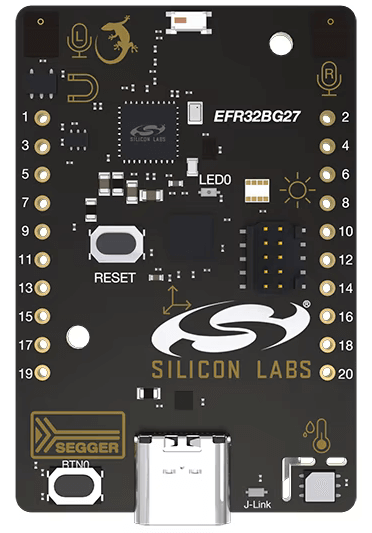
하드웨어
- 최대 76.8MHz EFR32BG27 Blue Gecko Wireless SoC
- ARM Cortex-M33 core, RAM 64kB, Flash 768kB
- Macronix MX25R8035F ultra-low-power 8-Mbit SPI flash
- 무선 전송용 2.4GHz ceramic antenna
- Si7021 상대 습도·온도 sensor
- Vishay VEML6035 low-power high-sensitivity ambient light sensor
- Si7210 Hall-effect sensor
- TDK InvenSense ICM-20689 6-axis inertial sensor
- PDM microphone 한 쌍
- LED 1개와 push button 1개
- 초저전력 동작용 power-enable signal과 isolation switch
- USB virtual COM port와 Packet Trace Interface(PTI)를 포함하는 onboard SEGGER J-Link debugger
- Energy profiling과 고급 wireless network debugging용 Mini Simplicity connector
- GPIO와 외부 hardware 연결용 breakout pad
- Reset button
- CR2032 coin-cell holder와 external battery connector
상세 정보는 xG27 Dev Kit User's Guide를 참고합니다.
지원 기능
xg27_dk2602a board configuration은 다음 hardware 기능을 지원합니다.
| Interface | Controller | Driver/Component |
|---|---|---|
| NVIC | on-chip | nested vector interrupt controller |
| SYSTICK | on-chip | systick |
| FLASH | on-chip | flash memory |
| GPIO | on-chip | gpio |
| UART | on-chip | serial |
Flashing
xG27 Dev Kit에는 사용자가 programming할 수 없는 EFM32GG12 microcontroller 기반 embedded J-Link adapter가 있습니다. 이 adapter는 EFR32BG27의 flashing/debugging용 SWD, tracing용 SWO, console용 UART, host USB 연결을 제공합니다. USB 연결은 console UART용 CDC-ACM serial endpoint와 SWD/SWO용 proprietary J-Link endpoint를 노출합니다.
UART는 대부분의 desktop OS에 있는 표준 CDC-ACM USB driver와 picocom 같은 terminal에서 접근합니다. SWD와 SWO는 Simplicity Commander를 통해 접근합니다.
가장 간단한 방법은 West가 Simplicity Commander를 unattended mode로 실행하고 필요한 인자를 전달하게 하는 것입니다.
commander가 설치되어 있고 실행 파일 directory가PATH에 있으면:
west flash- 그렇지 않으면
commander의 전체 경로를 지정합니다.
west flash --commander <path_to_commander_directory>/commander- J-Link adapter가 여러 개 연결되어 있으면 사용할 adapter의 serial number를 지정합니다.
west flash --dev-id <J-Link serial number>Programming and debugging
hello_world sample로 Zephyr kernel과 application을 build합니다.
west build -b xg27_dk2602a samples/hello_worldUSB port로 device를 host computer에 연결하고 west flash를 사용합니다. Serial terminal은 115200 baud, data 8 bit, parity 없음, stop bit 1로 설정합니다. Reset 후 다음 메시지가 표시됩니다.
Hello World! xg27_dk2602aSource
출처
영어 원문에는 문단, 문서 지시문, 표, 코드, 코드 심벌, 경로를 그대로 보존했습니다.