Part 1
요약·해설
A00·A01은 BRD4184A/@0, A02 이상은 BRD4184B/@2를 사용하며 각 pin과 명령을 구분합니다.
EFR32BG22
BRD4184A · @0
BRD4184B · @2
Bluetooth
Part 2
접을 수 있는 영어 원문 전체
영어 원문 전체 펼치기
68E85F8EB59B1F462BBB0C654CE67570FA28044074829A7D62513BD71398100D
.. _sltb010a:

EFR32BG22 Thunderboard (SLTB010A)
#################################

SLTB010A is a development kit based on the EFR32BG22 SoC. Early revisions of
the kit (A00 and A01) use a slightly different PCB (BRD4184A) from later
revisions (BRD4184B).

.. image:: ../../../../../../../../boards/silabs/dev_kits/sltb010a/doc/sltb010a.jpg
   :align: center
   :alt: SLTB010A board

Hardware
********

- EFR32BG22 Blue Gecko Wireless SoC with upto 76.8 MHz operating frequency
- ARM® Cortex® M33 core with 32 kB RAM and 512 kB Flash
- Macronix ultra low power 8-Mbit SPI flash (MX25R8035F)
- 2.4 GHz ceramic antenna for wireless transmission
- Silicon Labs Si7021 relative humidity and temperature sensor
- Silicon Labs Si1133 UV index and ambient light sensor (EFR32BG22-BRD4184A)
- Vishay VEML6035 ambient light sensor (EFR32BG22-BRD4184B)
- Silicon Labs Si7210 hall effect sensor
- TDK InvenSense ICM-20648 6-axis inertial sensor
- Two Knowles SPK0641HT4H-1 MEMS microphones with PDM output (EFR32BG22-BRD4184B)
- One LED and one push button
- Power enable signals and isolation switches for ultra low power operation
- On-board SEGGER J-Link debugger for easy programming and debugging, which
  includes a USB virtual COM port and Packet Trace Interface (PTI)
- Mini Simplicity connector for access to energy profiling and advanced wireless
  network debugging
- Breakout pads for GPIO access and connection to external hardware
- Reset button
- Automatic switch-over between USB and battery power
- CR2032 coin cell holder and external battery connector

For more information about the EFR32BG SoC and Thunderboard EFR32BG22 board:

- `EFR32BG22 Website`_
- `EFR32BG22 Datasheet`_
- `EFR32xG22 Reference Manual`_
- `Thunderboard EFR32BG22 Website`_
- `EFR32BG22-BRD4184A User Guide`_
- `EFR32BG22-BRD4184B User Guide`_
- `EFR32BG22-BRD4184A Schematics`_
- `EFR32BG22-BRD4184B Schematics`_

Supported Features
==================

The sltb010a board configuration supports the following hardware features:

+-----------+------------+-------------------------------------+
| Interface | Controller | Driver/Component                    |
+===========+============+=====================================+
| MPU       | on-chip    | memory protection unit              |
+-----------+------------+-------------------------------------+
| NVIC      | on-chip    | nested vector interrupt controller  |
+-----------+------------+-------------------------------------+
| SYSTICK   | on-chip    | systick                             |
+-----------+------------+-------------------------------------+
| COUNTER   | on-chip    | stimer                              |
+-----------+------------+-------------------------------------+
| SPI(M/S)  | on-chip    | spi                                 |
+-----------+------------+-------------------------------------+
| FLASH     | on-chip    | flash memory                        |
+-----------+------------+-------------------------------------+
| GPIO      | on-chip    | gpio                                |
+-----------+------------+-------------------------------------+
| UART      | on-chip    | serial                              |
+-----------+------------+-------------------------------------+
| WATCHDOG  | on-chip    | watchdog                            |
+-----------+------------+-------------------------------------+
| TRNG      | on-chip    | true random number generator        |
+-----------+------------+-------------------------------------+
| I2C(M/S)  | on-chip    | i2c                                 |
+-----------+------------+-------------------------------------+
| RADIO     | on-chip    | bluetooth                           |
+-----------+------------+-------------------------------------+

The default configuration can be found in
:zephyr_file:`boards/silabs/dev_kits/sltb010a/sltb010a_defconfig`.

Connections and IOs
===================

The EFR32BG22 SoC has four gpio controllers (PORTA, PORTB, PORTC and PORTD).

There are two variants of this board, "A" and "B". Please take a look at your PCB,
to determine which one you have, as the GPIO pin bindings vary between those two.

BRD4184A (SLTB010A revision A00 and A01):

+------+-------------+-----------------------------------+
| Pin  | Function    | Usage                             |
+======+=============+===================================+
| PB0  | GPIO        | LED0 (YELLOW)                     |
+------+-------------+-----------------------------------+
| PB1  | GPIO        | SW0 Push Button PB0               |
+------+-------------+-----------------------------------+
| PA5  | UART_TX     | UART TX Console VCOM_TX US1_TX #1 |
+------+-------------+-----------------------------------+
| PA6  | UART_RX     | UART RX Console VCOM_RX US1_RX #1 |
+------+-------------+-----------------------------------+

BRD4184B (SLTB010A revision A02 and newer):

+------+-------------+-----------------------------------+
| Pin  | Function    | Usage                             |
+======+=============+===================================+
| PA4  | GPIO        | LED0 (YELLOW)                     |
+------+-------------+-----------------------------------+
| PB3  | GPIO        | SW0 Push Button PB0               |
+------+-------------+-----------------------------------+
| PA5  | UART_TX     | UART TX Console VCOM_TX US1_TX #1 |
+------+-------------+-----------------------------------+
| PA6  | UART_RX     | UART RX Console VCOM_RX US1_RX #1 |
+------+-------------+-----------------------------------+

System Clock
============

The EFR32BG22 SoC is configured to use the 38.4 MHz external oscillator on the
board.

Programming and Debugging
=========================

Flashing an application
-----------------------

Connect your device to your host computer using the USB port.
The sample application :ref:`hello_world` is used for this example.
Build the Zephyr kernel and application, then flash it to the device:

BRD4184A:

.. zephyr-app-commands::
   :zephyr-app: samples/hello_world
   :board: sltb010a@0
   :goals: flash

BRD4184B:

.. zephyr-app-commands::
   :zephyr-app: samples/hello_world
   :board: sltb010a@2
   :goals: flash

.. note::
   `west flash` requires `SEGGER J-Link software`_ to be installed on you host
   computer.

Open a serial terminal (minicom, putty, etc.) with the following settings:

- Speed: 115200
- Data: 8 bits
- Parity: None
- Stop bits: 1

Reset the board and you should be able to see on the corresponding Serial Port
the following message:

.. code-block:: console

   Hello World! sltb010a

Bluetooth
=========

To use the BLE function, run the command below to retrieve necessary binary
blobs from the SiLabs HAL repository.

.. code-block:: console

   west blobs fetch hal_silabs

Then build the Zephyr kernel and a Bluetooth sample with the following
command. The :ref:`bluetooth-observer-sample` sample application is used in
this example.

BRD4184A:

.. zephyr-app-commands::
   :zephyr-app: samples/bluetooth/observer
   :board: sltb010a@0
   :goals: build

BRD4184B:

.. zephyr-app-commands::
   :zephyr-app: samples/bluetooth/observer
   :board: sltb010a@2
   :goals: build


.. _Thunderboard EFR32BG22 Website:
   https://www.silabs.com/development-tools/thunderboard/thunderboard-bg22-kit

.. _EFR32BG22-BRD4184A User Guide:
   https://www.silabs.com/documents/public/user-guides/ug415-sltb010a-user-guide.pdf

.. _EFR32BG22-BRD4184B User Guide:
   https://www.silabs.com/documents/public/user-guides/ug464-brd4184b-user-guide.pdf

.. _EFR32BG22-BRD4184A Schematics:
   https://www.silabs.com/documents/public/schematic-files/BRD4184A-A01-schematic.pdf

.. _EFR32BG22-BRD4184B Schematics:
   https://www.silabs.com/documents/public/schematic-files/BRD4184B-A02-schematic.pdf

.. _EFR32BG22 Website:
   https://www.silabs.com/wireless/bluetooth/efr32bg22-series-2-socs

.. _EFR32BG22 Datasheet:
   https://www.silabs.com/documents/public/data-sheets/efr32bg22-datasheet.pdf

.. _EFR32xG22 Reference Manual:
   https://www.silabs.com/documents/public/reference-manuals/efr32xg22-rm.pdf

.. _SEGGER J-Link software:
   https://www.segger.com/downloads/jlink
Part 3
한국어 전문 번역
개요
SLTB010A는 EFR32BG22 SoC 기반 development kit입니다. 초기 revision A00·A01은 BRD4184A PCB를 사용하고, 이후 revision은 약간 다른 BRD4184B PCB를 사용합니다.
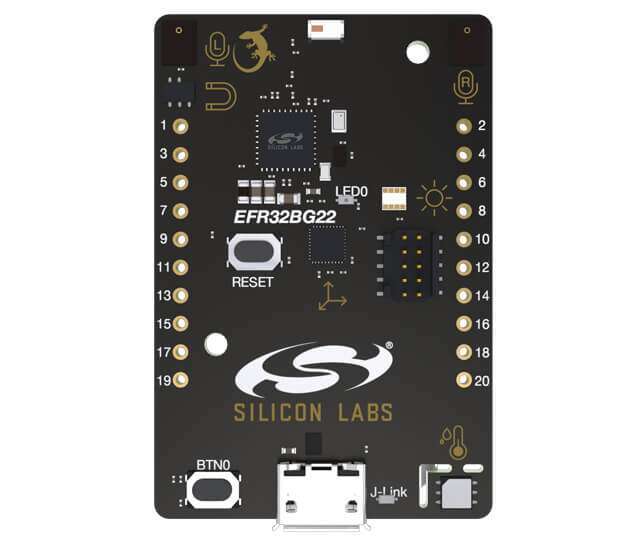
하드웨어
- 최대 76.8MHz EFR32BG22 Blue Gecko Wireless SoC
- ARM Cortex-M33 core, RAM 32kB, Flash 512kB
- Macronix MX25R8035F ultra-low-power 8-Mbit SPI flash
- 무선 전송용 2.4GHz ceramic antenna
- Si7021 상대 습도·온도 sensor
- BRD4184A의 Si1133 UV index·ambient light sensor
- BRD4184B의 Vishay VEML6035 ambient light sensor
- Si7210 Hall-effect sensor
- TDK InvenSense ICM-20648 6-axis inertial sensor
- BRD4184B의 PDM 출력 Knowles SPK0641HT4H-1 MEMS microphone 2개
- LED 1개와 push button 1개
- 초저전력 동작을 위한 power-enable signal과 isolation switch
- USB virtual COM port와 Packet Trace Interface(PTI)를 포함하는 onboard SEGGER J-Link debugger
- Energy profiling과 고급 wireless network debugging용 Mini Simplicity connector
- GPIO와 외부 hardware 연결용 breakout pad
- Reset button
- USB와 battery 전원의 자동 전환
- CR2032 coin-cell holder와 external battery connector
관련 자료: EFR32BG22 웹사이트, Datasheet, Reference Manual, Thunderboard 웹사이트, BRD4184A User Guide, BRD4184B User Guide, BRD4184A schematic, BRD4184B schematic.
지원 기능
sltb010a board configuration은 다음 기능을 지원합니다.
| Interface | Controller | Driver/Component |
|---|---|---|
| MPU | on-chip | memory protection unit |
| NVIC | on-chip | nested vector interrupt controller |
| SYSTICK | on-chip | systick |
| COUNTER | on-chip | stimer |
| SPI(M/S) | on-chip | spi |
| FLASH | on-chip | flash memory |
| GPIO | on-chip | gpio |
| UART | on-chip | serial |
| WATCHDOG | on-chip | watchdog |
| TRNG | on-chip | true random number generator |
| I2C(M/S) | on-chip | i2c |
| RADIO | on-chip | bluetooth |
기본 설정은 boards/silabs/dev_kits/sltb010a/sltb010a_defconfig에 있습니다.
연결과 I/O
EFR32BG22 SoC에는 PORTA·PORTB·PORTC·PORTD GPIO controller가 있습니다. Board에는 A와 B 두 variant가 있고 GPIO pin binding이 서로 다르므로 PCB 표기를 확인해야 합니다.
BRD4184A (SLTB010A revision A00·A01)
| Pin | Function | Usage |
|---|---|---|
| PB0 | GPIO | LED0 (YELLOW) |
| PB1 | GPIO | SW0 Push Button PB0 |
| PA5 | UART_TX | UART TX Console VCOM_TX US1_TX #1 |
| PA6 | UART_RX | UART RX Console VCOM_RX US1_RX #1 |
BRD4184B (SLTB010A revision A02 이상)
| Pin | Function | Usage |
|---|---|---|
| PA4 | GPIO | LED0 (YELLOW) |
| PB3 | GPIO | SW0 Push Button PB0 |
| PA5 | UART_TX | UART TX Console VCOM_TX US1_TX #1 |
| PA6 | UART_RX | UART RX Console VCOM_RX US1_RX #1 |
System clock
EFR32BG22 SoC는 board의 38.4MHz external oscillator를 사용하도록 구성됩니다.
Programming and debugging
Application flashing
USB port로 host computer에 연결합니다. hello_world를 build하고 device에 flash할 때 PCB revision에 맞는 board qualifier를 사용합니다.
BRD4184A
west build -b sltb010a@0 samples/hello_world
west flash
BRD4184B
west build -b sltb010a@2 samples/hello_world
west flashSerial terminal은 115200 baud, data 8 bit, parity 없음, stop bit 1로 설정합니다. Reset 후 다음 메시지가 표시됩니다.
Hello World! sltb010aBluetooth
BLE 기능을 사용하려면 먼저 SiLabs HAL repository에서 필요한 binary blob을 가져옵니다.
west blobs fetch hal_silabs그런 다음 PCB revision에 맞는 board qualifier로 Bluetooth observer sample을 build합니다.
BRD4184A
west build -b sltb010a@0 samples/bluetooth/observerBRD4184B
west build -b sltb010a@2 samples/bluetooth/observerSource
출처
영어 원문에는 문단, 문서 지시문, 표, 코드, 코드 심벌, 경로를 그대로 보존했습니다.