Part 1
요약·해설
두 serial firmware와 3.3V 제약, 12-pin 배선, 수동 reset/wake wiring, 세 variation과 on-board module build를 설명합니다.
UART · SPI
WICED · IWIN AT
3.3V only
ISMART4343C
Part 2
접을 수 있는 영어 원문 전체
영어 원문 전체 펼치기
595945D23ADEA549F92730D1ED67A97E30FDBCC40F0AE8420B523019F9C67CC5
.. _inventek_eswifi_shield:

Inventek es-WIFI Shield
#######################

Overview
********

The es-WIFI (embedded Serial-to-WiFi) modules are devices developed by Inventek
Systems.  It integrates WIFI and optionally Bluetooth Low Energy.  The es-WIFI
devices can run Cypress WICED or Inventek's IWIN (Inventek Systems Wireless
Interoperability Network) AT commands set.  The current es-WIFI driver is able
to use one of two serial interfaces: SPI or UART.

The Zephyr es-WIFI drivers was implemented using ISM43362-M3G-L44 with SPI
interface.  The UART was implemented with ISM4343-WBM-L151.  Besides that,
user can reprogram the modules to switch from one interface type to another
by the JTAG pin header.


ISMART4343C-EVB
===============

The `ISMART4343C-EVB`_ is a development Kit with Arduino Uno R3 compatible
shield.  It allows evaluate es-WIFI modules with SPI or UART interface.  For
UART interface the `inventek_eswifi_arduino_uart`_ must be selected.  For
SPI interface the `inventek_eswifi_arduino_spi`_ must be enabled.  The EVB
can use 5V from Arduino header, if board provide it, J17 position 1-2.
Otherwise, J17 2-3 will select USB-5V. More information can be found at
`ISMART4343C-EVB Users Manual`_.

.. note::
	The Inventek's EVBs signals are 3.3V only.

.. image:: ../../../../../../../boards/shields/inventek_eswifi/doc/ismart4343c-evb.jpg
   :align: center
   :alt: ISMART4343C-EVB

Pins Assignment of the ISMART EVBs
==================================

The below table presents signals by interface.  The UART switch SW3 must be on
position 3 to enable RX/TX signals when using es-WIFI with UART firmware.

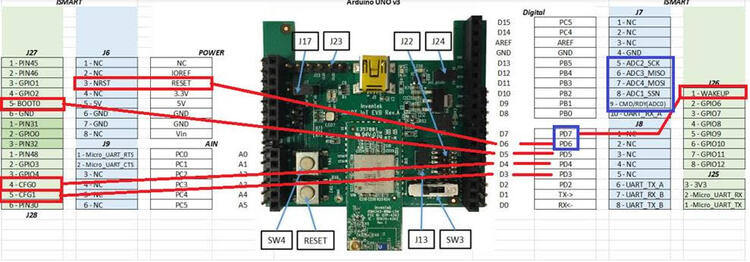
To enable full control by Arduino header user should do some manual wiring.
The signals from D3 up to D7 are not connected by default on the Inventek's
shield.  These signals marked as optional can help on development. The current
driver do not handle that signals and are simple suggestions and can be left
as is.  Some arduino boards don't have NRST pin connected to a GPIO pin.  The
recommendation is bend the NRST pin and make a wire to D6.  WAKE-UP signal is
available at header J26 pin 1 and shield configuration uses D7 to control that
signal, user need do a wire connecting these two terminals.  On the below
image is possible see suggested wiring connections.

.. image:: ../../../../../../../boards/shields/inventek_eswifi/doc/ismart4343c-evb-wiring.jpg
   :align: center
   :alt: ISMART4343C-EVB Wiring

+-----------------------+-----------+---------------------+
| Arduino Connector Pin | Function  | Serial Connection   |
+=======================+===========+=====================+
| D0                    | UART RX   | UART                |
+-----------------------+-----------+---------------------+
| D1                    | UART TX   | UART                |
+-----------------------+-----------+---------------------+
| D3                    | CFG-1     | UART/SPI [optional] |
+-----------------------+-----------+---------------------+
| D4                    | CFG-0     | UART/SPI [optional] |
+-----------------------+-----------+---------------------+
| D5                    | BOOT-0    | UART/SPI [optional] |
+-----------------------+-----------+---------------------+
| D6                    | NRST      | UART/SPI [wiring]   |
+-----------------------+-----------+---------------------+
| D7                    | WAKE-UP   | UART/SPI [wiring]   |
+-----------------------+-----------+---------------------+
| D9                    | CMD/RDY   | SPI                 |
+-----------------------+-----------+---------------------+
| D10                   | SPI CS    | SPI                 |
+-----------------------+-----------+---------------------+
| D11                   | SPI MOSI  | SPI                 |
+-----------------------+-----------+---------------------+
| D12                   | SPI MISO  | SPI                 |
+-----------------------+-----------+---------------------+
| D13                   | SPI SCK   | SPI                 |
+-----------------------+-----------+---------------------+


Supported variations
====================

The below table suggests shield variation accordingly with end user
application.  When a standard Arduino R3 connector is available on board, user
should select the matching shield configuration based on the serial interface
(SERIAL or SPI).  The inventek_eswifi is available to allow users testing a
built-in module with dedicated <board>.overlay and <board>.defconfig files.

+-----------------------------+---------------------------------+-----------+
| Connector Standard          | Shield Designation              | Variation |
+=============================+=================================+===========+
| Without standard (overlay)  | `inventek_eswifi`_              |     1     |
+-----------------------------+---------------------------------+-----------+
| Arduino by UART             | `inventek_eswifi_arduino_uart`_ |     2     |
+-----------------------------+---------------------------------+-----------+
| Arduino by SPI              | `inventek_eswifi_arduino_spi`_  |     3     |
+-----------------------------+---------------------------------+-----------+

Requirements
************

This shield requires a board which provides a configuration that allows an
UART or SPI interface and two or three GPIO. (see :ref:`shields` for more
details).

.. note::
	Some boards may already have a network interface:  Check network
	documentation to understand how properly configure both interfaces.
	To keep simple, you can keep only the WIFI interface enabled at
	Networking -> Link Layer Options.  This will avoid problems running
	Zephyr samples.

Tested Boards
=============

+------------------------------+------------------------------+-----------+
| Board                        | Disabled Interface           | Variation |
+==============================+==============================+===========+
| ATMEL sam_v71_xult/samv71q21 | Ethernet                     |   2 , 3   |
+------------------------------+------------------------------+-----------+
| ST nucleo_f767zi             | Ethernet                     |   2 , 3   |
+------------------------------+------------------------------+-----------+
| ST disco_l475_iot1           |                              |     -     |
+------------------------------+------------------------------+-----------+

.. note::
	ST disco_l475_iot1 already have an ISM43362 module with IWIN SPI
	firmware.  It doesn't need this shield to expose es-WIFI.  It is only
	used here as reference to demonstrate how configure an on-board
	module.

Sample usage
************

The reference sample for WIFI is :zephyr:code-sample:`wifi-shell`.  It allows you to use WIFI
shell to scan local Wireless networks.  With the password you can pick,
connect and send ping.

Build and Programming
*********************

Set ``--shield <shield designator>`` when you invoke ``west build``.

.. zephyr-app-commands::
   :zephyr-app: samples/net/wifi
   :host-os: unix
   :board: [sam_v71_xult/samv71q21 | nucleo_f767zi]
   :shield: inventek_eswifi_arduino_uart
   :goals: build flash
   :compact:

.. zephyr-app-commands::
   :zephyr-app: samples/net/wifi
   :host-os: unix
   :board: [sam_v71_xult/samv71q21 | nucleo_f767zi]
   :shield: inventek_eswifi_arduino_spi
   :goals: build flash
   :compact:

.. zephyr-app-commands::
   :zephyr-app: samples/net/wifi
   :host-os: unix
   :board: disco_l475_iot1
   :goals: build flash
   :compact:


References
**********

.. target-notes::

.. _ISMART4343C-EVB:
   https://www.inventeksys.com/ismart4343-c-arduino-shield-wi-fi-2ghz-bluetooth-ble/

.. _ISMART4343C-EVB Users Manual:
   https://www.inventeksys.com/wp-content/uploads/IoT-EVB-Users-Manual.pdf

.. _inventek_eswifi:
   https://github.com/zephyrproject-rtos/zephyr/blob/master/boards/shields/inventek_eswifi/inventek_eswifi.overlay

.. _inventek_eswifi_arduino_uart:
   https://github.com/zephyrproject-rtos/zephyr/blob/master/boards/shields/inventek_eswifi/inventek_eswifi_arduino_uart.overlay

.. _inventek_eswifi_arduino_spi:
   https://github.com/zephyrproject-rtos/zephyr/blob/master/boards/shields/inventek_eswifi/inventek_eswifi_arduino_spi.overlay
Part 3
한국어 전문 번역
개요
es-WIFI(embedded Serial-to-WiFi) module은 Inventek Systems가 개발한 device입니다. Wi-Fi와 선택적으로 Bluetooth Low Energy를 통합하며 Cypress WICED 또는 Inventek IWIN(Inventek Systems Wireless Interoperability Network) AT command set을 실행할 수 있습니다. 현재 es-WIFI driver는 SPI 또는 UART 중 하나를 사용합니다.
Zephyr es-WIFI SPI driver는 ISM43362-M3G-L44, UART driver는 ISM4343-WBM-L151로 구현했습니다. JTAG pin header로 module을 다시 program하면 interface type을 서로 바꿀 수도 있습니다.
ISMART4343C-EVB
ISMART4343C-EVB는 Arduino Uno R3 호환 shield를 갖춘 development kit로 es-WIFI module의 SPI/UART interface를 평가합니다. UART에는 inventek_eswifi_arduino_uart, SPI에는 inventek_eswifi_arduino_spi를 선택합니다.
Board가 Arduino header에 5V를 제공하면 J17 position 1-2로 그 전원을 사용합니다. 그렇지 않으면 J17 position 2-3으로 USB-5V를 선택합니다.
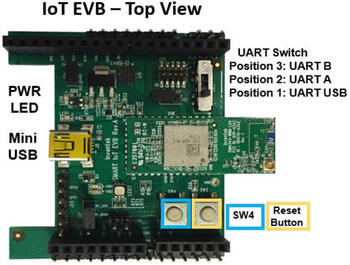
ISMART EVB pin assignment
UART firmware를 사용할 때 RX/TX를 활성화하려면 UART switch SW3를 position 3에 둡니다.
Arduino header에서 모든 signal을 제어하려면 수동 배선이 필요합니다. D3~D7은 기본 연결되지 않으며 optional signal은 현재 driver가 처리하지 않으므로 그대로 두어도 됩니다.
- Arduino board의 NRST가 GPIO에 연결되지 않았다면 NRST pin을 구부려
D6에 wire로 연결하는 것이 권장됩니다. - WAKE-UP은 header
J26 pin 1에 있으며 shield configuration은D7로 제어하므로 두 terminal을 wire로 연결해야 합니다.
| Arduino connector pin | Function | Serial connection |
|---|---|---|
| D0 | UART RX | UART |
| D1 | UART TX | UART |
| D3 | CFG-1 | UART/SPI [optional] |
| D4 | CFG-0 | UART/SPI [optional] |
| D5 | BOOT-0 | UART/SPI [optional] |
| D6 | NRST | UART/SPI [wiring] |
| D7 | WAKE-UP | UART/SPI [wiring] |
| D9 | CMD/RDY | SPI |
| D10 | SPI CS | SPI |
| D11 | SPI MOSI | SPI |
| D12 | SPI MISO | SPI |
| D13 | SPI SCK | SPI |
지원 variation
Arduino R3 connector가 있으면 serial interface에 맞는 UART 또는 SPI configuration을 선택합니다. Built-in module을 시험할 때는 전용 <board>.overlay와 <board>.defconfig를 제공하는 inventek_eswifi를 사용할 수 있습니다.
| Connector standard | Shield designation | Variation |
|---|---|---|
| Without standard (overlay) | inventek_eswifi | 1 |
| Arduino by UART | inventek_eswifi_arduino_uart | 2 |
| Arduino by SPI | inventek_eswifi_arduino_spi | 3 |
요구 사항
UART 또는 SPI interface와 GPIO 2~3개를 제공하도록 구성된 board가 필요합니다.
시험된 board
| Board | Disabled interface | Variation |
|---|---|---|
| ATMEL sam_v71_xult/samv71q21 | Ethernet | 2, 3 |
| ST nucleo_f767zi | Ethernet | 2, 3 |
| ST disco_l475_iot1 | - |
ST disco_l475_iot1에는 IWIN SPI firmware가 설치된 ISM43362 module이 이미 있으므로 es-WIFI를 노출하기 위한 shield가 필요하지 않습니다. 이 board는 on-board module configuration의 reference로만 사용합니다.
Sample 사용
Wi-Fi reference sample은 Wi-Fi shell입니다. 주변 wireless network를 scan하고, password를 입력해 network를 선택·연결한 뒤 ping을 보낼 수 있습니다.
빌드와 프로그래밍
Arduino UART
west build -b [sam_v71_xult/samv71q21 | nucleo_f767zi]   --shield inventek_eswifi_arduino_uart   samples/net/wifi
west flash
Arduino SPI
west build -b [sam_v71_xult/samv71q21 | nucleo_f767zi]   --shield inventek_eswifi_arduino_spi   samples/net/wifi
west flash
On-board module
west build -b disco_l475_iot1 samples/net/wifi
west flash
참고 자료
Source
출처
영어 원문에는 문단, 문서 지시문, 표, 코드, 코드 심벌, 경로를 그대로 보존했습니다.