Part 1
요약·해설
133 MHz dual-core와 memory, 13개 peripheral의 Kconfig/compatible, DTS route, 7개 기본 mapping, BOOTSEL UF2 flash를 설명합니다.
RP2040 · dual-core · 133 MHz
264 KB SRAM · 2 MB flash
14 GPIO · PIO UART · USB
BOOTSEL · UF2 drag-and-drop
Part 2
접을 수 있는 영어 원문 전체
영어 원문 전체 펼치기
5CB9F8F7FD7F0E01C245DC8A5432D7B26BCD6F43C177E1F022FB0E99697F1670
.. _xiao_rp2040:

XIAO RP2040
###########

Overview
********

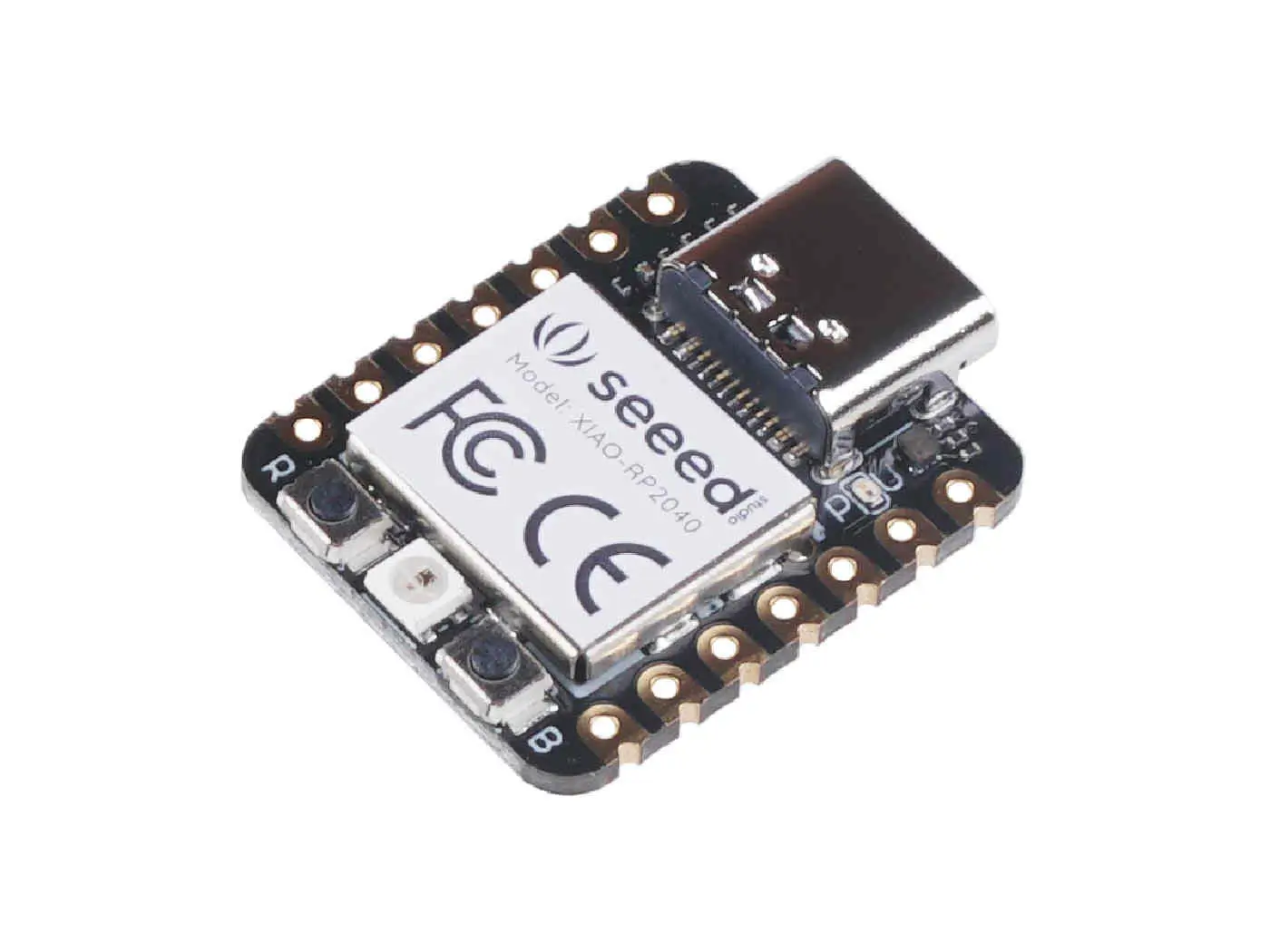
The XIAO RP2040 is an IoT mini development board from Seeed Studio.
It is equipped with an RP2040 SoC, an on-board WS2812 addressable
LED, and USB connector. The USB bootloader allows it
to be flashed without any adapter, in a drag-and-drop manner.

For more details see the `Seeed Studio XIAO RP2040`_ wiki page.

.. figure:: ../../../../../../../boards/seeed/xiao_rp2040/doc/img/xiao_rp2040.webp
   :align: center
   :alt: XIAO RP2040

   XIAO RP2040

Hardware
********

The Seeed Studio XIAO RP2040 is a low-power microcontroller that
carries the powerful Dual-core RP2040 processor with a flexible
clock running up to 133 MHz. There is also 264KB of SRAM, and 2MB of
on-board Flash memory.

There are 14 GPIO PINs on Seeed Studio XIAO RP2040, on which there
are 11 digital pins, 4 analog pins, 11 PWM Pins,1 I2C interface,
1 UART interface, 1 SPI interface, 1 SWD Bonding pad interface.

Supported Features
==================

The ``xiao_rp2040`` board target supports the following hardware
features:

.. list-table::
   :header-rows: 1

   * - Peripheral
     - Kconfig option
     - Devicetree compatible
   * - NVIC
     - N/A
     - :dtcompatible:`arm,v6m-nvic`
   * - UART
     - :kconfig:option:`CONFIG_SERIAL`
     - :dtcompatible:`raspberrypi,pico-uart`
   * - GPIO
     - :kconfig:option:`CONFIG_GPIO`
     - :dtcompatible:`raspberrypi,pico-gpio`
   * - ADC
     - :kconfig:option:`CONFIG_ADC`
     - :dtcompatible:`raspberrypi,pico-adc`
   * - I2C
     - :kconfig:option:`CONFIG_I2C`
     - :dtcompatible:`snps,designware-i2c`
   * - SPI
     - :kconfig:option:`CONFIG_SPI`
     - :dtcompatible:`raspberrypi,pico-spi`
   * - USB Device
     - :kconfig:option:`CONFIG_USB_DEVICE_STACK`
     - :dtcompatible:`raspberrypi,pico-usbd`
   * - HWINFO
     - :kconfig:option:`CONFIG_HWINFO`
     - N/A
   * - Watchdog Timer (WDT)
     - :kconfig:option:`CONFIG_WATCHDOG`
     - :dtcompatible:`raspberrypi,pico-watchdog`
   * - PWM
     - :kconfig:option:`CONFIG_PWM`
     - :dtcompatible:`raspberrypi,pico-pwm`
   * - Flash
     - :kconfig:option:`CONFIG_FLASH`
     - :dtcompatible:`raspberrypi,pico-flash-controller`
   * - Clock controller
     - :kconfig:option:`CONFIG_CLOCK_CONTROL`
     - :dtcompatible:`raspberrypi,pico-clock-controller`
   * - UART (PIO)
     - :kconfig:option:`CONFIG_SERIAL`
     - :dtcompatible:`raspberrypi,pico-uart-pio`

Pin Mapping
===========

The peripherals of the RP2040 SoC can be routed to various pins on the board.
The configuration of these routes can be modified through DTS. Please refer to
the datasheet to see the possible routings for each peripheral.

Default Zephyr Peripheral Mapping:
----------------------------------

.. rst-class:: rst-columns

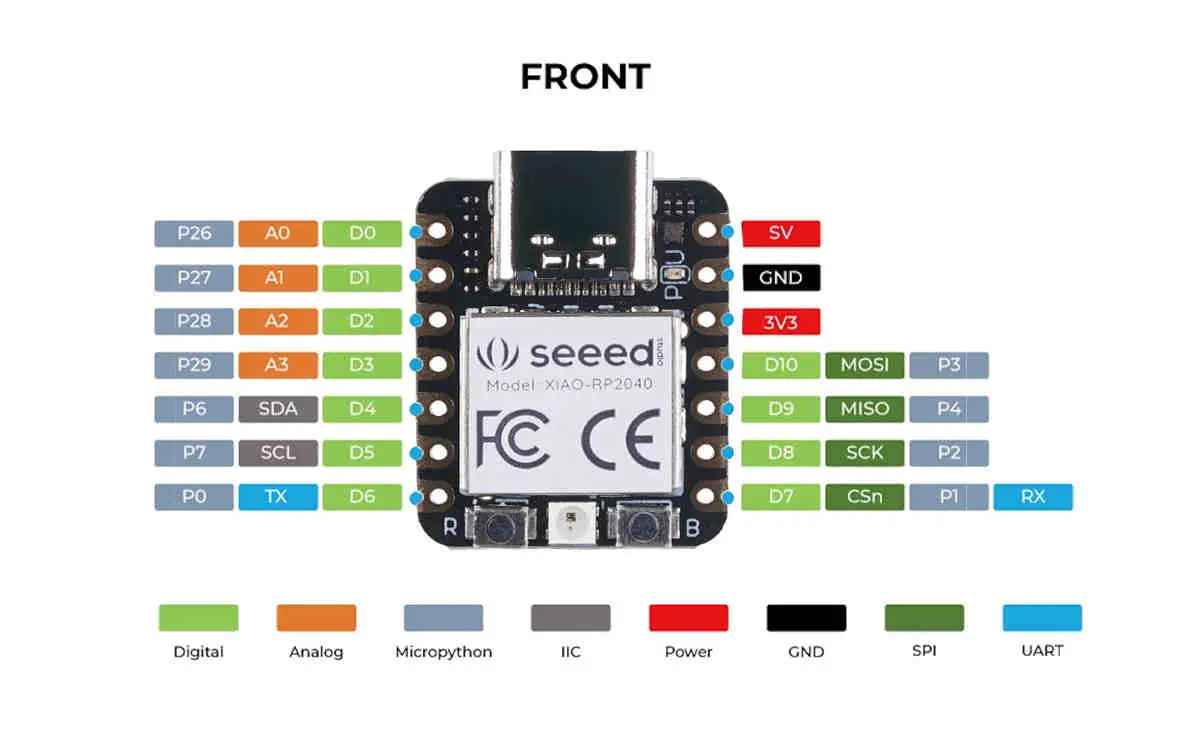
- UART0_TX : P0
- UART0_RX : P1
- I2C1_SDA : P6
- I2C1_SCL : P7
- SPI0_RX : P4
- SPI0_SCK : P2
- SPI0_TX : P3

Connections and IOs
===================

The board uses a standard XIAO pinout, the default pin mapping is the following:

.. figure:: ../../../../../../../boards/seeed/xiao_rp2040/doc/img/xiao_rp2040_pinout.webp
   :align: center
   :alt: XIAO RP2040 Pinout

   XIAO RP2040 Pinout

Programming and Debugging
*************************

Flashing
========

Using UF2
---------

You can flash the Xiao RP2040 with a UF2 file.
By default, building an app for this board will generate a
:file:`build/zephyr/zephyr.uf2` file. If the Xiao RP2040 is powered on with
the ``BOOTSEL`` button pressed, it will appear on the host as a mass storage
device. The UF2 file should be copied to the device, which will
flash the Xiao RP2040.

References
**********

.. target-notes::

.. _`Seeed Studio XIAO RP2040`: https://wiki.seeedstudio.com/XIAO-RP2040/
Part 3
한국어 전문 번역
개요
XIAO RP2040은 Seeed Studio의 IoT mini development board입니다. RP2040 SoC, on-board WS2812 addressable LED와 USB connector를 갖습니다. USB bootloader 덕분에 별도 adapter 없이 drag-and-drop 방식으로 flash할 수 있습니다.
자세한 내용은 Seeed Studio XIAO RP2040 Wiki를 참고합니다.
하드웨어
Seeed Studio XIAO RP2040은 최대 133 MHz의 flexible clock으로 동작하는 강력한 dual-core RP2040 processor를 탑재한 low-power microcontroller board입니다. 264 KB SRAM과 2 MB on-board flash memory도 제공합니다.
GPIO pin은 14개이며, 그중 digital pin 11개, analog pin 4개, PWM pin 11개가 있습니다. I2C, UART, SPI interface 각 1개와 SWD bonding-pad interface 1개를 제공합니다.
지원 기능
xiao_rp2040 board target이 지원하는 peripheral과 활성화 Kconfig option, Devicetree compatible은 다음과 같습니다.
| Peripheral | Kconfig option | Devicetree compatible |
|---|---|---|
| NVIC | N/A | arm,v6m-nvic |
| UART | CONFIG_SERIAL | raspberrypi,pico-uart |
| GPIO | CONFIG_GPIO | raspberrypi,pico-gpio |
| ADC | CONFIG_ADC | raspberrypi,pico-adc |
| I2C | CONFIG_I2C | snps,designware-i2c |
| SPI | CONFIG_SPI | raspberrypi,pico-spi |
| USB Device | CONFIG_USB_DEVICE_STACK | raspberrypi,pico-usbd |
| HWINFO | CONFIG_HWINFO | N/A |
| Watchdog Timer (WDT) | CONFIG_WATCHDOG | raspberrypi,pico-watchdog |
| PWM | CONFIG_PWM | raspberrypi,pico-pwm |
| Flash | CONFIG_FLASH | raspberrypi,pico-flash-controller |
| Clock controller | CONFIG_CLOCK_CONTROL | raspberrypi,pico-clock-controller |
| UART (PIO) | CONFIG_SERIAL | raspberrypi,pico-uart-pio |
Pin mapping
RP2040 SoC peripheral은 board의 여러 pin으로 route할 수 있습니다. 이 route는 DTS에서 변경할 수 있으며 각 peripheral의 가능한 route는 datasheet를 참고합니다.
기본 Zephyr peripheral mapping
UART0_TX : P0UART0_RX : P1I2C1_SDA : P6I2C1_SCL : P7SPI0_RX : P4SPI0_SCK : P2SPI0_TX : P3
연결과 I/O
Board는 standard XIAO pinout을 사용합니다. 기본 pin mapping은 다음 그림과 같습니다.
Programming과 debugging
UF2 flashing
XIAO RP2040은 UF2 file로 flash할 수 있습니다. 기본적으로 이 board용 application을 build하면 build/zephyr/zephyr.uf2가 생성됩니다.
BOOTSEL button을 누른 채 XIAO RP2040의 전원을 켜면 host에 mass-storage device로 나타납니다. UF2 file을 해당 device에 복사하면 XIAO RP2040이 flash됩니다.
참고 자료
Source
출처
영어 원문에는 문단, 문서 지시문, 표, 코드, 코드 심벌, 경로를 그대로 보존했습니다.