Part 1
요약·해설
CR52 target, 지원 interface 6종, LED8, CN20 기본 console과 Coresight/OpenOCD workflow를 설명합니다.
R-Car S4 CR52 · lockstep
CN20 · SCIF0 · 115200 8N1
Olimex ARM-USB-OCD-H · Coresight 20-pin
Part 2
접을 수 있는 영어 원문 전체
영어 원문 전체 펼치기
059D2C5331EBCBC4435E9966038C0C388E6DEF816548676750233CC89E9F9DCE
.. _rcar_spider_boards:

Renesas R-Car Spider
####################

Overview
********

| R-Car S4 enables the launch of Car Server/CoGW with high performance, high-speed networking,
| high security and high functional safety levels that are required as E/E architectures
| evolve into domains and zones.

| The R-Car S4 solution allows designers to re-use up to 88 percent of software code developed
| for 3rd generation R-Car SoCs and RH850 MCU applications.\
| The software package supports the real-time cores with various drivers and basic software
| such as Linux BSP and hypervisors.

The Renesas R-Car Spider board is the Renesas R-Car S4 reference board and is designed for
evaluating features and performance of this SoC.

.. figure:: ../../../../../../../boards/renesas/rcar_spider_s4/doc/img/rcar_s4_spider_full.jpg
   :align: center
   :alt: R-Car S4 Spider

More information about the board can be found at `Renesas R-Car S4 Spider`_ website.

Hardware
********

Hardware capabilities for the S4 Spider board can be found on the `eLinux S4 Spider`_ page.

.. figure:: ../../../../../../../boards/renesas/rcar_spider_s4/doc/img/rcar_s4_block_diagram.jpg
   :align: center
   :alt: R-Car S4 Spider block diagram

.. note:: We support Zephyr running on the CR52 processor that is provided for RTOS purpose.

More information about the SoC that equips the board can be found here:

- `Renesas R-Car S4 chip`_

Supported Features
==================

Here are the current supported features when running Zephyr Project on the R-Car S4 Spider CR52:

+-----------+------------------------------+--------------------------------+
| Interface | Driver/components            | Support level                  |
+===========+==============================+================================+
| PINMUX    | pinmux                       |                                |
+-----------+------------------------------+--------------------------------+
| CLOCK     | clock_control                |                                |
+-----------+------------------------------+--------------------------------+
| GPIO      | gpio                         |                                |
+-----------+------------------------------+--------------------------------+
| UART      | uart                         | serial port-polling            |
+           +                              +                                +
|           | FT232RQ                      | serial port-interrupt          |
+-----------+------------------------------+--------------------------------+
| I2C       | i2c                          | interrupt driven               |
+-----------+------------------------------+--------------------------------+
| PWM       | pwm                          | All channels                   |
+-----------+------------------------------+--------------------------------+

It is also currently possible to write on the ram console.

More features will be supported soon.

Connections and IOs
===================

| The "Spider board" consists of a CPU board and a Breakout board.
| The CPU board is stuck on top of the Breakout board.

Here are the official IOs figures from eLinux for S4 board:

`S4 Spider CPU board IOs`_

`S4 Spider breakout board IOs`_

GPIO
----

By running Zephyr on S4 Spider, the software controllable LED 'LED8' can be used as output.

UART
----

Here is information about both serial ports provided on the S4 Spider board :

+--------------------+----------+--------------------+-------------+------------------------+
| Physical Interface | Location | Software Interface | Converter   | Further Information    |
+====================+==========+====================+=============+========================+
| CN20 USB Port      | CPU Board| SCIF0/HSCIF1       | FT232HQ     | Default Zephyr serial  |
+--------------------+----------+--------------------+-------------+------------------------+
| CN21 USB Port      | CPU Board| SCIF3/HSCIF0       | FT2232H-56Q | Used by U-BOOT & Linux |
+--------------------+----------+--------------------+-------------+------------------------+

.. note::
   The Zephyr console output is assigned to SCIF0 (CN20 USB Port) with settings:
   115200 8N1 without hardware flow control by default.

I2C
---

I2C is mainly used to manage and power-on some onboard chips on the S4 Spider board.

Embedded I2C devices and I/O expanders are not yet supported.
The current I2C support therefore does not make any devices available to the user at this time.

Programming and Debugging
*************************

Build and flash applications as usual (see :ref:`build_an_application` and
:ref:`application_run` for more details).

Supported Debug Probe
=====================

| The "Olimex ARM-USB-OCD-H" probe is the only officially supported probe.
| This probe is supported by OpenOCD that is shipped with the Zephyr SDK.

The "Olimex ARM-USB-OCD-H" probe needs to be connected with a "Coresight 20 pins"
adapter to CN1 connector on Spider board.

Configuring a Console
=====================

Connect a USB cable from your PC to CN20 USB port of your Spider board.

Use the following settings with your serial terminal of choice (minicom, putty,
etc.):

- Speed: 115200
- Data: 8 bits
- Parity: None
- Stop bits: 1

Flashing
========

First of all, open your serial terminal.

Applications for the ``rcar_spider_s4/r8a779f0/r52`` board configuration can be built in the
usual way (see :ref:`build_an_application` for more details).

.. zephyr-app-commands::
   :zephyr-app: samples/hello_world
   :board: rcar_spider_s4/r8a779f0/r52
   :goals: flash

You should see the following message in the terminal:

.. code-block:: console

	*** Booting Zephyr OS build v3.3.0-rc2 ***
	Hello World! rcar_spider_s4

Debugging
=========

First of all, open your serial terminal.

Here is an example for the :ref:`hello_world` application.

.. zephyr-app-commands::
   :zephyr-app: samples/hello_world
   :board: rcar_spider_s4/r8a779f0/r52
   :goals: debug

You will then get access to a GDB session for debugging.

By continuing the app, you should see the following message in the terminal:

.. code-block:: console

	*** Booting Zephyr OS build v3.3.0-rc2 ***
	Hello World! rcar_spider_s4

References
**********

- `Renesas R-Car S4 Spider`_
- `Renesas R-Car S4 chip`_
- `eLinux S4 Spider`_

.. _Renesas R-Car S4 Spider:
   https://www.renesas.com/us/en/products/automotive-products/automotive-system-chips-socs/rtp8a779f0askb0sp2s-r-car-s4-reference-boardspider

.. _Renesas R-Car S4 chip:
	https://www.renesas.com/us/en/products/automotive-products/automotive-system-chips-socs/r-car-s4-automotive-system-chip-soc-car-servercommunication-gateway

.. _eLinux S4 Spider:
	https://elinux.org/R-Car/Boards/Spider

.. _S4 Spider CPU board IOs:
	https://elinux.org/images/6/6d/Rcar_s4_spider_cpu_board.jpg

.. _S4 Spider breakout board IOs:
	https://elinux.org/images/2/29/Rcar_s4_spider_breakout_board.jpg
Part 3
한국어 전문 번역
개요
R-Car S4는 E/E architecture가 domain과 zone 구조로 발전하면서 필요한 고성능, 고속 networking, 높은 security와 functional safety를 갖춘 Car Server/Communication Gateway(CoGW)를 구현합니다.
Designer는 3세대 R-Car SoC 및 RH850 MCU application용 software code의 최대 88%를 재사용할 수 있습니다. Software package는 여러 driver와 Linux BSP, hypervisor 같은 basic software로 real-time core를 지원합니다.
Renesas R-Car Spider board는 R-Car S4 reference board이며 SoC의 기능과 성능을 평가하도록 설계되었습니다.
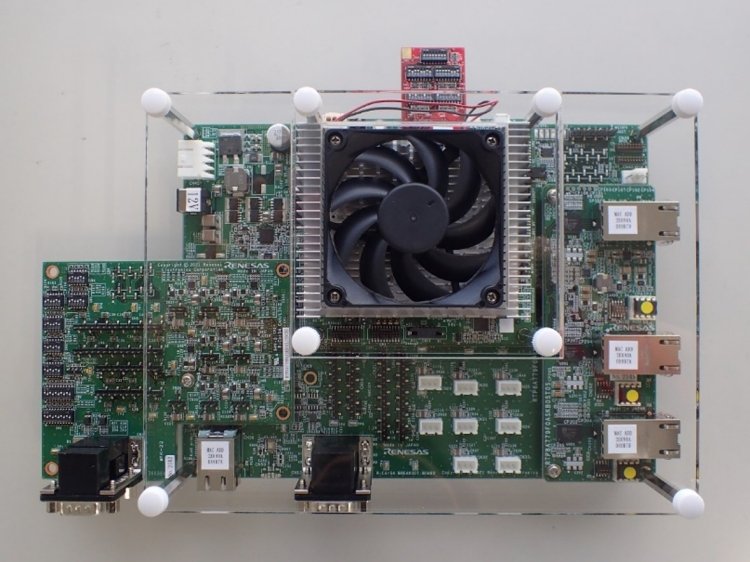
자세한 정보는 Renesas R-Car S4 Spider website에 있습니다.
하드웨어
S4 Spider hardware capability는 eLinux S4 Spider page에서 확인할 수 있습니다.
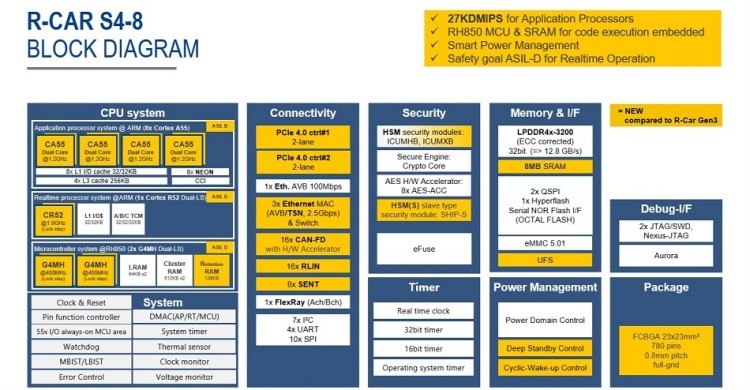
보드의 SoC 정보는 Renesas R-Car S4 chip page에서 확인할 수 있습니다.
지원 기능
R-Car S4 Spider CR52에서 Zephyr Project를 실행할 때 현재 지원되는 기능은 다음과 같습니다.
| 인터페이스 | 드라이버/컴포넌트 | 지원 수준 |
|---|---|---|
PINMUX | pinmux | |
CLOCK | clock_control | |
GPIO | gpio | |
UART | uart · FT232RQ | polling · interrupt |
I2C | i2c | interrupt driven |
PWM | pwm | all channels |
RAM console에 쓰는 것도 현재 가능하며 더 많은 기능이 지원될 예정입니다.
연결과 I/O
Spider board는 CPU board와 breakout board로 구성되며 CPU board가 breakout board 위에 장착됩니다. eLinux 공식 그림은 S4 Spider CPU board I/O와 S4 Spider breakout board I/O에서 볼 수 있습니다.


GPIO
S4 Spider에서 Zephyr를 실행하면 software-controllable LED LED8을 output으로 사용할 수 있습니다.
UART
S4 Spider board의 serial port 두 개는 다음과 같습니다.
| 물리 인터페이스 | 위치 | Software interface | Converter | 추가 정보 |
|---|---|---|---|---|
CN20 USB port | CPU board | SCIF0/HSCIF1 | FT232HQ | 기본 Zephyr serial |
CN21 USB port | CPU board | SCIF3/HSCIF0 | FT2232H-56Q | U-Boot 및 Linux 사용 |
I2C
I2C는 주로 S4 Spider board의 일부 on-board chip을 관리하고 켜는 데 사용합니다. Embedded I2C device와 I/O expander가 아직 지원되지 않아 현재 사용자에게 제공되는 I2C device는 없습니다.
프로그래밍과 디버깅
Application은 일반적인 방법으로 build하고 flash합니다.
지원 debug probe
공식 지원 probe는 Olimex ARM-USB-OCD-H뿐입니다. Zephyr SDK에 포함된 OpenOCD가 이를 지원합니다. Coresight 20-pin adapter를 사용해 probe를 Spider board의 CN1 connector에 연결해야 합니다.
Console 구성
PC에서 Spider board의 CN20 USB port로 USB cable을 연결하고 terminal을 속도 115200, data 8 bits, parity None, stop bits 1로 설정합니다.
플래시
먼저 serial terminal을 엽니다. rcar_spider_s4/r8a779f0/r52 board configuration용 hello_world application을 build하고 flash합니다.
west build -b rcar_spider_s4/r8a779f0/r52 samples/hello_world
west flash
Terminal에 다음 메시지가 표시되어야 합니다.
*** Booting Zephyr OS build v3.3.0-rc2 ***
Hello World! rcar_spider_s4
디버깅
먼저 serial terminal을 열고 다음처럼 hello_world를 debug합니다.
west build -b rcar_spider_s4/r8a779f0/r52 samples/hello_world
west debug
GDB session에 접근한 뒤 application을 계속 실행하면 terminal에 다음 메시지가 표시됩니다.
*** Booting Zephyr OS build v3.3.0-rc2 ***
Hello World! rcar_spider_s4
참고 자료
Source
출처
영어 원문에는 문단, 문서 지시문, 표, 코드, 코드 심벌, 경로를 그대로 보존했습니다.