Part 1
요약·해설
세 hardware 영역, 지원 interface 4종, Cortex-M85 toolchain 조건, J-Link flash와 Ozone v3.30d debug 설정을 설명합니다.
RA8M1 · Cortex-M85 · 480 MHz
External Octo-SPI 512 Mb
Zephyr SDK v0.16.6+
Part 2
접을 수 있는 영어 원문 전체
영어 원문 전체 펼치기
01383834F860C802F40D9E2CF56297784F499451E331722BE5154388DE40FCD3
.. _ek_ra8m1:

RA8M1 Evaluation Kit
####################

Overview
********

The EK-RA8M1 is an Evaluation Kit for Renesas RA8M1 MCU Group which is the first
32-bits MCUs based on new Arm Cortex-M85. The kit offer multiple external interface
and peripherals set optimized on board allows user to seamlessly evaluate the features
of the RA8M1 MCU and develop embedded system application in various field.

The key features of the EK-RA8M1 board are categorized in three groups as follow:

**MCU Native Pin Access**

- 480MHz Arm Cortex-M85 based RA8M1 MCU in 224 pins, BGA package
- Native pin acces througgh 2 x 50-pin, and 2 x 40-pin male headers
- MCU current measurement points for precision current consumption measurement
- Multiple clock sources - RA8M1 MCU oscillator and sub-clock oscillator crystals,
  providing precision 20.000MHz and 32,768 Hz refeence clocks.
  Additional low precision clocks are avaialbe internal to the RA8M1 MCU

**System Control and Ecosystem Access**

- USB Full Speed Host and Device (micro-AB connector)
- Four 5V input sources

  - USB (Debug, Full Speed, High Speed)
  - External power supply (using surface mount clamp test points and power input vias)

- Three Debug modes

  - Debug on-board (SWD)
  - Debug in (ETM, SWD and JTAG)
  - Debug out (SWD)

- User LEDs and buttons

  - Three User LEDs (red, blue, green)
  - Power LED (white) indicating availability of regulated power
  - Debug LED (yellow) indicating the debug connection
  - Two User buttons
  - One Reset button

- Five most popular ecosystems expansions

  - Two Seeed Grove system (I2C/I3C) connectors
  - One SparkFun Qwiic connector
  - Two Digilent Pmod (SPI, UART and I2C/I3C) connectors
  - Arduino (Uno R3) connector
  - MikroElektronika mikroBUS connector

- MCU boot configuration jumper

**Special Feature Access**

- Ethernet (RJ45 RMII interface)
- USB High Speed Host and Device (micro-AB connector)
- 512 Mb (64 MB) External Octo-SPI Flash (present in the MCU Native Pin Access area of the EK-RA8M1 board)
- CAN FD (3-pin header)

.. figure:: ../../../../../../../boards/renesas/ek_ra8m1/doc/ek-ra8m1-board.jpg
	:align: center
	:alt: RA8M1 Evaluation Kit

	EK-RA8M1 Board Functional Area Definitions (Credit: Renesas Electronics Corporation)

Hardware
********
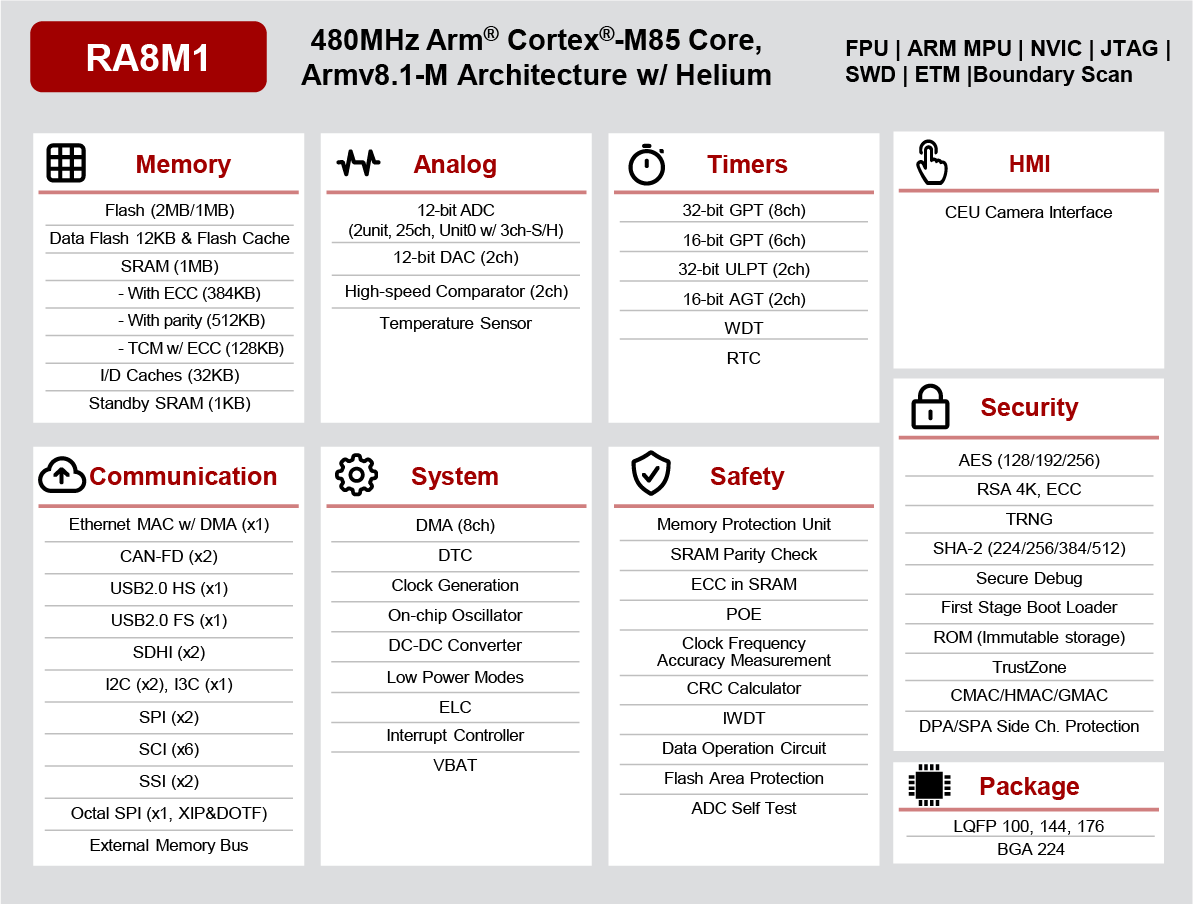
Detail Hardware feature for the RA8M1 MCU group can be found at `RA8M1 Group User's Manual Hardware`_

.. figure:: ../../../../../../../boards/renesas/ek_ra8m1/doc/ra8m1-block-diagram.jpg
	:width: 442px
	:align: center
	:alt: RA8M1 MCU group feature

	RA8M1 Block diagram (Credit: Renesas Electronics Corporation)

Detail Hardware feature for the EK-RA8M1 MCU can be found at `EK-RA8M1 - User's Manual`_

Supported Features
==================

The below features are currently supported on Zephyr OS for EK-RA8M1 board:

+-----------+------------+----------------------+
| Interface | Controller | Driver/Component     |
+===========+============+======================+
| GPIO      | on-chip    | gpio                 |
+-----------+------------+----------------------+
| MPU       | on-chip    | arch/arm             |
+-----------+------------+----------------------+
| NVIC      | on-chip    | arch/arm             |
+-----------+------------+----------------------+
| UART      | on-chip    | serial               |
+-----------+------------+----------------------+

Other hardware features are currently not supported by the port.

Programming and Debugging
*************************

Applications for the ``ek_ra8m1`` board configuration can be
built, flashed, and debugged in the usual way. See
:ref:`build_an_application` and :ref:`application_run` for more details on
building and running.

**Note:** Only support from SDK v0.16.6 in which GCC for Cortex Arm-M85 was available.
To build for EK-RA8M1 user need to get and install GNU Arm Embedded toolchain from https://github.com/zephyrproject-rtos/sdk-ng/releases/tag/v0.16.6

Flashing
========

Program can be flashed to EK-RA8M1 via the on-board SEGGER J-Link debugger.
SEGGER J-link's drivers are avaialbe at https://www.segger.com/downloads/jlink/

To flash the program to board

  1. Connect to J-Link OB via USB port to host PC

  2. Make sure J-Link OB jumper is in default configuration as describe in `EK-RA8M1 - User's Manual`_

  3. Execute west command

	.. code-block:: console

		west flash -r jlink

Debugging
=========

You can use Segger Ozone (`Segger Ozone Download`_) for a visual debug interface

Once downloaded and installed, open Segger Ozone and configure the debug project
like so:

* Target Device: R7FA8M1AH
* Target Interface: SWD
* Target Interface Speed: 4 MHz
* Host Interface: USB
* Program File: <path/to/your/build/zephyr.elf>

**Note:** It's verified that we can debug OK on Segger Ozone v3.30d so please use this or later
version of Segger Ozone

References
**********
- `EK-RA8M1 Website`_
- `RA8M1 MCU group Website`_

.. _EK-RA8M1 Website:
   https://www.renesas.com/us/en/products/microcontrollers-microprocessors/ra-cortex-m-mcus/ek-ra8m1-evaluation-kit-ra8m1-mcu-group

.. _RA8M1 MCU group Website:
   https://www.renesas.com/us/en/products/microcontrollers-microprocessors/ra-cortex-m-mcus/ra8m1-480-mhz-arm-cortex-m85-based-microcontroller-helium-and-trustzone

.. _EK-RA8M1 - User's Manual:
   https://www.renesas.com/us/en/document/mat/ek-ra8m1-users-manual

.. _RA8M1 Group User's Manual Hardware:
   https://www.renesas.com/us/en/document/mah/ra8m1-group-users-manual-hardware

.. _Segger Ozone Download:
   https://www.segger.com/downloads/jlink#Ozone

.. _zephyr-sdk-0.16.5-6-ge895c4e_linux-x86_64:
   https://github.com/zephyrproject-rtos/sdk-ng/suites/22342313531/artifacts/1379111922
Part 3
한국어 전문 번역
개요
EK-RA8M1은 새로운 Arm Cortex-M85 기반 최초의 32-bit MCU인 Renesas RA8M1 MCU group용 evaluation kit입니다. 여러 external interface와 최적화된 on-board peripheral을 제공하여 RA8M1 기능 평가와 다양한 embedded system application 개발을 돕습니다.
핵심 기능은 다음 세 그룹으로 나뉩니다.
MCU native pin access
- 224-pin BGA package의 480 MHz Arm Cortex-M85 기반 RA8M1 MCU
- 2개의 50-pin 및 2개의 40-pin male header를 통한 native pin access
- 정밀 소비 전류 측정을 위한 MCU current measurement point
- 20.000 MHz 및 32,768 Hz reference clock을 제공하는 RA8M1 MCU oscillator와 sub-clock oscillator crystal. 정확도가 낮은 추가 clock도 MCU 내부에서 사용 가능
System control과 ecosystem access
- Micro-AB connector의 USB Full Speed host/device
- 5 V input source 4개: Debug·Full Speed·High Speed USB, surface-mount clamp test point와 power input via를 사용하는 외부 power supply
- Debug mode 3개: on-board(SWD), debug-in(ETM·SWD·JTAG), debug-out(SWD)
- User LED 3개(red·blue·green), regulated power를 나타내는 white power LED, debug connection을 나타내는 yellow debug LED, user button 2개, reset button 1개
- 널리 쓰이는 expansion ecosystem 5종: Seeed Grove I2C/I3C connector 2개, SparkFun Qwiic connector 1개, Digilent Pmod SPI/UART/I2C/I3C connector 2개, Arduino Uno R3 connector, MikroElektronika mikroBUS connector
- MCU boot configuration jumper
Special feature access
- Ethernet(RJ45 RMII interface)
- Micro-AB connector의 USB High Speed host/device
- EK-RA8M1 MCU native pin access 영역의 512 Mb(64 MB) external Octo-SPI flash
- CAN FD(3-pin header)
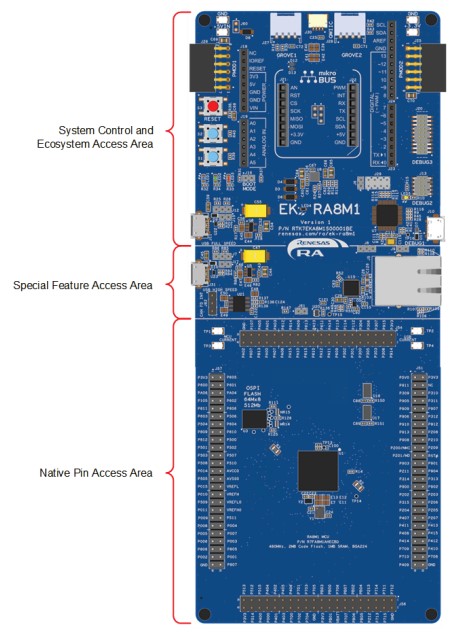
하드웨어
RA8M1 MCU group의 자세한 hardware feature는 RA8M1 Group User's Manual: Hardware에서 확인할 수 있습니다.
EK-RA8M1의 자세한 hardware feature는 EK-RA8M1 User's Manual에 있습니다.
지원 기능
EK-RA8M1 board에서 현재 Zephyr OS가 지원하는 기능은 다음과 같습니다.
| 인터페이스 | 컨트롤러 | 드라이버/컴포넌트 |
|---|---|---|
GPIO | on-chip | gpio |
MPU | on-chip | arch/arm |
NVIC | on-chip | arch/arm |
UART | on-chip | serial |
그 밖의 hardware feature는 현재 이 port에서 지원하지 않습니다.
프로그래밍과 디버깅
ek_ra8m1 board configuration용 application은 일반적인 방법으로 build, flash, debug할 수 있습니다.
플래시
On-board SEGGER J-Link debugger로 EK-RA8M1에 program을 flash할 수 있습니다. Driver는 SEGGER J-Link download page에서 받을 수 있습니다.
- USB port로 J-Link OB를 host PC에 연결합니다.
- EK-RA8M1 User's Manual 설명대로 J-Link OB jumper가 default configuration인지 확인합니다.
- 다음 west command를 실행합니다.
west flash -r jlink디버깅
Visual debug interface로 SEGGER Ozone을 사용할 수 있습니다. 설치 후 Ozone을 열고 debug project를 다음처럼 구성합니다.
- Target Device: R7FA8M1AH
- Target Interface: SWD
- Target Interface Speed: 4 MHz
- Host Interface: USB
- Program File: <path/to/your/build/zephyr.elf>
참고 자료
Source
출처
영어 원문에는 문단, 문서 지시문, 표, 코드, 코드 심벌, 경로를 그대로 보존했습니다.