Part 1
요약·해설
RAK19007 base와 RAK11722 조합, 지원 controller 9종, J-Link 및 pylink 준비와 serial 출력 확인 절차를 설명합니다.
Apollo3 Blue · Cortex-M4F · 96 MHz
Bluetooth 5 LE · SX1262 LoRa
1 MB flash · 384 KB RAM
Part 2
접을 수 있는 영어 원문 전체
영어 원문 전체 펼치기
FE513C3B3A4F537DDBFEB96A3B59CD1E1E78009093036FA3ABDDF9FA7804FB6B
.. _rak11720:

RAK11720
########

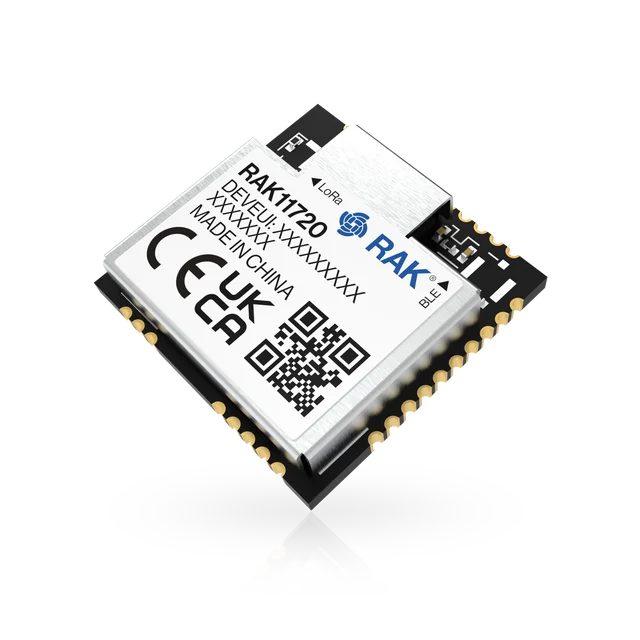
The RAK11720 is a WisBlock Core module for RAK WisBlock.
It is based on the powerful ultra-low power Apollo3 Blue SoC (AMA3B1KK-KBR-B0)
from Ambiq together with a Semtech SX1262 LoRa® transceiver.

The AMA3B1KK-KBR-B0 has an integrated Bluetooth Low Energy transceiver
that enhances the communication capabilities. The RAK11720 stamp module
comes in the same size and footprint as our RAK3172 module which gives
you the opportunity to enhance your existing designs
with BLE without designing a new PCB.

.. image:: ../../../../../../../boards/rak/rak11720/doc/img/rak11720.webp
   :align: center
   :alt: RAK11720

Hardware
********

The easiset way to use a RAK11720, is the WisBlock Modular system.
A WisBlock Base board (RAK19007) which provides the power
supply and programming/debug interface is the base to plug a
RAK11722 (WisBlock Core module with the RAK11720) in.

- Apollo3 Blue SoC with up to 96 MHz operating frequency
- ARM® Cortex® M4F core
- 16 kB 2-way Associative/Direct-Mapped Cache per core
- Up to 1 MB of flash memory for code/data
- Up to 384 KB of low leakage / low power RAM for code/data
- Integrated Bluetooth 5 Low-energy controller
- Semtech SX1262 low power high range LoRa transceiver
- iPEX connectors for the LORA antenna and BLE antenna.
- 2 user LEDs on RAK19007 WisBlock Base board
- Powered by either Micro USB, 3.7V rechargeable battery or a 5V Solar Panel Port

For more information about the RAK11720 stamp module:

- `WisDuo RAK11720 Website`_
- `WisBlock RAK11722 Website`_

Supported Features
==================

The RAK11720 module configuration supports the following hardware features:

+-----------+------------+----------------------+
| Interface | Controller | Driver/Component     |
+===========+============+======================+
| MPU       | on-chip    | arch/arm             |
+-----------+------------+----------------------+
| NVIC      | on-chip    | arch/arm             |
+-----------+------------+----------------------+
| SYSTICK   | on-chip    | systick              |
+-----------+------------+----------------------+
| STIMER    | on-chip    | stimer               |
+-----------+------------+----------------------+
| GPIO      | on-chip    | gpio                 |
+-----------+------------+----------------------+
| UART      | on-chip    | serial               |
+-----------+------------+----------------------+
| WDT       | on-chip    | watchdog             |
+-----------+------------+----------------------+
| RADIO     | on-chip    | bluetooth            |
+-----------+------------+----------------------+
| RADIO     | on-board   | LoRa (SX1262)        |
+-----------+------------+----------------------+

The default configuration can be found in the defconfig file:
``boards/rak/rak11720/rak11720_defconfig``.

Programming and Debugging
=========================

The RAK11720 board shall be connected to a Segger Embedded Debugger Unit
`J-Link OB <https://www.segger.com/jlink-ob.html>`_. This provides a debug
interface to the Apollo3 Blue chip. You can use JLink to communicate with
the Apollo3 Blue.

Flashing an application
-----------------------

Connect your device to your host computer using the JLINK USB port.
The sample application :ref:`hello_world` is used for this example.
Build the Zephyr kernel and application, then flash it to the device:

.. zephyr-app-commands::
   :zephyr-app: samples/hello_world
   :board: rak11720
   :goals: flash

.. note::
   `west flash` requires `SEGGER J-Link software`_ and `pylink`_ Python module
   to be installed on you host computer.

Open a serial terminal (minicom, putty, etc.) with the following settings:

- Speed: 115200
- Data: 8 bits
- Parity: None
- Stop bits: 1

Reset the board and you should be able to see on the corresponding Serial Port
the following message:

.. code-block:: console

   Hello World! rak11720/apollo3_blue

.. _WisDuo RAK11720 Website:
   https://docs.rakwireless.com/Product-Categories/WisDuo/RAK11720-Module/Overview/#product-description

.. _WisBlock RAK11722 Website:
   https://docs.rakwireless.com/Product-Categories/WisBlock/RAK11722/Overview/#product-description

.. _SEGGER J-Link software:
   https://www.segger.com/downloads/jlink

.. _pylink:
   https://github.com/Square/pylink
Part 3
한국어 전문 번역
RAK11720
RAK11720은 RAK WisBlock용 WisBlock Core 모듈입니다. 강력한 초저전력 Ambiq Apollo3 Blue SoC(AMA3B1KK-KBR-B0)와 Semtech SX1262 LoRa® 송수신기를 결합합니다.
AMA3B1KK-KBR-B0에는 통신 기능을 확장하는 Bluetooth Low Energy 송수신기가 통합되어 있습니다. RAK11720 stamp module은 RAK3172 module과 크기 및 footprint가 같으므로 새 PCB를 설계하지 않고 기존 설계에 BLE를 추가할 수 있습니다.
하드웨어
RAK11720을 가장 쉽게 사용하는 방법은 WisBlock Modular system입니다. 전원 공급과 programming/debug interface를 제공하는 WisBlock Base board(RAK19007)에 RAK11720을 탑재한 WisBlock Core module인 RAK11722를 꽂아 사용합니다.
- 최대 96 MHz로 동작하는 Apollo3 Blue SoC
- ARM® Cortex®-M4F core
- Core당 16 kB 2-way associative/direct-mapped cache
- Code/data용 flash memory 최대 1 MB
- Code/data용 low-leakage/low-power RAM 최대 384 KB
- 통합 Bluetooth 5 Low Energy controller
- Semtech SX1262 저전력 장거리 LoRa 송수신기
- LoRa antenna와 BLE antenna용 iPEX connector
- RAK19007 WisBlock Base board의 user LED 2개
- Micro USB, 3.7 V rechargeable battery 또는 5 V solar panel port 전원
Stamp module은 WisDuo RAK11720 문서, Core module은 WisBlock RAK11722 문서에서 자세히 확인할 수 있습니다.
지원 기능
RAK11720 module configuration은 다음 hardware feature를 지원합니다.
| 인터페이스 | 컨트롤러 | 드라이버/컴포넌트 |
|---|---|---|
MPU | on-chip | arch/arm |
NVIC | on-chip | arch/arm |
SYSTICK | on-chip | systick |
STIMER | on-chip | stimer |
GPIO | on-chip | gpio |
UART | on-chip | serial |
WDT | on-chip | watchdog |
RADIO | on-chip | bluetooth |
RADIO | on-board | LoRa (SX1262) |
기본 구성은 boards/rak/rak11720/rak11720_defconfig에 있습니다.
프로그래밍과 디버깅
RAK11720 board는 Segger Embedded Debugger Unit인 J-Link OB에 연결해야 합니다. 이 장치는 Apollo3 Blue chip용 debug interface를 제공하며, J-Link로 Apollo3 Blue와 통신할 수 있습니다.
애플리케이션 플래시
JLINK USB port로 장치를 host computer에 연결합니다. 다음 예시는 hello_world sample application을 build한 뒤 장치에 flash합니다.
west build -b rak11720 samples/hello_world
west flashSerial terminal(minicom, PuTTY 등)은 다음과 같이 설정합니다.
- 속도: 115200
- Data: 8 bits
- Parity: None
- Stop bits: 1
보드를 reset하면 해당 serial port에 다음 메시지가 표시됩니다.
Hello World! rak11720/apollo3_blueSource
출처
영어 원문에는 문단, 문서 지시문, 표, 코드, 코드 심벌, 경로를 그대로 보존했습니다.