Part 1
요약·해설
62.5 MHz clock, PL011 UART, Ethernet·SLIP 조건과 flash 쓰기 제한을 설명합니다.
Cortex-A53
GIC-400 · PL011 · ARM timer
QEMU Ethernet · conditional SLIP
Part 2
접을 수 있는 영어 원문 전체
영어 원문 전체 펼치기
42AC40D75E6277DB7D63989AA9DA04E5EED30D2ECE620FFE9793E31CF50C8465
.. _qemu_cortex_a53:

ARM Cortex-A53 Emulation (QEMU)
###############################

Overview
********

This board configuration will use QEMU to emulate a generic Cortex-A53 hardware
platform.

This configuration provides support for an ARM Cortex-A53 CPU and these
devices:

* GIC-400 interrupt controller
* ARM architected timer
* PL011 UART controller

Hardware
********
Supported Features
==================

The following hardware features are supported:

+--------------+------------+----------------------+
| Interface    | Controller | Driver/Component     |
+==============+============+======================+
| GIC          | on-chip    | interrupt controller |
+--------------+------------+----------------------+
| PL011 UART   | on-chip    | serial port          |
+--------------+------------+----------------------+
| ARM TIMER    | on-chip    | system clock         |
+--------------+------------+----------------------+

The kernel currently does not support other hardware features on this platform.

Devices
========
System Clock
------------

This board configuration uses a system clock frequency of 62.5 MHz.

Serial Port
-----------

This board configuration uses a single serial communication channel with the
CPU's UART0.

Known Problems or Limitations
==============================

The following platform features are unsupported:

* Writing to the hardware's flash memory


Programming and Debugging
*************************

Use this configuration to run basic Zephyr applications and kernel tests in the QEMU
emulated environment, for example, with the :zephyr:code-sample:`synchronization` sample:

.. zephyr-app-commands::
   :zephyr-app: samples/synchronization
   :host-os: unix
   :board: qemu_cortex_a53
   :goals: run

This will build an image with the synchronization sample app, boot it using
QEMU, and display the following console output:

.. code-block:: console

        ***** Booting Zephyr OS build zephyr-v2.0.0-1657-g99d310da48e5 *****
        threadA: Hello World from qemu_cortex_a53!
        threadB: Hello World from qemu_cortex_a53!
        threadA: Hello World from qemu_cortex_a53!
        threadB: Hello World from qemu_cortex_a53!
        threadA: Hello World from qemu_cortex_a53!
        threadB: Hello World from qemu_cortex_a53!
        threadA: Hello World from qemu_cortex_a53!
        threadB: Hello World from qemu_cortex_a53!

Exit QEMU by pressing :kbd:`CTRL+A` :kbd:`x`.

Debugging
=========

Refer to the detailed overview about :ref:`application_debugging`.

Networking
==========

The board supports the QEMU built-in Ethernet adapter to connect to the host
system. See :ref:`networking_with_eth_qemu` for details.

It is also possible to use SLIP networking over an emulated serial port.
Although this board only supports a single UART, so subsystems like logging
and shell would need to be disabled, therefore this is not directly supported.

References
**********

1. (ID050815) ARM® Cortex®-A Series - Programmer’s Guide for ARMv8-A
2. (ID070919) Arm® Architecture Reference Manual - Armv8, for Armv8-A architecture profile
3. (ARM DAI 0527A) Application Note Bare-metal Boot Code for ARMv8-A Processors
4. AArch64 Exception and Interrupt Handling
5. Fundamentals of ARMv8-A
Part 3
한국어 전문 번역
개요
이 board 구성은 QEMU로 generic Cortex-A53 hardware platform을 emulation합니다. Arm Cortex-A53 CPU와 GIC-400 interrupt controller, Arm architected timer, PL011 UART controller를 지원합니다.
지원 기능
| 인터페이스 | 컨트롤러 | 드라이버/컴포넌트 |
|---|---|---|
GIC | on-chip | interrupt controller |
PL011 UART | on-chip | serial port |
ARM TIMER | on-chip | system clock |
Kernel은 현재 이 platform의 다른 하드웨어 기능을 지원하지 않습니다.
장치
System clock
System clock frequency는 62.5 MHz입니다.
Serial port
CPU의 UART0 하나를 사용합니다.
알려진 문제와 제한
Hardware flash memory 쓰기를 지원하지 않습니다.
프로그래밍과 디버깅
이 구성은 QEMU emulated environment에서 기본 Zephyr application과 kernel test를 실행할 때 사용합니다. 다음은 synchronization sample 예입니다.
# Unix host의 Zephyr 저장소 루트에서
west build -b qemu_cortex_a53 samples/synchronization -t run
Image를 build하고 QEMU로 boot하면 다음 console output이 표시됩니다.
*** Booting Zephyr OS build v3.7.0 ***
thread_a: Hello World from cpu 0 on qemu_cortex_a53!
thread_b: Hello World from cpu 0 on qemu_cortex_a53!
thread_a: Hello World from cpu 0 on qemu_cortex_a53!
thread_b: Hello World from cpu 0 on qemu_cortex_a53!
thread_a: Hello World from cpu 0 on qemu_cortex_a53!
thread_b: Hello World from cpu 0 on qemu_cortex_a53!
thread_a: Hello World from cpu 0 on qemu_cortex_a53!
thread_b: Hello World from cpu 0 on qemu_cortex_a53!Ctrl+A를 누른 뒤 x를 눌러 QEMU를 종료합니다.
Debug
일반 Zephyr application debugging 절차를 따릅니다.
Networking
QEMU built-in Ethernet adapter로 host system에 연결할 수 있습니다. Emulated serial port를 통한 SLIP networking도 가능하지만 UART가 하나뿐이라 logging과 shell 같은 subsystem을 비활성화해야 하므로 직접 지원되는 구성은 아닙니다.
참고 자료
- (ID050815) Arm Cortex-A Series Programmer's Guide for Armv8-A
- (ID070919) Arm Architecture Reference Manual - Armv8, for Armv8-A architecture profile
- (ARM DAI 0527A) Application Note Bare-metal Boot Code for ARMv8-A Processors
- AArch64 Exception and Interrupt Handling
- Fundamentals of ARMv8-A
Run
실행 결과
Zephyr 3.7.0의 synchronization 예제를 QEMU Cortex-A53에서 실행한 기록입니다. 두 스레드가 번갈아 메시지를 출력합니다.
실행 환경
- 실행일
- 2026-11-04
- 호스트
- x86_64 Debian · Linux 6.12.94
- SDK
- Zephyr SDK 0.16.8
- 에뮬레이터
- SDK에 포함된 QEMU 7.0.0 · TCG, KVM 미사용
공식 문서의 출력 예시는 Zephyr v2.0 기준입니다. 아래 v3.7.0 실행 기록과는 부팅 배너, 스레드 이름, CPU 번호 표기가 다릅니다.
west build -p always -b qemu_cortex_a53 samples/synchronization -t run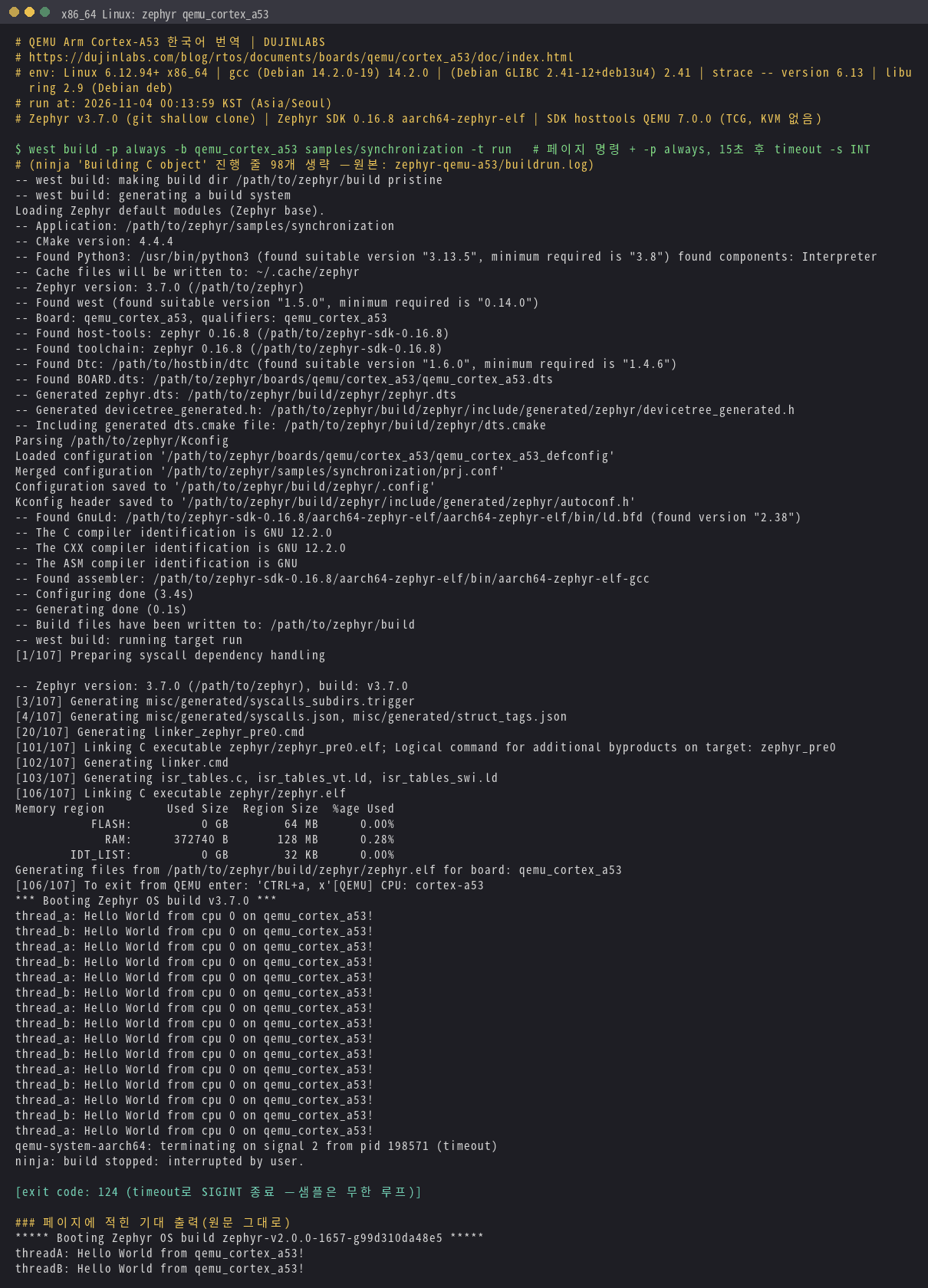
Source
출처
영어 원문에는 문단, 문서 지시문, 표, 코드, 코드 심벌, 경로를 그대로 보존했습니다.