Part 1
요약·해설
지원 기능 8종, internal PMIC TWI1, u-blox UARTE1과 cellular-specific conflict를 설명합니다.
nRF52840 · BLE/802.15.4
u-blox LTE or 2G/3G
LiPo · internal PMIC
Part 2
접을 수 있는 영어 원문 전체
영어 원문 전체 펼치기
C1222DEBDD0692EA32010C532CEB5F4F6364CBE236ADF43E23F6E5E2BAC617B3
.. _particle_boron:

Particle Boron
##############

Overview
********

The Particle Boron is a cellular-enabled development board with a
Nordic Semiconductor nRF52840 for mesh support and an LTE or 2G/3G
modem.  The board was developed by Particle Industries and has a SWD
connector on it for programming.

It is equipped with a onboard LIPO circuit and conforms to the
Adafruit Feather formfactor.

The Particle Boron board provides support for the Nordic Semiconductor nRF52840
ARM |reg| Cortex |reg|-M4F SoC with an integrated 2.4 GHz transceiver supporting
Bluetooth |reg| Low Energy and IEEE |reg| 802.15.4.

For more information about the Particle Boron board:

- `Boron Datasheet`_
- `Boron Hardware Files`_

Hardware
********

On the front of the board are RGB-LED, LED and LIPO circuitry.
The RGB-LED is controlled by the nRF52840 via GPIO pins.

.. figure:: ../../../../../../../boards/particle/boron/doc/img/particle_boron.jpg
     :align: center
     :alt: Particle Boron

     Particle Boron (Credit: Particle Industries)

Power supply
============

The board is optimized for low power applications and supports two
power source configurations: battery and micro USB connector.

It contains circuitry for LIPO usage and can be charged via the USB port.

Supported Features
==================

The particle_boron board configuration supports the following
hardware features:

+-----------+------------+----------------------+
| Interface | Controller | Driver/Component     |
+===========+============+======================+
| NVIC      | on-chip    | nested vectored      |
|           |            | interrupt controller |
+-----------+------------+----------------------+
| RTC       | on-chip    | system clock         |
+-----------+------------+----------------------+
| UART      | on-chip    | serial port          |
+-----------+------------+----------------------+
| I2C       | on-chip    | i2c                  |
+-----------+------------+----------------------+
| SPI       | on-chip    | spi                  |
+-----------+------------+----------------------+
| GPIO      | on-chip    | gpio                 |
+-----------+------------+----------------------+
| FLASH     | on-chip    | flash                |
+-----------+------------+----------------------+
| RADIO     | on-chip    | Bluetooth            |
+-----------+------------+----------------------+

Other hardware features have not been enabled yet for this board.

Connections and IOs
===================

Please see the `Boron Datasheet`_ for header pin assignments, which are
common to all Feather-compatible Particle boards.  Some peripherals are
available to applications through DTS overlay include directives:

- ``mesh_feather_spi_spi3.dtsi`` exposes SPI3 on labeled Feather
  SPI pins
- ``mesh_feather_spi1_spi3.dtsi`` exposes SPI3 on labeled Feather
  SPI1 pins
- ``mesh_feather_uart1_rtscts.dtsi`` adds hardware flow control to
  labeled Feather UART pins

LED
---

* LED0 (blue)
* LED1 (red)
* LED2 (green)
* LED3 (blue)

Push buttons
------------

* SW0 via MODE
* SW1 via RESET

I2C
---

* TWI0 enabled on labeled header (SDA/SCL)
* TWI1 enabled for internal power management ICs

SPI
---

* SPI0 disabled due to TWI0 conflict
* SPI1 disabled due to TWI1 conflict
* SPI2 internal to 32 Mb CFI flash chip
* SPI3 selectable with overlay (SPI or SPI1)

UART
----

* UARTE0 enabled RX/TX on labeled header (UART1); add RTS/CTS with overlay
* UARTE1 internal to u-blox cellular modem

Programming and Debugging
*************************

Applications for the ``particle_boron`` board configuration can be
built and flashed in the usual way (see :ref:`build_an_application`
and :ref:`application_run` for more details).

Flashing
========

Build and flash an application in the usual way, for example:

.. zephyr-app-commands::
   :zephyr-app: samples/basic/blinky
   :board: particle_boron
   :goals: build flash

Debugging
=========

You can debug an application in the usual way.  Here is an example for the
:ref:`hello_world` application.

.. zephyr-app-commands::
   :zephyr-app: samples/hello_world
   :board: particle_boron
   :maybe-skip-config:
   :goals: debug


Testing the LEDs and buttons
****************************

There are 2 samples that allow you to test that the buttons (switches) and
LEDs on the board are working properly with Zephyr:

* :zephyr:code-sample:`blinky`
* :zephyr:code-sample:`button`

You can build and flash the examples to make sure Zephyr is running correctly on
your board.

.. _Boron Datasheet:
   https://docs.particle.io/datasheets/cellular/boron-datasheet/

.. _Boron Hardware Files:
   https://github.com/particle-iot/boron
Part 3
한국어 전문 번역
개요
Particle Boron은 nRF52840 mesh와 LTE 또는 2G/3G modem을 결합한 cellular-enabled development board입니다. Nordic Semiconductor nRF52840가 mesh를 담당하며 programming용 SWD connector가 있습니다.
On-board LiPo circuit가 있고 Adafruit Feather form factor를 따릅니다. nRF52840 Cortex-M4F SoC의 2.4 GHz transceiver는 Bluetooth Low Energy와 IEEE 802.15.4를 지원합니다.
하드웨어와 전원
Board front에는 nRF52840 GPIO가 제어하는 RGB LED, 별도 LED, LiPo circuit가 있습니다.
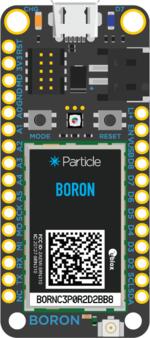
Low-power application에 맞춰져 battery와 micro USB 두 전원을 지원합니다. LiPo를 사용하고 USB로 충전할 수 있습니다.
지원 기능
| 인터페이스 | 컨트롤러 | 드라이버/컴포넌트 |
|---|---|---|
NVIC | on-chip | nested vectored interrupt controller |
RTC | on-chip | system clock |
UART | on-chip | serial port |
I2C | on-chip | i2c |
SPI | on-chip | spi |
GPIO | on-chip | gpio |
FLASH | on-chip | flash |
RADIO | on-chip | Bluetooth |
표 밖의 기능은 아직 활성화되지 않았습니다.
연결과 I/O
Header pin은 Feather-compatible Particle board 공통이며 datasheet에 있습니다. Application에서 사용할 수 있는 DTS overlay:
mesh_feather_spi_spi3.dtsi: Feather SPI pin에 SPI3mesh_feather_spi1_spi3.dtsi: Feather SPI1 pin에 SPI3mesh_feather_uart1_rtscts.dtsi: Feather UART pin에 RTS/CTS flow control
LED와 button
- LED0 blue, LED1 red, LED2 green, LED3 blue
- SW0: MODE, SW1: RESET
I2C
- TWI0: SDA/SCL header에서 활성
- TWI1: internal power-management IC용
SPI
- SPI0: TWI0 충돌로 비활성
- SPI1: TWI1 충돌로 비활성
- SPI2: internal 32 Mb CFI flash
- SPI3: overlay로 SPI 또는 SPI1 pin에서 선택
UART
- UARTE0: UART1 header RX/TX, overlay로 RTS/CTS 추가
- UARTE1: internal u-blox cellular modem
프로그래밍과 디버깅
particle_boron application을 일반 방식으로 build·flash합니다.
# Zephyr 저장소 루트에서
west build -b particle_boron samples/basic/blinky
west flash
Debug
# Zephyr 저장소 루트에서
west build -b particle_boron samples/hello_world
west debug
LED와 button test
blinky와 button sample로 switch와 LED 동작을 확인할 수 있습니다.
참고 자료
Source
출처
영어 원문에는 문단, 문서 지시문, 표, 코드, 코드 심벌, 경로를 그대로 보존했습니다.