Part 1
요약·해설
기능 13종, battery 제약, Espressif blob, simple boot와 MCUboot, sysbuild output과 custom OpenOCD를 설명합니다.
Wi-Fi · BLE · Ethernet · CAN
2 relays · LiPo backup
Simple · MCUboot/sysbuild
Part 2
접을 수 있는 영어 원문 전체
영어 원문 전체 펼치기
E32514E34CC318CAA453FA265213B9572C0D670AF04DA9874FC3001108247E72
.. _olimex_esp32_evb:

Olimex ESP32-EVB
################

Overview
********

The Olimex ESP32-EVB is an OSHW certified, open-source IoT board based on the
Espressif ESP32-WROOM-32E/UE module. It has a wired 100Mbit/s Ethernet Interface,
Bluetooth LE, WiFi, infrared remote control, and CAN connectivity. Two relays
allows switching power appliances on and off.

The board can operate from a single LiPo backup battery as it has an internal
LiPo battery charger. There is no step-up converter, so relays, CAN, and USB
power does not work when running off battery.

.. figure:: ../../../../../../../boards/olimex/olimex_esp32_evb/doc/ESP32-EVB.jpg
   :align: center
   :alt: ESP32-EVB

   ESP32-EVB (Credit: Olimex)

Hardware
********

- ESP32-WROOM-32E/UE module with 4MB flash.
- On-board programmer, CH340T USB-to-UART
- WiFi, Bluetooth LE connectivity.
- 100Mbit/s Ethernet interface, Microchip LAN8710A PHY.
- MicroSD card slot.
- 2 x 10A/250VAC (15A/120VAC 15A/24VDC) relays with connectors and status LEDs.
- CAN interface, Microchip MCP2562-E high-speed CAN transceiver.
- IR receiver and transmitter, up to 5 meters distance.
- BL4054B LiPo battery charger with status LEDs for stand-alone operation during
  power outages.
- Power jack for external 5VDC power supply.
- Univeral EXTension (UEXT) connector for connecting UEXT modules.
- User push button.
- 40 pin GPIO connector with all ESP32 pins.

For more information about the ESP32-EVB and the ESP32-WROOM-32E/UE module, see
these reference documents:

- `ESP32-EVB Website`_
- `ESP32-EVB Schematic`_
- `ESP32-EVB GitHub Repository`_
- `ESP32-WROOM32-E/UE Datasheet`_

Supported Features
******************

The olimex_esp32_evb board configuration supports the following hardware
features:

+-----------+------------+-------------------------------------+
| Interface | Controller | Driver/Component                    |
+===========+============+=====================================+
| EFUSE     | on-chip    | hwinfo, device ID                   |
+-----------+------------+-------------------------------------+
| FLASH     | module     | External flash                      |
+-----------+------------+-------------------------------------+
| GPIO      | on-chip    | gpio                                |
+-----------+------------+-------------------------------------+
| I2C       | on-chip    | I2C                                 |
+-----------+------------+-------------------------------------+
| INTERRUPT | on-chip    | interrupt controller                |
+-----------+------------+-------------------------------------+
| IO_MUX    | on-chip    | pinctrl                             |
+-----------+------------+-------------------------------------+
| SPI       | on-chip    | spi                                 |
+-----------+------------+-------------------------------------+
| TIMG      | on-chip    | counter                             |
+-----------+------------+-------------------------------------+
| TRNG      | on-chip    | entropy                             |
+-----------+------------+-------------------------------------+
| TWAI      | on-chip    | CAN controller                      |
+-----------+------------+-------------------------------------+
| UART      | on-chip    | uart                                |
+-----------+------------+-------------------------------------+
| WDT       | on-chip    | watchdog                            |
+-----------+------------+-------------------------------------+
| WiFi      | on-chip    | WiFi                                |
+-----------+------------+-------------------------------------+

The default configuration can be found in
:zephyr_file:`boards/olimex/olimex_esp32_evb/olimex_esp32_evb_appcpu_defconfig`
and
:zephyr_file:`boards/olimex/olimex_esp32_evb/olimex_esp32_evb_procpu_defconfig`


Other hardware features are not currently supported by the port.

System requirements
*******************

Prerequisites
=============

Espressif HAL requires WiFi and Bluetooth binary blobs in order work. Run the command
below to retrieve those files.

.. code-block:: console

   west blobs fetch hal_espressif

.. note::

   It is recommended running the command above after :file:`west update`.

Building & Flashing
*******************

Simple boot
===========

The board could be loaded using the single binary image, without 2nd stage bootloader.
It is the default option when building the application without additional configuration.

.. note::

   Simple boot does not provide any security features nor OTA updates.

MCUboot bootloader
==================

User may choose to use MCUboot bootloader instead. In that case the bootloader
must be build (and flash) at least once.

There are two options to be used when building an application:

1. Sysbuild
2. Manual build

.. note::

   User can select the MCUboot bootloader by adding the following line
   to the board default configuration file.

   .. code:: cfg

      CONFIG_BOOTLOADER_MCUBOOT=y

Sysbuild
========

The sysbuild makes possible to build and flash all necessary images needed to
bootstrap the board with the ESP32 SoC.

To build the sample application using sysbuild use the command:

.. zephyr-app-commands::
   :tool: west
   :app: samples/hello_world
   :board: olimex_esp32_evb
   :goals: build
   :west-args: --sysbuild
   :compact:

By default, the ESP32 sysbuild creates bootloader (MCUboot) and application
images. But it can be configured to create other kind of images.

Build directory structure created by sysbuild is different from traditional
Zephyr build. Output is structured by the domain subdirectories:

.. code-block::

  build/
  ├── hello_world
  │   └── zephyr
  │       ├── zephyr.elf
  │       └── zephyr.bin
  ├── mcuboot
  │    └── zephyr
  │       ├── zephyr.elf
  │       └── zephyr.bin
  └── domains.yaml

.. note::

   With ``--sysbuild`` option the bootloader will be re-build and re-flash
   every time the pristine build is used.

For more information about the system build please read the :ref:`sysbuild` documentation.

Manual build
============

During the development cycle, it is intended to build & flash as quickly possible.
For that reason, images can be build one at a time using traditional build.

The instructions following are relevant for both manual build and sysbuild.
The only difference is the structure of the build directory.

.. note::

   Remember that bootloader (MCUboot) needs to be flash at least once.

Build and flash applications as usual (see :ref:`build_an_application` and
:ref:`application_run` for more details).

.. zephyr-app-commands::
   :zephyr-app: samples/hello_world
   :board: olimex_esp32_evb/esp32/procpu
   :goals: build

The usual ``flash`` target will work with the ``olimex_esp32_evb`` board
configuration. Here is an example for the :ref:`hello_world`
application.

.. zephyr-app-commands::
   :zephyr-app: samples/hello_world
   :board: olimex_esp32_evb/esp32/procpu
   :goals: flash

Open the serial monitor using the following command:

.. code-block:: shell

   west espressif monitor

After the board has automatically reset and booted, you should see the following
message in the monitor:

.. code-block:: console

   ***** Booting Zephyr OS vx.x.x-xxx-gxxxxxxxxxxxx *****
   Hello World! olimex_esp32_evb

Debugging
*********

As with much custom hardware, the ESP32 modules require patches to
OpenOCD that are not upstreamed yet. Espressif maintains their own fork of
the project. The custom OpenOCD can be obtained at `OpenOCD ESP32`_

The Zephyr SDK uses a bundled version of OpenOCD by default. You can overwrite that behavior by adding the
``-DOPENOCD=<path/to/bin/openocd> -DOPENOCD_DEFAULT_PATH=<path/to/openocd/share/openocd/scripts>``
parameter when building.

Here is an example for building the :ref:`hello_world` application.

.. zephyr-app-commands::
   :zephyr-app: samples/hello_world
   :board: olimex_esp32_evb/esp32/procpu
   :goals: build flash
   :gen-args: -DOPENOCD=<path/to/bin/openocd> -DOPENOCD_DEFAULT_PATH=<path/to/openocd/share/openocd/scripts>

You can debug an application in the usual way. Here is an example for the :ref:`hello_world` application.

.. zephyr-app-commands::
   :zephyr-app: samples/hello_world
   :board: olimex_esp32_evb/esp32/procpu
   :goals: debug

References
**********

.. _ESP32-EVB Website:
   https://www.olimex.com/Products/IoT/ESP32/ESP32-EVB/open-source-hardware

.. _ESP32-EVB Schematic:
   https://github.com/OLIMEX/ESP32-EVB/raw/master/HARDWARE/REV-I/ESP32-EVB_Rev_I.pdf

.. _ESP32-EVB GitHub Repository:
   https://github.com/OLIMEX/ESP32-EVB

.. _ESP32-WROOM32-E/UE Datasheet:
   https://www.espressif.com/sites/default/files/documentation/esp32-wroom-32e_esp32-wroom-32ue_datasheet_en.pdf

.. _OpenOCD ESP32:
   https://github.com/espressif/openocd-esp32/releases
Part 3
한국어 전문 번역
개요
Olimex ESP32-EVB는 Espressif ESP32-WROOM-32E/UE module 기반의 OSHW 인증 open-source IoT board입니다. Wired 100 Mbit/s Ethernet, Bluetooth LE, Wi-Fi, infrared remote control, CAN과 전원 appliance를 켜고 끄는 relay 2개를 제공합니다.
내부 LiPo charger가 있어 LiPo backup battery 하나로 동작할 수 있습니다. 다만 step-up converter가 없으므로 battery로만 구동할 때 relay, CAN, USB power는 동작하지 않습니다.
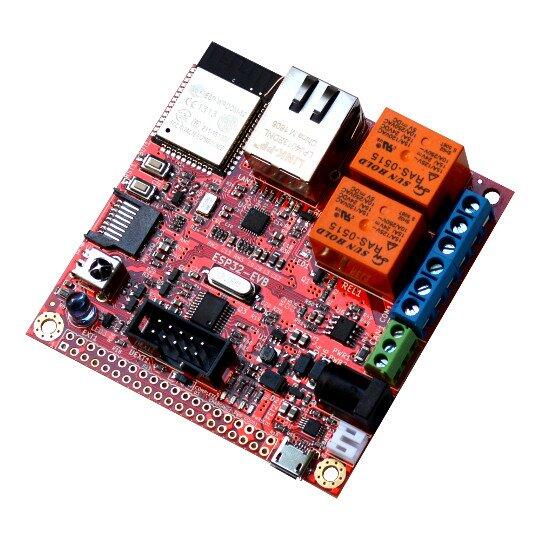
하드웨어
- 4 MB flash의 ESP32-WROOM-32E/UE module
- CH340T USB-to-UART on-board programmer
- Wi-Fi와 Bluetooth LE
- Microchip LAN8710A PHY의 100 Mbit/s Ethernet
- MicroSD card slot
- Connector와 status LED가 있는 10 A/250 VAC, 15 A/120 VAC, 15 A/24 VDC relay 2개
- Microchip MCP2562-E high-speed transceiver의 CAN interface
- 최대 5 m infrared receiver/transmitter
- 정전 중 standalone 동작을 위한 status LED 포함 BL4054B LiPo charger
- 외부 5 VDC power jack, UEXT connector, user button
- 모든 ESP32 pin을 제공하는 40-pin GPIO connector
지원 기능
| 인터페이스 | 컨트롤러 | 드라이버/컴포넌트 |
|---|---|---|
EFUSE | on-chip | hwinfo, device ID |
FLASH | module | External flash |
GPIO | on-chip | gpio |
I2C | on-chip | I2C |
INTERRUPT | on-chip | interrupt controller |
IO_MUX | on-chip | pinctrl |
SPI | on-chip | spi |
TIMG | on-chip | counter |
TRNG | on-chip | entropy |
TWAI | on-chip | CAN controller |
UART | on-chip | uart |
WDT | on-chip | watchdog |
WiFi | on-chip | WiFi |
기본 구성은 boards/olimex/olimex_esp32_evb/olimex_esp32_evb_appcpu_defconfig와 boards/olimex/olimex_esp32_evb/olimex_esp32_evb_procpu_defconfig에 있습니다. 표 밖의 기능은 현재 port에서 지원하지 않습니다.
시스템 요구사항
Espressif HAL이 Wi-Fi와 Bluetooth를 사용하려면 binary blob이 필요합니다. west update 뒤 다음 명령을 실행하는 것이 좋습니다.
west blobs fetch hal_espressifBuild와 flash
Simple boot
추가 설정 없이 build하면 second-stage bootloader 없이 single binary image를 load하는 simple boot가 기본값입니다. Simple boot는 security feature와 OTA update를 제공하지 않습니다.
MCUboot bootloader
MCUboot를 선택하면 bootloader를 적어도 한 번 build하고 flash해야 합니다. Application build 방법은 sysbuild와 manual build 두 가지입니다. Board default configuration에 다음 설정을 추가해 MCUboot를 선택합니다.
CONFIG_BOOTLOADER_MCUBOOT=ySysbuild
Sysbuild는 ESP32 SoC bootstrapping에 필요한 모든 image를 함께 build하고 flash할 수 있게 합니다.
# Zephyr 저장소 루트에서
west build --sysbuild -b olimex_esp32_evb samples/hello_world
기본 ESP32 sysbuild는 MCUboot bootloader와 application image를 만들며 다른 image 구성도 가능합니다. Build output은 domain subdirectory 구조를 사용합니다.
build/
├── hello_world
│   └── zephyr
│       ├── zephyr.elf
│       └── zephyr.bin
├── mcuboot
│   └── zephyr
│       ├── zephyr.elf
│       └── zephyr.bin
└── domains.yaml--sysbuild에서는 pristine build를 사용할 때마다 bootloader를 다시 build하고 flash합니다.
Manual build
개발 중 빠른 반복을 위해 traditional build로 image를 하나씩 build·flash할 수 있습니다. 아래 절차는 build directory 구조만 다르고 sysbuild에도 적용됩니다. MCUboot는 적어도 한 번 flash되어 있어야 합니다.
# Zephyr 저장소 루트에서
west build -b olimex_esp32_evb/esp32/procpu samples/hello_world
# Zephyr 저장소 루트에서
west flashSerial monitor를 엽니다.
west espressif monitor자동 reset과 boot 뒤 다음 메시지가 표시됩니다.
***** Booting Zephyr OS vx.x.x-xxx-gxxxxxxxxxxxx *****
Hello World! olimex_esp32_evb
디버깅
ESP32 module에는 upstream OpenOCD에 아직 포함되지 않은 patch가 필요하며 Espressif가 자체 fork를 유지합니다. Zephyr SDK는 기본적으로 bundled OpenOCD를 사용하지만 build option으로 custom executable과 script path를 지정할 수 있습니다.
# Zephyr 저장소 루트에서
west build -b olimex_esp32_evb/esp32/procpu samples/hello_world -- -DOPENOCD=<path/to/bin/openocd> -DOPENOCD_DEFAULT_PATH=<path/to/openocd/share/openocd/scripts>
west flash
# Zephyr 저장소 루트에서
west debug참고 자료
Source
출처
영어 원문에는 문단, 문서 지시문, 표, 코드, 코드 심벌, 경로를 그대로 보존했습니다.