Part 1
요약·해설
LPC55S3x 상위 집합 지원 전략, 22개 GPIO·PWM·CAN·USB 핀, PLL1 144/96 MHz, J-Link 재구성과 flash/debug 절차를 설명합니다.
LPC55S36 · Cortex-M33 · 150 MHz
PWM · CAN · USB FS · DAC
LPC-Link2 · J-Link · J1
Part 2
접을 수 있는 영어 원문 전체
영어 원문 전체 펼치기
436F631CA6C3525F803A3A43C360ECE4F4A62A80F79097B455BE61CFFF75CFB3
.. _lpcxpresso55s36:

NXP LPCXpresso55S36
###################

Overview
********

The LPCXpresso55S36 board provides the ideal platform for evaluation
of the LPC55S3x/LPC553x MCU family, based on the Arm® Cortex®-M33
architecture. Arduino® UNO compatible shield connectors are included,
with additional expansion ports around the Arduino footprint, along
with a PMod/host interface port and MikroElektronika Click module
site.

.. image:: ../../../../../../../boards/nxp/lpcxpresso55s36/doc/lpcxpresso55S36.jpg
   :align: center
   :alt: LPCXpresso55S36

Hardware
********

- LPC55S36 Arm® Cortex®-M33 microcontroller running at up to 150 MHz
- 256 KB flash and 96 KB SRAM on-chip
- LPC-Link2 debug high speed USB probe with VCOM port
- I2C and SPI USB bridging to the LPC device via LPC-Link2 probe
- MikroElektronika Click expansion option
- LPCXpresso expansion connectors compatible with Arduino UNO
- PMod compatible expansion / host connector
- Reset, ISP, wake, and user buttons for easy testing of software functionality
- Tri-color LED
- Full-speed USB device / host port
- High-speed USB device / host port
- UART header for external serial to USB cable
- CAN Transceiver
- Stereo audio codec with in/out line

For more information about the LPC55S36 SoC and LPCXPresso55S36 board, see:

- `LPC55S36 SoC Website`_
- `LPC55S36 Datasheet`_
- `LPC55S36 User Manual`_
- `LPCXpresso55S36 Website`_
- `LPCXpresso55S36 User Manual`_
- `LPCXpresso55S36 Development Board Design Files`_

Supported Features
==================

NXP considers the LPCXpresso55S36 as a superset board for the LPC55(S)3x
family of MCUs.  This board is a focus for NXP's Full Platform Support for
Zephyr, to better enable the entire LPC55(S)3x family.  NXP prioritizes enabling
this board with new support for Zephyr features.  The lpcxpresso55s36 board
configuration supports the hardware features below.  Another similar superset
board is the :ref:`lpcxpresso55s69`, and that board may have additional features
already supported, which can also be re-used on this lpcxpresso55s36 board:

+-----------+------------+-------------------------------------+
| Interface | Controller | Driver/Component                    |
+===========+============+=====================================+
| NVIC      | on-chip    | nested vector interrupt controller  |
+-----------+------------+-------------------------------------+
| SYSTICK   | on-chip    | systick                             |
+-----------+------------+-------------------------------------+
| IOCON     | on-chip    | pinmux                              |
+-----------+------------+-------------------------------------+
| GPIO      | on-chip    | gpio                                |
+-----------+------------+-------------------------------------+
| USART     | on-chip    | serial port-polling;                |
|           |            | serial port-interrupt               |
+-----------+------------+-------------------------------------+
| CLOCK     | on-chip    | clock_control                       |
+-----------+------------+-------------------------------------+
| CAN       | on-chip    | canbus                              |
+-----------+------------+-------------------------------------+
| IAP       | on-chip    | flash                               |
+-----------+------------+-------------------------------------+
| PWM       | on-chip    | pwm                                 |
+-----------+------------+-------------------------------------+
| USB FS    | on-chip    | USB Full Speed device               |
+-----------+------------+-------------------------------------+
| DAC       | on-chip    | dac                                 |
+-----------+------------+-------------------------------------+

Other hardware features are not currently enabled.

Currently available targets for this board are:

- *lpcxpresso55s36*

Connections and IOs
===================

The LPC55S36 SoC has IOCON registers, which can be used to configure
the functionality of a pin.

+---------+-----------------+----------------------------+
| Name    | Function        | Usage                      |
+=========+=================+============================+
| PIO0_17 | GPIO            | USR SW3                    |
+---------+-----------------+----------------------------+
| PIO0_22 | GPIO            | GREEN LED                  |
+---------+-----------------+----------------------------+
| PIO0_28 | GPIO            | RED LED                    |
+---------+-----------------+----------------------------+
| PIO0_29 | USART           | USART RX                   |
+---------+-----------------+----------------------------+
| PIO0_30 | USART           | USART TX                   |
+---------+-----------------+----------------------------+
| PIO1_11 | GPIO            | BLUE_LED                   |
+---------+-----------------+----------------------------+
| PIO1_18 | GPIO            | Wakeup SW1                 |
+---------+-----------------+----------------------------+
| PIO1_20 | FLEXPPWM0_PWM0_A| pwm                        |
+---------+-----------------+----------------------------+
| PIO1_17 | FLEXPPWM0_PWM0_B| pwm                        |
+---------+-----------------+----------------------------+
| PIO1_6  | FLEXPPWM0_PWM1_A| pwm                        |
+---------+-----------------+----------------------------+
| PIO1_22 | FLEXPPWM0_PWM1_B| pwm                        |
+---------+-----------------+----------------------------+
| PIO1_8  | FLEXPPWM0_PWM2_A| pwm                        |
+---------+-----------------+----------------------------+
| PIO1_4  | FLEXPPWM0_PWM2_B| pwm                        |
+---------+-----------------+----------------------------+
| PIO1_21 | FLEXPPWM1_PWM0_A| pwm                        |
+---------+-----------------+----------------------------+
| PIO0_3  | FLEXPPWM1_PWM0_B| pwm                        |
+---------+-----------------+----------------------------+
| PIO1_23 | FLEXPPWM1_PWM1_A| pwm                        |
+---------+-----------------+----------------------------+
| PIO0_21 | FLEXPPWM1_PWM1_B| pwm                        |
+---------+-----------------+----------------------------+
| PIO1_25 | FLEXPPWM1_PWM2_A| pwm                        |
+---------+-----------------+----------------------------+
| PIO0_31 | FLEXPPWM1_PWM2_B| pwm                        |
+---------+-----------------+----------------------------+
| PIO1_2  | CAN0_TXD        | CAN TX                     |
+---------+-----------------+----------------------------+
| PIO1_3  | CAN0_RXD        | CAN RX                     |
+---------+-----------------+----------------------------+
| PIO0_22 | USB0_VBUS       | USBFS VBUS                 |
+---------+-----------------+----------------------------+

System Clock
============

The LPC55S36 SoC is configured to use PLL1 clocked from the external 24MHz
crystal, running at 144MHz as a source for the system clock. When the flash
controller is enabled, the core clock will be reduced to 96MHz. Other sources for the system clock are
provided in the SOC, depending on your system requirements.

Serial Port
===========

The LPC55S36 SoC has 8 FLEXCOMM interfaces for serial
communication. One is configured as USART for the console and the
remaining are not used.

Programming and Debugging
*************************

Build and flash applications as usual (see :ref:`build_an_application`
and :ref:`application_run` for more details).

Configuring a Debug Probe
=========================

A debug probe is used for both flashing and debugging the board. This
board is configured by default to use the LPC-Link2 CMSIS-DAP Onboard
Debug Probe, however the :ref:`pyocd-debug-host-tools` does not yet
support the LPC55S36 so you must reconfigure the board for one of the
J-Link debug probe instead.

First install the :ref:`jlink-debug-host-tools` and make sure they are
in your search path.

Then follow the instructions in
:ref:`lpclink2-jlink-onboard-debug-probe` to program the J-Link
firmware. Please make sure you have the latest firmware for this
board.

Configuring a Console
=====================

Connect a USB cable from your PC to J1 (LINK2), and use the serial
terminal of your choice (minicom, putty, etc.) with the following
settings:

- Speed: 115200
- Data: 8 bits
- Parity: None
- Stop bits: 1

Flashing
========

Here is an example for the :ref:`hello_world` application.

.. zephyr-app-commands::
   :zephyr-app: samples/hello_world
   :board: lpcxpresso55s36
   :goals: flash

Open a serial terminal, reset the board (press the RESET button), and you should
see the following message in the terminal:

.. code-block:: console

   ***** Booting Zephyr OS v2.2.0 *****
   Hello World! lpcxpresso55s36

Debugging
=========

Here is an example for the :ref:`hello_world` application.

.. zephyr-app-commands::
   :zephyr-app: samples/hello_world
   :board: lpcxpresso55s36
   :goals: debug

Open a serial terminal, step through the application in your debugger, and you
should see the following message in the terminal:

.. code-block:: console

   ***** Booting Zephyr OS zephyr-v2.2.0 *****
   Hello World! lpcxpresso55s36

.. _LPC55S36 SoC Website:
   https://www.nxp.com/products/processors-and-microcontrollers/arm-microcontrollers/general-purpose-mcus/lpc5500-cortex-m33/lpc553x-s3x-advanced-analog-armcortex-m33-based-mcu-family:LPC553x

.. _LPC55S36 Datasheet:
    https://www.nxp.com/docs/en/data-sheet/LPC553x.pdf

.. _LPC55S36 User Manual:
   https://www.nxp.com/docs/en/reference-manual/LPC553xRM.pdf

.. _LPCxpresso55S36 Website:
   https://www.nxp.com/design/development-boards/lpcxpresso-boards/development-board-for-the-lpc553x-family-of-mcus:LPCXpresso55S36

.. _LPCXpresso55S36 User Manual:
   https://www.nxp.com/docs/en/user-manual/LPCXpresso55S36UM.pdf

.. _LPCXpresso55S36 Development Board Design Files:
   https://www.nxp.com/webapp/Download?colCode=LPCXPRESSO5536_EVK-DESIGN-FILES
Part 3
한국어 전문 번역
개요
LPCXpresso55S36 보드는 Arm Cortex-M33 아키텍처 기반 LPC55S3x/LPC553x MCU 제품군을 평가하기에 적합한 플랫폼입니다. Arduino UNO 호환 shield 커넥터와 주변 확장 포트, PMod/host 포트, MikroElektronika Click 모듈 장착부를 제공합니다.
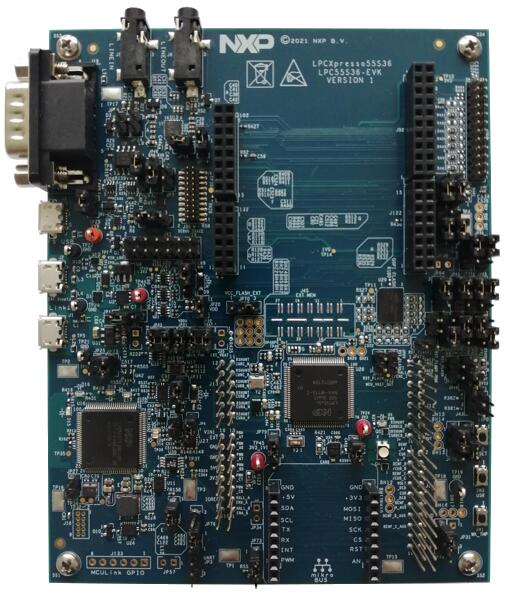
하드웨어
- 최대 150 MHz LPC55S36 Arm Cortex-M33
- 온칩 256 KB flash와 96 KB SRAM
- VCOM 포트를 갖춘 LPC-Link2 고속 USB 디버그 프로브
- LPC-Link2를 통한 I2C·SPI USB bridge
- MikroElektronika Click, Arduino UNO, PMod 확장
- reset, ISP, wake, user 버튼과 3색 LED
- Full-Speed·High-Speed USB device/host 포트
- 외부 serial-to-USB용 UART 헤더
- CAN transceiver
- 입출력 line을 갖춘 stereo audio codec
자세한 자료는 아래 SoC·보드 웹사이트, 데이터시트, Reference Manual, User Manual과 설계 파일을 참고하십시오.
지원 기능
NXP는 LPCXpresso55S36을 LPC55(S)3x MCU 계열의 상위 집합 보드로 봅니다. LPC55(S)3x 전체를 지원하기 위한 Zephyr Full Platform Support의 중심 보드이므로 새 기능을 이 보드에서 우선 활성화합니다. 비슷한 상위 집합 보드인 lpcxpresso55s69의 추가 지원 기능도 이 보드에서 재사용할 수 있습니다.
| 인터페이스 | 컨트롤러 | 드라이버/컴포넌트 |
|---|---|---|
NVIC | on-chip | nested vector interrupt controller |
SYSTICK | on-chip | systick |
IOCON | on-chip | pinmux |
GPIO | on-chip | gpio |
USART | on-chip | serial port-polling; serial port-interrupt |
CLOCK | on-chip | clock_control |
CAN | on-chip | canbus |
IAP | on-chip | flash |
PWM | on-chip | pwm |
USB FS | on-chip | USB Full Speed device |
DAC | on-chip | dac |
그 밖의 기능은 현재 활성화되어 있지 않습니다. 현재 target은 lpcxpresso55s36입니다.
연결과 I/O
LPC55S36 SoC의 IOCON 레지스터로 핀 기능을 구성합니다.
| 이름 | 기능 | 용도 |
|---|---|---|
PIO0_17 | GPIO | USR SW3 |
PIO0_22 | GPIO | GREEN LED |
PIO0_28 | GPIO | RED LED |
PIO0_29 | USART | USART RX |
PIO0_30 | USART | USART TX |
PIO1_11 | GPIO | BLUE_LED |
PIO1_18 | GPIO | Wakeup SW1 |
PIO1_20 | FLEXPPWM0_PWM0_A | pwm |
PIO1_17 | FLEXPPWM0_PWM0_B | pwm |
PIO1_6 | FLEXPPWM0_PWM1_A | pwm |
PIO1_22 | FLEXPPWM0_PWM1_B | pwm |
PIO1_8 | FLEXPPWM0_PWM2_A | pwm |
PIO1_4 | FLEXPPWM0_PWM2_B | pwm |
PIO1_21 | FLEXPPWM1_PWM0_A | pwm |
PIO0_3 | FLEXPPWM1_PWM0_B | pwm |
PIO1_23 | FLEXPPWM1_PWM1_A | pwm |
PIO0_21 | FLEXPPWM1_PWM1_B | pwm |
PIO1_25 | FLEXPPWM1_PWM2_A | pwm |
PIO0_31 | FLEXPPWM1_PWM2_B | pwm |
PIO1_2 | CAN0_TXD | CAN TX |
PIO1_3 | CAN0_RXD | CAN RX |
PIO0_22 | USB0_VBUS | USBFS VBUS |
시스템 클록
외부 24 MHz crystal에서 clock을 받는 PLL1을 시스템 클록 소스로 사용하며 144 MHz로 동작합니다. Flash controller가 활성화되면 core clock은 96 MHz로 낮아집니다. 시스템 요구에 따라 다른 SoC clock source도 사용할 수 있습니다.
직렬 포트
직렬 통신용 FLEXCOMM 인터페이스 8개 중 하나를 콘솔용 USART로 구성하고 나머지는 사용하지 않습니다.
프로그래밍과 디버깅
애플리케이션은 일반 Zephyr 절차로 빌드하고 플래시합니다.
디버그 프로브 구성
보드는 기본적으로 LPC-Link2 CMSIS-DAP 온보드 프로브를 사용하지만 pyOCD가 LPC55S36을 아직 지원하지 않으므로 J-Link로 재구성해야 합니다. J-Link host 도구를 설치해 검색 경로에 넣고 LPC-Link2 안내에 따라 이 보드용 최신 J-Link 펌웨어를 프로그래밍합니다.
콘솔 구성
PC와 J1 (LINK2)를 USB로 연결하고 직렬 터미널을 115200 baud, 8 bits, parity None, stop bit 1로 설정합니다.
플래시
west build -b lpcxpresso55s36 samples/hello_world
west flash
RESET 버튼으로 보드를 reset하면 다음 메시지가 표시됩니다.
***** Booting Zephyr OS v2.2.0 *****
Hello World! lpcxpresso55s36
디버깅
west build -b lpcxpresso55s36 samples/hello_world
west debug
단계 실행하면 다음 메시지가 표시됩니다.
***** Booting Zephyr OS zephyr-v2.2.0 *****
Hello World! lpcxpresso55s36
참고 자료
Source
출처
영어 원문에는 문단, 문서 지시문, 표, 코드, 코드 심벌, 경로를 그대로 보존했습니다.