Part 1
요약·해설
Touch 중심 하드웨어와 48 MHz FIRC, UART1 console을 정리하고 LinkServer 및 on-board J-Link 설정과 hello_world 실행을 설명합니다.
MKE15Z256VLL7 · 72 MHz
256 KB Flash · 32 KB RAM
OpenSDA · LinkServer · J-Link
Part 2
접을 수 있는 영어 원문 전체
영어 원문 전체 펼치기
D2FC574CDF206B2E904D22DB48B627C51222F8B3A614039A2B7D10EA26514944
.. _frdm_ke15z:

NXP FRDM-KE15Z
##############

Overview
********

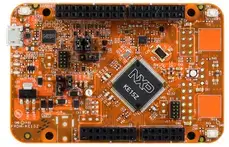
The FRDM-KE15Z is a development board for NXP Kinetis KE1xZ 32-bit
MCU-based platforms. The FRDM-KE15Z contains a robust TSI module
with up to 50 channels which makes this board highly flexible
for touch keys. Offers options for serial
communication, flash programming, and run-control debugging.

.. figure:: ../../../../../../../boards/nxp/frdm_ke15z/doc/frdm_ke15z.webp
   :align: center
   :alt: FRDM-KE15Z

Hardware
********

- MKE15Z256VLL7 MCU (up to 72 MHz, 256 KB flash memory, 32 KB RAM)
- OpenSDA Debug Circuit with a virtual serial port
- Touch electrodes in the self-capacitive mode
- Compatible with FRDM-TOUCH, FRDM-MC-LVBLDC, and Arduino® boards
- User Components such as Reset; RGB LED and two user buttons
- 6-axis FXOS8700CQ digital accelerometer and magnetometer

For more information about the KE1xZ SoC and the FRDM-KE15Z board, see
these NXP reference documents:

- `KE1XZ SOC Website`_
- `FRDM-KE15Z Datasheet`_
- `FRDM-KE15Z Reference Manual`_
- `FRDM-KE15Z Website`_
- `FRDM-KE15Z User Guide`_
- `FRDM-KE15Z Schematics`_

Supported Features
==================

The frdm_ke15z board configuration supports the following hardware
features:

+-----------+------------+-------------------------------------+
| Interface | Controller | Driver/Component                    |
+===========+============+=====================================+
| NVIC      | on-chip    | nested vector interrupt controller  |
+-----------+------------+-------------------------------------+
| SYSTICK   | on-chip    | systick                             |
+-----------+------------+-------------------------------------+
| GPIO      | on-chip    | gpio                                |
+-----------+------------+-------------------------------------+
| UART      | on-chip    | uart polling;                       |
|           |            | uart interrupt                      |
+-----------+------------+-------------------------------------+

The default configuration can be found in the defconfig file:
:zephyr_file:`boards/nxp/frdm_ke15z/frdm_ke15z_defconfig`.

Other hardware features are not currently supported by the port.

System Clock
============

The KE15 SoC is configured to run at 48 MHz using the FIRC.

Serial Port
===========

The KE15 SoC has three UARTs. UART1 is configured for the console.

Programming and Debugging
*************************

Build and flash applications as usual (see :ref:`build_an_application` and
:ref:`application_run` for more details).

Configuring a Debug Probe
=========================

A debug probe is used for both flashing and debugging the board. This board is
configured by default to use Linkserver.

Early versions of this board have an outdated version of the OpenSDA bootloader
and require an update. Please see the `DAPLink Bootloader Update`_ page for
instructions to update from the CMSIS-DAP bootloader to the DAPLink bootloader.

Option 1: Linkserver
-------------------------------------------------------

Install the :ref:`linkserver-debug-host-tools` and make sure they are in your
search path.  LinkServer works with the default CMSIS-DAP firmware included in
the on-board debugger.

Linkserver is the default for this board, ``west flash`` and ``west debug`` will
call the linkserver runner.

Option 2: :ref:`opensda-jlink-onboard-debug-probe`
--------------------------------------------------

Install the :ref:`jlink-debug-host-tools` and make sure they are in your search
path.

Follow the instructions in :ref:`opensda-jlink-onboard-debug-probe` to program
the `OpenSDA J-Link Firmware for FRDM-KE15Z`_.
Use the ``-r jlink`` option with west to use the jlink runner.

.. code-block:: console

   west flash -r jlink

Configuring a Console
=====================

Regardless of your choice in debug probe, we will use the OpenSDA
microcontroller as a usb-to-serial adapter for the serial console.

Connect a USB cable from your PC to J5.

Use the following settings with your serial terminal of choice (minicom, putty,
etc.):

- Speed: 115200
- Data: 8 bits
- Parity: None
- Stop bits: 1

Flashing
========

Here is an example for the :ref:`hello_world` application.

.. zephyr-app-commands::
   :zephyr-app: samples/hello_world
   :board: frdm_ke15z
   :goals: flash

Open a serial terminal, reset the board (press the SW1 button), and you should
see the following message in the terminal:

.. code-block:: console

   *** Booting Zephyr OS build v3.6.0-3478-gb923667860b1 ***
   Hello World! frdm_ke15z/mke15z7

Debugging
=========

Here is an example for the :ref:`hello_world` application.

.. zephyr-app-commands::
   :zephyr-app: samples/hello_world
   :board: frdm_ke15z
   :goals: debug

Open a serial terminal, step through the application in your debugger, and you
should see the following message in the terminal:

.. code-block:: console

   ***** Booting Zephyr OS v3.6.0-xxx-gxxxxxxxxxxxx *****
   Hello World! frdm_ke15z

.. _KE1XZ SoC Website:
   https://www.nxp.com/products/processors-and-microcontrollers/arm-microcontrollers/general-purpose-mcus/ke-series-arm-cortex-m4-m0-plus/ke1xz-arm-cortex-m0-plus-5v-main-stream-mcu-with-nxp-touch-and-can-control:KE1xZ

.. _FRDM-KE15Z Datasheet:
   https://www.nxp.com/docs/en/data-sheet/KE1xZP100M72SF0.pdf

.. _FRDM-KE15Z Reference Manual:
   https://www.nxp.com/webapp/Download?colCode=KE1XZP100M72SF0RM

.. _FRDM-KE15Z Website:
   https://www.nxp.com/design/design-center/development-boards-and-designs/general-purpose-mcus/freedom-development-platform-for-kinetis-ke1xmcus:FRDM-KE15Z

.. _FRDM-KE15Z User Guide:
   https://www.nxp.com/document/guide/get-started-with-the-frdm-ke15z:NGS-FRDM-KE15Z

.. _FRDM-KE15Z Schematics:
   https://www.nxp.com/webapp/Download?colCode=FRDM-KE15Z-SCH-DESIGNFILES

.. _DAPLink Bootloader Update:
   https://os.mbed.com/blog/entry/DAPLink-bootloader-update/

.. _OpenSDA J-Link Firmware for FRDM-KE15Z:
   https://www.segger.com/downloads/jlink/OpenSDA_FRDM-KE15Z
Part 3
한국어 전문 번역
개요
FRDM-KE15Z는 NXP Kinetis KE1xZ 32-bit MCU platform용 development board입니다. 최대 50 channel의 강력한 TSI module을 갖춰 touch key를 유연하게 구성할 수 있으며 serial communication, flash programming, run-control debugging을 지원합니다.
하드웨어
MKE15Z256VLL7MCU: 최대 72 MHz, 256 KB flash memory, 32 KB RAM- virtual serial port를 갖춘 OpenSDA debug circuit
- self-capacitive mode touch electrode
- FRDM-TOUCH, FRDM-MC-LVBLDC, Arduino board 호환
- reset, RGB LED, user button 2개
- 6-axis
FXOS8700CQdigital accelerometer/magnetometer
KE1xZ SoC와 FRDM-KE15Z의 website, datasheet, reference manual, user guide, schematic은 아래 참고 자료에서 확인할 수 있습니다.
지원 기능
| 인터페이스 | 컨트롤러 | 드라이버/컴포넌트 |
|---|---|---|
NVIC | on-chip | nested vector interrupt controller |
SYSTICK | on-chip | systick |
GPIO | on-chip | gpio |
UART | on-chip | uart polling; uart interrupt |
기본 구성은 boards/nxp/frdm_ke15z/frdm_ke15z_defconfig에 있습니다. 그 밖의 하드웨어 기능은 현재 이 port에서 지원되지 않습니다.
Clock과 Serial
KE15 SoC는 FIRC를 사용해 48 MHz로 동작합니다. UART는 3개이며 UART1이 console로 구성됩니다.
프로그래밍과 디버깅
일반적인 Zephyr application과 같은 방식으로 build하고 flash합니다. debug probe는 flash와 debug에 모두 사용되며 기본 설정은 LinkServer입니다. 초기 보드의 오래된 OpenSDA bootloader는 DAPLink Bootloader Update 지침에 따라 CMSIS-DAP에서 DAPLink bootloader로 update해야 합니다.
선택 1: LinkServer
LinkServer debug host tool을 설치해 search path에 포함하십시오. LinkServer는 on-board debugger의 기본 CMSIS-DAP firmware와 동작하며, 기본 runner이므로 west flash와 west debug가 linkserver runner를 호출합니다.
선택 2: OpenSDA J-Link on-board probe
J-Link debug host tool을 설치하고 OpenSDA J-Link 지침에 따라 OpenSDA J-Link Firmware for FRDM-KE15Z를 program하십시오. West에서 -r jlink option을 사용합니다.
west flash -r jlinkConsole 구성
OpenSDA microcontroller를 serial console용 USB-to-serial adapter로 사용합니다. PC에서 J5로 USB cable을 연결하고 115200 baud, 8 data bits, parity None, 1 stop bit로 설정하십시오.
Flash
west build -b frdm_ke15z samples/hello_world
west flash
serial terminal을 열고 SW1으로 reset하면 다음 출력이 표시됩니다.
*** Booting Zephyr OS build v3.6.0-3478-gb923667860b1 ***
Hello World! frdm_ke15z/mke15z7
Debug
west build -b frdm_ke15z samples/hello_world
west debug
debugger에서 application을 단계 실행하면 다음 출력이 표시됩니다.
***** Booting Zephyr OS v3.6.0-xxx-gxxxxxxxxxxxx *****
Hello World! frdm_ke15z
참고 자료
Source
출처
영어 원문에는 문단, 문서 지시문, 표, 코드, 코드 심벌, 경로를 그대로 보존했습니다.