Part 1
요약·해설
K82F의 on-chip/off-chip flash와 18개 지원 interface, 120 MHz clock·J11 USB 제약을 정리하고, K82F용 DAPLink/J-Link firmware와 J5 console 설정을 설명합니다.
MK82FN256VLL15 · 150 MHz
256 KB Flash/RAM · 64 Mb QSPI
OpenSDAv2.1 · DAPLink · J-Link
Part 2
접을 수 있는 영어 원문 전체
영어 원문 전체 펼치기
A051BEE733E91A7B333A965D16768721FB9D006FD273020E9675BADB4D91551A
.. _frdm_k82f:

NXP FRDM-K82F
##############

Overview
********

The FRDM-K82F is a low-cost development platform for Kinetis K80, K81,
and K82 MCUs.

- Form-factor compatible with the Arduino R3 pin layout
- Peripherals enable rapid prototyping, including a six-axis digital
  accelerometer and magnetometer to create full eCompass capabilities, a
  tri-colored LED and two user push-buttons for direct interaction, 2x32 Mb
  QuadSPI external flash, FlexIO camera header, touchpads and headers for use
  with Bluetooth and 2.4 GHz radio add-on modules
- OpenSDAv2.1, the NXP open source hardware embedded serial and debug adapter
  running an open source bootloader, offers options for serial communication,
  flash programming, and run-control debugging

.. image:: ../../../../../../../boards/nxp/frdm_k82f/doc/frdm_k82f.jpg
   :align: center
   :alt: FRDM-K82F

Hardware
********

- MK82FN256VLL15 MCU (150 MHz, 256 KB flash memory, 256 KB RAM, low-power,
  crystal-less USB, and 100 Low profile Quad Flat Package (LQFP))
- Dual role USB interface with micro-B USB connector
- RGB LED
- FXOS8700CQ accelerometer and magnetometer
- Two user push buttons
- 2x 32 Mb QSPI flash
- Flexible power supply option - OpenSDAv2.1 USB, Kinetis K82 USB, and external source
- Easy access to MCU input/output through Arduino R3 compatible I/O connectors
- Programmable OpenSDAv2.1 debug circuit supporting the CMSIS-DAP Interface
  software that provides:

  - Mass storage device (MSD) flash programming interface
  - CMSIS-DAP debug interface over a driver-less USB HID connection providing
    run-control debugging and compatibility with IDE tools
  - Virtual serial port interface
  - Open source CMSIS-DAP software project

- FlexIO header

For more information about the K82F SoC and FRDM-K82F board:

- `K82F Website`_
- `K82F Datasheet`_
- `K82F Reference Manual`_
- `FRDM-K82F Website`_
- `FRDM-K82F User Guide`_
- `FRDM-K82F Schematics`_

Supported Features
==================

The frdm_k82f board configuration supports the hardware features listed
below.  For additional features not yet supported, please also refer to the
:ref:`frdm_k64f`, which is the superset board in NXP's Kinetis K series.
NXP prioritizes enabling the superset board with NXP's Full Platform Support for
Zephyr.  Therefore, the frdm_k64f board may have additional features
already supported, which can also be re-used on this frdm_k82f board:

+-----------+------------+-------------------------------------+
| Interface | Controller | Driver/Component                    |
+===========+============+=====================================+
| NVIC      | on-chip    | nested vector interrupt controller  |
+-----------+------------+-------------------------------------+
| SYSTICK   | on-chip    | systick                             |
+-----------+------------+-------------------------------------+
| PINMUX    | on-chip    | pinmux                              |
+-----------+------------+-------------------------------------+
| ADC       | on-chip    | adc                                 |
+-----------+------------+-------------------------------------+
| FLASH     | on-chip    | soc flash                           |
+-----------+------------+-------------------------------------+
| FLASH     | off-chip   | QSPI flash                          |
+-----------+------------+-------------------------------------+
| GPIO      | on-chip    | gpio                                |
+-----------+------------+-------------------------------------+
| I2C       | on-chip    | i2c                                 |
+-----------+------------+-------------------------------------+
| PWM       | on-chip    | pwm                                 |
+-----------+------------+-------------------------------------+
| RTC       | on-chip    | rtc                                 |
+-----------+------------+-------------------------------------+
| SENSOR    | off-chip   | fxos8700 polling;                   |
|           |            | fxos8700 trigger                    |
+-----------+------------+-------------------------------------+
| SPI       | on-chip    | spi                                 |
+-----------+------------+-------------------------------------+
| UART      | on-chip    | serial port-polling;                |
|           |            | serial port-interrupt               |
+-----------+------------+-------------------------------------+
| USB       | on-chip    | USB device                          |
+-----------+------------+-------------------------------------+
| WATCHDOG  | on-chip    | watchdog                            |
+-----------+------------+-------------------------------------+
| TRNG      | on-chip    | entropy                             |
+-----------+------------+-------------------------------------+
| FTFA      | on-chip    | flash programming                   |
+-----------+------------+-------------------------------------+
| PIT       | on-chip    | pit                                 |
+-----------+------------+-------------------------------------+

The default configuration can be found in
:zephyr_file:`boards/nxp/frdm_k82f/frdm_k82f_defconfig`

Other hardware features are not currently supported by the port.

System Clock
============

The K82F SoC is configured to use the 12 MHz external oscillator on the board
with the on-chip PLL to generate a 120 MHz system clock.

Serial Port
===========

The K82F SoC has five UARTs. One is configured for the console, the remaining
ones are not used.

USB
===

The K82F SoC has a USB OTG (USBOTG) controller that supports both
device and host functions through its micro USB connector (J11).
Only USB device function is supported in Zephyr at the moment.

Programming and Debugging
*************************

Build and flash applications as usual (see :ref:`build_an_application` and
:ref:`application_run` for more details).

Configuring a Debug Probe
=========================

A debug probe is used for both flashing and debugging the board. This board is
configured by default to use the :ref:`opensda-daplink-onboard-debug-probe`.

Early versions of this board have an outdated version of the OpenSDA bootloader
and require an update. Please see the `DAPLink Bootloader Update`_ page for
instructions to update from the CMSIS-DAP bootloader to the DAPLink bootloader.

Option 1: :ref:`opensda-daplink-onboard-debug-probe` (Recommended)
------------------------------------------------------------------

Install the :ref:`pyocd-debug-host-tools` and make sure they are in your search
path.

Follow the instructions in :ref:`opensda-daplink-onboard-debug-probe` to program
the `OpenSDA DAPLink FRDM-K82F Firmware`_.

Option 2: :ref:`opensda-jlink-onboard-debug-probe`
--------------------------------------------------

Install the :ref:`jlink-debug-host-tools` and make sure they are in your search
path.

Follow the instructions in :ref:`opensda-jlink-onboard-debug-probe` to program
the `OpenSDA J-Link Firmware for FRDM-K82F`_.

Add the arguments ``-DBOARD_FLASH_RUNNER=jlink`` and
``-DBOARD_DEBUG_RUNNER=jlink`` when you invoke ``west build`` to override the
default runner from pyOCD to J-Link:

.. zephyr-app-commands::
   :zephyr-app: samples/hello_world
   :board: frdm_k82f
   :gen-args: -DBOARD_FLASH_RUNNER=jlink -DBOARD_DEBUG_RUNNER=jlink
   :goals: build

Configuring a Console
=====================

Regardless of your choice in debug probe, we will use the OpenSDA
microcontroller as a usb-to-serial adapter for the serial console.

Connect a USB cable from your PC to J5.

Use the following settings with your serial terminal of choice (minicom, putty,
etc.):

- Speed: 115200
- Data: 8 bits
- Parity: None
- Stop bits: 1

Flashing
========

Here is an example for the :ref:`hello_world` application.

.. zephyr-app-commands::
   :zephyr-app: samples/hello_world
   :board: frdm_k82f
   :goals: flash

Open a serial terminal, reset the board (press the SW1 button), and you should
see the following message in the terminal:

.. code-block:: console

   ***** Booting Zephyr OS v1.14.0-xxx-gxxxxxxxxxxxx *****
   Hello World! frdm_k82f

Debugging
=========

Here is an example for the :ref:`hello_world` application.

.. zephyr-app-commands::
   :zephyr-app: samples/hello_world
   :board: frdm_k82f
   :goals: debug

Open a serial terminal, step through the application in your debugger, and you
should see the following message in the terminal:

.. code-block:: console

   ***** Booting Zephyr OS v1.14.0-xxx-gxxxxxxxxxxxx *****
   Hello World! frdm_k82f

.. _FRDM-K82F Website:
   https://www.nxp.com/design/development-boards/freedom-development-boards/mcu-boards/freedom-development-platform-for-kinetis-k82-k81-and-k80-mcus:FRDM-K82F

.. _FRDM-K82F User Guide:
   https://www.nxp.com/webapp/Download?colCode=FRDMK82FUG

.. _FRDM-K82F Schematics:
   https://www.nxp.com/downloads/en/schematics/FRDM-K82F-SCH.pdf

.. _K82F Website:
   https://www.nxp.com/products/processors-and-microcontrollers/arm-microcontrollers/general-purpose-mcus/k-series-cortex-m4/k8x-secure/kinetis-k82-150-mhz-hw-cryptographic-co-processor-quadspi-microcontrollers-mcus-based-on-arm-cortex-m4-core:K82_150

.. _K82F Datasheet:
   https://www.nxp.com/docs/en/data-sheet/K82P121M150SF5.pdf

.. _K82F Reference Manual:
   https://www.nxp.com/webapp/Download?colCode=K82P121M150SF5RM

.. _DAPLink Bootloader Update:
   https://os.mbed.com/blog/entry/DAPLink-bootloader-update/

.. _OpenSDA DAPLink FRDM-K82F Firmware:
   https://www.nxp.com/downloads/en/snippets-boot-code-headers-monitors/k20dx_frdmk82f_if_crc_legacy_0x8000.bin

.. _OpenSDA J-Link Firmware for FRDM-K82F:
   https://www.segger.com/downloads/jlink/OpenSDA_FRDM-K82F
Part 3
한국어 전문 번역
개요
FRDM-K82F는 Kinetis K80, K81, K82 MCU를 위한 저비용 development platform입니다.
- Arduino R3 pin layout과 호환되는 form factor
- 빠른 prototype 제작용 peripheral: 완전한 eCompass를 구성하는 6-axis digital accelerometer와 magnetometer, tri-color LED, user push button 2개,
2×32 MbQuadSPI external flash, FlexIO camera header, touchpad, Bluetooth 및 2.4 GHz radio add-on module용 header - OpenSDAv2.1: open-source bootloader를 실행하는 NXP open-source hardware embedded serial/debug adapter로 serial communication, flash programming, run-control debugging 선택지를 제공
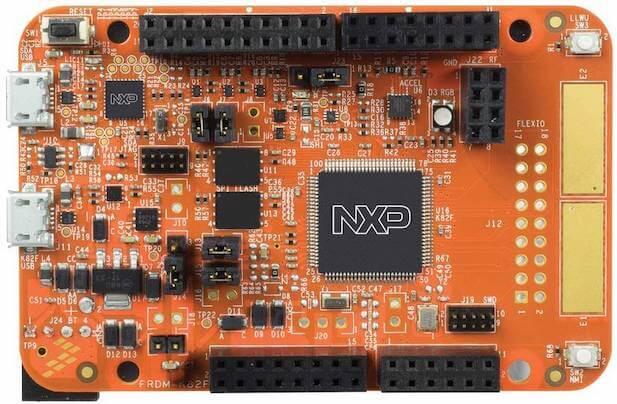
하드웨어
MK82FN256VLL15MCU: 150 MHz, 256 KB flash memory, 256 KB RAM, low-power, crystal-less USB, 100-pin LQFP- micro-B USB connector를 사용하는 dual-role USB interface
- RGB LED와
FXOS8700CQaccelerometer/magnetometer - user push button 2개와 32 Mb QSPI flash 2개
- 유연한 전원 선택: OpenSDAv2.1 USB, Kinetis K82 USB, external source
- Arduino R3 compatible I/O connector를 통한 MCU I/O 접근
- CMSIS-DAP interface software를 지원하는 programmable OpenSDAv2.1 debug circuit
- FlexIO header
OpenSDAv2.1은 MSD flash programming interface, driver가 필요 없는 USB HID 기반 CMSIS-DAP debug interface, run-control debugging과 IDE 호환성, virtual serial port interface, open-source CMSIS-DAP software project를 제공합니다.
지원 기능
frdm_k82f board configuration이 지원하는 기능은 다음과 같습니다. 아직 지원되지 않은 기능은 NXP Kinetis K series의 superset board인 frdm_k64f도 참고하십시오. NXP는 Zephyr Full Platform Support를 위해 superset board를 우선 활성화하므로 FRDM-K64F에서 이미 지원되는 기능을 FRDM-K82F에 재사용할 수 있습니다.
| 인터페이스 | 컨트롤러 | 드라이버/컴포넌트 |
|---|---|---|
NVIC | on-chip | nested vector interrupt controller |
SYSTICK | on-chip | systick |
PINMUX | on-chip | pinmux |
ADC | on-chip | adc |
FLASH | on-chip | soc flash |
FLASH | off-chip | QSPI flash |
GPIO | on-chip | gpio |
I2C | on-chip | i2c |
PWM | on-chip | pwm |
RTC | on-chip | rtc |
SENSOR | off-chip | fxos8700 polling; fxos8700 trigger |
SPI | on-chip | spi |
UART | on-chip | serial port-polling; serial port-interrupt |
USB | on-chip | USB device |
WATCHDOG | on-chip | watchdog |
TRNG | on-chip | entropy |
FTFA | on-chip | flash programming |
PIT | on-chip | pit |
기본 구성은 boards/nxp/frdm_k82f/frdm_k82f_defconfig에 있습니다. 그 밖의 하드웨어 기능은 현재 이 port에서 지원되지 않습니다.
Clock·Serial·USB
System clock
K82F SoC는 보드의 12 MHz external oscillator와 on-chip PLL을 사용해 120 MHz system clock을 생성하도록 구성됩니다.
Serial port
K82F SoC에는 UART가 5개 있습니다. 하나는 console로 구성되고 나머지는 사용하지 않습니다.
USB
K82F SoC의 USB OTG(USBOTG) controller는 micro USB connector J11을 통해 device와 host 기능을 모두 지원합니다. 현재 Zephyr에서는 USB device 기능만 지원됩니다.
프로그래밍과 디버깅
일반적인 Zephyr application과 같은 방식으로 build하고 flash합니다.
Debug probe 구성
debug probe는 보드의 flash와 debug에 모두 사용됩니다. 이 보드는 기본적으로 OpenSDA DAPLink on-board debug probe를 사용합니다.
선택 1: OpenSDA DAPLink on-board probe(권장)
pyOCD debug host tool을 설치하고 search path에 포함했는지 확인합니다. OpenSDA DAPLink on-board probe 지침에 따라 OpenSDA DAPLink FRDM-K82F Firmware를 program하십시오.
선택 2: OpenSDA J-Link on-board probe
J-Link debug host tool을 설치하고 search path에 포함했는지 확인합니다. OpenSDA J-Link on-board probe 지침에 따라 OpenSDA J-Link Firmware for FRDM-K82F를 program하십시오.
-DBOARD_FLASH_RUNNER=jlink와 -DBOARD_DEBUG_RUNNER=jlink를 추가하면 기본 runner를 pyOCD에서 J-Link로 바꿀 수 있습니다.
west build -b frdm_k82f samples/hello_world -- \
  -DBOARD_FLASH_RUNNER=jlink -DBOARD_DEBUG_RUNNER=jlink
Console 구성
debug probe 선택과 관계없이 OpenSDA microcontroller를 serial console용 USB-to-serial adapter로 사용합니다. PC에서 J5로 USB cable을 연결하십시오.
- Speed:
115200 - Data:
8 bits - Parity:
None - Stop bits:
1
Flash
west build -b frdm_k82f samples/hello_world
west flash
serial terminal을 열고 SW1 button을 눌러 보드를 reset하면 다음 메시지가 표시됩니다.
***** Booting Zephyr OS v1.14.0-xxx-gxxxxxxxxxxxx *****
Hello World! frdm_k82f
Debug
west build -b frdm_k82f samples/hello_world
west debug
serial terminal을 열고 debugger에서 application을 한 단계씩 실행하면 다음 메시지가 표시됩니다.
***** Booting Zephyr OS v1.14.0-xxx-gxxxxxxxxxxxx *****
Hello World! frdm_k82f
참고 자료
Source
출처
영어 원문에는 문단, 문서 지시문, 표, 코드, 코드 심벌, 경로를 그대로 보존했습니다.