Part 1
요약·해설
M2L31KI의 72 MHz clock, 512 KB dual-bank flash, 168 KB SRAM과 4개 지원 interface를 정리하고, DIP switch로 UART0 virtual COM을 활성화해 build·flash·debug하는 흐름을 설명합니다.
M2L31KIDAE · Cortex-M23
512 KB Flash · 168 KB SRAM
NU-Link2 · SWD · UART0 VCOM
Part 2
접을 수 있는 영어 원문 전체
영어 원문 전체 펼치기
90B7F8440B5523A261FFF65D4B5D9C8A8F5349F7262697C809658B1EB415FAFE
.. _nuvoton_m2l31ki:

NUVOTON NUMAKER M2L31KI
########################

Overview
********

The NuMaker M2L31KI is an Internet of Things (IoT) application focused platform
specially developed by Nuvoton. The NuMaker-M2L31KI is based on the NuMicro® M2L31
series MCU with ARM® -Cortex®-M23 core.

.. image:: ../../../../../../../boards/nuvoton/numaker_m2l31ki/doc/m2l31ki.webp
   :align: center
   :alt: M2L31KI

Features:
=========
- 32-bit Arm Cortex®-M23 M2L31KIDAE MCU
- Core clock up to 72 MHz
- 512 KB embedded Dual Bank Flash and 168 KB SRAM
- USB 2.0 Full-Speed OTG / Device
- USB 1.1 Host
- Arduino UNO compatible interface
- One push-button is for reset
- Two LEDs: one is for power indication and the other is for user-defined
- On-board NU-Link2 ICE debugger/programmer with SWD connector

More information about the board can be found at the `NuMaker M2L31KI User Manual`_.

Supported Features
==================

* The on-board 12-MHz crystal allows the device to run at its maximum operating speed of 72MHz.

The development board configuration supports the following hardware features:

+-----------+------------+-----------------------+
| Interface | Controller | Driver/Component      |
+===========+============+=======================+
| NVIC      | on-chip    | nested vectored       |
|           |            | interrupt controller  |
+-----------+------------+-----------------------+
| SYSTICK   | on-chip    | system clock          |
+-----------+------------+-----------------------+
| UART      | on-chip    | serial port           |
+-----------+------------+-----------------------+
| GPIO      | on-chip    | gpio                  |
+-----------+------------+-----------------------+

Other hardware features are not yet supported on Zephyr porting.

More details about the supported peripherals are available in `M2L31 TRM`_
Other hardware features are not currently supported by the Zephyr kernel.

Building and Flashing
*********************
Flashing
========

Here is an example for the :ref:`hello_world` application.

On board debugger Nu-link2 can emulate UART0 as a virtual COM port over usb,
To enable this, set ISW1 DIP switch 1-3 (TXD RXD VOM) to ON.
Connect the NuMaker-M2L31KI to your host computer using the USB port, then
run a serial host program to connect with your board. For example:

.. code-block:: console

   $ minicom -D /dev/ttyACM0

.. zephyr-app-commands::
   :zephyr-app: samples/hello_world
   :board: numaker_m2l31ki
   :goals: flash

Debugging
=========

Here is an example for the :ref:`hello_world` application.

.. zephyr-app-commands::
   :zephyr-app: samples/hello_world
   :board: numaker_m2l31ki
   :goals: debug

Step through the application in your debugger.

References
**********

.. _NuMaker M2L31KI User Manual:
   https://www.nuvoton.com/products/microcontrollers/arm-cortex-m23-mcus/m2l31-series/
.. _M2L31 TRM:
   https://www.nuvoton.com/products/microcontrollers/arm-cortex-m23-mcus/m2l31-series/
Part 3
한국어 전문 번역
개요
NuMaker-M2L31KI는 Nuvoton이 IoT application에 초점을 맞춰 개발한 platform입니다. Arm Cortex-M23 core를 탑재한 NuMicro M2L31 series MCU를 기반으로 합니다.
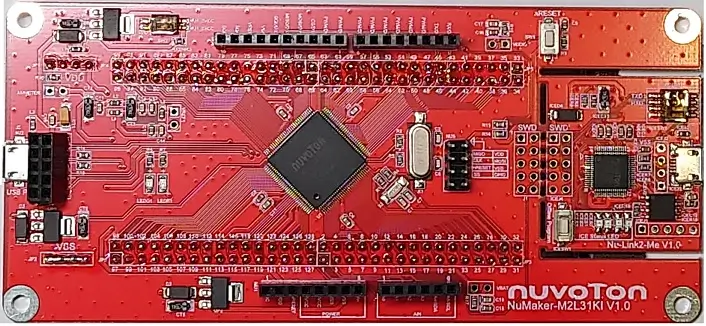
주요 특징
- 32-bit Arm Cortex-M23
M2L31KIDAEMCU - 최대
72 MHzcore clock 512 KBembedded dual-bank flash와168 KB SRAM- USB 2.0 Full-Speed OTG/Device
- USB 1.1 Host
- Arduino UNO compatible interface
- reset용 push button 1개
- power 표시용 LED 1개와 사용자 정의 LED 1개
- SWD connector를 갖춘 on-board NU-Link2 ICE debugger/programmer
보드에 관한 자세한 내용은 NuMaker M2L31KI User Manual에서 확인할 수 있습니다.
지원 기능
온보드 12 MHz crystal을 사용하면 device를 최대 동작 속도인 72 MHz로 실행할 수 있습니다.
개발 보드 구성에서 지원되는 하드웨어 기능은 다음과 같습니다.
| 인터페이스 | 컨트롤러 | 드라이버/컴포넌트 |
|---|---|---|
NVIC | on-chip | nested vectored interrupt controller |
SYSTICK | on-chip | system clock |
UART | on-chip | serial port |
GPIO | on-chip | gpio |
그 밖의 하드웨어 기능은 아직 Zephyr port에서 지원되지 않습니다. 지원 peripheral에 관한 세부 정보는 M2L31 TRM을 참고하십시오. Zephyr kernel이 현재 지원하지 않는 다른 하드웨어 기능도 있습니다.
빌드와 Flash
Flash
다음은 hello_world application을 사용하는 예입니다.
온보드 Nu-Link2 debugger는 USB를 통해 UART0을 virtual COM port로 emulation할 수 있습니다. 이 기능을 사용하려면 ISW1 DIP switch의 1~3번(TXD, RXD, VOM)을 ON으로 설정하십시오.
USB port로 NuMaker-M2L31KI를 host computer에 연결한 다음 serial host program으로 보드에 접속합니다. 예를 들면 다음과 같습니다.
minicom -D /dev/ttyACM0samples/hello_world를 numaker_m2l31ki 대상으로 build하고 flash합니다.
west build -b numaker_m2l31ki samples/hello_world
west flash
Debug
hello_world application을 debug하는 예는 다음과 같습니다.
west build -b numaker_m2l31ki samples/hello_world
west debug
debugger에서 application을 한 단계씩 실행하십시오.
참고 자료
Source
출처
영어 원문에는 문단, 문서 지시문, 표, 코드, 코드 심벌, 경로를 그대로 보존했습니다.