Part 1
요약·해설
실험 단계 하드웨어의 14개 지원 기능과 oscillator capacitor 선택을 정리하고, readback protection 오류에서 core를 recover한 뒤 다시 flash하는 흐름을 설명합니다.
nRF54L15 · Cortex-M33
RRAM
west flash --recover
Part 2
접을 수 있는 영어 원문 전체
영어 원문 전체 펼치기
F5F70B06F183165DBB2094AC7DE0B6FC22DA8EEDDCF55FD078FEE7600565EF03
.. _nrf54l15pdk_nrf54l15:

nRF54L15 PDK
############

Overview
********

.. note::

   All software for the nRF54L15 SoC is experimental and hardware availability
   is restricted to the participants in the limited sampling program.

The nRF54L15 Preview Development Kit hardware provides
support for the Nordic Semiconductor nRF54L15 Arm Cortex-M33 CPU and
the following devices:

* :abbr:`SAADC (Successive Approximation Analog to Digital Converter)`
* CLOCK
* RRAM
* :abbr:`GPIO (General Purpose Input Output)`
* :abbr:`TWIM (I2C-compatible two-wire interface master with EasyDMA)`
* :abbr:`MPU (Memory Protection Unit)`
* :abbr:`NVIC (Nested Vectored Interrupt Controller)`
* :abbr:`PWM (Pulse Width Modulation)`
* :abbr:`GRTC (Global real-time counter)`
* Segger RTT (RTT Console)
* :abbr:`SPI (Serial Peripheral Interface)`
* :abbr:`UARTE (Universal asynchronous receiver-transmitter)`
* :abbr:`WDT (Watchdog Timer)`

.. figure:: ../../../../../../../boards/nordic/nrf54l15pdk/doc/img/nrf54l15pdk_nrf54l15.webp
     :align: center
     :alt: nRF54L15 PDK

     nRF54L15 PDK (Credit: Nordic Semiconductor)

Hardware
********

nRF54L15 PDK has two crystal oscillators:

* High-frequency 32 MHz crystal oscillator (HFXO)
* Low-frequency 32.768 kHz crystal oscillator (LFXO)

The crystal oscillators can be configured to use either
internal or external capacitors.

Supported Features
==================

The ``nrf54l15pdk/nrf54l15/cpuapp`` board configuration supports the following
hardware features:

+-----------+------------+----------------------+
| Interface | Controller | Driver/Component     |
+===========+============+======================+
| SAADC     | on-chip    | adc                  |
+-----------+------------+----------------------+
| CLOCK     | on-chip    | clock_control        |
+-----------+------------+----------------------+
| RRAM      | on-chip    | flash                |
+-----------+------------+----------------------+
| GPIO      | on-chip    | gpio                 |
+-----------+------------+----------------------+
| TWIM      | on-chip    | i2c                  |
+-----------+------------+----------------------+
| MPU       | on-chip    | arch/arm             |
+-----------+------------+----------------------+
| NVIC      | on-chip    | arch/arm             |
+-----------+------------+----------------------+
| PWM       | on-chip    | pwm                  |
+-----------+------------+----------------------+
| GRTC      | on-chip    | counter              |
+-----------+------------+----------------------+
| RTT       | Segger     | console              |
+-----------+------------+----------------------+
| SPI(M/S)  | on-chip    | spi                  |
+-----------+------------+----------------------+
| SPU       | on-chip    | system protection    |
+-----------+------------+----------------------+
| UARTE     | on-chip    | serial               |
+-----------+------------+----------------------+
| WDT       | on-chip    | watchdog             |
+-----------+------------+----------------------+

Other hardware features have not been enabled yet for this board.

Programming and Debugging
*************************

Applications for the ``nrf54l15pdk/nrf54l15/cpuapp`` board can be
built, flashed, and debugged in the usual way. See
:ref:`build_an_application` and :ref:`application_run` for more details on
building and running.

Flashing
========

As an example, this section shows how to build and flash the :ref:`hello_world`
application.

.. warning::

   When programming the device, you might get an error similar to the following message::

    ERROR: The operation attempted is unavailable due to readback protection in
    ERROR: your device. Please use --recover to unlock the device.

   This error occurs when readback protection is enabled.
   To disable the readback protection, you must *recover* your device.

   Enter the following command to recover the core::

    west flash --recover

   The ``--recover`` command erases the flash memory and then writes a small binary into
   the recovered flash memory.
   This binary prevents the readback protection from enabling itself again after a pin
   reset or power cycle.

Follow the instructions in the :ref:`nordic_segger` page to install
and configure all the necessary software. Further information can be
found in :ref:`nordic_segger_flashing`.

To build and program the sample to the nRF54L15 PDK, complete the following steps:

First, connect the nRF54L15 PDK to you computer using the IMCU USB port on the PDK.
Next, build the sample by running the following command:

.. zephyr-app-commands::
   :zephyr-app: samples/hello_world
   :board: nrf54l15pdk/nrf54l15/cpuapp
   :goals: build flash

Testing the LEDs and buttons in the nRF54L15 PDK
************************************************

Test the nRF54L15 PDK with a :zephyr:code-sample:`blinky` sample.
Part 3
한국어 전문 번역
개요
nRF54L15 Preview Development Kit 하드웨어는 Nordic Semiconductor nRF54L15 Arm Cortex-M33 CPU와 다음 장치를 지원합니다.
- SAADC(Successive Approximation Analog to Digital Converter)
- CLOCK
- RRAM
- GPIO(General Purpose Input Output)
- TWIM(I2C-compatible two-wire interface master with EasyDMA)
- MPU(Memory Protection Unit)
- NVIC(Nested Vectored Interrupt Controller)
- PWM(Pulse Width Modulation)
- GRTC(Global real-time counter)
- Segger RTT(RTT Console)
- SPI(Serial Peripheral Interface)
- UARTE(Universal asynchronous receiver-transmitter)
- WDT(Watchdog Timer)
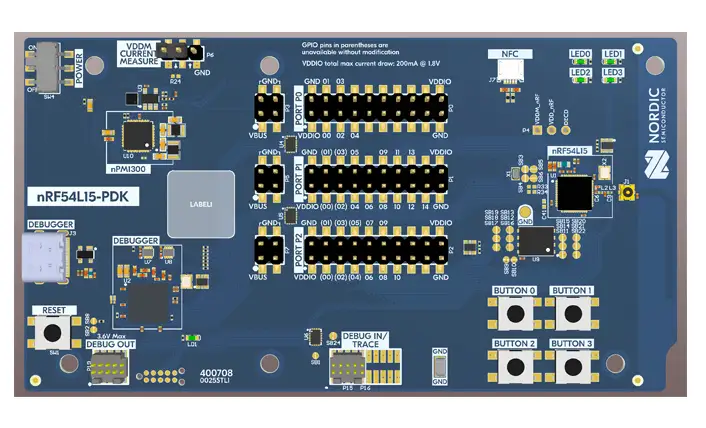
하드웨어
nRF54L15 PDK에는 다음 두 crystal oscillator가 있습니다.
- 고주파
32 MHzcrystal oscillator(HFXO) - 저주파
32.768 kHzcrystal oscillator(LFXO)
두 crystal oscillator는 각각 내부 capacitor 또는 외부 capacitor를 사용하도록 구성할 수 있습니다.
지원 기능
nrf54l15pdk/nrf54l15/cpuapp 보드 구성이 지원하는 하드웨어 기능은 다음과 같습니다.
| 인터페이스 | 컨트롤러 | 드라이버/컴포넌트 |
|---|---|---|
SAADC | on-chip | adc |
CLOCK | on-chip | clock_control |
RRAM | on-chip | flash |
GPIO | on-chip | gpio |
TWIM | on-chip | i2c |
MPU | on-chip | arch/arm |
NVIC | on-chip | arch/arm |
PWM | on-chip | pwm |
GRTC | on-chip | counter |
RTT | Segger | console |
SPI(M/S) | on-chip | spi |
SPU | on-chip | system protection |
UARTE | on-chip | serial |
WDT | on-chip | watchdog |
그 밖의 하드웨어 기능은 아직 이 보드에서 활성화되지 않았습니다.
프로그래밍과 디버깅
nrf54l15pdk/nrf54l15/cpuapp 보드용 애플리케이션은 일반적인 Zephyr 방식으로 빌드하고 flash하며 debug할 수 있습니다. 자세한 절차는 Zephyr의 애플리케이션 빌드 및 실행 문서를 참고하십시오.
Flash
다음은 hello_world 애플리케이션을 빌드하고 flash하는 예입니다.
ERROR: The operation attempted is unavailable due to readback protection in
ERROR: your device. Please use --recover to unlock the device.
이 오류는 readback protection이 활성화되어 있을 때 발생합니다. 보호를 비활성화하려면 장치를 recover해야 합니다. 다음 명령으로 core를 복구하십시오.
west flash --recoverNordic Segger 안내에 따라 필요한 소프트웨어를 설치하고 구성하십시오. 추가 정보는 Nordic Segger flashing 문서를 참고하십시오.
nRF54L15 PDK에 sample을 빌드하고 program하는 순서는 다음과 같습니다.
- PDK의 IMCU USB port를 사용하여 nRF54L15 PDK를 컴퓨터에 연결합니다.
- 다음 명령으로 sample을 빌드하고 flash합니다.
# From the root of the zephyr repository
west build -b nrf54l15pdk/nrf54l15/cpuapp samples/hello_world
west flash
nRF54L15 PDK의 LED와 버튼 시험
samples/basic/blinky sample로 nRF54L15 PDK를 시험하십시오.
Source
출처
영어 원문에는 문단, 문서 지시문, 표, 코드, 코드 심벌, 경로를 그대로 보존했습니다.