Part 1
요약·해설
두 코어의 지원 장치와 build target을 구분하고, 기본 Secure memory map에서 TF-M 또는 Zephyr 기반 Secure/Non-Secure image를 구성하는 전체 절차를 설명합니다.
PCA10095
Cortex-M33F · 128 MHz
Cortex-M33 · 64 MHz
Part 2
접을 수 있는 영어 원문 전체
영어 원문 전체 펼치기
6EB8385C76B762D7BDD9F8EADCCEACDF0E9BA7457DCF0A297B4252893F93A1E5
.. _nrf5340dk_nrf5340:

nRF5340 DK
##########

Overview
********

The nRF5340 DK (PCA10095) is a single-board development kit for evaluation
and development on the Nordic nRF5340 System-on-Chip (SoC).

The nRF5340 is a dual-core SoC based on the Arm® Cortex®-M33 architecture, with:

* a full-featured Arm Cortex-M33F core with DSP instructions, FPU, and
  Armv8-M Security Extension, running at up to 128 MHz, referred to as
  the **application core**
* a secondary Arm Cortex-M33 core, with a reduced feature set, running at
  a fixed 64 MHz, referred to as the **network core**.

The ``nrf5340dk/nrf5340/cpuapp`` build target provides support for the application
core on the nRF5340 SoC. The ``nrf5340dk/nrf5340/cpunet`` build target provides
support for the network core on the nRF5340 SoC.

nRF5340 SoC provides support for the following devices:

* :abbr:`ADC (Analog to Digital Converter)`
* CLOCK
* FLASH
* :abbr:`GPIO (General Purpose Input Output)`
* :abbr:`IDAU (Implementation Defined Attribution Unit)`
* :abbr:`I2C (Inter-Integrated Circuit)`
* :abbr:`MPU (Memory Protection Unit)`
* :abbr:`NVIC (Nested Vectored Interrupt Controller)`
* :abbr:`PWM (Pulse Width Modulation)`
* RADIO (Bluetooth Low Energy and 802.15.4)
* :abbr:`RTC (nRF RTC System Clock)`
* Segger RTT (RTT Console)
* :abbr:`SPI (Serial Peripheral Interface)`
* :abbr:`UARTE (Universal asynchronous receiver-transmitter)`
* :abbr:`USB (Universal Serial Bus)`
* :abbr:`WDT (Watchdog Timer)`

.. figure:: ../../../../../../../boards/nordic/nrf5340dk/doc/img/nrf5340dk.jpg
     :align: center
     :alt: nRF5340 DK

     nRF5340 DK (Credit: Nordic Semiconductor)

More information about the board can be found at the
`nRF5340 DK website`_.
The `nRF5340 DK Product Specification`_
contains the processor's information and the datasheet.


Hardware
********

nRF5340 DK has two external oscillators. The frequency of
the slow clock is 32.768 kHz. The frequency of the main clock
is 32 MHz.

Supported Features
==================

The ``nrf5340dk/nrf5340/cpuapp`` board configuration supports the following
hardware features:

+-----------+------------+----------------------+
| Interface | Controller | Driver/Component     |
+===========+============+======================+
| ADC       | on-chip    | adc                  |
+-----------+------------+----------------------+
| CLOCK     | on-chip    | clock_control        |
+-----------+------------+----------------------+
| FLASH     | on-chip    | flash                |
+-----------+------------+----------------------+
| GPIO      | on-chip    | gpio                 |
+-----------+------------+----------------------+
| I2C(M)    | on-chip    | i2c                  |
+-----------+------------+----------------------+
| MPU       | on-chip    | arch/arm             |
+-----------+------------+----------------------+
| NVIC      | on-chip    | arch/arm             |
+-----------+------------+----------------------+
| PWM       | on-chip    | pwm                  |
+-----------+------------+----------------------+
| RTC       | on-chip    | system clock         |
+-----------+------------+----------------------+
| RTT       | Segger     | console              |
+-----------+------------+----------------------+
| SPI(M/S)  | on-chip    | spi                  |
+-----------+------------+----------------------+
| SPU       | on-chip    | system protection    |
+-----------+------------+----------------------+
| UARTE     | on-chip    | serial               |
+-----------+------------+----------------------+
| USB       | on-chip    | usb                  |
+-----------+------------+----------------------+
| WDT       | on-chip    | watchdog             |
+-----------+------------+----------------------+

The ``nrf5340dk/nrf5340/cpunet`` board configuration supports the following
hardware features:

+-----------+------------+----------------------+
| Interface | Controller | Driver/Component     |
+===========+============+======================+
| CLOCK     | on-chip    | clock_control        |
+-----------+------------+----------------------+
| FLASH     | on-chip    | flash                |
+-----------+------------+----------------------+
| GPIO      | on-chip    | gpio                 |
+-----------+------------+----------------------+
| I2C(M)    | on-chip    | i2c                  |
+-----------+------------+----------------------+
| MPU       | on-chip    | arch/arm             |
+-----------+------------+----------------------+
| NVIC      | on-chip    | arch/arm             |
+-----------+------------+----------------------+
| RADIO     | on-chip    | Bluetooth,           |
|           |            | ieee802154           |
+-----------+------------+----------------------+
| RTC       | on-chip    | system clock         |
+-----------+------------+----------------------+
| RTT       | Segger     | console              |
+-----------+------------+----------------------+
| SPI(M/S)  | on-chip    | spi                  |
+-----------+------------+----------------------+
| UARTE     | on-chip    | serial               |
+-----------+------------+----------------------+
| WDT       | on-chip    | watchdog             |
+-----------+------------+----------------------+

Other hardware features have not been enabled yet for this board.
See `nRF5340 DK Product Specification`_
for a complete list of nRF5340 DK board hardware features.

Connections and IOs
===================

LED
---

* LED1 (green) = P0.28
* LED2 (green) = P0.29
* LED3 (green) = P0.30
* LED4 (green) = P0.31

Push buttons
------------

* BUTTON1 = SW1 = P0.23
* BUTTON2 = SW2 = P0.24
* BUTTON3 = SW3 = P0.8
* BUTTON4 = SW4 = P0.9
* BOOT = SW5 = boot/reset

Security components
===================

- Implementation Defined Attribution Unit (`IDAU`_) on the application core.
  The IDAU is implemented with the System Protection Unit and is used to
  define secure and non-secure memory maps.  By default, all of the memory
  space  (Flash, SRAM, and peripheral address space) is defined to be secure
  accessible only.
- Secure boot.

Programming and Debugging
*************************

nRF5340 application core supports the Armv8-M Security Extension.
Applications built for the ``nrf5340dk/nrf5340/cpuapp`` board by default
boot in the Secure state.

nRF5340 network core does not support the Armv8-M Security Extension.
nRF5340 IDAU may configure bus accesses by the nRF5340 network core
to have Secure attribute set; the latter allows to build and run
Secure only applications on the nRF5340 SoC.

Building Secure/Non-Secure Zephyr applications with Arm |reg| TrustZone |reg|
=============================================================================

Applications on the nRF5340 may contain a Secure and a Non-Secure firmware
image for the application core. The Secure image can be built using either
Zephyr or `Trusted Firmware M`_ (TF-M). Non-Secure firmware
images are always built using Zephyr. The two alternatives are described below.

.. note::

   By default the Secure image for nRF5340 application core is built
   using TF-M.


Building the Secure firmware with TF-M
--------------------------------------

The process to build the Secure firmware image using TF-M and the Non-Secure
firmware image using Zephyr requires the following steps:

1. Build the Non-Secure Zephyr application
   for the application core using ``-DBOARD=nrf5340dk/nrf5340/cpuapp/ns``.
   To invoke the building of TF-M the Zephyr build system requires the
   Kconfig option ``BUILD_WITH_TFM`` to be enabled, which is done by
   default when building Zephyr as a Non-Secure application.
   The Zephyr build system will perform the following steps automatically:

      * Build the Non-Secure firmware image as a regular Zephyr application
      * Build a TF-M (secure) firmware image
      * Merge the output image binaries together
      * Optionally build a bootloader image (MCUboot)

.. note::

   Depending on the TF-M configuration, an application DTS overlay may be
   required, to adjust the Non-Secure image Flash and SRAM starting address
   and sizes.

2. Build the application firmware for the network core using
   ``-DBOARD=nrf5340dk/nrf5340/cpunet``.


Building the Secure firmware using Zephyr
-----------------------------------------

The process to build the Secure and the Non-Secure firmware images
using Zephyr requires the following steps:

1. Build the Secure Zephyr application for the application core
   using ``-DBOARD=nrf5340dk/nrf5340/cpuapp`` and
   ``CONFIG_TRUSTED_EXECUTION_SECURE=y`` and ``CONFIG_BUILD_WITH_TFM=n``
   in the application project configuration file.
2. Build the Non-Secure Zephyr application for the application core
   using ``-DBOARD=nrf5340dk/nrf5340/cpuapp/ns``.
3. Merge the two binaries together.
4. Build the application firmware for the network core using
   ``-DBOARD=nrf5340dk/nrf5340/cpunet``.


When building a Secure/Non-Secure application for the nRF5340 application core,
the Secure application will have to set the IDAU (SPU) configuration to allow
Non-Secure access to all CPU resources utilized by the Non-Secure application
firmware. SPU configuration shall take place before jumping to the Non-Secure
application.

Building a Secure only application
==================================

Build the Zephyr app in the usual way (see :ref:`build_an_application`
and :ref:`application_run`), using ``-DBOARD=nrf5340dk/nrf5340/cpuapp`` for
the firmware running on the nRF5340 application core, and using
``-DBOARD=nrf5340dk/nrf5340/cpunet`` for the firmware running
on the nRF5340 network core.

Flashing
========

Follow the instructions in the :ref:`nordic_segger` page to install
and configure all the necessary software. Further information can be
found in :ref:`nordic_segger_flashing`. Then you can build and flash
applications as usual (:ref:`build_an_application` and
:ref:`application_run` for more details).

.. warning::

   The nRF5340 has a flash read-back protection feature. When flash read-back
   protection is active, you will need to recover the chip before reflashing.
   If you are flashing with :ref:`west <west-build-flash-debug>`, run
   this command for more details on the related ``--recover`` option:

   .. code-block:: console

      west flash -H -r nrfjprog --skip-rebuild

.. note::

   Flashing and debugging applications on the nRF5340 DK requires
   upgrading the nRF Command Line Tools to version 10.12.0. Further
   information on how to install the nRF Command Line Tools can be
   found in :ref:`nordic_segger_flashing`.

Here is an example for the :ref:`hello_world` application running on the
nRF5340 application core.

First, run your favorite terminal program to listen for output.

.. code-block:: console

   $ minicom -D <tty_device> -b 115200

Replace :code:`<tty_device>` with the port where the board nRF5340 DK
can be found. For example, under Linux, :code:`/dev/ttyACM0`.

Then build and flash the application in the usual way.

.. zephyr-app-commands::
   :zephyr-app: samples/hello_world
   :board: nrf5340dk/nrf5340/cpuapp
   :goals: build flash

Debugging
=========

Refer to the :ref:`nordic_segger` page to learn about debugging Nordic
boards with a Segger IC.


Testing the LEDs and buttons in the nRF5340 DK
**********************************************

There are 2 samples that allow you to test that the buttons (switches) and
LEDs on the board are working properly with Zephyr:

* :zephyr:code-sample:`blinky`
* :zephyr:code-sample:`button`

You can build and flash the examples to make sure Zephyr is running correctly on
your board. The button and LED definitions can be found in
:zephyr_file:`boards/nordic/nrf5340dk/nrf5340_cpuapp_common.dtsi`.

References
**********

.. target-notes::

.. _IDAU:
   https://developer.arm.com/docs/100690/latest/attribution-units-sau-and-idau
.. _nRF5340 DK website:
   https://www.nordicsemi.com/Software-and-tools/Development-Kits/nRF5340-DK
.. _nRF5340 DK Product Specification: https://docs.nordicsemi.com/bundle/ps_nrf5340/page/keyfeatures_html5.html
.. _Trusted Firmware M: https://www.trustedfirmware.org/projects/tf-m/
Part 3
한국어 전문 번역
개요
nRF5340 DK(PCA10095)는 Nordic nRF5340 System-on-Chip(SoC)를 평가하고 그 위에서 개발하기 위한 single-board development kit입니다.
nRF5340은 Arm Cortex-M33 아키텍처 기반의 dual-core SoC이며 두 코어의 역할과 성능이 다릅니다.
- Application core: DSP 명령, FPU, Armv8-M Security Extension을 갖춘 full-featured Arm Cortex-M33F 코어입니다. 최대
128 MHz로 동작합니다. - Network core: 기능 구성이 축소된 보조 Arm Cortex-M33 코어입니다. 고정
64 MHz로 동작합니다.
nrf5340dk/nrf5340/cpuapp 빌드 대상은 application core를, nrf5340dk/nrf5340/cpunet 빌드 대상은 network core를 지원합니다. 즉, 같은 보드라도 어느 코어에서 실행할 firmware인지에 따라 Zephyr board target을 구분해야 합니다.
nRF5340 SoC는 다음 장치를 지원합니다.
- ADC(Analog to Digital Converter)
- CLOCK
- FLASH
- GPIO(General Purpose Input Output)
- IDAU(Implementation Defined Attribution Unit)
- I2C(Inter-Integrated Circuit)
- MPU(Memory Protection Unit)
- NVIC(Nested Vectored Interrupt Controller)
- PWM(Pulse Width Modulation)
- RADIO(Bluetooth Low Energy 및 802.15.4)
- RTC(nRF RTC System Clock)
- Segger RTT(RTT Console)
- SPI(Serial Peripheral Interface)
- UARTE(Universal asynchronous receiver-transmitter)
- USB(Universal Serial Bus)
- WDT(Watchdog Timer)
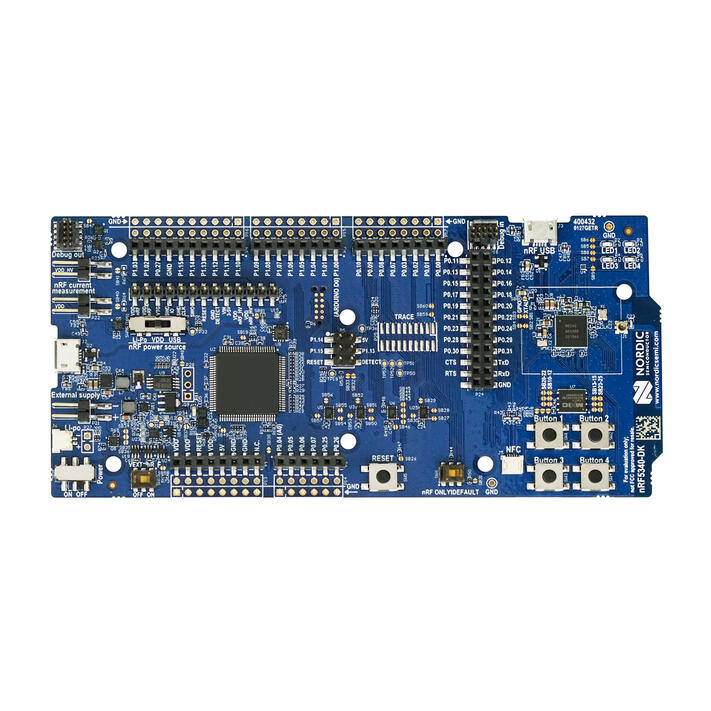
보드 정보는 nRF5340 DK 웹사이트에서 확인할 수 있습니다. nRF5340 DK Product Specification에는 프로세서 정보와 데이터시트가 들어 있습니다.
하드웨어
nRF5340 DK에는 외부 oscillator가 두 개 있습니다. 저속 clock의 주파수는 32.768 kHz이고 main clock의 주파수는 32 MHz입니다.
지원 기능
nrf5340dk/nrf5340/cpuapp 보드 구성이 지원하는 하드웨어 기능은 다음과 같습니다.
| 인터페이스 | 컨트롤러 | 드라이버/컴포넌트 |
|---|---|---|
ADC | on-chip | adc |
CLOCK | on-chip | clock_control |
FLASH | on-chip | flash |
GPIO | on-chip | gpio |
I2C(M) | on-chip | i2c |
MPU | on-chip | arch/arm |
NVIC | on-chip | arch/arm |
PWM | on-chip | pwm |
RTC | on-chip | system clock |
RTT | Segger | console |
SPI(M/S) | on-chip | spi |
SPU | on-chip | system protection |
UARTE | on-chip | serial |
USB | on-chip | usb |
WDT | on-chip | watchdog |
nrf5340dk/nrf5340/cpunet 보드 구성이 지원하는 하드웨어 기능은 다음과 같습니다.
| 인터페이스 | 컨트롤러 | 드라이버/컴포넌트 |
|---|---|---|
CLOCK | on-chip | clock_control |
FLASH | on-chip | flash |
GPIO | on-chip | gpio |
I2C(M) | on-chip | i2c |
MPU | on-chip | arch/arm |
NVIC | on-chip | arch/arm |
RADIO | on-chip | Bluetooth, ieee802154 |
RTC | on-chip | system clock |
RTT | Segger | console |
SPI(M/S) | on-chip | spi |
UARTE | on-chip | serial |
WDT | on-chip | watchdog |
그 밖의 하드웨어 기능은 아직 이 보드에서 활성화되지 않았습니다. nRF5340 DK의 전체 하드웨어 기능 목록은 nRF5340 DK Product Specification을 참고하십시오.
연결과 입출력
LED
- LED1(녹색) =
P0.28 - LED2(녹색) =
P0.29 - LED3(녹색) =
P0.30 - LED4(녹색) =
P0.31
Push button
- BUTTON1 = SW1 =
P0.23 - BUTTON2 = SW2 =
P0.24 - BUTTON3 = SW3 =
P0.8 - BUTTON4 = SW4 =
P0.9 - BOOT = SW5 = boot/reset
보안 컴포넌트
- IDAU: application core에는 Implementation Defined Attribution Unit이 있습니다. 이 IDAU는 System Protection Unit(SPU)으로 구현되며 Secure memory map과 Non-Secure memory map을 정의하는 데 사용됩니다. 기본 상태에서는 Flash, SRAM, peripheral address space를 포함한 모든 memory space가 Secure 상태에서만 접근할 수 있게 정의됩니다.
- Secure boot: 보드가 Secure한 부팅 흐름을 구성할 수 있도록 지원합니다.
프로그래밍과 디버깅
nRF5340 application core는 Armv8-M Security Extension을 지원합니다. nrf5340dk/nrf5340/cpuapp 보드용으로 빌드한 애플리케이션은 기본적으로 Secure state에서 부팅합니다.
nRF5340 network core는 Armv8-M Security Extension을 지원하지 않습니다. 다만 nRF5340 IDAU는 network core의 bus access에 Secure attribute가 설정되도록 구성할 수 있습니다. 이 구성을 사용하면 nRF5340 SoC에서 Secure-only 애플리케이션을 빌드하고 실행할 수 있습니다.
Arm TrustZone으로 Secure/Non-Secure Zephyr 애플리케이션 빌드
nRF5340의 application core에는 Secure firmware image와 Non-Secure firmware image가 함께 들어갈 수 있습니다. Secure image는 Zephyr 또는 Trusted Firmware-M(TF-M)으로 빌드할 수 있지만, Non-Secure firmware image는 항상 Zephyr로 빌드합니다. 두 가지 빌드 방법은 다음과 같습니다.
TF-M으로 Secure firmware 빌드
TF-M Secure firmware image와 Zephyr Non-Secure firmware image를 만드는 절차는 다음과 같습니다.
-DBOARD=nrf5340dk/nrf5340/cpuapp/ns를 사용해 application core용 Non-Secure Zephyr 애플리케이션을 빌드합니다.Zephyr build system이 TF-M 빌드를 호출하려면 Kconfig 옵션
BUILD_WITH_TFM이 활성화되어야 합니다. Zephyr를 Non-Secure 애플리케이션으로 빌드할 때 이 옵션은 기본으로 활성화됩니다. Zephyr build system은 다음 작업을 자동으로 수행합니다.- 일반 Zephyr 애플리케이션과 같은 방식으로 Non-Secure firmware image 빌드
- TF-M Secure firmware image 빌드
- 두 출력 image binary 병합
- 선택적으로 MCUboot bootloader image 빌드
-DBOARD=nrf5340dk/nrf5340/cpunet을 사용해 network core용 application firmware를 빌드합니다.
Zephyr로 Secure firmware 빌드
Zephyr를 사용해 Secure firmware image와 Non-Secure firmware image를 만드는 절차는 다음과 같습니다.
-DBOARD=nrf5340dk/nrf5340/cpuapp을 사용하고 애플리케이션 project configuration file에CONFIG_TRUSTED_EXECUTION_SECURE=y와CONFIG_BUILD_WITH_TFM=n을 설정하여 application core용 Secure Zephyr 애플리케이션을 빌드합니다.-DBOARD=nrf5340dk/nrf5340/cpuapp/ns를 사용해 application core용 Non-Secure Zephyr 애플리케이션을 빌드합니다.- 두 binary를 병합합니다.
-DBOARD=nrf5340dk/nrf5340/cpunet을 사용해 network core용 application firmware를 빌드합니다.
nRF5340 application core용 Secure/Non-Secure 애플리케이션을 빌드할 때 Secure 애플리케이션은 Non-Secure application firmware가 사용하는 모든 CPU resource에 Non-Secure access를 허용하도록 IDAU(SPU)를 구성해야 합니다. 이 SPU 구성은 Non-Secure 애플리케이션으로 제어를 넘기기 전에 완료해야 합니다.
Secure-only 애플리케이션 빌드
일반적인 Zephyr 애플리케이션 빌드 및 실행 방법을 사용합니다. nRF5340 application core에서 실행할 firmware에는 -DBOARD=nrf5340dk/nrf5340/cpuapp을 사용하고, nRF5340 network core에서 실행할 firmware에는 -DBOARD=nrf5340dk/nrf5340/cpunet을 사용합니다.
Flash
Nordic Segger 안내에 따라 필요한 소프트웨어를 설치하고 구성한 뒤 일반적인 방식으로 애플리케이션을 빌드하고 flash할 수 있습니다.
west flash -H -r nrfjprog --skip-rebuild다음은 nRF5340 application core에서 hello_world 애플리케이션을 실행하는 예입니다. 먼저 원하는 terminal 프로그램으로 출력을 수신합니다.
$ minicom -D <tty_device> -b 115200<tty_device>를 nRF5340 DK가 연결된 port로 바꾸십시오. Linux에서는 예를 들어 /dev/ttyACM0입니다. 그런 다음 일반적인 방식으로 애플리케이션을 빌드하고 flash합니다.
# From the root of the zephyr repository
west build -b nrf5340dk/nrf5340/cpuapp samples/hello_world
west flash
Debug
Segger IC를 이용한 Nordic 보드 디버깅 방법은 Nordic Segger 문서를 참고하십시오.
nRF5340 DK의 LED와 버튼 시험
다음 두 sample을 사용하면 보드의 버튼(switch)과 LED가 Zephyr에서 올바르게 동작하는지 시험할 수 있습니다.
samples/basic/blinkysamples/basic/button
예제를 빌드하고 flash하면 보드에서 Zephyr가 정상 실행되는지 확인할 수 있습니다. 버튼과 LED 정의는 boards/nordic/nrf5340dk/nrf5340_cpuapp_common.dtsi에서 확인할 수 있습니다.
Source
출처
영어 원문에는 문단, 문서 지시문, 표, 코드, 코드 심벌, 경로를 그대로 보존했습니다.