Part 1
요약·해설
지원 인터페이스와 보드 핀을 확인하고 hello_world, blinky, button으로 기본 동작을 검증합니다.
PCA10028
nRF51822 · Cortex-M0
Bluetooth Low Energy
Part 2
접을 수 있는 영어 원문 전체
영어 원문 전체 펼치기
B95269AFC9E38AA0935A75F31E8599096610F943B2C500961802670E63CC3615
.. _nrf51dk_nrf51422:

nRF51 DK
########

Overview
********

The nRF51 Development Kit (PCA10028) hardware provides support for the Nordic
Semiconductor nRF51822 ARM Cortex-M0 CPU and the following devices:

* :abbr:`ADC (Analog to Digital Converter)`
* CLOCK
* FLASH
* :abbr:`GPIO (General Purpose Input Output)`
* :abbr:`I2C (Inter-Integrated Circuit)`
* :abbr:`NVIC (Nested Vectored Interrupt Controller)`
* RADIO (Bluetooth Low Energy)
* :abbr:`RTC (nRF RTC System Clock)`
* Segger RTT (RTT Console)
* :abbr:`SPI (Serial Peripheral Interface)`
* :abbr:`UART (Universal asynchronous receiver-transmitter)`
* :abbr:`WDT (Watchdog Timer)`

.. figure:: ../../../../../../../boards/nordic/nrf51dk/doc/img/nrf51dk_nrf51822.jpg
     :align: center
     :alt: nRF51 DK

     nRF51 DK (Credit: Nordic Semiconductor)

More information about the board can be found at the
`nRF51 DK website`_. The `nRF51 Development Kit User Guide`_
contains the processor's information and the datasheet.


Hardware
********

nRF51 DK has two external oscillators. The frequency of
the slow clock is 32.768 kHz. The frequency of the main clock
is 16 MHz.

Supported Features
==================

The nrf51dk/nrf51822 board configuration supports the following nRF51
hardware features:

+-----------+------------+----------------------+
| Interface | Controller | Driver/Component     |
+===========+============+======================+
| ADC       | on-chip    | adc                  |
+-----------+------------+----------------------+
| CLOCK     | on-chip    | clock_control        |
+-----------+------------+----------------------+
| FLASH     | on-chip    | flash                |
+-----------+------------+----------------------+
| GPIO      | on-chip    | gpio                 |
+-----------+------------+----------------------+
| I2C(M)    | on-chip    | i2c                  |
+-----------+------------+----------------------+
| NVIC      | on-chip    | arch/arm             |
+-----------+------------+----------------------+
| RADIO     | on-chip    | Bluetooth            |
+-----------+------------+----------------------+
| RTC       | on-chip    | system clock         |
+-----------+------------+----------------------+
| RTT       | Segger     | console              |
+-----------+------------+----------------------+
| SPI(M/S)  | on-chip    | spi                  |
+-----------+------------+----------------------+
| UART      | on-chip    | serial               |
+-----------+------------+----------------------+
| WDT       | on-chip    | watchdog             |
+-----------+------------+----------------------+

Other hardware features have not been enabled yet for this board.
See `nRF51 DK website`_ and `nRF51 Development Kit User Guide`_
for a complete list of nRF51 Development Kit board hardware features.

Connections and IOs
===================

LED
---

* LED1 (green) = P0.21
* LED2 (green) = P0.22
* LED3 (green) = P0.23
* LED4 (green) = P0.24

Push buttons
------------

* BUTTON1 = SW1 = P0.17
* BUTTON2 = SW2 = P0.18
* BUTTON3 = SW3 = P0.19
* BUTTON4 = SW4 = P0.20
* BOOT = SW5 = boot/reset

Programming and Debugging
*************************

Flashing
========

Follow the instructions in the :ref:`nordic_segger` page to install
and configure all the necessary software. Further information can be
found in :ref:`nordic_segger_flashing`. Then build and flash
applications as usual (see :ref:`build_an_application` and
:ref:`application_run` for more details).

Here is an example for the :ref:`hello_world` application.

First, run your favorite terminal program to listen for output.

.. code-block:: console

   $ minicom -D <tty_device> -b 115200

Replace :code:`<tty_device>` with the port where the board nRF51 DK
can be found. For example, under Linux, :code:`/dev/ttyACM0`.

Then build and flash the application in the usual way.

.. zephyr-app-commands::
   :zephyr-app: samples/hello_world
   :board: nrf51dk/nrf51822
   :goals: build flash

Debugging
=========

Refer to the :ref:`nordic_segger` page to learn about debugging Nordic boards with a
Segger IC.


Testing the LEDs and buttons in the nRF51 DK
********************************************

There are 2 samples that allow you to test that the buttons (switches) and LEDs on
the board are working properly with Zephyr:

.. code-block:: console

   samples/basic/blinky
   samples/basic/button

You can build and flash the examples to make sure Zephyr is running correctly on
your board. The button and LED definitions can be found in
:zephyr_file:`boards/nordic/nrf51dk/nrf51dk_nrf51822.dts`.

References
**********

.. target-notes::

.. _nRF51 DK website: https://www.nordicsemi.com/Software-and-Tools/Development-Kits/nRF51-DK
.. _nRF51 Development Kit User Guide: https://docs.nordicsemi.com/bundle/nRF51-Series-DK/resource/nRF51_Development_Kit_User_Guide_v1.2.pdf
Part 3
한국어 전문 번역
개요
nRF51 Development Kit(PCA10028)는 Nordic Semiconductor nRF51822 Arm Cortex-M0 CPU를 탑재하며 ADC, CLOCK, FLASH, GPIO, I2C, NVIC, Bluetooth Low Energy용 RADIO, RTC, Segger RTT console, SPI, UART, WDT를 지원합니다.
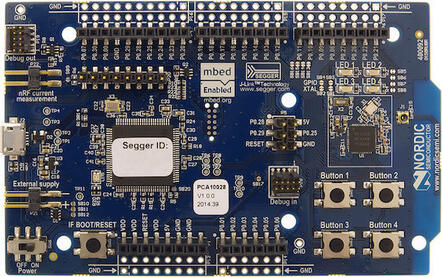
보드 정보는 nRF51 DK 웹사이트에서 확인할 수 있습니다. nRF51 Development Kit User Guide에는 프로세서 정보와 데이터시트가 들어 있습니다.
하드웨어
nRF51 DK에는 외부 oscillator가 두 개 있습니다. 저속 clock은 32.768 kHz, main clock은 16 MHz입니다.
지원 기능
nrf51dk/nrf51822 보드 구성에서 지원하는 nRF51 하드웨어 기능은 다음과 같습니다.
| 인터페이스 | 컨트롤러 | 드라이버/컴포넌트 |
|---|---|---|
ADC | on-chip | adc |
CLOCK | on-chip | clock_control |
FLASH | on-chip | flash |
GPIO | on-chip | gpio |
I2C(M) | on-chip | i2c |
NVIC | on-chip | arch/arm |
RADIO | on-chip | Bluetooth |
RTC | on-chip | system clock |
RTT | Segger | console |
SPI(M/S) | on-chip | spi |
UART | on-chip | serial |
WDT | on-chip | watchdog |
그 밖의 하드웨어 기능은 아직 이 보드에서 활성화되지 않았습니다. 전체 기능은 nRF51 DK 웹사이트와 nRF51 Development Kit User Guide를 참고하십시오.
연결과 입출력
LED
- LED1(녹색):
P0.21 - LED2(녹색):
P0.22 - LED3(녹색):
P0.23 - LED4(녹색):
P0.24
Push button
- BUTTON1 = SW1 =
P0.17 - BUTTON2 = SW2 =
P0.18 - BUTTON3 = SW3 =
P0.19 - BUTTON4 = SW4 =
P0.20 - BOOT = SW5 = boot/reset
프로그래밍과 디버깅
Flash
Nordic Segger 안내에 따라 필요한 소프트웨어를 설치하고 구성한 뒤 일반적인 방식으로 애플리케이션을 빌드하고 flash합니다. hello_world를 실행하려면 먼저 terminal에서 출력을 수신합니다.
$ minicom -D <tty_device> -b 115200<tty_device>는 nRF51 DK가 연결된 port로 바꾸십시오. Linux에서는 예를 들어 /dev/ttyACM0입니다.
# From the root of the zephyr repository
west build -b nrf51dk/nrf51822 samples/hello_world
west flash
Debug
Segger IC를 이용한 Nordic 보드 디버깅 방법은 Nordic Segger 문서를 참고하십시오.
LED와 버튼 시험
다음 두 sample로 버튼(switch)과 LED가 Zephyr에서 올바르게 동작하는지 시험할 수 있습니다.
samples/basic/blinky
samples/basic/button
두 예제를 빌드하고 flash하면 보드에서 Zephyr가 정상 실행되는지 확인할 수 있습니다. 버튼과 LED 정의는 boards/nordic/nrf51dk/nrf51dk_nrf51822.dts에 있습니다.
Source
출처
영어 원문에는 문단, 문서 지시문, 표, 코드, 코드 심벌, 경로를 그대로 보존했습니다.