Part 1
요약·해설
POSIX arch와 inf_clock 위에 장치별 HW·무선 모델, BabbleSim 통신과 테스트 hook을 쌓습니다.
워크스테이션 통합 테스트
BabbleSim 물리 계층
bs_tests · backchannel · EDTT
Part 2
접을 수 있는 영어 원문 전체
영어 원문 전체 펼치기
8C6FC1F825A5CE74198600ECB8C4B6A5CFAFAFB0E70366621F6B9477C8C78CFB
.. _bsim boards:

Bsim boards
###########

**Available bsim boards**

* :ref:`Simulated nRF52833 (nrf52_bsim)<nrf52_bsim>`
* :ref:`Simulated nRF5340 (nrf5340bsim)<nrf5340bsim>`
* :ref:`Simulated nRF54L15 (nrf54l15bsim)<nrf54l15bsim>`

.. contents:: Table of contents
   :depth: 2
   :backlinks: entry
   :local:

This page covers the design, architecture and rationale, of the
nrf5x_bsim boards and other similar bsim boards.
These boards are postfixed with `_bsim` as they use BabbleSim_
(shortened bsim), to simulate the radio environment.
These boards use the `native simulator`_ and the :ref:`POSIX architecture<Posix arch>` to build
and execute the embedded code natively on Linux.

Particular details on the :ref:`nRF52<nrf52_bsim>`, :ref:`nRF5340<nrf5340bsim>` and
:ref:`nRF54l15<nrf54l15bsim>` simulation boards, including how to use them,
can be found in their respective documentation.

.. _BabbleSim:
   https://BabbleSim.github.io

.. _EDTT:
   https://github.com/EDTTool/EDTT

.. _Architecture of HW models used for FW development and testing:
   https://babblesim.github.io/arch_hw_models.html

.. _native simulator:
   https://github.com/BabbleSim/native_simulator/blob/main/docs/README.md

.. _native simulator design documentation:
   https://github.com/BabbleSim/native_simulator/blob/main/docs/Design.md

.. _nRF HW models design documentation:
   https://github.com/BabbleSim/ext_nRF_hw_models/blob/main/docs/README_HW_models.md


Overall objective
*****************

The main purpose of these bsim boards is to be test-benches for
integration testing of embedded code on workstation/simulation.
Integration testing in the sense that the code under test will, at the very
least, run with the Zephyr RTOS just like for any other
:ref:`POSIX arch based board<posix_arch_rationale>`, but in addition these
will include some HW models which, to some degree, pretend to be the real
embedded HW.

These tests are run in workstation, that is, without using real embedded HW.
The intention being to be able to run tests much faster than real time,
without the need for real HW, and in a deterministic/reproducible fashion.

Unlike :ref:`native_sim <native_sim>`, bsim boards do not interact directly with any host
peripherals, and their execution is independent of the host load, or timing.

These boards are also designed to be used as prototyping and development environments,
which can help developing applications or communication stacks.

.. _bsim_boards_tests:

Different types of tests and how the bsim boards relate to them
===============================================================

With the POSIX architecture we provided an overall
:ref:`comparison of what the POSIX arch provides vs other options<posix_arch_compare>`.
That comparison applies fully to these boards, but in this section we expand
further on the differences, benefits and drawbacks of different testing
methodologies normally employed by embedded SW developers and how they relate
to these boards.

- Unit tests:
  Typical unit tests frameworks provide unit testing
  support which covers a different need: testing a component in isolation.
  Zephyr provides a unit testing target (unit_testing) which is not related to
  these bsim boards.
- Integration tests on real HW: Allows testing with the real SW
  components that may be too dependent on the exact HW particularities, and
  possibly without any changes compared to the final solution.
  As such can provide better integration coverage than simulation ins ome cases,
  but at the expense of slower execution, needing the real HW setups,
  test in general not being reproducible, and in many cases failures
  not being easy to debug.
  They otherwise serve a very similar purpose to simulation integration tests.
- Integration tests on workstation (what the POSIX arch and these boards enable)

  - Using bsim boards: Allow testing the embedded SW (or a subset), including
    the OS, models of peripherals etc. By testing them in conjunction,
    it is possible to test the components interactions and their integration.
  - Using bsim boards with the BabbleSim Physical layer simulation allows
    testing how several devices would interact with each other.
    For ex. how a left and a right earbud synchronize and exchange data and
    audio over their radio link, and how they interact with a mobile phone.
  - Using bsim boards, and the `EDTT`_ framework: With the EDTT framework we can
    test the embedded code under test while controlling the test from external
    python test scripts. This is supported by compiling the embedded code with
    an special driver that handles the EDTT communication (its RPC transport)
    and an embedded application that handles the RPC calls themselves, while
    the python test scripts provide the test logic.
  - Using Zephyr's :ref:`native_sim <native_sim>` board: It also allows integration testing of
    the embedded code, but without any specific HW. In that way, many embedded
    components which are dependent on the HW would not be suited for testing in
    that platform. Just like the bsim boards, this Zephyr target board can
    be used with or without Zephyr's ztest system and twister.
    The :ref:`native_sim <native_sim>` board shares the :ref:`POSIX architecture<Posix arch>`,
    and native simulator runner with the bsim boards.

- Zephyr's ztest infrastructure and Zephyr's twister:
  Based on dedicated embedded test applications build with the code under test.
  The embedded test application is responsible for driving the tests and check
  the results on its own, and provide a test result to a PC which directs the
  test.
  Originally used as a framework for integration testing on target,
  with a very dedicated test application,
  these are fully supported with the bsim boards.

Design
******

Layering: Zephyr's arch, soc and board layers
=============================================

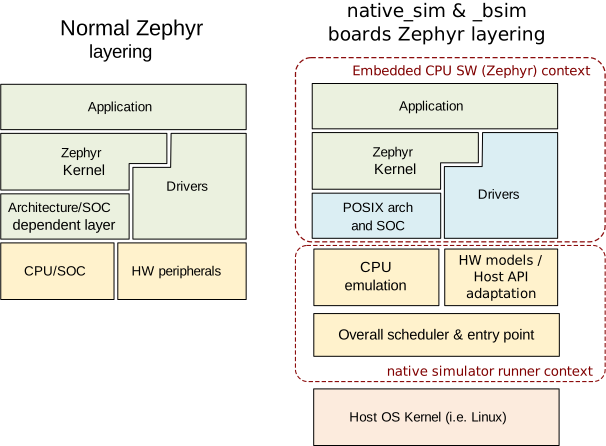
The basic architecture layering of these boards is as follows:

- The `native simulator`_ runner is used to execute the code in your host.
- The architecture, SOC and board components of Zephyr are replaced with
  simulation specific ones.
- The architecture (arch) is the Zephyr :ref:`POSIX architecture<Posix arch>`
  layer.
  The SOC layer is `inf_clock`. And the board layer is dependent on
  the specific device we are simulating.
- The POSIX architecture provides an adaptation from the Zephyr arch API
  (which handles mostly the thread context switching) to the native simulator
  CPU thread emulation.
  See :ref:`POSIX arch architecture<posix_arch_architecture>`
- The SOC `inf_clock` layer provides an adaptation to the native simulator CPU "simulation"
  and the handling of control between the "CPU simulation" (Zephyr threads) and the
  HW models thread ( See `Threading`_ ).
- The board layer provides all SOC/ IC specific content, including
  selecting the HW models which are built in the native simulator runner context, IRQ handling,
  busy wait API (see :ref:`posix_busy_wait<posix_busy_wait>`), and Zephyr's printk backend.
  Note that in a normal Zephyr target interrupt handling and a custom busy wait
  would be provided by the SOC layer, but abusing Zephyr's layering, and for the
  `inf_clock` layer to be generic, these were delegated to the board.
  The board layer provides other test specific
  functionality like bs_tests hooks, trace control, etc, and
  by means of the native simulator, provides the :c:func:`main` entry point for the Linux
  program, command line argument handling, and the overall time scheduling of
  the simulated device.
  Note that the POSIX arch and `inf_clock` soc expect a set of APIs being provided by
  the board. This includes the busy wait API, a basic tracing API, the interrupt
  controller and interrupt handling APIs, :c:func:`posix_exit`,
  and :c:func:`posix_get_hw_cycle` (see :file:`posix_board_if.h` and :file:`posix_soc_if.h`).

.. figure:: ../../../../../../boards/native/doc/layering_natsim.svg
    :align: center
    :alt: Zephyr layering in native & bsim builds
    :figclass: align-center

    Overall architecture in a Zephyr application in an embedded target vs a bsim
    target

Important limitations and unsupported features
==============================================

All native and bsim boards share the same set of
:ref:`important limitations which<posix_arch_limitations>`
are inherited from the POSIX arch and `inf_clock` design.

Similarly, they inherit the POSIX architecture
:ref:`unsupported features set <posix_arch_unsupported>`.

.. _Threading:

Threading and overall scheduling of CPU and HW models
=====================================================

The threading description, as well as the general SOC and board architecture
introduced in
:ref:`POSIX arch architecture<posix_arch_architecture>` and on the
`native simulator design documentation`_ apply to the bsim boards.

Moreover in
`Architecture of HW models used for FW development and testing`_
a general introduction to the babblesim HW models and their scheduling are provided.

In case of the nRF bsim boards, more information can be found in the
`nRF HW models design documentation`_.

Time and the time_machine
=========================

Simulated time in bsim boards is in principle fully decoupled from
real wall-clock time. As described in
:ref:`POSIX arch architecture<posix_arch_architecture>`,
simulated time is advanced
as needed to the next scheduled HW event, and does not progress while
the simulated CPU is executing code.

In general simulation time will pass much faster than real time,
and the simulation results will not be affected in any way by the
load of the simulation host or by the process execution being "paused"
in a debugger or similar.

The native simulator HW scheduler provides the overall HW event time loop
required by the HW models, which consists of a very simple
"search for next event", "advance time to next event and execute it" loop,
together with an API for components that use it to inform about their events
timers having been updated. Events are defined at design time,
they are not registered dynamically for simplicity and speed.

Use of babblesim components: tracing, random number generation, logging activity
================================================================================

The same considerations as for the HW models apply to the bsim boards, see
`Architecture of HW models used for FW development and testing`_.

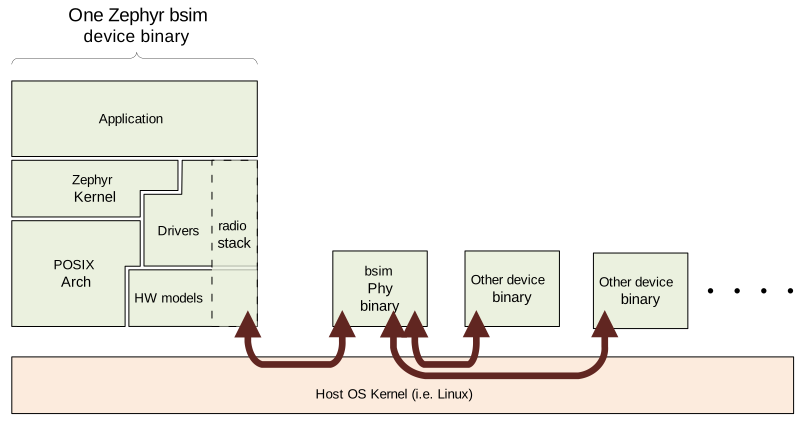
The communication between a Zephyr device and other simulated devices is
handled over the bsim libPhyCom libraries. For the radio activity the figure
below represents this communication:


.. figure:: ../../../../../../boards/native/doc/Zephyr_and_bsim.svg
    :align: center
    :alt: Communication between a Zephyr device and other simulated devices
    :figclass: align-center

    Communication between a Zephyr device and other simulated devices

Test code may also communicate with other devices' test code using the bsim
backchannels. These provide a direct, reliable pipe between devices which test code
can use to exchange data.


About using Zephyr APIs
=======================

Note that even though part of the bsim board code is linked with the Zephyr kernel,
one should in general not call Zephyr APIs from the board code itself.
In particular, one should not call Zephyr APIs from the original/HW models
thread as the Zephyr code would be called from the wrong context,
and will with all likelihood cause all kind of difficult to debug issues.

In general board code should be considered as lower level than the Zephyr OS,
and not dependent on it.
For example, board code should not use the printk API as that anyhow would
result in a call back into the board code (the bsim specific printk backend)
which relies on the bs_trace API. Instead, for tracing the bs_trace API
should be used directly.
The same applies to other Zephyr APIs, including the entropy API, etc.

posix_print and nsi_print backends
==================================

The bsim board provides a backend for the ``posix_print`` API which is expected by the posix
ARCH and `inf_clock` code, and for the ``nsi_print`` API expected by the native simulator.

These simply route this API calls into the ``bs_trace`` bsim API.
Any message printed to these APIs, and by extension by default to Zephyr's ``printk``,
will be printed to the console (stdout) together with all other device messages.

.. _bsim_boards_bs_tests:

bs_tests
========

The bsim boards provide also the bs_tests facility.

This allows tests to be defined (registered), and for each of these tests to
use a number of special test hooks which are present only in these simulated
targets.

These tests are built together with the embedded SW, and are present in the
binary but will not be executed by default.
From the command line the user can query what tests are present, and select
which test (if any) should be executed. When a test is selected its registered
callbacks are assigned to the respective hooks.

There is a set of one time hooks at different levels of initialization of the HW
and Zephyr OS, a hook to process possible command line arguments, and, a hook
that can be used to sniff or capture interrupts.
`bs_tests` also provides a hook which will be called from the embedded application
:c:func:`main`, but this will only work if the main application supports it,
that is, if the main app is a version for simulation which calls
:c:func:`bst_main` when running in the bsim board.

Apart from these hooks, the `bs_tests` system provides facilities to build a
dedicated test "task". This will be executed in the HW models thread context,
but will have access to all SW variables. This task will be driven with a
special timer which can be configured to produce either periodic or one time
ticks. When these ticks occur a registered test tick function will be called.
This can be used to support the test logic, like run checks or perform actions
at specific points in time. This can be combined with Babblesim's tb_defs macros
to build quite complex test tasks which can wait for a given amount of time,
for conditions to be fulfilled, etc.

Note when writing the tests with `bs_tests` one needs to be aware that other
bs tests will probably be built with the same application, and that therefore
the tests should not be registering initialization or callback functions using
NATIVE_TASKS or Zephyr's PRE/POST kernel driver initialization APIs as this
will execute even if the test is not selected.
Instead the equivalent `bs_tests` provided hooks should be used.

Note also that, for AMP targets like the :ref:`nrf5340bsim <nrf5340bsim>`, each embedded MCU has
its own separate `bs_tests` built with that MCU. You can select if and what test is used
for each MCU separatedly with the command line options.

Command line argument parsing
=============================

bsim boards need to handle command line arguments. There are several sets of
arguments:

- Basic arguments: to enable selecting things like trace verbosity, random seed,
  simulation device number and simulation id (when connected to a phy), etc.
  This follow as much as possible the same convention as other bsim
  devices to ease use for developers.
- The HW models command line arguments: The HW models will expose which
  arguments they need to have processed, but the bsim board as actual
  integrating program ensures they are handled.
- Test (bs_tests) control: To select a test for each embedded CPU,
  print which are available, and pass arguments to the tests themselves.

Command line argument parsing is handled by using the bs_cmd_line component
from Babblesim's base/libUtilv1 library. And basic arguments definitions that
comply with the expected convention are provided in bs_cmd_line_typical.h.

Other considerations
====================

- Endianness: Code will be built for the host target architecture, which is
  typically x86. x86 is little endian, which is typically also the case for the
  target architecture. If this is not the case, embedded code which works in one
  may not work in the other due to endianness bugs.
  Note that Zephyr code is be written to support both big and little endian.
- WordSize: The bsim targets, as well as normal embedded targets are 32 bit
  targets. In the case of the bsim targets this is done by explicitly targeting
  x86 (ILP32 ABI) instead of x86_64. This is done purposefully to provide more
  accurate structures layout in memory and therefore better reproduce possible
  issues related to access to structures members or array overflows.
Part 3
한국어 전문 번역
사용 가능한 bsim 보드
- 시뮬레이션 nRF52833:
nrf52_bsim - 시뮬레이션 nRF5340:
nrf5340bsim - 시뮬레이션 nRF54L15:
nrf54l15bsim
이 문서는 nrf5x_bsim과 유사한 bsim 보드의 설계·아키텍처·근거를 설명합니다. 보드 이름의 _bsim 접미사는 무선 환경을 시뮬레이션하는 BabbleSim을 사용한다는 뜻입니다.
이 보드는 native simulator와 POSIX 아키텍처로 임베디드 코드를 Linux용 네이티브 코드로 빌드하고 실행합니다. nRF52, nRF5340, nRF54L15 보드별 사용법은 각 보드 문서에 있습니다.
전체 목표
bsim 보드의 주된 목적은 워크스테이션·시뮬레이션 환경에서 임베디드 코드 통합 테스트를 수행하는 test bench가 되는 것입니다. 테스트 코드는 다른 POSIX 아키텍처 기반 보드와 마찬가지로 Zephyr RTOS와 함께 실행되며, 여기에 실제 임베디드 하드웨어를 어느 정도 흉내 내는 HW 모델이 추가됩니다.
테스트는 실제 임베디드 하드웨어 없이 워크스테이션에서 실행됩니다. 실제 시간보다 훨씬 빠르고, 실제 장비 없이도 결정론적이고 재현 가능한 테스트를 수행하려는 설계입니다.
native_sim과 달리 bsim 보드는 호스트 주변장치와 직접 상호작용하지 않으며 실행이 호스트 부하나 타이밍과 무관합니다. 애플리케이션과 통신 스택을 만드는 프로토타이핑·개발 환경으로도 사용할 수 있습니다.
테스트 유형과 bsim의 관계
- 단위 테스트: 구성요소를 격리해 시험하는 별도 요구를 충족합니다. Zephyr의
unit_testing대상은 bsim 보드와 관계가 없습니다. - 실제 HW 통합 테스트: 하드웨어 특성에 크게 의존하는 실제 SW 구성요소를 최종 제품과 거의 같은 형태로 시험할 수 있어 경우에 따라 시뮬레이션보다 통합 범위가 넓습니다. 하지만 실행이 느리고 실제 장비 구성이 필요하며, 보통 재현성이 낮고 실패를 디버깅하기 어렵습니다. 목적 자체는 시뮬레이션 통합 테스트와 비슷합니다.
- 워크스테이션 통합 테스트:
- bsim 보드는 OS와 주변장치 모델을 포함한 임베디드 SW 전체 또는 일부를 함께 시험해 구성요소 간 상호작용과 통합을 검증합니다.
- BabbleSim 물리 계층을 함께 사용하면 여러 장치 사이 상호작용을 시험할 수 있습니다. 예를 들어 좌우 이어버드가 무선 링크로 데이터·오디오를 동기화하고 휴대전화와 상호작용하는 상황을 재현할 수 있습니다.
- EDTT를 사용하면 외부 Python 스크립트에서 테스트를 제어할 수 있습니다. 임베디드 코드는 EDTT RPC 전송 드라이버와 RPC 처리 애플리케이션을 포함해 컴파일되고 Python 스크립트가 테스트 논리를 담당합니다.
native_sim도 특정 HW 없이 임베디드 코드 통합 테스트를 지원하지만 HW 종속 구성요소에는 적합하지 않을 수 있습니다. bsim과 마찬가지로 ztest·Twister를 선택적으로 사용할 수 있고 POSIX 아키텍처와 native simulator runner를 공유합니다.
- ztest와 Twister: 테스트 대상 코드와 함께 전용 임베디드 테스트 애플리케이션을 빌드합니다. 애플리케이션이 테스트를 구동·판정하고 PC 쪽 제어기에 결과를 제공합니다. 원래 실제 대상 통합 테스트용으로 만들어졌지만 bsim에서도 완전히 지원됩니다.
설계
Zephyr의 arch·SoC·board 계층
- native simulator runner가 호스트에서 코드를 실행합니다.
- Zephyr의 아키텍처·SoC·보드 컴포넌트를 시뮬레이션 전용 컴포넌트로 대체합니다.
- arch 계층은 Zephyr POSIX 아키텍처, SoC 계층은
inf_clock, 보드 계층은 시뮬레이션 대상 장치에 따라 달라집니다. - POSIX 아키텍처는 주로 스레드 문맥 전환을 처리하는 Zephyr arch API를 native simulator CPU 스레드 에뮬레이션에 연결합니다.
inf_clock은 native simulator CPU “시뮬레이션”과 Zephyr 스레드인 CPU 시뮬레이션 및 HW 모델 스레드 사이 제어 전환을 연결합니다.- 보드 계층은 native simulator runner 문맥에 포함할 SoC/IC별 HW 모델, IRQ 처리, busy wait API, Zephyr
printkbackend를 제공합니다. 일반 Zephyr 대상에서는 인터럽트 처리와 busy wait가 SoC 계층에 있지만inf_clock을 일반화하기 위해 보드 계층에 위임했습니다. - 보드 계층은
bs_testshook과 trace 제어 같은 테스트 기능도 제공합니다. native simulator를 통해 Linux 프로그램의main(), 명령행 인수 처리와 장치 전체 시간 스케줄링을 제공합니다. - POSIX arch와
inf_clock은 보드가 busy wait, 기본 trace, 인터럽트 컨트롤러·처리,posix_exit(),posix_get_hw_cycle()API를 제공하리라 기대합니다. 인터페이스는posix_board_if.h와posix_soc_if.h에 정의됩니다.
중요한 제한과 미지원 기능
모든 native·bsim 보드는 POSIX arch와 inf_clock 설계에서 오는 동일한 중요 제한을 공유하며, POSIX 아키텍처의 미지원 기능도 그대로 물려받습니다.
CPU와 HW 모델의 스레딩·전체 스케줄링
POSIX 아키텍처 문서와 native simulator 설계 문서의 스레딩·SoC·보드 구조가 bsim에도 적용됩니다. BabbleSim HW 모델과 스케줄링의 일반 구조는 펌웨어 개발·테스트용 HW 모델 아키텍처를, nRF 모델은 nRF HW 모델 설계 문서를 참조합니다.
시간과 time_machine
bsim의 시뮬레이션 시간은 원칙적으로 실제 벽시계 시간과 완전히 분리됩니다. 시뮬레이션 CPU가 코드를 실행할 때는 시간이 진행하지 않고 다음 HW 이벤트가 필요할 때 그 시점으로 전진합니다.
보통 시뮬레이션 시간은 실시간보다 훨씬 빠르게 흐르며, 호스트 부하나 디버거에서 프로세스를 일시 정지하는 일이 결과에 영향을 주지 않습니다.
native simulator HW 스케줄러는 HW 모델용 이벤트 시간 루프를 제공합니다. 루프는 “다음 이벤트 검색”→“그 시점으로 시간 전진”→“이벤트 실행”을 반복합니다. 컴포넌트는 자기 이벤트 타이머가 변경됐음을 API로 알립니다. 단순성과 속도를 위해 이벤트는 설계 시 정의하며 동적으로 등록하지 않습니다.
BabbleSim 컴포넌트: trace·난수·활동 기록
bsim 보드의 BabbleSim 컴포넌트도 HW 모델과 같은 설계 원칙을 따릅니다. Zephyr 장치와 다른 시뮬레이션 장치 사이 통신은 bsim libPhyCom 라이브러리로 처리합니다.
테스트 코드는 bsim backchannel로 다른 장치의 테스트 코드와 통신할 수도 있습니다. backchannel은 테스트 코드가 데이터를 교환할 수 있는 직접적이고 신뢰성 있는 파이프입니다.
Zephyr API 사용 주의
bsim 보드 코드 일부가 Zephyr 커널과 링크되더라도 보드 코드 자체에서 Zephyr API를 호출하면 안 됩니다. 특히 원래 스레드/HW 모델 스레드에서 호출하면 잘못된 문맥에서 Zephyr 코드가 실행되어 디버깅하기 어려운 문제가 생길 가능성이 큽니다.
보드 코드는 Zephyr OS보다 낮은 계층이며 OS에 의존하지 않는 것으로 봐야 합니다. 예를 들어 보드 코드에서 printk를 호출하면 bs_trace API에 의존하는 bsim 전용 printk backend를 거쳐 다시 보드 코드로 돌아옵니다. trace에는 bs_trace를 직접 사용해야 합니다. entropy를 포함한 다른 Zephyr API도 마찬가지입니다.
posix_print와 nsi_print backend
bsim 보드는 POSIX arch·inf_clock가 요구하는 posix_print API와 native simulator가 요구하는 nsi_print API의 backend를 제공합니다. 두 backend는 호출을 bsim bs_trace API로 전달합니다. 이 API와 기본 Zephyr printk가 출력하는 메시지는 다른 모든 장치 메시지와 함께 콘솔 표준 출력에 표시됩니다.
bs_tests
bsim 보드는 bs_tests 기능도 제공합니다. 테스트를 등록하고 시뮬레이션 대상에서만 존재하는 특수 hook을 사용할 수 있습니다.
테스트는 임베디드 SW와 함께 빌드되어 바이너리에 포함되지만 기본으로 실행되지는 않습니다. 사용자는 명령행에서 포함된 테스트를 조회하고 실행할 테스트를 선택합니다. 선택하면 등록된 callback이 해당 hook에 배정됩니다.
HW와 Zephyr OS 초기화 단계별 일회성 hook, 명령행 인수 처리 hook, 인터럽트 sniff/capture hook이 있습니다. 임베디드 애플리케이션 main()에서 호출되는 hook도 있지만, 애플리케이션이 시뮬레이션 버전으로서 bsim 보드 실행 시 bst_main()을 호출해야 동작합니다.
bs_tests는 전용 테스트 “task”도 만들 수 있습니다. 이 task는 HW 모델 스레드 문맥에서 실행되지만 모든 SW 변수에 접근합니다. 주기 또는 일회성 tick을 만드는 특수 타이머가 task를 구동하고, tick 때 등록된 테스트 함수가 호출됩니다. 특정 시점의 검사·동작을 수행하거나 BabbleSim tb_defs 매크로와 결합해 시간·조건을 기다리는 복잡한 테스트 task를 만들 수 있습니다.
같은 애플리케이션에 다른 bs 테스트도 함께 빌드될 수 있으므로 NATIVE_TASKS나 Zephyr PRE/POST 커널 드라이버 초기화 API로 테스트 초기화·callback을 등록하면 안 됩니다. 테스트를 선택하지 않아도 실행되기 때문입니다. 대신 bs_tests가 제공하는 동등한 hook을 사용합니다.
nrf5340bsim 같은 AMP 대상은 각 임베디드 MCU에 별도 bs_tests를 빌드합니다. MCU별로 사용할 테스트를 명령행 옵션에서 따로 선택할 수 있습니다.
명령행 인수 해석
bsim 보드는 다음 인수 집합을 처리해야 합니다.
- 기본 인수: trace 상세도, 난수 seed, 시뮬레이션 장치 번호와 물리 계층 연결 시 simulation ID 등을 선택합니다. 개발 편의를 위해 다른 bsim 장치와 같은 규칙을 최대한 따릅니다.
- HW 모델 인수: 각 모델이 필요한 인수를 노출하고, 통합 프로그램인 bsim 보드가 처리되도록 보장합니다.
- 테스트 제어: 임베디드 CPU별 테스트 선택, 사용 가능한 테스트 출력, 테스트 자체로 인수 전달을 처리합니다.
명령행은 BabbleSim base/libUtilv1의 bs_cmd_line 컴포넌트로 해석합니다. 공통 규칙을 따르는 기본 인수 정의는 bs_cmd_line_typical.h에서 제공합니다.
그 밖의 고려사항
- Endian: 보통 x86 호스트용으로 빌드하며 x86과 일반적인 임베디드 대상은 모두 little-endian입니다. 대상의 endian이 다르면 한쪽에서 동작하는 임베디드 코드가 endian 버그 때문에 다른 쪽에서 실패할 수 있습니다. Zephyr 코드는 big-endian과 little-endian을 모두 지원하도록 작성되어야 합니다.
- Word size: bsim과 일반 임베디드 대상은 32비트입니다. bsim은 x86_64 대신 x86 ILP32 ABI를 명시적으로 겨냥합니다. 메모리 구조체 배치를 실제 대상과 더 가깝게 만들고 구조체 멤버 접근이나 배열 범위 초과 문제를 더 잘 재현하기 위한 의도적인 선택입니다.
외부 설계 자료
Source
출처
영어 원문에는 문단, 문서 지시문, 표, 코드, 코드 심벌, 경로를 그대로 보존했습니다.