Part 1
요약·해설
STM32F4 보드를 처음 플래시할 때 만나는 보호 오류와 OpenOCD 잠금 해제 절차가 핵심입니다.
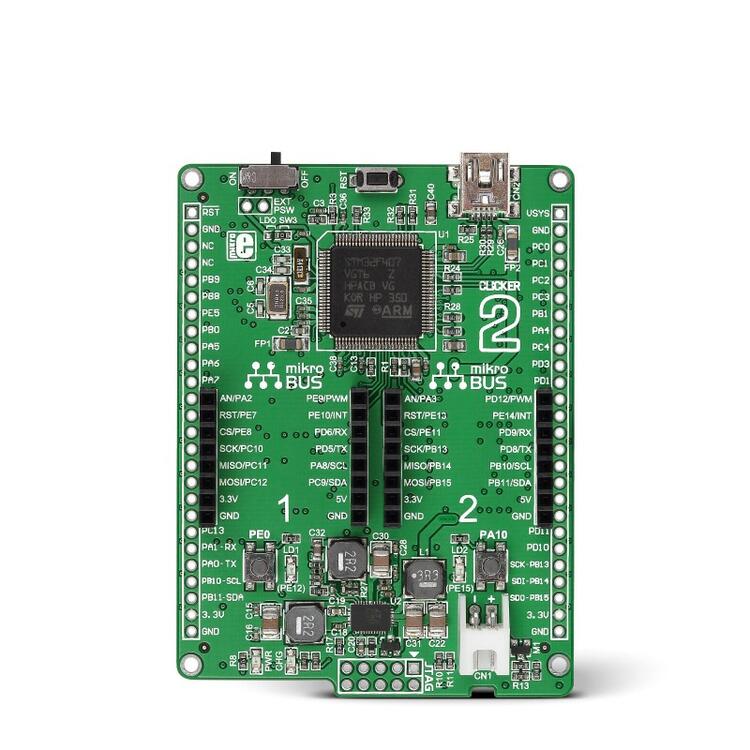
STM32F407 · Cortex-M4
mikroBUS 2개 · 범용 헤더 2개
LiPo 배터리 · USB
Part 2
접을 수 있는 영어 원문 전체
영어 원문 전체 펼치기
C1871DDB922D156C1A698B74B9FEAE5AED6C4226245997C3960B1E7141742CE5
.. _mikroe_clicker_2:

MikroE Clicker 2 for STM32
##########################

Overview
********
MikroE Clicker 2 for STM32 is a development board containing an `STM32F407`_
microcontroller. It is equipped with two mikrobus sockets and furthermore has
two headers for general signal break out.
The board also has battery connection and a battery management unit on board.
It can be powered either from a battery pack, such as a LiPo or from USB.
The board is equipped with a 25MHz crystal as well as a 32.768kHz clock crystal.


.. figure:: ../../../../../../../boards/mikroe/clicker_2/doc/img/clicker-2-stm32f4-thickbox_default-2.jpg
   :align: center
   :alt: Clicker 2 For STM32

   Clicker 2 For STM32 (Credit: MikroElektronika d.o.o.)

Hardware
********
The Clicker 2 board contains the following connections:

  - Two MikroBUS connectors
  - Two headers with general connections

Furthermore the board contains two LEDs and two push buttons that are connected
to the microcontroller.

Supported Features
==================
The Zephyr MikroE Clicker 2 configuration supports the following hardware features:

+-----------+------------+-------------------------------------+
| Interface | Controller | Driver/Component                    |
+===========+============+=====================================+
| NVIC      | on-chip    | nested vector interrupt controller  |
+-----------+------------+-------------------------------------+
| UART      | on-chip    | serial port-polling;                |
|           |            | serial port-interrupt               |
+-----------+------------+-------------------------------------+
| PINMUX    | on-chip    | pinmux                              |
+-----------+------------+-------------------------------------+
| I2C       | on-chip    | i2c                                 |
+-----------+------------+-------------------------------------+
| SPI       | on-chip    | spi                                 |
+-----------+------------+-------------------------------------+
| ADC       | on-chip    | adc                                 |
+-----------+------------+-------------------------------------+
| USB       | on-chip    | usb                                 |
+-----------+------------+-------------------------------------+

Other hardware features have not been enabled yet for this board.

The default configuration can be found in
:zephyr_file:`boards/mikroe/clicker_2/mikroe_clicker_2_defconfig`

Connections and IOs
===================

The two mikroBUS interfaces are aliased in the device tree so that their
peripherals can be accessed using ``mikrobus_N_INTERFACE`` so e.g. the spi on
bus 2 can be found by the alias ``mikrobus_2_spi``. The counting corresponds
with the marking on the board.

For connections on the edge connectors, please refer to `Clicker 2 for STM32 User Manual`_.

Programming and Debugging
*************************
Applications for the ``mikroe_clicker_2`` board configuration can
be built and flashed in the usual way (see :ref:`build_an_application` and
:ref:`application_run` for more details).


Flashing
========
The initial state of the board is set to lock.
When you flash, it will fail with the message:

.. code-block:: console

   Error: stm32x device protected

Unlocking with openocd makes it possible to flash.

.. code-block:: console

   $ openocd -f /usr/share/openocd/scripts/interface/stlink-v2.cfg \
       -f /usr/share/openocd/scripts/target/stm32f4x.cfg -c init\
       -c "reset halt" -c "stm32f4x unlock 0" -c "reset run" -c shutdown

Here is an example for the :ref:`hello_world` application.

.. zephyr-app-commands::
   :zephyr-app: samples/hello_world
   :board: mikroe_clicker_2
   :goals: build flash

You should see the following message on the console:

.. code-block:: console

   Hello World! mikroe_clicker_2


Debugging
=========

You can debug an application in the usual way.  Here is an example for the
:ref:`hello_world` application.

.. zephyr-app-commands::
   :zephyr-app: samples/hello_world
   :board: mikroe_clicker_2
   :maybe-skip-config:
   :goals: debug

References
**********
.. _Clicker 2 website:
    https://www.mikroe.com/clicker-2-stm32f4
.. _Clicker 2 for STM32 User Manual:
    https://download.mikroe.com/documents/starter-boards/clicker-2/stm32f4/clicker2-stm32-manual-v100.pdf
.. _STM32F407VG Website:
    https://www.st.com/content/st_com/en/products/microcontrollers-microprocessors/stm32-32-bit-arm-cortex-mcus/stm32-high-performance-mcus/stm32f4-series/stm32f407-417/stm32f407vg.html
.. _STM32F407:
    https://www.st.com/resource/en/datasheet/stm32f407vg.pdf
Part 3
한국어 전문 번역
개요
MikroE Clicker 2 for STM32는 STM32F407 마이크로컨트롤러를 탑재한 개발 보드입니다. mikroBUS 소켓 두 개와 범용 신호를 외부로 꺼내는 헤더 두 개를 갖추고 있습니다.
보드에는 배터리 커넥터와 배터리 관리 장치가 있으며 LiPo 같은 배터리 팩 또는 USB로 전원을 공급할 수 있습니다. 25MHz 크리스털과 32.768kHz 시계용 크리스털도 탑재되어 있습니다.
하드웨어
Clicker 2 보드는 다음 연결부를 제공합니다.
- mikroBUS 커넥터 2개
- 범용 연결 헤더 2개
그 밖에도 마이크로컨트롤러에 연결된 LED 두 개와 푸시 버튼 두 개가 있습니다.
지원 기능
Zephyr의 MikroE Clicker 2 보드 구성은 다음 하드웨어 기능을 지원합니다.
| 인터페이스 | 컨트롤러 | 드라이버/컴포넌트 |
|---|---|---|
| NVIC | 온칩 | 중첩 벡터 인터럽트 컨트롤러 |
| UART | 온칩 | 폴링 방식 직렬 포트, 인터럽트 방식 직렬 포트 |
| PINMUX | 온칩 | 핀 멀티플렉싱 |
| I2C | 온칩 | I2C |
| SPI | 온칩 | SPI |
| ADC | 온칩 | ADC |
| USB | 온칩 | USB |
나머지 하드웨어 기능은 이 보드에서 아직 활성화되지 않았습니다. 기본 구성은 boards/mikroe/clicker_2/mikroe_clicker_2_defconfig에 있습니다.
연결과 I/O
두 mikroBUS 인터페이스는 devicetree alias로 등록되어 각 주변장치에 mikrobus_N_INTERFACE 형식으로 접근할 수 있습니다. 예를 들어 2번 버스의 SPI는 mikrobus_2_spi alias로 찾습니다. 숫자는 보드의 인쇄 표기와 일치합니다.
에지 커넥터의 배선은 Clicker 2 for STM32 사용자 설명서를 참조하십시오.
프로그래밍과 디버깅
mikroe_clicker_2 보드용 애플리케이션은 일반적인 Zephyr 빌드·실행 절차로 빌드하고 플래시할 수 있습니다.
플래시
보드의 초기 출고 상태는 잠겨 있습니다. 이 상태에서 플래시하면 다음 오류가 발생합니다.
Error: stm32x device protectedOpenOCD로 잠금을 해제하면 플래시할 수 있습니다.
$ openocd -f /usr/share/openocd/scripts/interface/stlink-v2.cfg \
    -f /usr/share/openocd/scripts/target/stm32f4x.cfg -c init\
    -c "reset halt" -c "stm32f4x unlock 0" -c "reset run" -c shutdown
hello_world 애플리케이션의 빌드·플래시 예는 다음과 같습니다.
# Zephyr 저장소 루트에서 실행
west build -b mikroe_clicker_2 samples/hello_world
west flash
콘솔에는 다음 메시지가 표시되어야 합니다.
Hello World! mikroe_clicker_2디버깅
애플리케이션은 일반적인 방식으로 디버깅할 수 있습니다. hello_world 예제는 다음과 같습니다.
# Zephyr 저장소 루트에서 실행
west build -b mikroe_clicker_2 samples/hello_world
west debug
참고 자료
Source
출처
영어 원문에는 문단, 문서 지시문, 표, 코드, 코드 심벌, 경로를 그대로 보존했습니다.