Part 1
요약·해설
MIMXRT1062, 8MB QSPI·32MB SDRAM, Swift/Zephyr pin ID와 DAPLink 실행 흐름을 다룹니다.
MIMXRT1062 · Cortex-M7 · 600MHz
8MB QSPI · 32MB SDRAM
External DAPLink · SWD
Part 2
접을 수 있는 영어 원문 전체
영어 원문 전체 펼치기
A96F598CC9A0AB563F62A77AA015BBB79E3E1810C7AA9BEF9D9D88E12B82C4CF
.. _mm_feather:

MadMachine SwiftIO Feather
##########################

Overview
********

The SwiftIO Feather board, designed by MadMachine is
designed with support for the modern `Swift language
<https://docs.swift.org/swift-book/>`_.  Zephyr provides basic
low-level capabilities for the SwiftIO Feather board. Swift application would
run on top of Zephyr. More information about the board can be found
at:

- `MadMachine Homepage`_
- `SwiftIO API Reference`_

.. image:: ../../../../../../../boards/madmachine/mm_feather/doc/mm_feather.jpg
   :align: center
   :alt: SwiftIO Feather Board

Hardware
********

- MIMXRT1062DVL6B MCU (Cortex-M7 at 600MHz, 2048KB on-chip memory)

- Memory

   - 8MB QSPI Flash
   - 32MB SDRAM
   - TF socket for SD card

- USB

   - USB-C 2.0 OTG connector

- Power

   - 5V USB power
   - 4.2V DC jack

- Debug

   - SWD connector


- RGB LED


Supported Features
==================

The mm_feather board configuration supports the following hardware
features:

+-----------+------------+-------------------------------------+
| Interface | Controller | Driver/Component                    |
+===========+============+=====================================+
| NVIC      | on-chip    | nested vector interrupt controller  |
+-----------+------------+-------------------------------------+
| SYSTICK   | on-chip    | systick                             |
+-----------+------------+-------------------------------------+
| DISPLAY   | on-chip    | display                             |
+-----------+------------+-------------------------------------+
| GPIO      | on-chip    | gpio                                |
+-----------+------------+-------------------------------------+
| I2C       | on-chip    | i2c                                 |
+-----------+------------+-------------------------------------+
| SPI       | on-chip    | spi                                 |
+-----------+------------+-------------------------------------+
| UART      | on-chip    | serial port-polling;                |
|           |            | serial port-interrupt               |
+-----------+------------+-------------------------------------+
| I2S       | on-chip    | I2S                                 |
+-----------+------------+-------------------------------------+
| USB       | on-chip    | USB device                          |
+-----------+------------+-------------------------------------+


Connections and IOs
===================

Note:
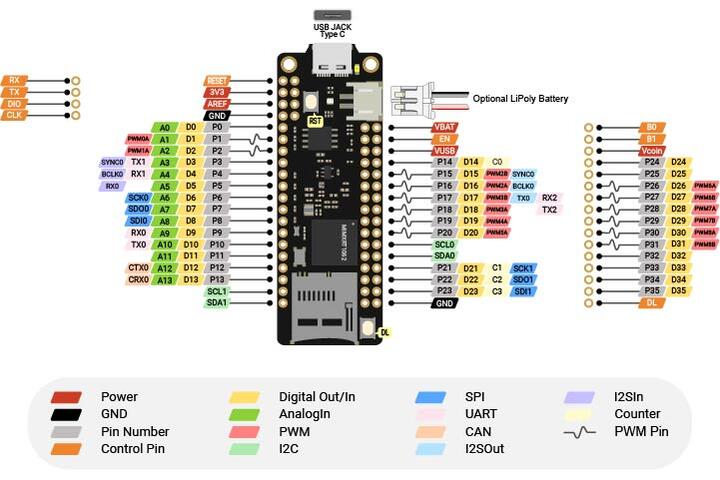
The following SwiftIO Feather pinout diagram is used for Swift programming.
The Swift ID is not the same as the Zephyr driver ID.

+-----------+---------------+----------+---------------+--------------------------+
| Name                      | GPIO                     | Other peripherals        |
+===========+===============+==========+===============+==========+===============+
| Swift ID  | Pin name      | Swift ID | Zephyr driver | Swift ID | Zephyr driver |
+-----------+---------------+----------+---------------+----------+---------------+
| P0        | GPIO_AD_B1_04 | D0       | GPIO1_IO20    |          |               |
+-----------+---------------+----------+---------------+----------+---------------+
| P1        | GPIO_AD_B1_08 | D1       | GPIO1_IO24    |          |               |
+-----------+---------------+----------+---------------+----------+---------------+
| P2        | GPIO_AD_B1_09 | D2       | GPIO1_IO25    |          |               |
+-----------+---------------+----------+---------------+----------+---------------+
| P3        | GPIO_AD_B1_10 | D3       | GPIO1_IO26    |          |               |
+-----------+---------------+----------+---------------+ UART1    | UART_8        |
| P4        | GPIO_AD_B1_11 | D4       | GPIO1_IO27    |          |               |
+-----------+---------------+----------+---------------+----------+---------------+
| P5        | GPIO_AD_B1_12 | D5       | GPIO1_IO28    |          |               |
+-----------+---------------+----------+---------------+----------+---------------+
| P6        | GPIO_AD_B1_15 | D6       | GPIO1_IO31    |          |               |
+-----------+---------------+----------+---------------+          |               |
| P7        | GPIO_AD_B1_14 | D7       | GPIO1_IO30    | SPI0     | SPI_3         |
+-----------+---------------+----------+---------------+          |               |
| P8        | GPIO_AD_B1_13 | D8       | GPIO1_IO29    |          |               |
+-----------+---------------+----------+---------------+----------+---------------+
| P9        | GPIO_AD_B1_03 | D9       | GPIO1_IO19    |          |               |
+-----------+---------------+----------+---------------+ UART0    | UART_2        |
| P10       | GPIO_AD_B1_02 | D10      | GPIO1_IO18    |          |               |
+-----------+---------------+----------+---------------+----------+---------------+
| P11       | GPIO_AD_B1_05 | D11      | GPIO1_IO21    |          |               |
+-----------+---------------+----------+---------------+----------+---------------+
| P12       | GPIO_AD_B0_14 | D12      | GPIO1_IO14    |          |               |
+-----------+---------------+----------+---------------+ CAN0     | CAN_3         |
| P13       | GPIO_AD_B0_15 | D13      | GPIO1_IO15    |          |               |
+-----------+---------------+----------+---------------+----------+---------------+
| P14       | GPIO_B0_00    | D14      | GPIO2_IO00    |          |               |
+-----------+---------------+----------+---------------+----------+---------------+
| P15       | GPIO_B1_03    | D15      | GPIO2_IO19    |          |               |
+-----------+---------------+----------+---------------+----------+---------------+
| P16       | GPIO_B1_02    | D16      | GPIO2_IO18    |          |               |
+-----------+---------------+----------+---------------+----------+---------------+
| P17       | GPIO_B1_01    | D17      | GPIO2_IO17    |          |               |
+-----------+---------------+----------+---------------+ UART2    | UART_4        |
| P18       | GPIO_B1_00    | D18      | GPIO2_IO16    |          |               |
+-----------+---------------+----------+---------------+----------+---------------+
| P19       | GPIO_B1_15    | D19      | GPIO2_IO31    |          |               |
+-----------+---------------+----------+---------------+----------+---------------+
| P20       | GPIO_B1_14    | D20      | GPIO2_IO30    |          |               |
+-----------+---------------+----------+---------------+----------+---------------+
| P21       | GPIO_B0_03    | D21      | GPIO2_IO03    |          |               |
+-----------+---------------+----------+---------------+          |               |
| P22       | GPIO_B0_02    | D22      | GPIO2_IO02    | SPI1     | SPI_4         |
+-----------+---------------+----------+---------------+          |               |
| P23       | GPIO_B0_01    | D23      | GPIO2_IO01    |          |               |
+-----------+---------------+----------+---------------+----------+---------------+
| P24       | GPIO_B0_04    | D24      | GPIO2_IO04    |          |               |
+-----------+---------------+----------+---------------+----------+---------------+
| P25       | GPIO_B0_05    | D25      | GPIO2_IO05    |          |               |
+-----------+---------------+----------+---------------+----------+---------------+
| P26       | GPIO_B0_06    | D26      | GPIO2_IO06    |          |               |
+-----------+---------------+----------+---------------+----------+---------------+
| P27       | GPIO_B0_07    | D27      | GPIO2_IO07    |          |               |
+-----------+---------------+----------+---------------+----------+---------------+
| P28       | GPIO_B0_08    | D28      | GPIO2_IO08    |          |               |
+-----------+---------------+----------+---------------+----------+---------------+
| P29       | GPIO_B0_09    | D29      | GPIO2_IO09    |          |               |
+-----------+---------------+----------+---------------+----------+---------------+
| P30       | GPIO_B0_10    | D30      | GPIO2_IO10    |          |               |
+-----------+---------------+----------+---------------+----------+---------------+
| P31       | GPIO_B0_11    | D31      | GPIO2_IO11    |          |               |
+-----------+---------------+----------+---------------+----------+---------------+
| P32       | GPIO_B0_12    | D32      | GPIO2_IO12    |          |               |
+-----------+---------------+----------+---------------+----------+---------------+
| P33       | GPIO_B0_13    | D33      | GPIO2_IO13    |          |               |
+-----------+---------------+----------+---------------+----------+---------------+
| P34       | GPIO_B0_14    | D34      | GPIO2_IO14    |          |               |
+-----------+---------------+----------+---------------+----------+---------------+
| P35       | GPIO_B0_15    | D35      | GPIO2_IO15    |          |               |
+-----------+---------------+----------+---------------+----------+---------------+
|           | GPIO_AD_B1_07 |          | GPIO1_IO23    |          |               |
+-----------+---------------+----------+---------------+ I2C0     | I2C_3         |
|           | GPIO_AD_B1_06 |          | GPIO1_IO22    |          |               |
+-----------+---------------+----------+---------------+----------+---------------+
|           | GPIO_AD_B1_00 |          | GPIO1_IO16    |          |               |
+-----------+---------------+----------+---------------+ I2C1     | I2C_1         |
|           | GPIO_AD_B1_00 |          | GPIO1_IO17    |          |               |
+-----------+---------------+----------+---------------+----------+---------------+


Programming and Flash
*************************

Build and flash applications as usual (see :ref:`build_an_application` and
:ref:`application_run` for more details).

Configuring a Console
=====================

Connect a USB-to-serial adapter from your PC to corresponding UART pins of SwiftIO Feather.

Use the following settings with your serial terminal of choice (minicom, putty,
etc.):

- Speed: 115200
- Data: 8 bits
- Parity: None
- Stop bits: 1

Flashing
========

Here is an example for the :ref:`hello_world` application.

Connect a DAPLink debugger from your PC to corresponding SWD pins of SwiftIO Feather.

.. zephyr-app-commands::
   :zephyr-app: samples/hello_world
   :board: mm_feather
   :goals: flash

Open a serial terminal, reset the board (press the "reset" button), and you should
see the following message in the terminal:

.. code-block:: console

   *** Booting Zephyr OS build v2.6.0-rc1-301-gd9c666a5abf8  ***
   Hello World! mm_feather

Debugging
=========

Here is an example for the :ref:`hello_world` application.

.. zephyr-app-commands::
   :zephyr-app: samples/hello_world
   :board: mm_feather
   :goals: debug

Open a serial terminal, step through the application in your debugger, and you
should see the following message in the terminal:

.. code-block:: console

   *** Booting Zephyr OS build v2.6.0-rc1-301-gd9c666a5abf8  ***
   Hello World! mm_feather


.. _MadMachine Homepage:
   https://madmachine.io

.. _SwiftIO API Reference:
   https://madmachineio.github.io/SwiftIO/documentation/swiftio/
Part 3
한국어 전문 번역
개요
MadMachine이 설계한 SwiftIO Feather board는 현대적인 Swift language를 지원하도록 만들어졌습니다. Zephyr는 SwiftIO Feather용 기본 low-level capability를 제공하며 Swift application은 Zephyr 위에서 실행됩니다. 자세한 내용은 MadMachine Homepage와 SwiftIO API Reference에서 확인할 수 있습니다.
Hardware
- MIMXRT1062DVL6B MCU: 600MHz Cortex-M7, 2048KB on-chip memory
- Memory: 8MB QSPI Flash, 32MB SDRAM, SD card용 TF socket
- USB-C 2.0 OTG connector
- Power: 5V USB power와 4.2V DC jack
- SWD connector
- RGB LED
지원 기능
mm_feather board configuration은 다음 hardware 기능을 지원합니다.
| Interface | Controller | Driver/Component |
|---|---|---|
| NVIC | on-chip | nested vector interrupt controller |
| SYSTICK | on-chip | systick |
| DISPLAY | on-chip | display |
| GPIO | on-chip | gpio |
| I2C | on-chip | i2c |
| SPI | on-chip | spi |
| UART | on-chip | serial port-polling; serial port-interrupt |
| I2S | on-chip | I2S |
| USB | on-chip | USB device |
연결과 I/O
| Swift ID | Pin name | GPIO Swift ID | Zephyr driver | Peripheral Swift ID | Zephyr driver |
|---|---|---|---|---|---|
| P0 | GPIO_AD_B1_04 | D0 | GPIO1_IO20 | ||
| P1 | GPIO_AD_B1_08 | D1 | GPIO1_IO24 | ||
| P2 | GPIO_AD_B1_09 | D2 | GPIO1_IO25 | ||
| P3 | GPIO_AD_B1_10 | D3 | GPIO1_IO26 | UART1 (P3-P4) | UART_8 |
| P4 | GPIO_AD_B1_11 | D4 | GPIO1_IO27 | ||
| P5 | GPIO_AD_B1_12 | D5 | GPIO1_IO28 | ||
| P6 | GPIO_AD_B1_15 | D6 | GPIO1_IO31 | SPI0 (P6-P8) | SPI_3 |
| P7 | GPIO_AD_B1_14 | D7 | GPIO1_IO30 | ||
| P8 | GPIO_AD_B1_13 | D8 | GPIO1_IO29 | ||
| P9 | GPIO_AD_B1_03 | D9 | GPIO1_IO19 | UART0 (P9-P10) | UART_2 |
| P10 | GPIO_AD_B1_02 | D10 | GPIO1_IO18 | ||
| P11 | GPIO_AD_B1_05 | D11 | GPIO1_IO21 | ||
| P12 | GPIO_AD_B0_14 | D12 | GPIO1_IO14 | CAN0 (P12-P13) | CAN_3 |
| P13 | GPIO_AD_B0_15 | D13 | GPIO1_IO15 | ||
| P14 | GPIO_B0_00 | D14 | GPIO2_IO00 | ||
| P15 | GPIO_B1_03 | D15 | GPIO2_IO19 | ||
| P16 | GPIO_B1_02 | D16 | GPIO2_IO18 | ||
| P17 | GPIO_B1_01 | D17 | GPIO2_IO17 | UART2 (P17-P18) | UART_4 |
| P18 | GPIO_B1_00 | D18 | GPIO2_IO16 | ||
| P19 | GPIO_B1_15 | D19 | GPIO2_IO31 | ||
| P20 | GPIO_B1_14 | D20 | GPIO2_IO30 | ||
| P21 | GPIO_B0_03 | D21 | GPIO2_IO03 | SPI1 (P21-P23) | SPI_4 |
| P22 | GPIO_B0_02 | D22 | GPIO2_IO02 | ||
| P23 | GPIO_B0_01 | D23 | GPIO2_IO01 | ||
| P24 | GPIO_B0_04 | D24 | GPIO2_IO04 | ||
| P25 | GPIO_B0_05 | D25 | GPIO2_IO05 | ||
| P26 | GPIO_B0_06 | D26 | GPIO2_IO06 | ||
| P27 | GPIO_B0_07 | D27 | GPIO2_IO07 | ||
| P28 | GPIO_B0_08 | D28 | GPIO2_IO08 | ||
| P29 | GPIO_B0_09 | D29 | GPIO2_IO09 | ||
| P30 | GPIO_B0_10 | D30 | GPIO2_IO10 | ||
| P31 | GPIO_B0_11 | D31 | GPIO2_IO11 | ||
| P32 | GPIO_B0_12 | D32 | GPIO2_IO12 | ||
| P33 | GPIO_B0_13 | D33 | GPIO2_IO13 | ||
| P34 | GPIO_B0_14 | D34 | GPIO2_IO14 | ||
| P35 | GPIO_B0_15 | D35 | GPIO2_IO15 | ||
| GPIO_AD_B1_07 | GPIO1_IO23 | I2C0 (2-pin pair) | I2C_3 | ||
| GPIO_AD_B1_06 | GPIO1_IO22 | ||||
| GPIO_AD_B1_00 | GPIO1_IO16 | I2C1 (2-pin pair) | I2C_1 | ||
| GPIO_AD_B1_00 | GPIO1_IO17 |
Programming과 Flash
일반적인 Zephyr application과 같은 방법으로 application을 build하고 flash합니다.
Console 설정
PC의 USB-to-serial adapter를 SwiftIO Feather의 해당 UART pin에 연결합니다. Minicom, PuTTY 등 원하는 serial terminal에서 다음 값을 사용합니다.
- Speed: 115200
- Data: 8 bits
- Parity: None
- Stop bits: 1
Flashing
hello_world application 예입니다. PC의 DAPLink debugger를 SwiftIO Feather의 해당 SWD pin에 연결합니다.
# From the root of the zephyr repository
west build -b mm_feather samples/hello_world
west flash
Serial terminal을 열고 board의 reset button을 누르면 다음 message가 표시되어야 합니다.
*** Booting Zephyr OS build v2.6.0-rc1-301-gd9c666a5abf8  ***
Hello World! mm_feather
Debugging
hello_world application을 debug하는 예입니다.
# From the root of the zephyr repository
west build -b mm_feather samples/hello_world
west debug
Serial terminal을 열고 debugger에서 application을 한 단계씩 실행하면 다음 message가 표시되어야 합니다.
*** Booting Zephyr OS build v2.6.0-rc1-301-gd9c666a5abf8  ***
Hello World! mm_feather
관련 자료
Source
출처
영어 원문에는 문단, 문서 지시문, 표, 코드, 코드 심벌, 경로를 그대로 보존했습니다.