Part 1
요약·해설
KC868-A32의 I/O·relay·통신 사양, Espressif HAL blob 준비와 Zephyr 실행 절차를 다룹니다.
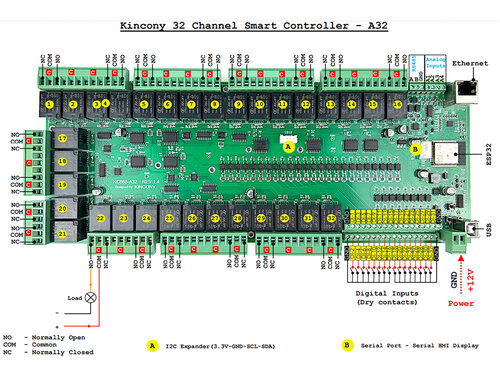
ESP-WROOM-32 · Wi-Fi · Bluetooth
32 inputs · 32 relays · RS485
LAN8270A · Ethernet Kconfig
Part 2
접을 수 있는 영어 원문 전체
영어 원문 전체 펼치기
3C2517536AF4A09EB0F73E5782A9C085302325C1505F1373333D30A4C81DCA2F
.. _kincony_kc868_a32:

KINCONY KC868-A32
#################

Overview
********

Kincony KC868-A32 is a home automation relay module based on the
Espressif ESP-WROOM-32 module with all its inherent capabilities
(Wi-Fi, Bluetooth, etc.)

The features include the following:

- 32 digital optoisolated inputs “dry contact”
- 4 analog inputs 0-5 V
- 32 relays 220 V, 10 A (COM, NO, NC)
- RS485 interface
- I2C connector
- Connector GSM/HMI
- Ethernet LAN8270A
- USB Type-B connector for programming and filling firmware
- RESET and DOWNLOAD buttons
- Powered by 12V DC

.. figure:: ../../../../../../../boards/kincony/kincony_kc868_a32/doc/img/kincony_kc868_a32.jpg
    :align: center
    :alt: KINCONCY-KC868-A32

    KINCONCY-KC868-A32

System requirements
===================

Prerequisites
-------------

Espressif HAL requires WiFi and Bluetooth binary blobs in order work. Run the command
below to retrieve those files.

.. code-block:: console

   west blobs fetch hal_espressif

.. note::

   It is recommended running the command above after :file:`west update`.

Building & Flashing
-------------------

Build and flash applications as usual (see :ref:`build_an_application` and
:ref:`application_run` for more details).

.. zephyr-app-commands::
   :zephyr-app: samples/hello_world
   :board: kincony_kc868_a32/esp32/procpu
   :goals: build

The usual ``flash`` target will work with the ``kincony_kc868_a32`` board
configuration. Here is an example for the :ref:`hello_world`
application.

.. zephyr-app-commands::
   :zephyr-app: samples/hello_world
   :board: kincony_kc868_a32/esp32/procpu
   :goals: flash

Open the serial monitor using the following command:

.. code-block:: shell

   west espressif monitor

After the board has automatically reset and booted, you should see the following
message in the monitor:

.. code-block:: console

   ***** Booting Zephyr OS vx.x.x-xxx-gxxxxxxxxxxxx *****
   Hello World! kincony_kc868_a32

Enabling Ethernet
*****************

Enable Ethernet in KConfig:

.. code-block:: cfg

    CONFIG_NETWORKING=y
    CONFIG_NET_L2_ETHERNET=y
    CONFIG_MDIO=y

References
**********

.. _KINCONY KC868-A32 User Guide: https://www.kincony.com/arduino-esp32-32-channel-relay-module-kc868-a32.html
Part 3
한국어 전문 번역
개요
KinCony KC868-A32는 Espressif ESP-WROOM-32 module을 기반으로 하는 home-automation relay module입니다. 따라서 Wi-Fi와 Bluetooth를 비롯한 해당 module의 기능을 사용할 수 있습니다.
주요 기능은 다음과 같습니다.
- 32개 digital optoisolated input, 즉
dry contact
- 0~5V analog input 4개
- 220V, 10A relay 32개(COM, NO, NC)
- RS485 interface
- I2C connector
- GSM/HMI connector
- Ethernet LAN8270A
- Programming과 firmware 기록용 USB Type-B connector
- RESET button과 DOWNLOAD button
- 12V DC 전원
System requirements
Prerequisites
Espressif HAL이 동작하려면 WiFi와 Bluetooth binary blob이 필요합니다. 다음 명령으로 해당 파일을 가져옵니다.
west blobs fetch hal_espressifBuilding과 Flashing
일반적인 Zephyr application과 같은 방식으로 build하고 flash합니다. 자세한 공통 절차는 Zephyr의 Build an Application과 Run an Application 문서를 참고하십시오.
west build -b kincony_kc868_a32/esp32/procpu samples/hello_worldkincony_kc868_a32 board configuration에서는 일반적인 flash target이 동작합니다. hello_world application을 flash하는 예는 다음과 같습니다.
west build -b kincony_kc868_a32/esp32/procpu samples/hello_world
west flash
다음 명령으로 serial monitor를 엽니다.
west espressif monitorBoard가 자동으로 reset되고 boot하면 monitor에 다음 message가 표시되어야 합니다.
***** Booting Zephyr OS vx.x.x-xxx-gxxxxxxxxxxxx *****
Hello World! kincony_kc868_a32
Ethernet 활성화
Kconfig에서 Ethernet을 활성화하려면 다음 option을 설정합니다.
CONFIG_NETWORKING=y
CONFIG_NET_L2_ETHERNET=y
CONFIG_MDIO=y
참고 자료
Source
출처
영어 원문에는 문단, 문서 지시문, 표, 코드, 코드 심벌, 경로를 그대로 보존했습니다.