Part 1
요약·해설
Cyclone V SoC DevKit의 jumper·switch, Quartus·GSRD, UART, preloader, OpenOCD와 GDB 절차를 다룹니다.
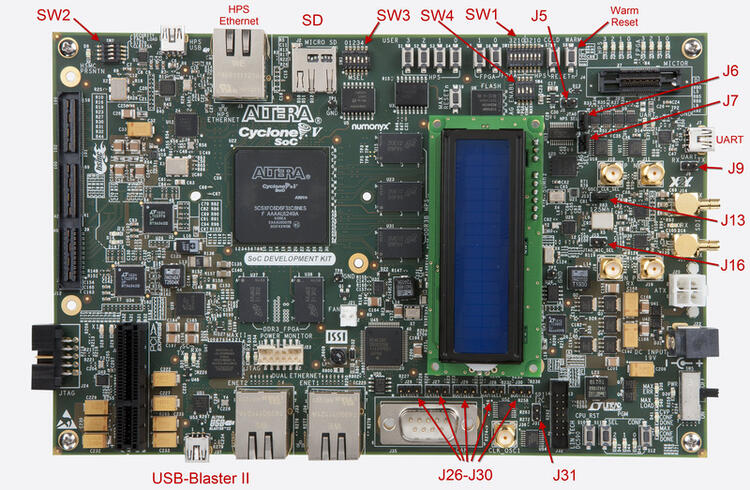
HPS · Arm Cortex-A9
Cyclone V · GSRD
USB-Blaster II · OpenOCD · GDB
Part 2
접을 수 있는 영어 원문 전체
영어 원문 전체 펼치기
4347D4061C654997BFC42489155EE6D88748DC04B8AF13F59F2BE9F1466F6F6D
.. _cyclonev_socdk:

Intel® Cyclone® V SoC Development Kit
#####################################

Overview
********


The Zephyr kernel is supported on the Intel® Cyclone® V SoC Development Kit,
using its Hard Processor System (HPS) CPU.

.. figure:: ../../../../../../../../boards/intel/socfpga_std/cyclonev_socdk/doc/img/cv_soc_board.jpg
   :align: center
   :alt: Intel's Cyclone® V SoC FPGA DevKit

   Intel®'s Cyclone® V SoC FPGA DevKit  (Credit: Intel®)

Hardware
********

Jumpers and DIP Switch settings
===============================

Recommended board settings are the same as the GSRD for Cyclone® V
SoC Development Board.

There are two sets of switches on the back of the board. Of particular
importance is SW2. First, the board jumpers need to be configured as follows:

* J5 : Open
* J6 : Short
* J7 : Short
* J9 : Open
* J13: Short
* J16: Open
* J26: Short pins 1-2
* J27: Short pins 2-3
* J28: Short pins 1-2
* J29: Short pins 2-3
* J30: Short pins 1-2
* J31: Open

Then, the board switches need to be configured as follows:

* SW1: All OFF
* SW2: All OFF
* SW3: ON-OFF-ON-OFF-ON-ON
* SW4: OFF-OFF-ON-ON

Other switches are user switches, their position is application-specific.
Refer to the development kit user manual for specifics about jumpers and switches

Necessary Software
==================

You will need the Intel® Quartus® Prime SDK in order to work with this device. The
`Intel® Quartus® Prime Lite Edition <https://www.intel.com/content/www/us/en/software-kit/684215/intel-quartus-prime-lite-edition-design-software-version-21-1-for-linux.html>`_
for Linux may be obtained without charge.

For your convenience using the SDK tools (such as ``quartus_pgm``),
you should put the binaries provided by the SDK
in your path. Below is an example, adjust ALTERA_BASE to where you installed the
SDK:

.. code-block:: console

   export QUARTUS_ROOTDIR=/opt/intelFPGA_lite/21.1
   export PATH=$PATH:$QUARTUS_ROOTDIR/quartus/bin:$QUARTUS_ROOTDIR/programmer/bin

You may need to adjust your udev rules so that you can talk to the USB Blaster
II peripheral, which is the built-in JTAG interface for this device.

The following works for Ubuntu:

.. code-block:: console

   # For Altera USB-Blaster permissions.
   SUBSYSTEM=="usb",\
   ENV{DEVTYPE}=="usb_device",\
   ATTR{idVendor}=="09fb",\
   ATTR{idProduct}=="6010",\
   MODE="0666",\
   NAME="bus/usb/$env{BUSNUM}/$env{DEVNUM}",\
   RUN+="/bin/chmod 0666 %c"
   SUBSYSTEM=="usb",\
   ENV{DEVTYPE}=="usb_device",\
   ATTR{idVendor}=="09fb",\
   ATTR{idProduct}=="6810",\
   MODE="0666",\
   NAME="bus/usb/$env{BUSNUM}/$env{DEVNUM}",\
   RUN+="/bin/chmod 0666 %c"

You can test connectivity with the SDK jtagconfig tool, you should see something
like:

.. code-block:: console

   $ jtagconfig
   1) USB-BlasterII [1-5]
     4ba00477   SOCVHPS
     02D020DD   5ZSEBA6(.|ES)/5CSEMA6/..


Golden Reference Design
=======================

The Golden System Reference Design (GSRD) provides a set of essential hardware
and software system componets that can be used as a starting point for various
custom user designs.

The Zephyr support for Cyclone® V SoC Development Kit is based on GSRD hardware.
Please refer to `Intel® Cyclone® V SoC GSRD <https://rocketboards.org/foswiki/Documentation/CycloneVSoCGSRD>`_

The hardware use for this release is based on Intel® Quartus® version 21.1
the hardware files can be found `here <https://releases.rocketboards.org/release/2018.05/gsrd/hw/cv_soc_devkit_ghrd.tar.gz>`_

The directory "cv_soc_devkit_ghrd" contains the necessary files to create
a Intel® Quartus® project:

* ghrd_top.v : top level Verilog (HDL) file for the GSRD
* soc_system.qpf : Quartus® Prime Project File
* soc_system.qsf : Quartus® Prime Settings File
* soc_system.qsys : Platform Designer file (contains the SoC system)
* soc_system.sopcinfo : SOPC Information file contains details about modules instantiated in the project, parameter names and values.
* soc_system_timing.sdc : Synopsys Desing Constraint FILE.
* output_files/soc_system.sof : FPGA configuration file.


Flash this FPGA file (.sof) using the ``quartus_pgm`` SDK tool with the FPGA
configuration file soc_system.sof:

.. code-block:: console

   $ quartus_pgm -m jtag -o "p;path/to/soc_system.sof"

This system is composed by the HPS, ARM Cortex-A9. In this example the UART, timer,
USB, I2C, DDR memory are exposed. Please double check the peripheral you intend to
use have its corresponding driver support.
You can find more information of the Cyclone® V SoC Devkit GSRD in RocketBoards
or consult the "Cyclone® V Hard Processor System Technical Reference Manual"


Console Output
==============

16550 UART
----------

By default, the kernel is configured to send console output to the 16550 UART.
You can monitor this on your workstation by connecting to the top right mini USB
port on the board (J8/UART) (it will show up in /dev as a ttyUSB node), and then running
minicom/PuTTy with flow control disabled, 115200-8N1 settings.


Programming and Debugging
*************************

Flashing
========

Flashing Kernel into the board
------------------------------

The usual ``flash`` target will work with the ``cyclonev_socdk`` board
configuration. Here is an example for the :ref:`hello_world`
application.

``Important!!!`` : Before flashing the board a ``preloader`` is required,
you can download `cv_soc_devkit_ghrd.tar.gz <https://releases.rocketboards.org/release/2018.05/gsrd/hw/cv_soc_devkit_ghrd.tar.gz>`_,
extract the file and copy ``cv_soc_devkit_ghrd/software/preloader/uboot-socfpga/spl/u-boot-spl``
to :zephyr_file:`boards/intel/socfpga_std/cyclonev_socdk/support/`

.. zephyr-app-commands::
   :zephyr-app: samples/hello_world
   :board: cyclonev_socdk
   :goals: flash

Refer to :ref:`build_an_application` and :ref:`application_run` for
more details.

This provisions the Zephyr kernel and the CPU configuration onto the board,
using the customized OpenOCD runner script :zephyr_file:`scripts/west_commands/runners/intel_cyclonev.py`
After it completes the kernel will immediately boot using the GSRD preloader.
Notice that there a lot of helper files to ``flash`` the application with
OpenOCD and GDB Debbuger (Zephyr SDK must be installed in your machine).
This files should be located in :zephyr_file:`boards/intel/socfpga_std/cyclonev_socdk/support/` including:

* blaster_6810.hex : USB-BlasterII firmware
* tmp_preloader_dl_cmd.txt : GDB helper file to load the preloader
* tmp_appli_dl_cmd.gdb : GDB helper file to load the zephyr.elf file
* tmp_appli_debug_cmd.gdb : GDB helper file to load the zephyr.elf file while debugging
* openocd.cfg : sources configuration files for OpenOCD
* download_all.gdb : GDB helper file to load the preloader
* u-boot-spl : Cyclone® V SoC DevKit GSRD preloader (copied from GSRD: cv_soc_devkit_ghrd.tar.gz)

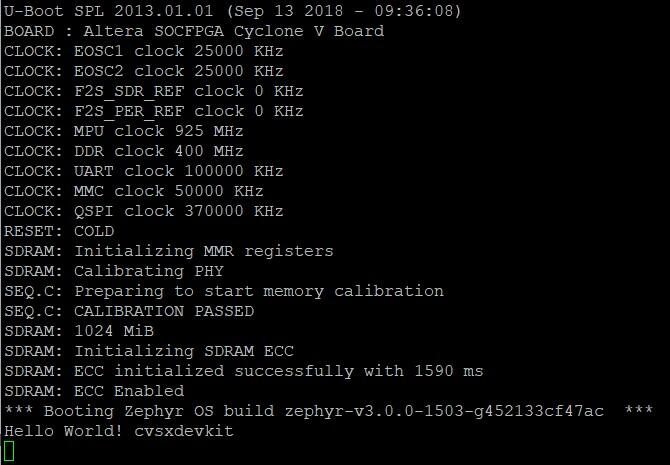
The following image shows the expected output (UART) after executing "west flash" using
the "hello world" sample design:

.. figure:: ../../../../../../../../boards/intel/socfpga_std/cyclonev_socdk/doc/img/cyclonev_westflash.jpg
   :align: center
   :alt: UART output after "west flash" example

   UART output after "west flash" example (Credit: Intel®)

Debugging
=========

The Zephyr SDK includes a GDB server which can be used to debug a Cyclone® V
SoC Development Kit board.
You can either debug a running image that was flashed onto the device in User
Flash Memory (UFM), or load an image over the JTAG using GDB.

Debugging With Flashed Image
----------------------------

You can debug an application in the usual way.  Here is an example.

.. zephyr-app-commands::
   :zephyr-app: samples/hello_world
   :board: cyclonev_socdk
   :goals: debug

You will see output similar to the following:

.. code-block:: console

   -- west debug: rebuilding
   ninja: no work to do.
   -- west debug: using runner intel_cyclonev
   -- runners.intel_cyclonev: OpenOCD GDB server running on port 3333; no thread info available
   Open On-Chip Debugger 0.11.0+dev-00244-g7e3dbbbe2 (2021-11-18-07:14)
   Licensed under GNU GPL v2
   For bug reports, read http://openocd.org/doc/doxygen/bugs.html
   Info : only one transport option; autoselect 'jtag'
   cycv_dbginit
   Info : Listening on port 6666 for tcl connections
   Info : Listening on port 4444 for telnet connections
   Info : Altera USB-Blaster II (uninitialized) found
   Info : Loading firmware...
   Info : Waiting for reenumerate...
   Info : Waiting for reenumerate...
   Info : Altera USB-Blaster II found (Firm. rev. = 1.39)
   Info : This adapter doesn't support configurable speed
   Info : JTAG tap: fpgasoc.fpga.tap tap/device found: 0x02d020dd (mfg: 0x06e (Altera), part: 0x2d02, ver: 0x0)
   Info : JTAG tap: fpgasoc.cpu tap/device found: 0x4ba00477 (mfg: 0x23b (ARM Ltd), part: 0xba00, ver: 0x4)
   Info : DAP transaction stalled (WAIT) - slowing down
   Info : DAP transaction stalled (WAIT) - slowing down
   Info : fpgasoc.cpu.0: hardware has 6 breakpoints, 4 watchpoints
   Info : starting gdb server for fpgasoc.cpu.0 on 3333
   Info : Listening on port 3333 for gdb connections
   Info : accepting 'gdb' connection on tcp/3333
   Info : fpgasoc.cpu.0 rev 0, partnum c09, arch f, variant 3, implementor 41
   Info : fpgasoc.cpu.0: MPIDR level2 0, cluster 0, core 0, multi core, no SMT
   target halted in ARM state due to debug-request, current mode: Supervisor
   cpsr: 0x600001d3 pc: 0x00002fa4
   MMU: disabled, D-Cache: disabled, I-Cache: enabled
   warning: No executable has been specified and target does not support
   determining executable automatically.  Try using the "file" command.
   0x00002fa4 in ?? ()
   Restoring section .text (0xffff0000 to 0xffff6f84)
   Info : DAP transaction stalled (WAIT) - slowing down
   Warn : keep_alive() was not invoked in the 1000 ms timelimit. GDB alive packet not sent! (1469 ms). Workaround: increase "set remotetimeout" in GDB
   Restoring section .rodata (0xffff6f84 to 0xffff8af9)
   Restoring section .data (0xffff8b00 to 0xffff99d4)
   Info : DAP transaction stalled (WAIT) - slowing down
   Hardware assisted breakpoint 1 at 0xffff147e
   Info : fpgasoc.cpu.0 rev 0, partnum c09, arch f, variant 3, implementor 41
   fpgasoc.cpu.0 rev 0, partnum c09, arch f, variant 3, implementor 41

   Temporary breakpoint 1, 0xffff147e in spl_boot_device ()
   [Inferior 1 (Remote target) detached]
   Info : dropped 'gdb' connection
   shutdown command invoked
   Open On-Chip Debugger 0.11.0+dev-00244-g7e3dbbbe2 (2021-11-18-07:14)
   Licensed under GNU GPL v2
   For bug reports, read http://openocd.org/doc/doxygen/bugs.html
   Info : only one transport option; autoselect 'jtag'
   cycv_dbginit
   Info : Listening on port 6666 for tcl connections
   Info : Listening on port 4444 for telnet connections
   Info : Altera USB-Blaster II found (Firm. rev. = 1.39)
   Info : This adapter doesn't support configurable speed
   Info : JTAG tap: fpgasoc.fpga.tap tap/device found: 0x02d020dd (mfg: 0x06e (Altera), part: 0x2d02, ver: 0x0)
   Info : JTAG tap: fpgasoc.cpu tap/device found: 0x4ba00477 (mfg: 0x23b (ARM Ltd), part: 0xba00, ver: 0x4)
   Info : DAP transaction stalled (WAIT) - slowing down
   Info : DAP transaction stalled (WAIT) - slowing down
   Info : fpgasoc.cpu.0: hardware has 6 breakpoints, 4 watchpoints
   Info : fpgasoc.cpu.0 rev 0, partnum c09, arch f, variant 3, implementor 41
   Info : fpgasoc.cpu.0: MPIDR level2 0, cluster 0, core 0, multi core, no SMT
   Info : starting gdb server for fpgasoc.cpu.0 on 3333
   Info : Listening on port 3333 for gdb connections
   Info : accepting 'gdb' connection on tcp/3333
   warning: No executable has been specified and target does not support
   determining executable automatically.  Try using the "file" command.
   0xffff147c in ?? ()
   warning: /home/demo/zephyrproject/zephyr/boards/intel/socfpga_std/cyclonev_socdk/support/tmp_appli_debug_cmd.gdb: No such file or directory
   [Inferior 1 (Remote target) detached]
   Info : dropped 'gdb' connection
   shutdown command invoked
   Open On-Chip Debugger 0.11.0+dev-00244-g7e3dbbbe2 (2021-11-18-07:14)
   Licensed under GNU GPL v2
   For bug reports, read http://openocd.org/doc/doxygen/bugs.html
   Info : only one transport option; autoselect 'jtag'
   cycv_dbginit
   Info : Listening on port 6666 for tcl connections
   Info : Listening on port 4444 for telnet connections
   Info : Altera USB-Blaster II found (Firm. rev. = 1.39)
   Info : This adapter doesn't support configurable speed
   Info : JTAG tap: fpgasoc.fpga.tap tap/device found: 0x02d020dd (mfg: 0x06e (Altera), part: 0x2d02, ver: 0x0)
   Info : JTAG tap: fpgasoc.cpu tap/device found: 0x4ba00477 (mfg: 0x23b (ARM Ltd), part: 0xba00, ver: 0x4)
   Info : DAP transaction stalled (WAIT) - slowing down
   Info : DAP transaction stalled (WAIT) - slowing down
   Info : fpgasoc.cpu.0: hardware has 6 breakpoints, 4 watchpoints
   Reading symbols from /home/demo/zephyrproject/zephyr/build/zephyr/zephyr.elf...
   Info : fpgasoc.cpu.0 rev 0, partnum c09, arch f, variant 3, implementor 41
   Info : fpgasoc.cpu.0: MPIDR level2 0, cluster 0, core 0, multi core, no SMT
   Info : starting gdb server for fpgasoc.cpu.0 on 3333
   Info : Listening on port 3333 for gdb connections
   Remote debugging using :3333
   Info : accepting 'gdb' connection on tcp/3333
   main () at /home/demo/zephyrproject/zephyr/samples/hello_world/src/main.c:11
   11              printk("Hello World! %s\n", CONFIG_BOARD);
   (gdb)


Try other examples
==================
There are varios examples that can be downloaded to the Cyclone® V SoC FPGA
Development Kit Board. Try to ``blink`` an LED from the HPS side of the chip:

.. zephyr-app-commands::
   :zephyr-app: samples/basic/blinky
   :board: cyclonev_socdk
   :goals: flash

.. figure:: ../../../../../../../../boards/intel/socfpga_std/cyclonev_socdk/doc/img/cyclonev_blinky.jpg
   :align: center
   :alt: HPS LED0 blinking example

   HPS LED0 blinking example (Credit: Intel®)

Try writing characters to the LCD display connected to the i2c bus:

.. zephyr-app-commands::
   :zephyr-app: samples/drivers/lcd_cyclonev_socdk
   :board: cyclonev_socdk
   :goals: flash


References
**********

* `Cyclone® V Hard Processor System Technical Reference Manual <https://www.intel.com/content/dam/www/programmable/us/en/pdfs/literature/hb/cyclone-v/cv_54001.pdf>`_
* `Cyclone® V SoC Development Kit and Intel® SoC FPGA Embedded Development Suite <https://www.intel.com/content/www/us/en/products/details/fpga/development-kits/cyclone/v-sx.html>`_
* `Cyclone® V SoC GSRD in RocketBoards.org <https://rocketboards.org/foswiki/Documentation/CycloneVSoCGSRD>`_
* `Intel® FPGA Software Download Center <https://www.intel.com/content/www/us/en/collections/products/fpga/software/downloads.html>`_
* `Embedded Peripherals IP User Guide <https://www.altera.com/content/dam/altera-www/global/en_US/pdfs/literature/ug/ug_embedded_ip.pdf>`_
* `Quartus II Scripting Reference Manual <https://www.altera.com/content/dam/altera-www/global/en_US/pdfs/literature/manual/tclscriptrefmnl.pdf>`_
Part 3
한국어 전문 번역
개요
Zephyr kernel은 Intel Cyclone V SoC Development Kit의 Hard Processor System(HPS) CPU를 지원합니다.
Hardware
Jumper와 DIP switch 설정
권장 board setting은 Cyclone V SoC Development Board용 Golden System Reference Design(GSRD)과 같습니다. Board 뒷면에는 두 switch set가 있으며 특히 SW2가 중요합니다.
Jumper
- J5: Open
- J6: Short
- J7: Short
- J9: Open
- J13: Short
- J16: Open
- J26: pin 1-2 short
- J27: pin 2-3 short
- J28: pin 1-2 short
- J29: pin 2-3 short
- J30: pin 1-2 short
- J31: Open
Switch
- SW1: 모두 OFF
- SW2: 모두 OFF
- SW3: ON-OFF-ON-OFF-ON-ON
- SW4: OFF-OFF-ON-ON
그 밖의 switch는 user switch이며 위치는 application별로 다릅니다. 자세한 jumper·switch 정보는 development kit user manual을 참고합니다.
필요 software
이 device를 사용하려면 Intel Quartus Prime SDK가 필요합니다. Linux용 Intel Quartus Prime Lite Edition은 무료로 받을 수 있습니다. quartus_pgm 같은 SDK tool을 편리하게 사용하려면 설치 위치에 맞게 binary를 PATH에 추가합니다.
export QUARTUS_ROOTDIR=/opt/intelFPGA_lite/21.1
export PATH=$PATH:$QUARTUS_ROOTDIR/quartus/bin:$QUARTUS_ROOTDIR/programmer/bin
Built-in JTAG interface인 USB Blaster II와 통신할 수 있도록 udev rule을 조정해야 할 수 있습니다. Ubuntu에서 동작하는 예는 다음과 같습니다.
# For Altera USB-Blaster permissions.
SUBSYSTEM=="usb",\
ENV{DEVTYPE}=="usb_device",\
ATTR{idVendor}=="09fb",\
ATTR{idProduct}=="6010",\
MODE="0666",\
NAME="bus/usb/$env{BUSNUM}/$env{DEVNUM}",\
RUN+="/bin/chmod 0666 %c"
SUBSYSTEM=="usb",\
ENV{DEVTYPE}=="usb_device",\
ATTR{idVendor}=="09fb",\
ATTR{idProduct}=="6810",\
MODE="0666",\
NAME="bus/usb/$env{BUSNUM}/$env{DEVNUM}",\
RUN+="/bin/chmod 0666 %c"
SDK의 jtagconfig tool로 연결을 시험하면 다음과 비슷한 결과가 나와야 합니다.
$ jtagconfig
1) USB-BlasterII [1-5]
  4ba00477   SOCVHPS
  02D020DD   5ZSEBA6(.|ES)/5CSEMA6/..
Golden Reference Design
Golden System Reference Design(GSRD)은 custom user design의 출발점으로 사용할 핵심 hardware·software system component를 제공합니다. Cyclone V SoC Development Kit의 Zephyr support는 Cyclone V SoC GSRD hardware를 기반으로 합니다.
이 release의 hardware는 Intel Quartus version 21.1 기반이며 cv_soc_devkit_ghrd.tar.gz에서 받을 수 있습니다. cv_soc_devkit_ghrd directory에는 Quartus project 생성에 필요한 다음 file이 있습니다.
ghrd_top.v: GSRD top-level Verilog(HDL)soc_system.qpf: Quartus Prime Project Filesoc_system.qsf: Quartus Prime Settings Filesoc_system.qsys: SoC system을 포함하는 Platform Designer filesoc_system.sopcinfo: Project에 instantiate된 module, parameter name과 value를 담은 SOPC Information filesoc_system_timing.sdc: Synopsys Design Constraint fileoutput_files/soc_system.sof: FPGA configuration file
quartus_pgm으로 soc_system.sof를 flash합니다.
$ quartus_pgm -m jtag -o "p;path/to/soc_system.sof"System은 HPS와 Arm Cortex-A9으로 구성됩니다. 이 예에서는 UART, timer, USB, I2C와 DDR memory가 노출됩니다. 사용하려는 peripheral에 대응하는 driver support가 있는지 반드시 확인하십시오. 자세한 내용은 RocketBoards GSRD 또는 Cyclone V Hard Processor System Technical Reference Manual에서 확인합니다.
Console output: 16550 UART
기본적으로 kernel은 16550 UART로 console output을 보냅니다. Board 오른쪽 위 mini USB port J8/UART를 workstation에 연결하면 /dev에 ttyUSB node로 나타납니다. Flow control을 끄고 115200-8N1로 minicom 또는 PuTTY를 실행합니다.
Programming과 Debugging
Kernel flash
cyclonev_socdk board configuration에서 일반적인 flash target을 사용할 수 있습니다.
west build -b cyclonev_socdk samples/hello_world
west flash
이 과정은 custom OpenOCD runner scripts/west_commands/runners/intel_cyclonev.py를 사용해 Zephyr kernel과 CPU configuration을 board에 provision합니다. 완료되면 GSRD preloader로 kernel이 즉시 boot합니다. Zephyr SDK가 설치되어 있어야 하며 OpenOCD·GDB용 helper file은 boards/intel/socfpga_std/cyclonev_socdk/support/에 있어야 합니다.
blaster_6810.hex: USB-Blaster II firmwaretmp_preloader_dl_cmd.txt: preloader load용 GDB helpertmp_appli_dl_cmd.gdb:zephyr.elfload용 GDB helpertmp_appli_debug_cmd.gdb: debug 중zephyr.elfload용 GDB helperopenocd.cfg: OpenOCD configuration sourcedownload_all.gdb: preloader load용 GDB helperu-boot-spl: GSRD preloader
west flash로 Hello World를 실행했을 때 예상되는 UART output은 다음과 같습니다.
Debugging
Zephyr SDK에는 Cyclone V SoC Development Kit를 debug할 GDB server가 포함됩니다. User Flash Memory(UFM)에 flash되어 실행 중인 image를 debug하거나 GDB로 JTAG를 통해 image를 load할 수 있습니다.
west build -b cyclonev_socdk samples/hello_world
west debug
출력 예시는 다음과 같습니다.
-- west debug: rebuilding
ninja: no work to do.
-- west debug: using runner intel_cyclonev
-- runners.intel_cyclonev: OpenOCD GDB server running on port 3333; no thread info available
Open On-Chip Debugger 0.11.0+dev-00244-g7e3dbbbe2 (2021-11-18-07:14)
Licensed under GNU GPL v2
For bug reports, read http://openocd.org/doc/doxygen/bugs.html
Info : only one transport option; autoselect 'jtag'
cycv_dbginit
Info : Listening on port 6666 for tcl connections
Info : Listening on port 4444 for telnet connections
Info : Altera USB-Blaster II (uninitialized) found
Info : Loading firmware...
Info : Waiting for reenumerate...
Info : Waiting for reenumerate...
Info : Altera USB-Blaster II found (Firm. rev. = 1.39)
Info : This adapter doesn't support configurable speed
Info : JTAG tap: fpgasoc.fpga.tap tap/device found: 0x02d020dd (mfg: 0x06e (Altera), part: 0x2d02, ver: 0x0)
Info : JTAG tap: fpgasoc.cpu tap/device found: 0x4ba00477 (mfg: 0x23b (ARM Ltd), part: 0xba00, ver: 0x4)
Info : DAP transaction stalled (WAIT) - slowing down
Info : DAP transaction stalled (WAIT) - slowing down
Info : fpgasoc.cpu.0: hardware has 6 breakpoints, 4 watchpoints
Info : starting gdb server for fpgasoc.cpu.0 on 3333
Info : Listening on port 3333 for gdb connections
Info : accepting 'gdb' connection on tcp/3333
Info : fpgasoc.cpu.0 rev 0, partnum c09, arch f, variant 3, implementor 41
Info : fpgasoc.cpu.0: MPIDR level2 0, cluster 0, core 0, multi core, no SMT
target halted in ARM state due to debug-request, current mode: Supervisor
cpsr: 0x600001d3 pc: 0x00002fa4
MMU: disabled, D-Cache: disabled, I-Cache: enabled
warning: No executable has been specified and target does not support
determining executable automatically.  Try using the "file" command.
0x00002fa4 in ?? ()
Restoring section .text (0xffff0000 to 0xffff6f84)
Info : DAP transaction stalled (WAIT) - slowing down
Warn : keep_alive() was not invoked in the 1000 ms timelimit. GDB alive packet not sent! (1469 ms). Workaround: increase "set remotetimeout" in GDB
Restoring section .rodata (0xffff6f84 to 0xffff8af9)
Restoring section .data (0xffff8b00 to 0xffff99d4)
Info : DAP transaction stalled (WAIT) - slowing down
Hardware assisted breakpoint 1 at 0xffff147e
Info : fpgasoc.cpu.0 rev 0, partnum c09, arch f, variant 3, implementor 41
fpgasoc.cpu.0 rev 0, partnum c09, arch f, variant 3, implementor 41

Temporary breakpoint 1, 0xffff147e in spl_boot_device ()
[Inferior 1 (Remote target) detached]
Info : dropped 'gdb' connection
shutdown command invoked
Open On-Chip Debugger 0.11.0+dev-00244-g7e3dbbbe2 (2021-11-18-07:14)
Licensed under GNU GPL v2
For bug reports, read http://openocd.org/doc/doxygen/bugs.html
Info : only one transport option; autoselect 'jtag'
cycv_dbginit
Info : Listening on port 6666 for tcl connections
Info : Listening on port 4444 for telnet connections
Info : Altera USB-Blaster II found (Firm. rev. = 1.39)
Info : This adapter doesn't support configurable speed
Info : JTAG tap: fpgasoc.fpga.tap tap/device found: 0x02d020dd (mfg: 0x06e (Altera), part: 0x2d02, ver: 0x0)
Info : JTAG tap: fpgasoc.cpu tap/device found: 0x4ba00477 (mfg: 0x23b (ARM Ltd), part: 0xba00, ver: 0x4)
Info : DAP transaction stalled (WAIT) - slowing down
Info : DAP transaction stalled (WAIT) - slowing down
Info : fpgasoc.cpu.0: hardware has 6 breakpoints, 4 watchpoints
Info : fpgasoc.cpu.0 rev 0, partnum c09, arch f, variant 3, implementor 41
Info : fpgasoc.cpu.0: MPIDR level2 0, cluster 0, core 0, multi core, no SMT
Info : starting gdb server for fpgasoc.cpu.0 on 3333
Info : Listening on port 3333 for gdb connections
Info : accepting 'gdb' connection on tcp/3333
warning: No executable has been specified and target does not support
determining executable automatically.  Try using the "file" command.
0xffff147c in ?? ()
warning: /home/demo/zephyrproject/zephyr/boards/intel/socfpga_std/cyclonev_socdk/support/tmp_appli_debug_cmd.gdb: No such file or directory
[Inferior 1 (Remote target) detached]
Info : dropped 'gdb' connection
shutdown command invoked
Open On-Chip Debugger 0.11.0+dev-00244-g7e3dbbbe2 (2021-11-18-07:14)
Licensed under GNU GPL v2
For bug reports, read http://openocd.org/doc/doxygen/bugs.html
Info : only one transport option; autoselect 'jtag'
cycv_dbginit
Info : Listening on port 6666 for tcl connections
Info : Listening on port 4444 for telnet connections
Info : Altera USB-Blaster II found (Firm. rev. = 1.39)
Info : This adapter doesn't support configurable speed
Info : JTAG tap: fpgasoc.fpga.tap tap/device found: 0x02d020dd (mfg: 0x06e (Altera), part: 0x2d02, ver: 0x0)
Info : JTAG tap: fpgasoc.cpu tap/device found: 0x4ba00477 (mfg: 0x23b (ARM Ltd), part: 0xba00, ver: 0x4)
Info : DAP transaction stalled (WAIT) - slowing down
Info : DAP transaction stalled (WAIT) - slowing down
Info : fpgasoc.cpu.0: hardware has 6 breakpoints, 4 watchpoints
Reading symbols from /home/demo/zephyrproject/zephyr/build/zephyr/zephyr.elf...
Info : fpgasoc.cpu.0 rev 0, partnum c09, arch f, variant 3, implementor 41
Info : fpgasoc.cpu.0: MPIDR level2 0, cluster 0, core 0, multi core, no SMT
Info : starting gdb server for fpgasoc.cpu.0 on 3333
Info : Listening on port 3333 for gdb connections
Remote debugging using :3333
Info : accepting 'gdb' connection on tcp/3333
main () at /home/demo/zephyrproject/zephyr/samples/hello_world/src/main.c:11
11              printk("Hello World! %s\n", CONFIG_BOARD);
(gdb)
다른 예제
HPS LED blink
HPS 쪽에서 LED를 blink합니다.
west build -b cyclonev_socdk samples/basic/blinky
west flash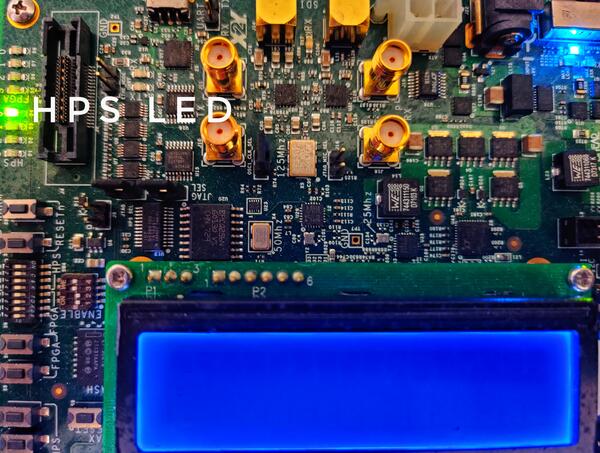
I2C LCD
I2C bus에 연결된 LCD display에 character를 씁니다.
west build -b cyclonev_socdk samples/drivers/lcd_cyclonev_socdk
west flash
참고 자료
Source
출처
영어 원문에는 문단, 문서 지시문, 표, 코드, 코드 심벌, 경로를 그대로 보존했습니다.