Part 1
요약·해설
CYW920829M2EVK-02는 dual Cortex-M33, 10dBm BLE, IMU·microphone과 Arduino-compatible header를 제공합니다.
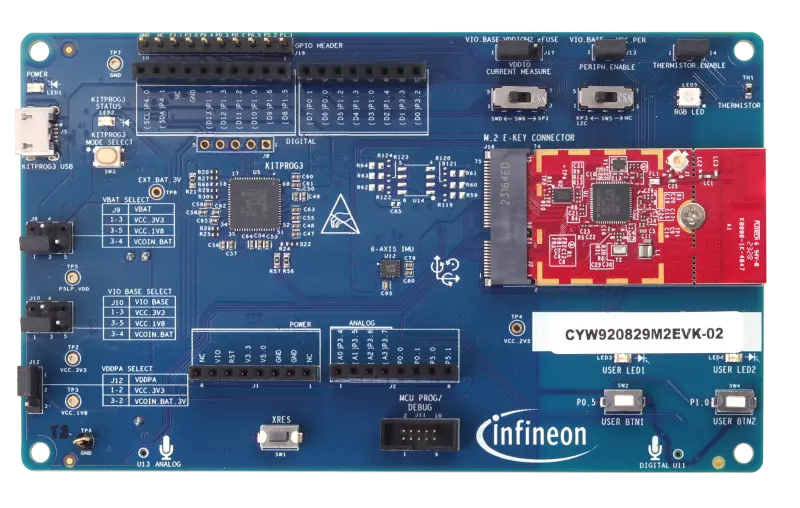
AIROC CYW20829 · dual M33
Bluetooth LE · 10dBm
KitProg3 · Infineon OpenOCD
Part 2
접을 수 있는 영어 원문 전체
영어 원문 전체 펼치기
8888249D7C4B73933756A15A6DB32CD7AE2F52E38FDFE44579F472B63E4638B7
.. _cyw920829m2evk_02:

INFINEON CYW920829M2EVK-02
############################

Overview
********

The AIROC™ CYW20829 Bluetooth® LE MCU Evaluation Kit (CYW920829M2EVK-02) with its included on-board peripherals enables evaluation, prototyping, and development of a wide array of Bluetooth® Low Energy applications, all on Infineon's low power, high performance AIROC™ CYW20829. The AIROC™ CYW20829's robust RF performance and 10 dBm TX output power without an external power amplifier (PA). This provides enough link budget for the entire spectrum of Bluetooth® LE use cases including industrial IoT applications, smart home, asset tracking, beacons and sensors, and medical devices.

The system features Dual Arm® Cortex® - M33s for powering the MCU and Bluetooth subsystem with programmable and reconfigurable analog and digital blocks. In addition, on the kit, there is a suite of on-board peripherals including six-axis inertial measurement unit (IMU), thermistor, analog mic, user programmable buttons (2), LEDs (2), and RGB LED. There is also extensive GPIO support with extended headers and Arduino Uno R3 compatibility for third-party shields.

.. image:: ../../../../../../../boards/infineon/cyw920829m2evk_02/doc/img/cyw920829m2evk_02.webp
     :align: center
     :alt: CYW920829M2EVK_02

Hardware
********

For more information about the CYW20829 SoC and CYW920829M2EVK-02 board:

- `CYW20829 SoC Website`_
- `CYW920829M2EVK-02 Board Website`_

Kit Features:
=============

- AIROC™ CYW20829 Bluetooth® LE MCU in 56 pin QFN package
- Arduino compatible headers for hardware expansion
- On-board sensors - 6-axis IMU, Thermistor, Infineon analog microphone, and Infineon digital microphone
- User switches, RGB LED and user LEDs
- USB connector for power, programming and USB-UART bridge

Kit Contents:
=============

- CYW20829 evaluation board (CYW9BTM2BASE3+CYW920829M2IPA2)
- USB Type-A to Micro-B cable
- Six jumper wires (five inches each)
- Quick start guide


Supported Features
==================

The board configuration supports the following hardware features:

+-----------+------------+-----------------------+
| Interface | Controller | Driver/Component      |
+===========+============+=======================+
| NVIC      | on-chip    | nested vectored       |
|           |            | interrupt controller  |
+-----------+------------+-----------------------+
| SYSTICK   | on-chip    | system clock          |
+-----------+------------+-----------------------+
| GPIO      | on-chip    | GPIO                  |
+-----------+------------+-----------------------+
| UART      | on-chip    | serial port-polling;  |
|           |            | serial port-interrupt |
+-----------+------------+-----------------------+


The default configuration can be found in the Kconfig

:zephyr_file:`boards/infineon/cyw920829m2evk_02/cyw920829m2evk_02_defconfig`

System Clock
============

The AIROC™ CYW20829 Bluetooth®  MCU SoC is configured to use the internal IMO+FLL as a source for
the system clock. Other sources for the system clock are provided in the SOC, depending on your
system requirements.

Fetch Binary Blobs
******************

cyw920829m2evk_02 board requires fetch binary files (e.g Bluetooth controller firmware).

To fetch Binary Blobs:

.. code-block:: console

   west blobs fetch hal_infineon

Build blinking led sample
*************************

Here is an example for building the :zephyr:code-sample:`blinky` sample application.

.. zephyr-app-commands::
   :zephyr-app: samples/basic/blinky
   :board: cyw920829m2evk_02
   :goals: build

Programming and Debugging
*************************

The CYW920829M2EVK-02 includes an onboard programmer/debugger (`KitProg3`_) to provide debugging, flash programming, and serial communication over USB. Flash and debug commands use OpenOCD and require a custom Infineon OpenOCD version, that supports KitProg3, to be installed.

Infineon OpenOCD Installation
=============================

Both the full `ModusToolbox`_ and the `ModusToolbox Programming Tools`_ packages include Infineon OpenOCD. Installing either of these packages will also install Infineon OpenOCD. If neither package is installed, a minimal installation can be done by downloading the `Infineon OpenOCD`_ release for your system and manually extract the files to a location of your choice.

.. note:: Linux requires device access rights to be set up for KitProg3. This is handled automatically by the ModusToolbox and ModusToolbox Programming Tools installations. When doing a minimal installation, this can be done manually by executing the script ``openocd/udev_rules/install_rules.sh``.

West Commands
=============

The path to the installed Infineon OpenOCD executable must be available to the ``west`` tool commands. There are multiple ways of doing this. The example below uses a permanent CMake argument to set the CMake variable ``OPENOCD``.

   .. tabs::
      .. group-tab:: Windows

         .. code-block:: shell

            # Run west config once to set permanent CMake argument
            west config build.cmake-args -- -DOPENOCD=path/to/infineon/openocd/bin/openocd.exe

            # Do a pristine build once after setting CMake argument
            west build -b cyw920829m2evk_02 -p always samples/basic/blinky

            west flash
            west debug

      .. group-tab:: Linux

         .. code-block:: shell

            # Run west config once to set permanent CMake argument
            west config build.cmake-args -- -DOPENOCD=path/to/infineon/openocd/bin/openocd

            # Do a pristine build once after setting CMake argument
            west build -b cyw920829m2evk_02 -p always samples/basic/blinky

            west flash
            west debug

Once the gdb console starts after executing the west debug command, you may now set breakpoints and perform other standard GDB debugging on the CYW20829 CM33 core.

.. _CYW20829 SoC Website:
    https://www.infineon.com/cms/en/product/wireless-connectivity/airoc-bluetooth-le-bluetooth-multiprotocol/airoc-bluetooth-le/cyw20829/

.. _CYW920829M2EVK-02 Board Website:
    https://www.infineon.com/cms/en/product/evaluation-boards/cyw920829m2evk-02/

.. _CYW920829M2EVK-02 BT User Guide:
    https://www.infineon.com/cms/en/product/wireless-connectivity/airoc-bluetooth-le-bluetooth-multiprotocol/airoc-bluetooth-le/cyw20829/#!?fileId=8ac78c8c8929aa4d018a16f726c46b26

.. _ModusToolbox:
    https://softwaretools.infineon.com/tools/com.ifx.tb.tool.modustoolbox

.. _ModusToolbox Programming Tools:
    https://softwaretools.infineon.com/tools/com.ifx.tb.tool.modustoolboxprogtools

.. _Infineon OpenOCD:
    https://github.com/Infineon/openocd/releases/latest

.. _KitProg3:
    https://github.com/Infineon/KitProg3
Part 3
한국어 전문 번역
개요
AIROC CYW20829 Bluetooth LE MCU Evaluation Kit(CYW920829M2EVK-02)은 onboard peripheral과 함께 low-power high-performance AIROC CYW20829에서 다양한 Bluetooth Low Energy application을 평가·prototype·개발할 수 있게 합니다. 이 kit는 external power amplifier 없이 10dBm TX output과 강한 RF performance를 제공해 industrial IoT, smart home, asset tracking, beacon·sensor와 medical device에 필요한 link budget을 제공합니다.
System은 MCU와 Bluetooth subsystem용 dual Arm Cortex-M33, programmable·reconfigurable analog/digital block을 제공합니다. Board에는 six-axis IMU, thermistor, analog·digital microphone, programmable button 2개, LED 2개와 RGB LED가 있습니다. Extended GPIO header와 Arduino Uno R3 compatibility로 third-party shield도 사용할 수 있습니다.
Hardware
CYW20829 SoC와 evaluation board website는 참고 자료에서 확인할 수 있습니다.
Kit 기능
- 56-pin QFN package의 AIROC CYW20829 Bluetooth LE MCU
- Hardware expansion용 Arduino-compatible header
- 6-axis IMU, thermistor, Infineon analog·digital microphone
- User switch, RGB LED와 user LED
- Power, programming과 USB-UART bridge용 USB connector
Kit 구성품
- CYW20829 evaluation board(CYW9BTM2BASE3+CYW920829M2IPA2)
- USB Type-A to Micro-B cable
- 5-inch jumper wire 6개
- Quick Start Guide
지원 기능
| Interface | Controller | Driver/Component |
|---|---|---|
| NVIC | on-chip | nested vectored interrupt controller |
| SYSTICK | on-chip | system clock |
| GPIO | on-chip | GPIO |
| UART | on-chip | serial port-polling; serial port-interrupt |
Default Kconfig는 boards/infineon/cyw920829m2evk_02/cyw920829m2evk_02_defconfig에 있습니다.
System clock
AIROC CYW20829 SoC는 internal IMO+FLL을 system clock source로 사용하며 필요에 따라 다른 source도 사용할 수 있습니다.
Binary blob 가져오기
Bluetooth controller firmware 같은 binary file이 필요합니다.
west blobs fetch hal_infineonBlinky sample build
west build -b cyw920829m2evk_02 samples/basic/blinkyProgramming과 Debugging
Onboard KitProg3가 USB debugging, flash programming과 serial communication을 제공합니다. OpenOCD command에는 KitProg3를 지원하는 custom Infineon OpenOCD가 필요합니다.
Infineon OpenOCD 설치
ModusToolbox와 ModusToolbox Programming Tools에는 Infineon OpenOCD가 포함됩니다. 둘 다 없으면 system용 Infineon OpenOCD release를 내려받아 원하는 위치에 압축을 풉니다.
West command
설치한 OpenOCD executable 경로를 west에서 사용할 수 있게 해야 합니다. 다음 예는 CMake variable OPENOCD를 permanent build argument로 설정합니다.
Windows
west config build.cmake-args -- -DOPENOCD=path/to/infineon/openocd/bin/openocd.exe
west build -b cyw920829m2evk_02 -p always samples/basic/blinky
west flash
west debug
Linux
west config build.cmake-args -- -DOPENOCD=path/to/infineon/openocd/bin/openocd
west build -b cyw920829m2evk_02 -p always samples/basic/blinky
west flash
west debug
west debug 후 GDB console이 시작되면 breakpoint를 설정하고 CYW20829 CM33 core를 일반적인 GDB 방식으로 debug할 수 있습니다.
참고 자료
Source
출처
영어 원문에는 문단, 문서 지시문, 표, 코드, 코드 심벌, 경로를 그대로 보존했습니다.