Part 1
요약·해설
YJ-16019는 nRF52832, BLE, Segger RTT, LED와 button을 갖춘 coin-cell board입니다.
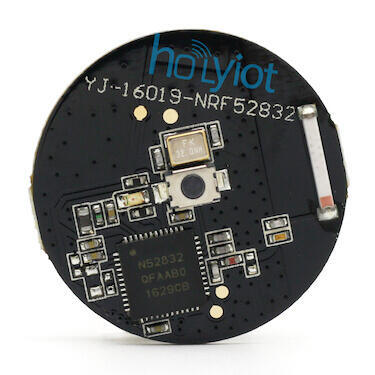
nRF52832 · Cortex-M4
CR2032 coin cell
External Segger J-Link
Part 2
접을 수 있는 영어 원문 전체
영어 원문 전체 펼치기
497159D5179FAFF1AD21220F6EEF130A7D47714E598D43B489372E850D4C95BF
.. _holyiot_yj16019:

Holyiot YJ-16019
################

Overview
********

The `Holyiot`_ YJ-16019 hardware provides support for the Nordic
Semiconductor nRF52832 ARM Cortex-M4 CPU and the following devices:

* CLOCK
* FLASH
* :abbr:`GPIO (General Purpose Input Output)`
* :abbr:`MPU (Memory Protection Unit)`
* :abbr:`NVIC (Nested Vectored Interrupt Controller)`
* :abbr:`PWM (Pulse Width Modulation)`
* RADIO (Bluetooth Low Energy)
* :abbr:`RTC (nRF RTC System Clock)`
* Segger RTT (RTT Console)
* :abbr:`WDT (Watchdog Timer)`

.. figure:: ../../../../../../../boards/holyiot/yj16019/doc/img/holyiot_yj16019_front.jpg
     :align: center
     :alt: Holyiot YJ-16019

     Holyiot YJ-16019 (Credit: Holyiot)

The board is equipped with one LED, one push button, and is powered by
a CR2032 coin cell. The `Nordic Semiconductor Infocenter`_
contains the processor's information and the datasheet.

Hardware
********

The nRF52832 of the Holyiot YJ-16019 is clocked by an external crystal with a frequency of 32 MHz
(Y1). The 32.768 kHz crystal (Y2) shown on the board schematics is not mounted.

Supported Features
==================

The holyiot_yj16019 board configuration supports the following
hardware features:

+-----------+------------+----------------------+
| Interface | Controller | Driver/Component     |
+===========+============+======================+
| CLOCK     | on-chip    | clock_control        |
+-----------+------------+----------------------+
| FLASH     | on-chip    | flash                |
+-----------+------------+----------------------+
| GPIO      | on-chip    | gpio                 |
+-----------+------------+----------------------+
| MPU       | on-chip    | arch/arm             |
+-----------+------------+----------------------+
| NVIC      | on-chip    | arch/arm             |
+-----------+------------+----------------------+
| PWM       | on-chip    | pwm                  |
+-----------+------------+----------------------+
| RADIO     | on-chip    | Bluetooth            |
+-----------+------------+----------------------+
| RTC       | on-chip    | system clock         |
+-----------+------------+----------------------+
| RTT       | Segger     | console              |
+-----------+------------+----------------------+
| WDT       | on-chip    | watchdog             |
+-----------+------------+----------------------+

Other hardware features have not been enabled yet for this board.

Connections and IOs
===================

LED and push button
-------------------

* Push button = P0.28
* LED = P0.29

Programming and Debugging
*************************

Applications for the ``holyiot_yj16019`` board configuration can be
built and flashed in the usual way (see :ref:`build_an_application`
and :ref:`application_run` for more details); however, an external
Segger J-Link is required since the board does not have any on-board
debug IC.

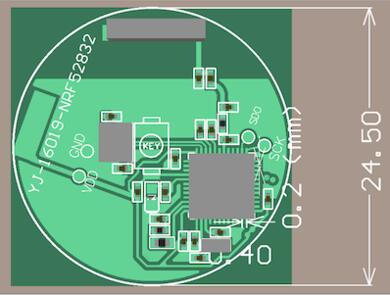
The following pins of the Segger J-Link must be connected to the following test
pads on the PCB (see image):

* VTref = VCC
* GND = GND
* SWDIO = SDO
* SWCLK = SCK

.. figure:: ../../../../../../../boards/holyiot/yj16019/doc/img/holyiot_yj16019_pcb.jpg
     :align: center
     :alt: Holyiot YJ-16019 PCB

     Holyiot YJ-16019 PCB (Credit: Holyiot)

Flashing
========

Follow the instructions in the :ref:`nordic_segger` page to install
and configure all the necessary software. Further information can be
found in :ref:`nordic_segger_flashing`. Then build and flash
applications as usual (see :ref:`build_an_application` and
:ref:`application_run` for more details).

Here is an example for the :zephyr:code-sample:`blinky` application.

.. zephyr-app-commands::
   :zephyr-app: samples/basic/blinky
   :board: holyiot_yj16019
   :goals: build flash

Debugging
=========

Refer to the :ref:`nordic_segger` page to learn about debugging Nordic
nRF52x-based boards with a Segger debugger.


Testing the LED and button on the Holyiot YJ-16019
**************************************************

There are 2 samples that allow you to test that the button and LED on
the board are working properly with Zephyr:

.. code-block:: console

   samples/basic/blinky
   samples/basic/button

You can build and flash the examples to make sure Zephyr is running
correctly on your board. The button and LED definitions can be found
in :zephyr_file:`boards/holyiot/yj16019/holyiot_yj16019.dts`.

References
**********

.. target-notes::

.. _Holyiot: http://www.holyiot.com
.. _Nordic Semiconductor Infocenter: https://infocenter.nordicsemi.com
Part 3
한국어 전문 번역
개요
Holyiot YJ-16019 hardware는 Nordic Semiconductor nRF52832 ARM Cortex-M4 CPU와 다음 device를 지원합니다.
- CLOCK
- FLASH
- GPIO(General Purpose Input Output)
- MPU(Memory Protection Unit)
- NVIC(Nested Vectored Interrupt Controller)
- PWM(Pulse Width Modulation)
- Bluetooth Low Energy RADIO
- RTC(nRF RTC system clock)
- Segger RTT console
- WDT(Watchdog Timer)
Board에는 LED 1개와 push button 1개가 있으며 CR2032 coin cell로 전원을 공급합니다. Processor 정보와 datasheet는 Nordic Semiconductor Infocenter에서 확인할 수 있습니다.
Hardware
YJ-16019의 nRF52832는 32MHz external crystal Y1로 clock을 공급받습니다. Board schematic에 표시된 32.768kHz crystal Y2는 실장되지 않았습니다.
지원 기능
holyiot_yj16019 board configuration은 다음 hardware 기능을 지원합니다.
| Interface | Controller | Driver/Component |
|---|---|---|
| CLOCK | on-chip | clock_control |
| FLASH | on-chip | flash |
| GPIO | on-chip | gpio |
| MPU | on-chip | arch/arm |
| NVIC | on-chip | arch/arm |
| PWM | on-chip | pwm |
| RADIO | on-chip | Bluetooth |
| RTC | on-chip | system clock |
| RTT | Segger | console |
| WDT | on-chip | watchdog |
그 밖의 hardware 기능은 아직 이 board에서 enable되지 않았습니다.
Connection과 I/O
LED와 push button
- Push button: P0.28
- LED: P0.29
Programming과 Debugging
holyiot_yj16019 application은 일반적인 방법으로 build·flash할 수 있습니다. 다만 onboard debug IC가 없으므로 external Segger J-Link가 필요합니다.
Segger J-Link pin을 PCB test pad에 다음과 같이 연결합니다.
- VTref → VCC
- GND → GND
- SWDIO → SDO
- SWCLK → SCK
Flashing
Zephyr의 Nordic Segger 안내에 따라 필요한 software를 설치·구성한 뒤 application을 일반적인 방법으로 build하고 flash합니다. blinky sample 예시는 다음과 같습니다.
west build -b holyiot_yj16019 samples/basic/blinky
west flash
Debugging
Segger debugger를 사용한 Nordic nRF52x board debugging 절차는 Zephyr Nordic Segger 문서를 참조하십시오.
YJ-16019 LED와 button 시험
다음 sample 2개로 board의 button과 LED가 Zephyr에서 올바르게 동작하는지 확인할 수 있습니다.
samples/basic/blinky
samples/basic/button
Sample을 build·flash해 Zephyr 동작을 확인합니다. Button과 LED 정의는 boards/holyiot/yj16019/holyiot_yj16019.dts에 있습니다.
참고 자료
Source
출처
영어 원문에는 문단, 문서 지시문, 표, 코드, 코드 심벌, 경로를 그대로 보존했습니다.