Part 1
요약·해설
ESP32-S2 Franzininho는 secure boot·flash encryption과 USB/LCD/camera interface를 제공하며 simple boot 또는 MCUboot를 사용합니다.
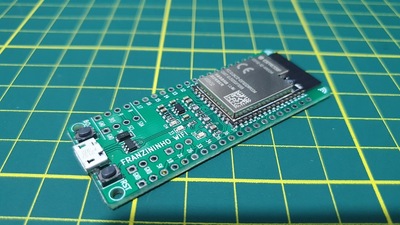
ESP32-S2 · single-core Wi-Fi
RSA-3072 · AES-XTS-256
Simple boot · MCUboot · sysbuild
Part 2
접을 수 있는 영어 원문 전체
영어 원문 전체 펼치기
80C03CD61EEF2F8775897B4B18130E5CCB57BD853D0B54DB1D4E4B537DF5589C
.. _esp32s2_franzininho:

ESP32-S2 Franzininho
####################

Overview
********

Franzininho is an educational development board based on ESP32-S2 which is a highly integrated, low-power, single-core Wi-Fi Microcontroller SoC,
designed to be secure and cost-effective, with a high performance and a rich set of IO capabilities. [1]_

The features include the following:

- RSA-3072-based secure boot
- AES-XTS-256-based flash encryption
- Protected private key and device secrets from software access
- Cryptographic accelerators for enhanced performance
- Protection against physical fault injection attacks
- Various peripherals:

  - 43x programmable GPIOs
  - 14x configurable capacitive touch GPIOs
  - USB OTG
  - LCD interface
  - camera interface
  - SPI
  - I2S
  - UART
  - ADC
  - DAC
  - LED PWM with up to 8 channels

.. figure:: ../../../../../../../boards/franzininho/esp32s2_franzininho/doc/img/esp32_s2_franzininho.jpg
        :align: center
        :alt: ESP32-S2 FRANZININHO

System requirements
===================

Prerequisites
-------------

Espressif HAL requires WiFi and Bluetooth binary blobs in order work. Run the command
below to retrieve those files.

.. code-block:: console

   west blobs fetch hal_espressif

.. note::

   It is recommended running the command above after :file:`west update`.

Building & Flashing
*******************

Simple boot
===========

The board could be loaded using the single binary image, without 2nd stage bootloader.
It is the default option when building the application without additional configuration.

.. note::

   Simple boot does not provide any security features nor OTA updates.

MCUboot bootloader
==================

User may choose to use MCUboot bootloader instead. In that case the bootloader
must be build (and flash) at least once.

There are two options to be used when building an application:

1. Sysbuild
2. Manual build

.. note::

   User can select the MCUboot bootloader by adding the following line
   to the board default configuration file.

   .. code:: cfg

      CONFIG_BOOTLOADER_MCUBOOT=y

Sysbuild
========

The sysbuild makes possible to build and flash all necessary images needed to
bootstrap the board with the ESP32 SoC.

To build the sample application using sysbuild use the command:

.. zephyr-app-commands::
   :tool: west
   :app: samples/hello_world
   :board: esp32s2_franzininho
   :goals: build
   :west-args: --sysbuild
   :compact:

By default, the ESP32 sysbuild creates bootloader (MCUboot) and application
images. But it can be configured to create other kind of images.

Build directory structure created by sysbuild is different from traditional
Zephyr build. Output is structured by the domain subdirectories:

.. code-block::

  build/
  ├── hello_world
  │   └── zephyr
  │       ├── zephyr.elf
  │       └── zephyr.bin
  ├── mcuboot
  │    └── zephyr
  │       ├── zephyr.elf
  │       └── zephyr.bin
  └── domains.yaml

.. note::

   With ``--sysbuild`` option the bootloader will be re-build and re-flash
   every time the pristine build is used.

For more information about the system build please read the :ref:`sysbuild` documentation.

Manual build
============

During the development cycle, it is intended to build & flash as quickly possible.
For that reason, images can be build one at a time using traditional build.

The instructions following are relevant for both manual build and sysbuild.
The only difference is the structure of the build directory.

.. note::

   Remember that bootloader (MCUboot) needs to be flash at least once.

Build and flash applications as usual (see :ref:`build_an_application` and
:ref:`application_run` for more details).

.. zephyr-app-commands::
   :zephyr-app: samples/hello_world
   :board: esp32s2_franzininho
   :goals: build

The usual ``flash`` target will work with the ``esp32s2_franzininho`` board
configuration. Here is an example for the :ref:`hello_world`
application.

.. zephyr-app-commands::
   :zephyr-app: samples/hello_world
   :board: esp32s2_franzininho
   :goals: flash

Open the serial monitor using the following command:

.. code-block:: shell

   west espressif monitor

After the board has automatically reset and booted, you should see the following
message in the monitor:

.. code-block:: console

   ***** Booting Zephyr OS vx.x.x-xxx-gxxxxxxxxxxxx *****
   Hello World! esp32s2_franzininho

References
**********

.. [1] https://www.espressif.com/en/products/socs/esp32-s2
.. _`ESP32S2 Technical Reference Manual`: https://espressif.com/sites/default/files/documentation/esp32-s2_technical_reference_manual_en.pdf
.. _`ESP32S2 Datasheet`: https://www.espressif.com/sites/default/files/documentation/esp32-s2_datasheet_en.pdf
Part 3
한국어 전문 번역
개요
Franzininho는 high-performance와 풍부한 I/O 기능을 제공하면서 secure하고 cost-effective하도록 설계된 highly-integrated low-power single-core Wi-Fi microcontroller SoC인 ESP32-S2 기반 교육용 development board입니다.
주요 기능은 다음과 같습니다.
- RSA-3072 기반 secure boot
- AES-XTS-256 기반 flash encryption
- Software access로부터 private key와 device secret 보호
- 성능 향상을 위한 cryptographic accelerator
- Physical fault-injection attack 방어
- Peripheral: programmable GPIO 43개, configurable capacitive-touch GPIO 14개, USB OTG, LCD interface, camera interface, SPI, I2S, UART, ADC, DAC, 최대 8-channel LED PWM
System requirement
Prerequisite
Espressif HAL이 동작하려면 WiFi와 Bluetooth binary blob이 필요합니다. 다음 명령으로 file을 가져옵니다.
west blobs fetch hal_espressifBuild와 Flash
Simple boot
Board는 second-stage bootloader 없이 single binary image로 load할 수 있습니다. 추가 configuration 없이 application을 build할 때의 default option입니다.
MCUboot bootloader
대신 MCUboot bootloader를 선택할 수 있으며, 이때 bootloader는 적어도 한 번 build하고 flash해야 합니다.
Application build 방식은 두 가지입니다.
- Sysbuild
- Manual build
Board default configuration file에 다음 line을 추가하면 MCUboot bootloader를 선택할 수 있습니다.
CONFIG_BOOTLOADER_MCUBOOT=ySysbuild
Sysbuild를 사용하면 ESP32 SoC로 board를 bootstrap하는 데 필요한 모든 image를 함께 build하고 flash할 수 있습니다.
Sysbuild로 sample application을 build하는 명령은 다음과 같습니다.
west build -b esp32s2_franzininho --sysbuild samples/hello_worldDefault ESP32 sysbuild는 bootloader(MCUboot)와 application image를 만들며, 다른 종류의 image도 만들도록 구성할 수 있습니다.
Sysbuild가 만드는 build directory 구조는 기존 Zephyr build와 다르며 domain subdirectory별로 output을 구성합니다.
build/
├── hello_world
│   └── zephyr
│       ├── zephyr.elf
│       └── zephyr.bin
├── mcuboot
│   └── zephyr
│       ├── zephyr.elf
│       └── zephyr.bin
└── domains.yaml자세한 내용은 Zephyr sysbuild 문서를 참조하십시오.
Manual build
Development cycle에서는 가능한 빠르게 build·flash하기 위해 기존 build 방식으로 image를 하나씩 build할 수 있습니다.
이후 지침은 manual build와 sysbuild 모두에 적용되며 차이는 build directory 구조뿐입니다.
일반적인 방법으로 application을 build하고 flash합니다.
west build -b esp32s2_franzininho samples/hello_worldesp32s2_franzininho board configuration에서는 일반 flash target을 사용할 수 있습니다.
west flash다음 명령으로 serial monitor를 엽니다.
west espressif monitorBoard가 자동으로 reset·boot한 뒤 monitor에 다음 message가 표시되어야 합니다.
***** Booting Zephyr OS vx.x.x-xxx-gxxxxxxxxxxxx *****
Hello World! esp32s2_franzininho
참고 자료
Source
출처
영어 원문에는 문단, 문서 지시문, 표, 코드, 코드 심벌, 경로를 그대로 보존했습니다.